
Introduction
This manual provides detailed instructions for the installation, operation, and maintenance of the Lowell RCCD-4628 Remote Consolidation Cabinet. The RCCD-4628 is a 28-inch height, dual-bay wall-mount cabinet designed to secure 19-inch network equipment with minimal intrusion into the room. It features a deep front door, a 4U upper bay with pivoting rails, and a 6U lower bay with vertical mounting rails.
Setup and Installation
Before beginning installation, ensure all components are present and undamaged. Installation should be performed by qualified personnel.
1. Mounting the Cabinet
- Select a suitable wall location capable of supporting the cabinet's weight (58 lbs empty) plus the weight of installed equipment (up to 150 lbs).
- Utilize the rear cutouts for fitting over wall obstructions and facilitating cable management.
- Secure the cabinet to the wall using appropriate fasteners for the wall type. Ensure the cabinet is level and securely anchored.
2. Installing Equipment in the 4U Upper Bay
The 4U upper bay is designed for horizontally-mounted panels, such as shallow patch panels.
- Open the deep door to access the upper bay.
- The 11-gauge rails, tapped 10-32, pivot down for easier access during installation. Gently pivot the rails down.
- Mount your 19-inch equipment into the 4U rack space.
- Once equipment is secured, pivot the rails back into their operational position.
3. Installing Equipment in the 6U Lower Bay
The 6U lower bay is designed for vertically-mounted 19-inch equipment.
- Access the lower bay.
- The 11-gauge rails, tapped 10-32, are adjustable vertically to accommodate equipment up to 21 inches deep. Adjust the rails to the desired depth using the provided hardware.
- Mount your 19-inch equipment vertically into the 6U rack space.
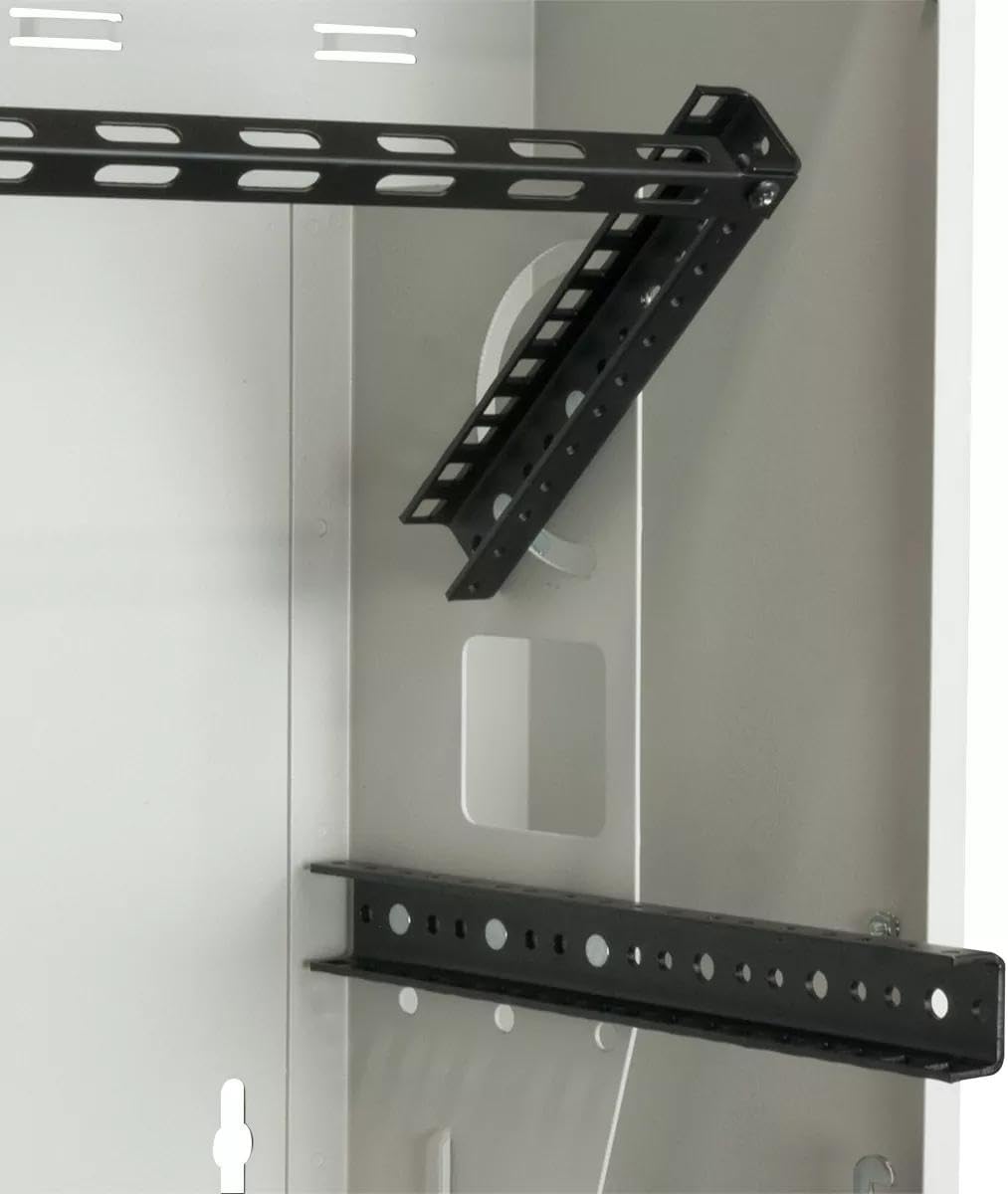
Figure 1: Internal view of the cabinet, illustrating the pivoting 4U upper rails and the adjustable 6U lower rails for equipment mounting.
4. Cable Management and Electrical Box
- Utilize the multiple bridge lances and rear cutouts for organized cable routing.
- An electrical box is included in the base for power distribution. Install necessary power components as required.
5. Optional Fan Kit Installation
- The vents in the base accommodate optional single fan kits for enhanced ventilation.
- If installing a fan kit, follow the manufacturer's instructions for the specific fan model.
Operation
The Lowell RCCD-4628 cabinet is designed for secure and accessible housing of network equipment.
1. Accessing the Top Section
- The deep door features a sloped top with a hinge, allowing quick access to the top section without opening the main compartment.
- Lift the sloped top to access the 4U upper bay for minor adjustments or cable checks.
2. Accessing the Main Compartment
- The main compartment is secured by a side key lock.
- Use the provided key to unlock and open the deep door for full access to both the 4U upper and 6U lower bays.
- Ensure the door is securely locked after accessing the equipment to maintain security.
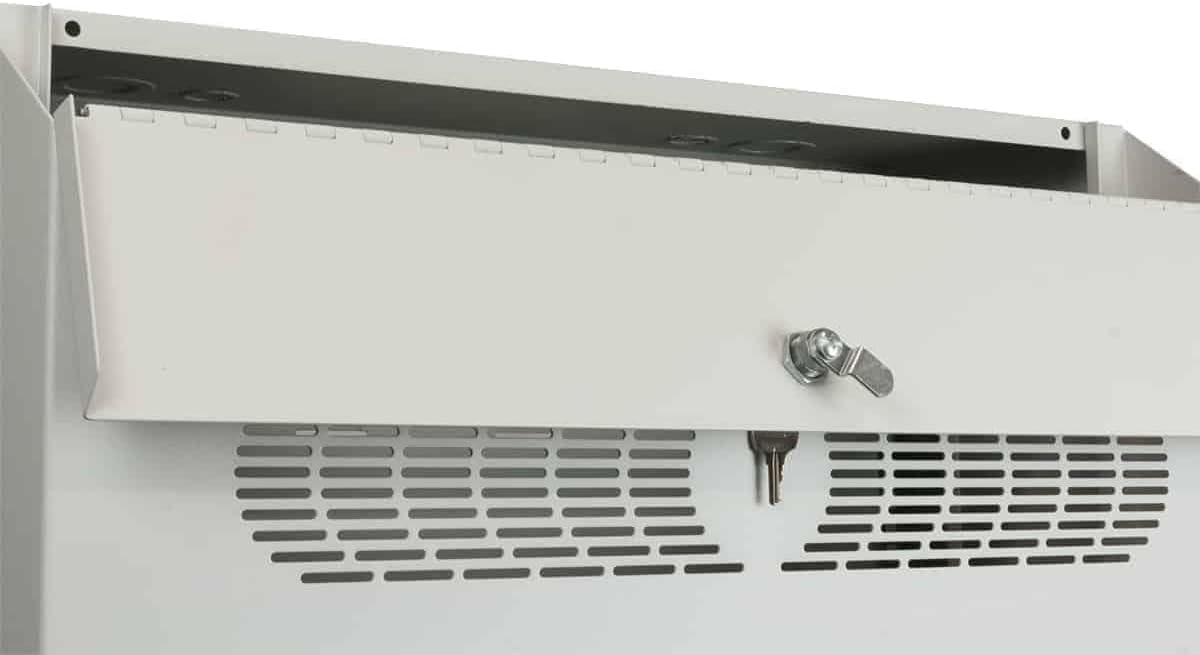
Figure 2: Detail of the deep door, showing the key lock mechanism and ventilation slots for airflow.
Maintenance
Regular maintenance ensures the longevity and optimal performance of your RCCD-4628 cabinet.
- Cleaning: Periodically wipe down the exterior surfaces with a soft, damp cloth. Avoid abrasive cleaners.
- Inspection: Annually inspect all mounting hardware, rack rails, and door hinges for signs of wear or loosening. Tighten any loose fasteners.
- Ventilation: Ensure the vents in the base and the deep door remain clear of obstructions to allow proper airflow.
- Security: Regularly check the key lock mechanism for smooth operation and ensure keys are stored securely.
Troubleshooting
This section addresses common issues you might encounter with the RCCD-4628 cabinet.
- Equipment does not fit: Verify that your equipment is 19-inch rack-mountable. For the 6U lower bay, ensure the rails are adjusted to the correct depth (up to 21 inches). For the 4U upper bay, ensure equipment depth is compatible with horizontal mounting.
- Door not closing/locking properly: Check for any obstructions preventing the door from closing fully. Inspect the hinge and lock mechanism for damage. Ensure the key is fully inserted and turned.
- Overheating equipment: Ensure the cabinet's vents are not blocked. Consider installing an optional single fan kit in the base if passive ventilation is insufficient for your equipment load.
- Cable management issues: Re-evaluate cable routing using the rear cutouts and bridge lances. Ensure cables are not pinched or obstructing access.
Specifications
| Feature | Detail |
|---|---|
| Model Number | RCCD-4628 |
| Construction Material | 16-gauge certified U.S. steel |
| Finish | Network Grey powder epoxy |
| Load Capacity | 150 lbs |
| Upper Bay Rack Space (Horizontal) | 4U x 4.97 D usable inches (pivoting 11-gauge rails, tapped 10-32) |
| Lower Bay Rack Space (Vertical) | 6U x 21 D usable inches (adjustable 11-gauge rails, tapped 10-32) |
| Overall Measurements (W x H x D) | 25.5 x 28 x 11.187 inches |
| Item Weight | 58 lbs |
| Key Features | Deep door with beveled edges, vents, sloped top with hinge, side key lock, rear cutouts, multiple bridge lances, electrical box in base, knockouts in top/base/side. |
Warranty Information
For specific warranty terms and conditions applicable to the Lowell RCCD-4628 Remote Consolidation Cabinet, please refer to the official warranty documentation provided with your purchase or visit the Lowell Manufacturing website. Warranty coverage typically addresses defects in materials and workmanship under normal use.
Customer Support
If you require technical assistance, have questions regarding installation, or need to report an issue with your Lowell RCCD-4628 cabinet, please contact Lowell Manufacturing customer support. Contact information can typically be found on the manufacturer's official website or in the packaging materials.