
Introduction
The STF Vibe 6.5-inch Wireless Speaker delivers powerful sound and vibrant LED lighting for any occasion. Enjoy up to 3.5 hours of continuous playback with its rechargeable battery. Connect via Bluetooth, USB, Micro SD, or AUX, and tune into your favorite FM radio stations. Enhance your audio experience by pairing two Vibe speakers with True Wireless Stereo (TWS) technology.
Package Contents
- STF Vibe 6.5-inch Wireless Speaker
- Charging Cable
- User Manual
Product Overview
Familiarize yourself with the speaker's components and controls.
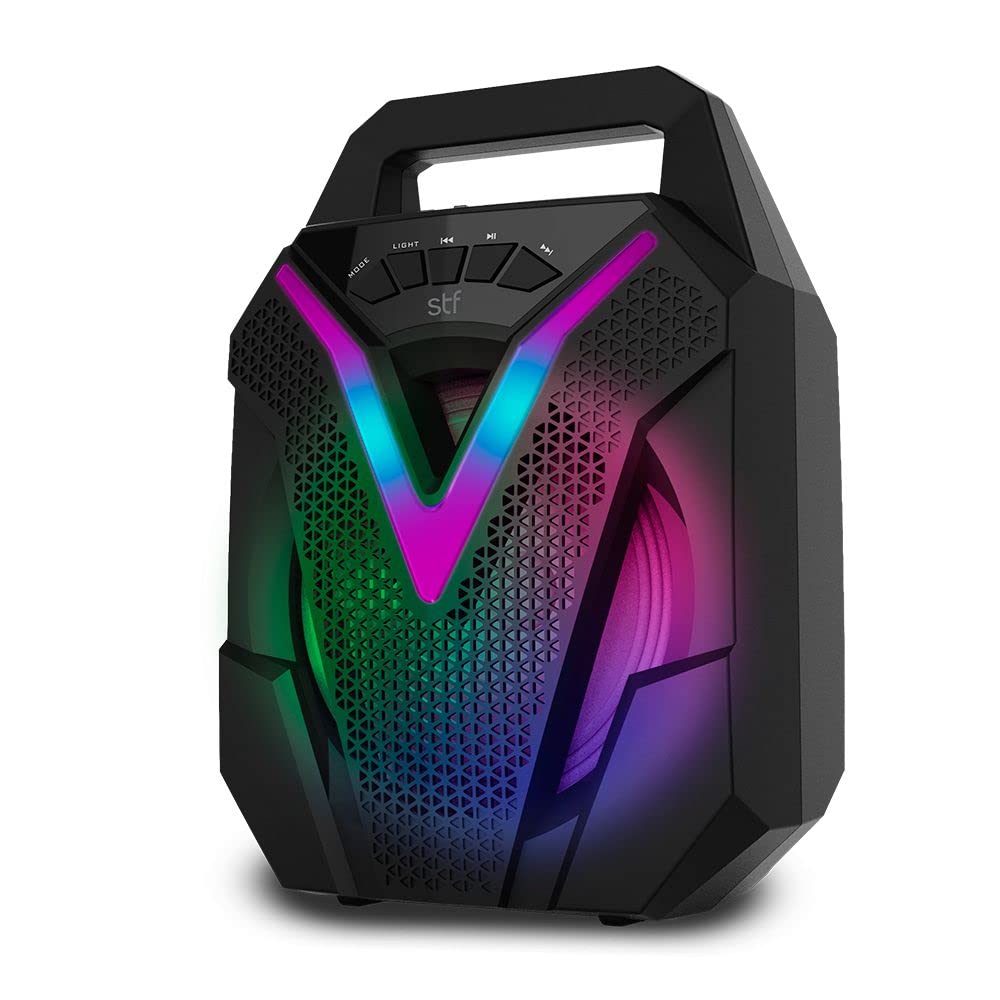
Image: Front view of the STF Vibe speaker, showcasing the main speaker grille, integrated LED lights, and the top control panel with buttons for mode, light, playback, and volume.
Control Panel Functions:
- MODE: Switches between Bluetooth, FM Radio, USB, SD, and AUX input modes.
- LIGHT: Cycles through different LED light patterns or turns them off.
- PREV/V-: Short press for previous track/station; long press to decrease volume.
- P/SCAN: Play/Pause in media modes; auto-scan and save stations in FM mode.
- NEXT/V+: Short press for next track/station; long press to increase volume.
Setup
Initial Charging
Before first use, fully charge the speaker. Connect the provided charging cable to the speaker's charging port and a standard USB power adapter (not included). The charging indicator will illuminate. Once fully charged, the indicator may change color or turn off.
Powering On/Off
Press and hold the Power button (usually integrated with the MODE button or a separate switch) for a few seconds to turn the speaker ON or OFF.
Operating Instructions
Mode Selection
Press the MODE button repeatedly to cycle through available input sources: Bluetooth, FM Radio, USB, Micro SD, and AUX.
Volume Control
Long press the NEXT/V+ button to increase the volume. Long press the PREV/V- button to decrease the volume.
Playback Control
In Bluetooth, USB, or SD mode:
- Short press P/SCAN to Play or Pause the current track.
- Short press NEXT/V+ for the next track.
- Short press PREV/V- for the previous track.
Connectivity
Bluetooth Pairing
- Turn on the STF Vibe speaker. It will automatically enter Bluetooth pairing mode, indicated by a flashing LED light.
- On your mobile device, enable Bluetooth and search for available devices.
- Select 'STF Vibe' from the list to connect. A confirmation tone will sound upon successful pairing.
USB/Micro SD Playback
Insert a USB flash drive or a Micro SD card (with MP3 audio files) into the corresponding port. The speaker will automatically switch to USB/SD mode and begin playing music from the storage device.
AUX Input
Connect an external audio device (e.g., smartphone, MP3 player) to the speaker's 3.5mm AUX input port using an audio cable. The speaker will automatically switch to AUX mode, or you may need to press the MODE button to select AUX.
FM Radio
- Press the MODE button to select FM radio mode.
- Long press the P/SCAN button to initiate an automatic scan for FM stations. The speaker will scan and save available stations.
- Short press PREV/V- or NEXT/V+ to navigate between saved FM stations.
True Wireless Stereo (TWS) Function
The TWS function allows you to pair two STF Vibe speakers for a stereo sound experience.
- Ensure both STF Vibe speakers are powered ON and are NOT connected to any Bluetooth device.
- On one of the speakers (this will be the primary speaker), long press the MODE button until you hear a distinct pairing tone. The speakers will automatically search and connect to each other.
- Once paired, the LED indicator on the primary speaker will flash, and the secondary speaker's LED will remain solid.
- Now, connect your mobile device to the primary speaker via Bluetooth as described in the Bluetooth Pairing section.
LED Lights
The STF Vibe speaker features integrated LED lights. Press the LIGHT button to cycle through various light modes or to turn the lights off.
Charging
When the battery is low, the speaker will indicate this with an audible alert or a flashing LED. Connect the charging cable to the speaker's charging port and a compatible USB power source. The charging indicator will show the charging status. A full charge provides up to 3.5 hours of playback time.
Maintenance
- Keep the speaker dry and away from moisture. This product is not waterproof.
- Clean the speaker with a soft, dry cloth. Do not use abrasive cleaners or harsh chemicals.
- Store the speaker in a cool, dry place when not in use for extended periods.
- Avoid exposing the speaker to extreme temperatures or direct sunlight.
Troubleshooting
| Problem | Solution |
|---|---|
| Speaker does not power on. | Ensure the battery is charged. Connect the charging cable and try again. |
| No sound from the speaker. | Check the volume levels on both the speaker and the connected device. Ensure the correct input mode (Bluetooth, AUX, USB, SD, FM) is selected. |
| Bluetooth device cannot connect. | Ensure the speaker is in Bluetooth pairing mode (flashing LED). Make sure Bluetooth is enabled on your device and it is within 10 meters of the speaker. Try unpairing and re-pairing. |
| TWS pairing fails. | Ensure both speakers are powered on and not connected to any other Bluetooth device. Repeat the TWS pairing steps carefully. |
| FM radio reception is poor. | Try repositioning the speaker. Ensure the charging cable is connected as it may act as an antenna. Perform an auto-scan again. |
Specifications
| Feature | Detail |
|---|---|
| Brand | STF |
| Model Name | VIBE |
| Speaker Size | 6.5 inches |
| Max Output Power | 23 Watts |
| Connectivity Technology | Bluetooth, USB, Micro SD, Aux 3.5mm, FM Radio |
| Bluetooth Range | Up to 10 meters (33 feet) |
| Battery Life | Up to 3.5 hours |
| Control Method | Tactile buttons |
| Audio Output Mode | Stereo |
| Power Source | Rechargeable Battery |
| Country of Origin | China |
Warranty and Support
Warranty Information
This STF Vibe Wireless Speaker is covered by a 1-year warranty against manufacturing defects from the date of purchase. Please retain your proof of purchase for warranty claims. The warranty does not cover damage caused by misuse, accidents, unauthorized modifications, or normal wear and tear.
Customer Support
For technical assistance, warranty claims, or any questions regarding your STF Vibe speaker, please contact STF customer service. Refer to the contact information provided on the product packaging or the official STF website for the most up-to-date support details.


