
1. Introduction
The Singing Machine Move Mic is a portable Bluetooth karaoke microphone and speaker designed for on-the-go entertainment. Featuring built-in LED lights, 22 voice effects, and a rechargeable battery, it allows users to sing along to their favorite music from any compatible device.
2. Package Contents
- SMM575 Microphone
- Micro-USB charging cable
- Tie-cord
3. Product Overview
Familiarize yourself with the components and features of your Move Mic.

Figure 3.1: Singing Machine Move Mic. This image shows the overall design of the microphone, highlighting its compact and portable nature.

Figure 3.2: Control Panel Layout. This image details the various buttons and indicators on the microphone, including power, Bluetooth pairing, LED light control, voice effect selection, and microphone volume adjustments.

Figure 3.3: Voice Effects. This graphic highlights some of the 22 voice effects, such as male, female, echo, robot, chipmunk, and radio, that can be applied to your vocals.
4. Setup
4.1 Charging the Microphone
Before first use, fully charge the Move Mic. Connect the supplied Micro-USB charging cable to the microphone's charging port and the other end to a USB power adapter (not included) or a computer's USB port. The charging indicator light will show charging status and turn off when fully charged. A full charge provides over 4 hours of playtime.
4.2 Powering On/Off
Press and hold the Power button ( ) located on the control panel to turn the microphone on or off.
5. Operating Instructions
5.1 Bluetooth Pairing
To connect your Move Mic to a Bluetooth-enabled device (e.g., smartphone, tablet):
- Ensure the Move Mic is powered on. The Bluetooth indicator light will flash, indicating it's in pairing mode.
- On your device, enable Bluetooth and search for "SMM575".
- Select "SMM575" from the list of available devices to pair. Once connected, the Bluetooth indicator light will turn solid blue.
- You can now stream music from your device through the Move Mic's integrated speaker.

Figure 5.1: Microphone in Use. This image shows individuals enjoying the Move Mic, highlighting its portability and ease of use for karaoke sessions.
5.2 Playing Music
Once paired, open your favorite music or karaoke app (e.g., Spotify, YouTube, Apple Music) on your connected device and start playing a song. The audio will play through the Move Mic's integrated speaker.
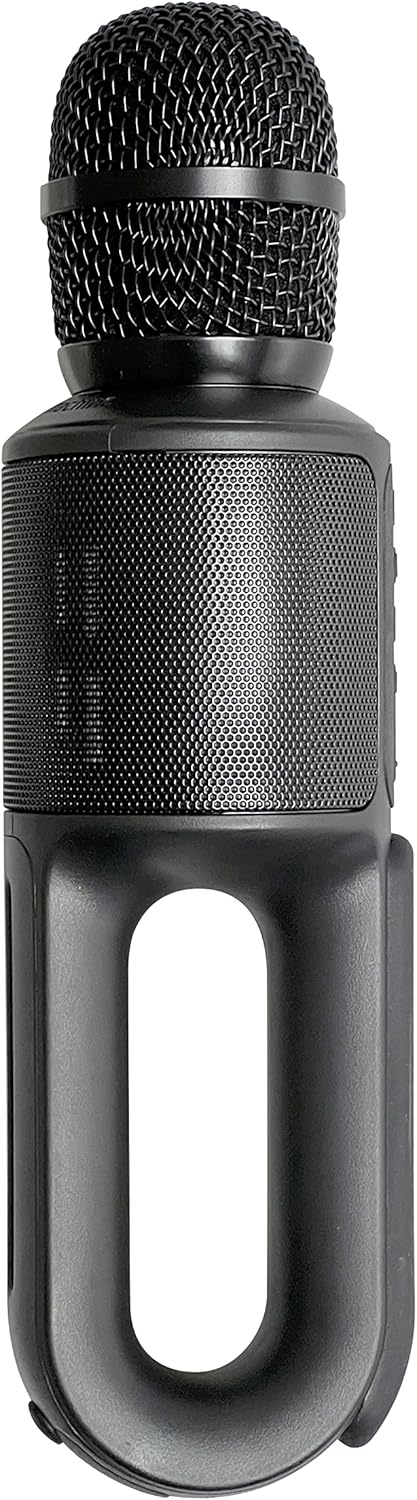
Figure 5.2: App Compatibility. The Move Mic is compatible with most popular music and karaoke applications, allowing for versatile use.
5.3 Using Voice Effects
The Move Mic features 22 preset voice effects. Press the Voice FX button ( ) repeatedly to cycle through the available effects, such as robot, echo, chipmunk, and more. Experiment to find your favorite!
5.4 LED Lights
The built-in LED ring light flashes and reacts to your voice, enhancing the karaoke experience. Press the Lights button ( ) to turn the lights on or off.
5.5 Vocal Cancel Feature
For the first time ever, cancel out a song's lead vocals with the touch of a button! Press the Vocal Cancel button ( ) to reduce or remove the original singer's voice from a track, allowing you to sing lead.
6. Maintenance
- Clean the microphone with a soft, dry cloth. Do not use abrasive cleaners or solvents.
- Store the microphone in a cool, dry place away from direct sunlight and extreme temperatures.
- To preserve battery life, fully charge the device before storing it for extended periods.
7. Troubleshooting
| Problem | Solution |
|---|---|
| Microphone does not power on. | Ensure the battery is charged. Connect the microphone to a power source using the USB-C cable. |
| No sound from the speaker. | Check if the microphone is paired correctly via Bluetooth. Increase the volume on both the microphone and your connected device. Ensure music is playing on your device. |
| Bluetooth connection fails. | Make sure the microphone is in pairing mode (flashing Bluetooth light). Turn off and on Bluetooth on your device. Try unpairing and re-pairing the device. Ensure no other devices are connected to the microphone. |
| Voice effects are not working. | Press the Voice FX button to cycle through effects. Ensure the microphone is picking up your voice clearly. |
8. Specifications
| Feature | Detail |
|---|---|
| Model Number | SMM575 |
| Item Weight | 10.8 ounces |
| Product Dimensions | 3.5 x 1 x 1 inches |
| Battery Type | 1 Lithium Ion (included) |
| Connectivity | Bluetooth, USB Type C |
| Special Features | 3.5mm jack, Portable, LED Lights, 22 Voice FX |
| Color | Black |
| Power Source | Battery Powered |
9. Warranty and Support
For warranty information and customer support, please visit the official Singing Machine website or refer to the product packaging. You can also visit the Singing Machine Store on Amazon for more details and product registration.


