
1. Introduction
This manual provides essential information for the safe installation, operation, and maintenance of your LMP ZY-B1046C Dusk to Dawn Outdoor Wall Sconce. Please read these instructions thoroughly before installation and retain them for future reference.
2. Safety Information
- Always disconnect power at the circuit breaker before installation, servicing, or cleaning.
- Ensure all electrical connections comply with local codes and ordinances. If you are unsure about wiring, consult a qualified electrician.
- Do not install near flammable materials.
- This fixture is rated for outdoor use and is IP65 waterproof.
- Use only GU10 5W LED bulbs as specified.
3. Package Contents
Verify that all components are present before beginning installation:
- LMP ZY-B1046C Wall Sconce Fixture (2 units)
- GU10 5W 3500K LED Bulbs (4 units)
- Mounting Hardware (screws, wire nuts, hex key)
- Instruction Manual
Image 3.1: Package Contents

This image displays the product packaging, the black wall sconce fixture, two GU10 LED bulbs, and a small bag containing wire nuts and a hex key.
4. Setup and Installation
Follow these steps for proper installation:
- Turn off Power: Locate the circuit breaker controlling the light fixture and turn off the power.
- Prepare Mounting Plate: Attach the mounting plate to the wall junction box using the provided screws. Ensure it is securely fastened.
- Connect Wiring: Connect the fixture's wires to your household wiring. Typically, black to black (live), white to white (neutral), and green/bare copper to green/bare copper (ground). Secure connections with wire nuts.
- Install Bulbs: Insert the GU10 5W LED bulbs into the sockets within the fixture. Push and twist to secure.
- Attach Fixture: Align the fixture with the mounting plate and secure it with the provided screws or nuts.
- Restore Power: Turn the power back on at the circuit breaker.
Image 4.1: Installation Steps

This image illustrates the installation process, showing how to attach the mounting bracket to the wall and then secure the light fixture onto the bracket.
For a visual guide on bulb installation, refer to the video below:
Video 4.1: How to Replace GU10 Lightbulbs
This video demonstrates the process of replacing GU10 lightbulbs in a wall sconce, showing how to remove the old bulb and insert a new one.
5. Operating Instructions
The LMP ZY-B1046C features a built-in Dusk to Dawn sensor for automated operation:
- The high-sensitivity IC light sensor detects ambient brightness.
- The light fixture will automatically turn on at night (when brightness is between 20-50 lux).
- The light fixture will automatically turn off during the daytime (when brightness is between 80-110 lux).
- No manual switching is required, providing convenience and energy savings.
Image 5.1: Dusk to Dawn Sensor Functionality

This image visually explains the Dusk to Dawn sensor, depicting the light fixture automatically activating in low light conditions and deactivating in daylight.
See the Dusk to Dawn feature in action:
Video 5.2: LMP Dusk to Dawn Outdoor Wall Lights Demonstration
This video showcases the LMP outdoor wall lights, highlighting their IP65 waterproof rating and the automatic dusk-to-dawn sensor functionality.
6. Maintenance
- Cleaning: To clean the fixture, ensure power is off. Wipe with a soft, damp cloth. Do not use abrasive cleaners or solvents.
- Bulb Replacement: If a bulb needs replacement, turn off the power, carefully remove the old GU10 bulb by pushing and twisting, and insert a new GU10 5W LED bulb.
- Durability: The fixture is constructed from heavy-duty aluminum and is IP65 waterproof, designed to withstand various weather conditions including rain, snow, and extreme temperatures without rusting or corrosion.
7. Troubleshooting
- Light does not turn on:
- Check if the power is on at the circuit breaker.
- Ensure bulbs are correctly installed and not faulty.
- Verify wiring connections are secure.
- Dusk to Dawn sensor not working correctly:
- Ensure the sensor is not obstructed by dirt, debris, or objects.
- Confirm there are no other light sources (e.g., streetlights, other fixtures) directly illuminating the sensor, which could prevent it from activating at dusk.
8. Specifications
| Feature | Specification |
|---|---|
| Brand | LMP |
| Model Number | ZY-B1046C |
| Color | Black |
| Material | Aluminum |
| Style | Modern |
| Light Fixture Form | Sconce |
| Product Dimensions | 4.25"L x 2.48"W x 9.64"H |
| Indoor/Outdoor Usage | Outdoor |
| Power Source | AC |
| Special Feature | Waterproof (IP65) |
| Light Source Type | LED |
| Voltage | 110V-240V |
| Light Color | Warm White (3000 Kelvin) |
| Brightness | 450 Lumen (per bulb) |
| Wattage | 5 watts (per bulb) |
| Bulb Base | GU10 |
| Certification | ETL |
Image 8.1: Product Dimensions Diagram
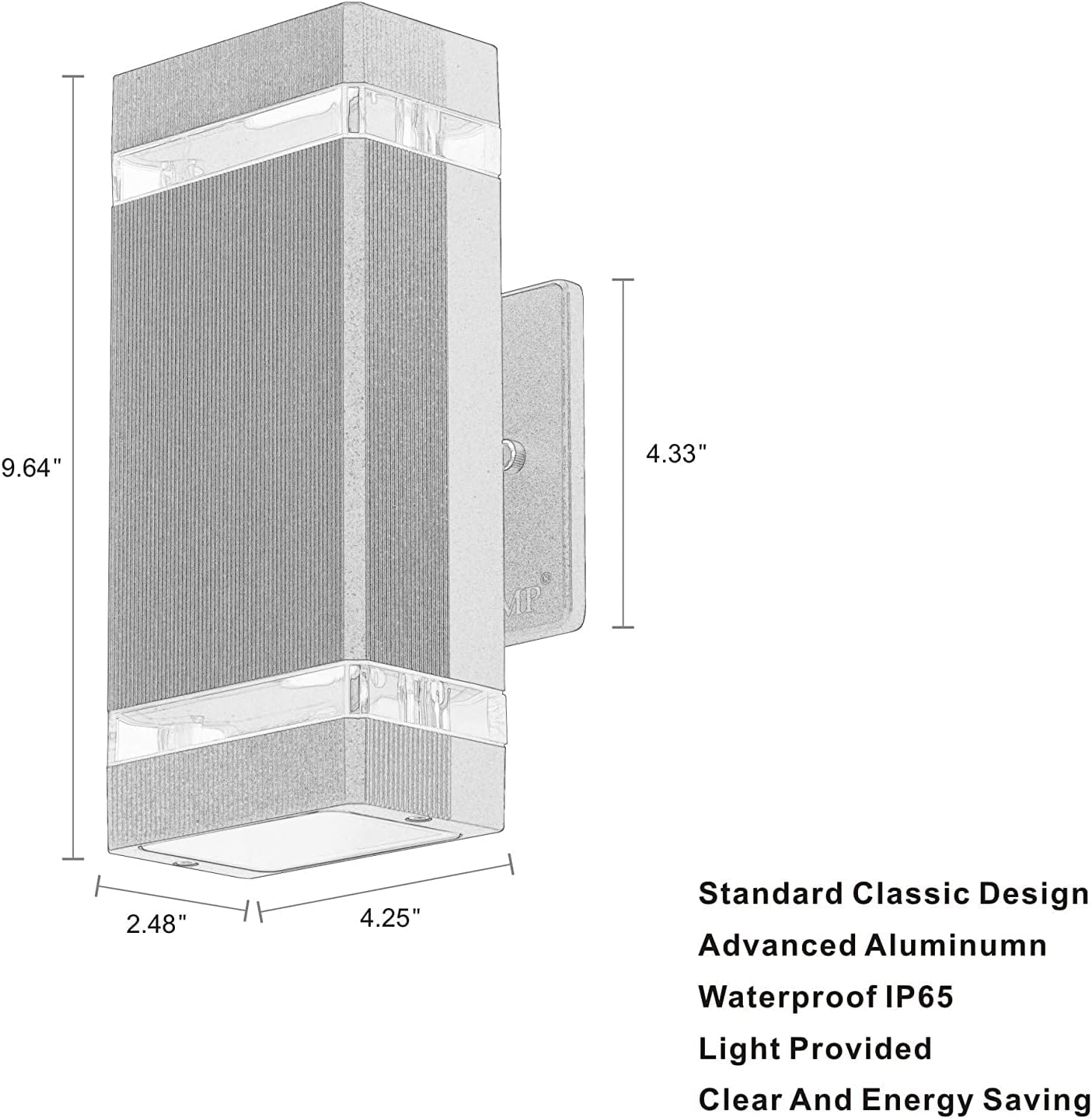
This diagram provides the length, width, and height measurements of the wall sconce fixture.
9. Warranty and Support
LMP provides a 2-year guarantee for this LED wall light. If you encounter any problems with your product, please do not hesitate to contact us. We are committed to resolving any issues as quickly as possible.
For support, please refer to the contact information provided with your purchase or visit the official LMP website.