
1. Introduction
Thank you for choosing the Ingco LED Flashlight Model HCFL186503. This manual provides essential information for the safe and efficient use of your new flashlight. Please read it thoroughly before operation and retain it for future reference.
The Ingco HCFL186503 is a robust LED flashlight designed for various lighting needs, featuring multiple brightness modes and a durable aluminum alloy construction.
2. Safety Information
- Eye Safety: Do not look directly into the LED light beam. The intense light can cause temporary vision impairment or permanent eye damage.
- Children: Keep the flashlight and its components out of reach of children.
- Battery Safety:
- Use only the specified 18650 Lithium-ion battery.
- Do not mix old and new batteries, or different types of batteries.
- Do not dispose of batteries in fire; they may explode.
- If the flashlight will not be used for an extended period, remove the battery to prevent leakage.
- Ensure correct battery polarity (+/-) when inserting.
- Heat: The flashlight head may become warm during prolonged use, especially on high brightness settings. Handle with care.
- Impact: While impact-resistant, avoid dropping the flashlight from excessive heights to prevent damage.
3. Package Contents
Carefully unpack the box and ensure all items are present and in good condition. If any items are missing or damaged, contact your retailer.
- Ingco LED Flashlight HCFL186503
- 18650 Lithium-ion Battery
- USB Charging Cable
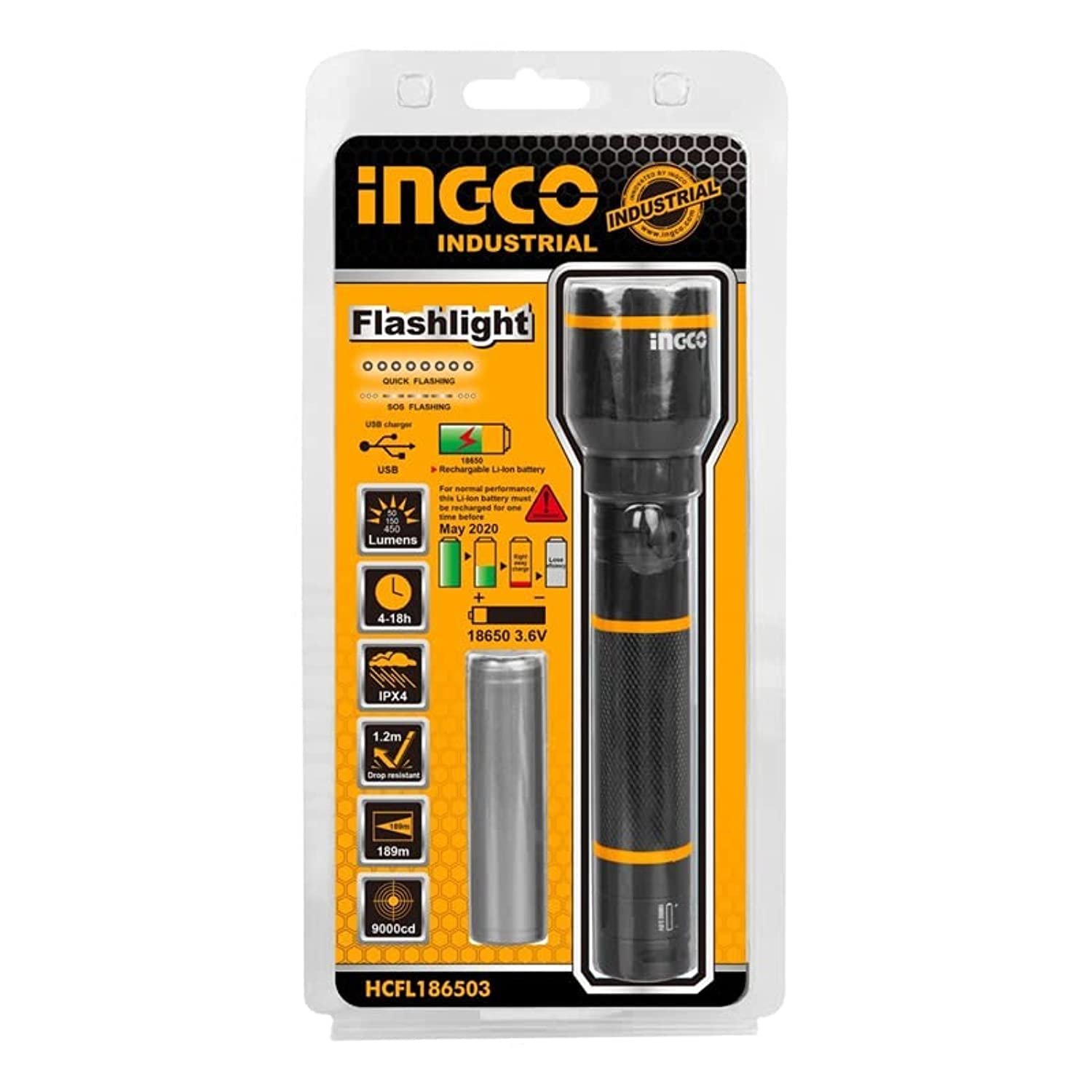
Image 1: Ingco LED Flashlight HCFL186503, showing the flashlight, 18650 battery, USB charging cable, and product packaging.
4. Setup
4.1 Battery Installation
- Unscrew the tail cap of the flashlight by turning it counter-clockwise.
- Insert the 18650 Lithium-ion battery with the positive (+) end facing towards the flashlight head (LED).
- Screw the tail cap back on clockwise until it is securely tightened.
4.2 Charging the Battery
The flashlight uses a rechargeable 18650 Lithium-ion battery. It is recommended to fully charge the battery before first use.
- Locate the charging port on the flashlight (typically under a rubber cover near the head or on the battery itself if it has a built-in port).
- Connect the small end of the provided USB charging cable to the flashlight's charging port.
- Connect the larger end of the USB cable to a standard USB power adapter (e.g., phone charger, computer USB port, power bank).
- An indicator light (if present) will typically show charging status (e.g., red for charging, green for fully charged).
- Once fully charged, disconnect the USB cable and ensure the charging port cover (if applicable) is securely closed to maintain water resistance.
5. Operating Instructions
The Ingco HCFL186503 flashlight features multiple lighting modes for various situations.
5.1 Power On/Off
Press the power button (usually located on the tail cap or side of the flashlight) to turn the flashlight ON. Press it again to turn it OFF.
5.2 Changing Brightness Modes
The flashlight offers three primary brightness modes: High, Medium, and Low. Some models may also include a Strobe or SOS mode.
- With the flashlight ON, press the power button repeatedly to cycle through the available modes. The typical sequence is High → Medium → Low → (Strobe/SOS, if present) → High.
- Release the button when you reach your desired brightness level.
6. Maintenance
- Cleaning: Wipe the flashlight body with a clean, soft cloth. For stubborn dirt, a slightly damp cloth can be used. Do not use abrasive cleaners or solvents.
- Threads and O-rings: Periodically lubricate the screw threads and O-rings with silicone grease to maintain smooth operation and water resistance.
- Battery Care: Recharge the battery regularly, even if not in use, to prolong its lifespan. Avoid fully discharging the battery.
- Storage: Store the flashlight in a cool, dry place. If storing for an extended period, remove the battery.
7. Troubleshooting
| Problem | Possible Cause | Solution |
|---|---|---|
| Flashlight does not turn on. | Battery is dead or incorrectly inserted. | Recharge or replace the battery. Check battery polarity. |
| Light is dim or flickers. | Low battery charge. Loose connections. | Recharge the battery. Ensure tail cap and head are tightened. |
| Flashlight gets hot quickly. | Prolonged use on High mode. | This is normal for high-power LEDs. Reduce brightness mode or turn off to cool down. |
| Tail cap or head is difficult to unscrew. | Dry threads. | Apply a small amount of silicone grease to the threads. |
8. Specifications
| Feature | Specification |
|---|---|
| Model Number | HCFL186503 |
| Brand | Ingco |
| Light Source | LED |
| Maximum Brightness | 400 Lumens |
| Brightness Modes | High (400 Lumens), Medium (150 Lumens), Low (50 Lumens) |
| High Mode Runtime | 4 hours |
| Low Mode Runtime | 18 hours |
| Battery Type | 18650 Lithium-ion |
| Material | Aircraft-grade Aluminum Alloy (6N01-T6) |
| Finish Type | Oxidized |
| Item Shape | Cylindrical |
| Dimensions (Diameter x Length) | 27.5 mm x 158.3 mm |
| Item Weight | 200 grams |
| Special Features | Adjustable Lighting Modes, Impact Resistant |
| Mounting Type | Handheld |
| Smart Home Compatibility | Not Compatible |
9. Warranty and Support
Ingco products are manufactured to high-quality standards. For warranty information, please refer to the warranty card included with your purchase or visit the official Ingco website. If you encounter any issues or require technical assistance, please contact Ingco customer support through their official channels.