
1. Introduction
Thank you for choosing the Alienpro DS-X 8-inch Waterproof Portable Speaker. This manual provides essential information for the safe and efficient operation of your device. Please read it thoroughly before use and retain it for future reference.
The Alienpro DS-X is a robust, portable audio system designed for various environments, including outdoor activities. It features an 8-inch subwoofer, 3-inch mid-range speakers, 100W RMS power, Bluetooth connectivity, AM/FM radio, USB playback, and inputs for microphones or guitars. Its waterproof and impact-resistant design ensures durability.
2. Safety Information
- Do not attempt to disassemble or modify the speaker. This may void the warranty and cause damage.
- Ensure all port covers are securely closed before exposing the speaker to water to maintain its waterproof integrity.
- Avoid extreme temperatures, direct sunlight, and high humidity.
- Use only the specified charging cable and power adapter.
- Keep the speaker away from medical devices, as it contains magnets.
- Clean the speaker with a soft, damp cloth. Do not use abrasive cleaners or solvents.
3. Package Contents
Please check the package for the following items:
- Alienpro DS-X 8-inch Portable Speaker (1 unit)
- Power Adapter/Charging Cable
- User Manual
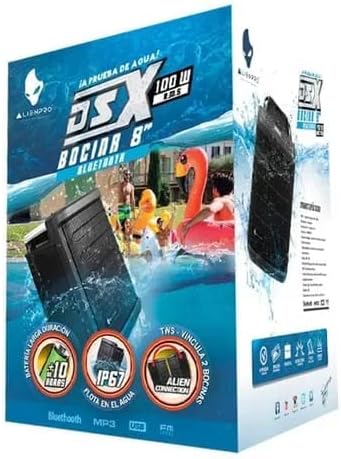
Image: The Alienpro DS-X speaker packaging, showing the product box with graphics highlighting its waterproof features and portability.
4. Product Overview
Familiarize yourself with the components and features of your Alienpro DS-X speaker.

Image: Front view of the Alienpro DS-X portable speaker, showcasing its black grille, Alienpro logo, and an extended telescopic handle for transport.

Image: Angled view of the Alienpro DS-X speaker, highlighting its robust black casing, front grille, and the extended telescopic handle.

Image: Side view of the Alienpro DS-X speaker, showing its thick casing, the extended telescopic handle, and a wheel at the base for portability.

Image: Close-up of the top control panel of the Alienpro DS-X speaker, featuring various buttons, an illuminated display, and a covered compartment designed to hold a smartphone or small device, with USB charging ports visible inside.
Key Features:
- Waterproof and Submersible: Designed to withstand water exposure and float.
- Impact Resistant: Durable construction for outdoor use.
- Powerful Audio: 8-inch passive radiator, 3-inch mids, 100W RMS output.
- Portable Design: Foldable handle and heavy-duty wheels for easy transport.
- Multiple Connectivity Options: Bluetooth, USB, AM/FM radio, 1/4-inch microphone/guitar input, 1/8-inch mini stereo auxiliary input.
- USB Charging: Port for charging external devices.
- Long Battery Life: Up to 10 hours of playback on a single charge.
5. Setup
5.1 Charging the Speaker
- Locate the charging port on the speaker, typically protected by a waterproof cover.
- Open the cover and connect the provided power adapter to the charging port.
- Plug the power adapter into a standard electrical outlet.
- The illuminated display will indicate the charging status. A full charge takes approximately [X] hours (refer to product specifications for exact time if available, otherwise omit).
- Once fully charged, disconnect the power adapter and securely close the waterproof cover.
5.2 Initial Power On
Press and hold the Power button (usually marked with ⑂) on the control panel for a few seconds until the display illuminates and you hear an audible cue.
6. Operating Instructions
6.1 Power On/Off
- To Power On: Press and hold the Power button until the display lights up.
- To Power Off: Press and hold the Power button again until the display turns off.
6.2 Bluetooth Pairing
- Ensure the speaker is powered on and in Bluetooth mode. If not, press the Mode button to cycle through modes until "BT" or a Bluetooth icon appears on the display.
- On your mobile device (smartphone, tablet, etc.), enable Bluetooth and search for available devices.
- Select "Alienpro DS-X" from the list of found devices.
- Once paired, the speaker will emit a confirmation sound, and the display will indicate a successful connection.
- You can now play audio from your device through the Alienpro DS-X speaker.
6.3 USB Playback
- Insert a USB flash drive containing MP3 audio files into the USB playback port.
- Press the Mode button to select USB mode. The speaker will automatically begin playing audio files from the USB drive.
- Use the Play/Pause, Next Track, and Previous Track buttons on the control panel to manage playback.
6.4 AM/FM Radio
- Press the Mode button to select AM or FM radio mode.
- To auto-scan and save stations, press and hold the Play/Pause button. The speaker will scan for available stations and store them.
- Use the Next Track and Previous Track buttons to navigate through saved stations.
6.5 Microphone/Guitar Input
- Connect a microphone or guitar to the 1/4-inch input jack.
- Adjust the volume for the input using the dedicated knob or controls on the speaker, if available.
- The audio from the connected device will be mixed with other audio sources (e.g., Bluetooth music).
6.6 Auxiliary Input (AUX)
- Connect an external audio device (e.g., MP3 player) to the 1/8-inch mini stereo auxiliary input using a compatible audio cable.
- Press the Mode button to select AUX mode.
- Control playback and volume from your connected device.
6.7 Charging External Devices
The speaker features a USB port for charging external devices. Simply connect your smartphone or other USB-powered device to the designated USB charging port on the speaker. Ensure the speaker has sufficient battery charge to power both itself and the external device.
6.8 Waterproof Features
The Alienpro DS-X is designed to be waterproof and submersible. It can float, making it suitable for use near water. Always ensure all port covers are tightly sealed before exposing the speaker to water to prevent damage.

Image: The Alienpro DS-X speaker being splashed with water, demonstrating its waterproof capability. Water droplets are visible on the speaker's surface.
7. Maintenance
- Cleaning: Wipe the speaker with a soft, damp cloth. Do not use harsh chemicals or abrasive materials.
- Storage: Store the speaker in a cool, dry place away from direct sunlight and extreme temperatures when not in use for extended periods.
- Battery Care: To prolong battery life, avoid fully discharging the battery frequently. Charge the speaker regularly, even if not in use, to maintain battery health.
- Water Exposure: After exposure to saltwater or chlorinated water, rinse the speaker with fresh water and allow it to dry completely before charging or opening any ports.
8. Troubleshooting
| Problem | Possible Cause | Solution |
|---|---|---|
| Speaker does not turn on. | Battery is depleted. | Charge the speaker fully. |
| Cannot pair via Bluetooth. | Speaker not in pairing mode; device Bluetooth off; too far from speaker. | Ensure speaker is in BT mode. Turn device Bluetooth off/on. Move device closer to speaker (within 10m). |
| No sound from speaker. | Volume too low; incorrect input mode; cable not connected properly. | Increase speaker and device volume. Select correct input mode (BT, USB, AUX, Radio). Check cable connections. |
| Radio reception is poor. | Weak signal; interference. | Relocate the speaker to an area with better reception. Extend any external antenna if available. |
| Water entered a port. | Port cover not sealed. | Immediately power off the speaker. Do not attempt to charge or use. Allow to dry completely in a well-ventilated area for several days before attempting to use again. Contact support if issues persist. |
9. Specifications
| Feature | Specification |
|---|---|
| Model Name | DS-X |
| Speaker Type | Subwoofer (with 3-inch mids) |
| Subwoofer Diameter | 8 Inches |
| Max Output Power | 100 Watts RMS |
| Connectivity Technology | Bluetooth, USB, 1/4-inch (Mic/Guitar), 1/8-inch (AUX) |
| Wireless Communication | Bluetooth |
| Power Source | Battery |
| Average Battery Life | 10 Hours |
| Waterproof Rating | Yes (Submersible, Floats) |
| Control Method | Tactile Buttons |
| Product Dimensions | 58 x 41 x 41 cm |
| Product Weight | 15 kg |
| Color | Black |
10. Warranty and Support
10.1 Limited Warranty
The Alienpro DS-X speaker comes with a limited warranty. Please refer to the warranty card included in your package or visit the official Alienpro website for detailed terms and conditions. This warranty typically covers manufacturing defects but does not cover damage caused by misuse, accidents, unauthorized modifications, or normal wear and tear.
10.2 Customer Support
If you encounter any issues or have questions regarding your Alienpro DS-X speaker that are not addressed in this manual, please contact Alienpro customer support. Contact information can usually be found on the product packaging, the official Alienpro website, or your purchase receipt.
When contacting support, please have your product model (DS-X) and proof of purchase readily available.