Product Overview
This replacement remote control is designed to operate various Fujitsu air conditioner models. It features a green backlit display for easy visibility in low light conditions and supports temperature display in both Fahrenheit and Celsius. While its appearance may differ from your original remote, it is fully compatible with the listed Fujitsu AC models.

Image: Front view of the YAOHUIMI replacement remote control, showing its buttons and green digital display.
Setup and Battery Installation
Before using the remote control, you will need to install batteries. This remote typically uses standard AAA batteries (not included).
- Locate the battery compartment on the back of the remote control.
- Slide the battery cover downwards or in the direction indicated by an arrow to open it.
- Insert two new AAA batteries, ensuring the positive (+) and negative (-) ends align correctly with the markings inside the compartment.
- Slide the battery cover back into place until it clicks securely.
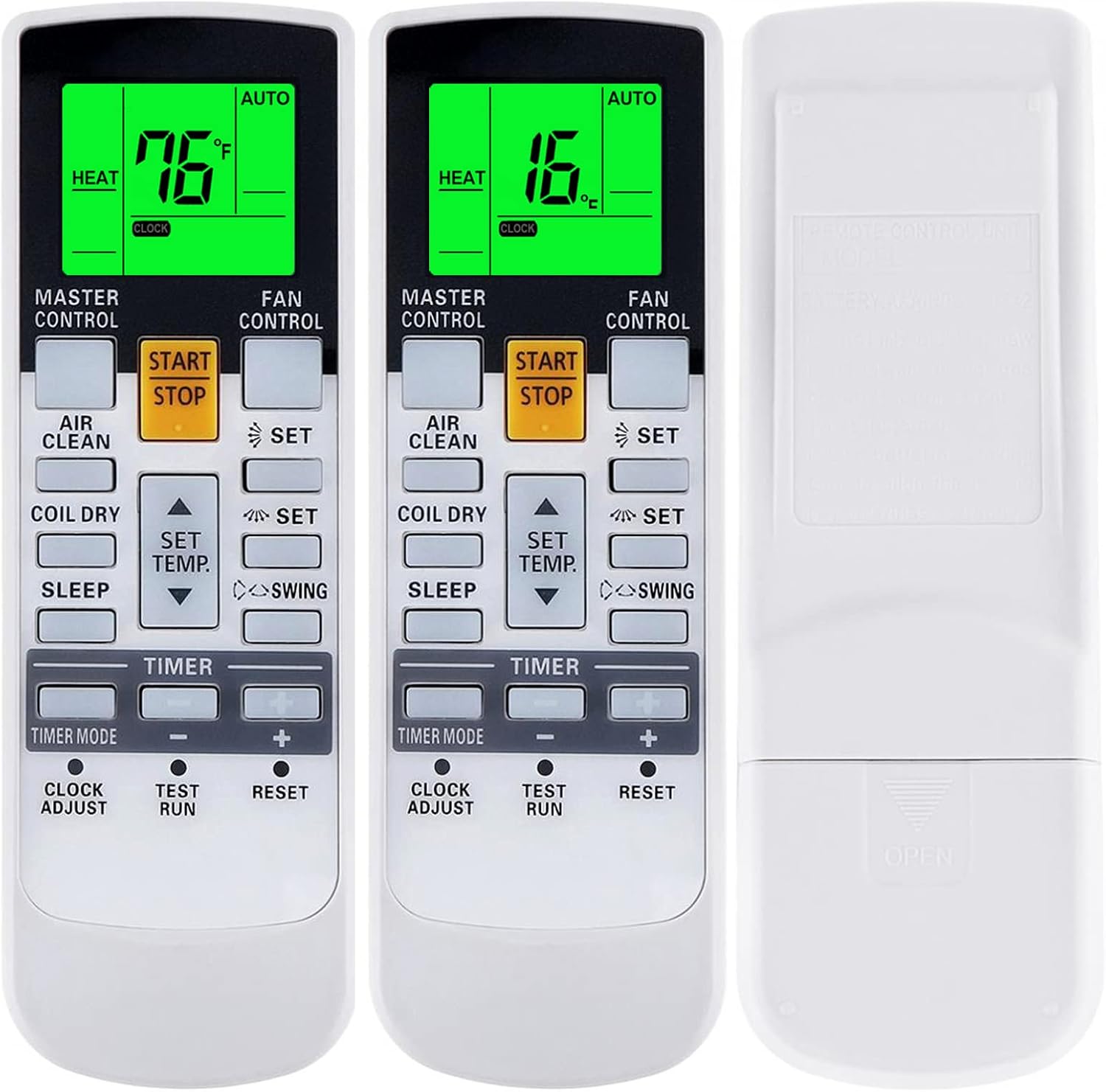
Image: Front and back view of the remote control, highlighting the battery compartment on the rear.
No pairing or complex setup is typically required for this replacement remote. Once batteries are installed, it should be ready to operate your compatible Fujitsu air conditioner.
Operating Instructions
Familiarize yourself with the buttons and display features of your new remote control.
Display and Backlight
The remote features a clear digital display with a green backlight, making it easy to read settings even in the dark.
- Temperature Display: The remote can display temperature in both Fahrenheit (°F) and Celsius (°C).
- Green Backlight: The display illuminates with a green backlight for improved visibility at night or in dimly lit rooms.

Image: Two remote controls side-by-side, demonstrating the temperature display in Fahrenheit and Celsius, and highlighting the green backlight feature.
Basic Functions
- START/STOP: Press this button (typically yellow) to turn the air conditioner ON or OFF.
- SET TEMP. (▲/▼): Use the up and down arrow buttons to adjust the desired temperature.
- FAN CONTROL: Adjust the fan speed (e.g., Auto, Low, Medium, High).
- TIMER MODE: Access and set timer functions for scheduled operation.
- CLOCK ADJUST: Set the current time on the remote's display.
- AIR CLEAN: Activates the air purification function (if supported by your AC unit).
- COIL DRY: Initiates a coil drying cycle to prevent mold and mildew.
- SLEEP: Activates sleep mode for comfortable overnight operation.
- SWING: Controls the louver swing function for air distribution.
Advanced Heat Functions (If Applicable)
Some Fujitsu AC models support specific heat functions like "10°C.HEAT", "50°F.HEAT", "MINI.HEAT", or "ECONOMY". These functions are accessible only if your original remote control also had these capabilities.
To activate these functions, press and hold the designated button (often the "SET TEMP." or a similar button, as indicated by the image) for approximately 4 seconds.

Image: A remote control illustrating that specific heat functions (10°C.HEAT, 50°F.HEAT, MINI.HEAT, ECONOMY) are available by pressing and holding a button for 4 seconds, provided the original remote supported them.
Maintenance
Battery Replacement
Replace batteries when the remote's display becomes dim or the remote stops responding. Always replace both batteries at the same time with new ones of the same type.
Cleaning
Wipe the remote control with a soft, dry cloth. Do not use liquid cleaners or abrasive materials, as they may damage the remote's surface or internal components.
Troubleshooting
- Remote not responding:
- Check if batteries are installed correctly with correct polarity.
- Replace old batteries with new ones.
- Ensure there are no obstructions between the remote and the air conditioner's receiver.
- Confirm the remote is pointed directly at the AC unit.
- Display is dim or blank:
- Batteries are low; replace them.
- Specific functions not working:
- Verify that your specific Fujitsu AC model supports the function you are trying to use. This replacement remote supports functions that were present on the original remote.
Specifications
| Brand | YAOHUIMI |
| Model Number | A420220331-BEIGUANG-200 |
| Compatible Devices | Fujitsu Air Conditioners (ASYA12LKC, AR-NJ1, AST9ASJCW, AST12ASJCW, etc. as listed in product description) |
| Display Features | Fahrenheit and Celsius display, Green Backlight |
| Power Source | AAA Batteries (not included) |
Warranty and Support
Specific warranty information for this product is not provided in the available documentation. For any issues or support inquiries, please contact the seller or refer to the product listing on the platform where it was purchased.
For further assistance, you may also refer to the official Fujitsu air conditioner user manual for your specific AC model, as this remote functions as a replacement for original Fujitsu remotes.


