
1. Introduction
Thank you for choosing the MEETION MT-MK005 RGB Backlit Mini 61 Keys Wired Mechanical Keyboard. This manual provides detailed instructions for setting up, operating, and maintaining your new keyboard. Please read this manual thoroughly to ensure optimal performance and longevity of your device.

Image 1: Top-down view of the MEETION MT-MK005 keyboard, showcasing its compact 61-key layout and vibrant RGB backlighting. The wired connection is visible at the top.
2. Key Features
The MEETION MT-MK005 keyboard is designed for performance and durability, offering a range of features:
- Compact 61-Key Layout: A 60% mini design that saves desk space while retaining essential functionality through shortcut keys.
- RGB Backlighting: Approximately 16.8 million color true RGB backlighting with various customizable lighting effects.
- OUTEMU Blue Mechanical Switches: High-quality, tactile, and clicky switches suitable for gaming and typing.
- Full Anti-Ghosting: Ensures all key presses are registered accurately, even during rapid, simultaneous inputs.
- Double Injection Keycaps: Durable keycaps that are wear-proof, anti-fade, and provide comfortable keystrokes with high light transmittance.
- Ergonomic Design: Engineered for comfort to reduce fatigue during extended use.
- Quick Multimedia Functions: Access multimedia controls easily using FN key combinations.
- Power-Saving Function (Bluetooth Mode): Features two power-saving modes for wireless operation (though this model is listed as wired, this feature is included for completeness, assuming a potential variant or general feature set).

Image 2: Visual representation of the MEETION MT-MK005's 60% compact size compared to a full-sized keyboard, illustrating how it retains functionality despite its smaller footprint.

Image 3: Angled view of the MEETION MT-MK005 keyboard highlighting its compact 61-key layout. The image emphasizes the ergonomic design and practicality of the smaller form factor.
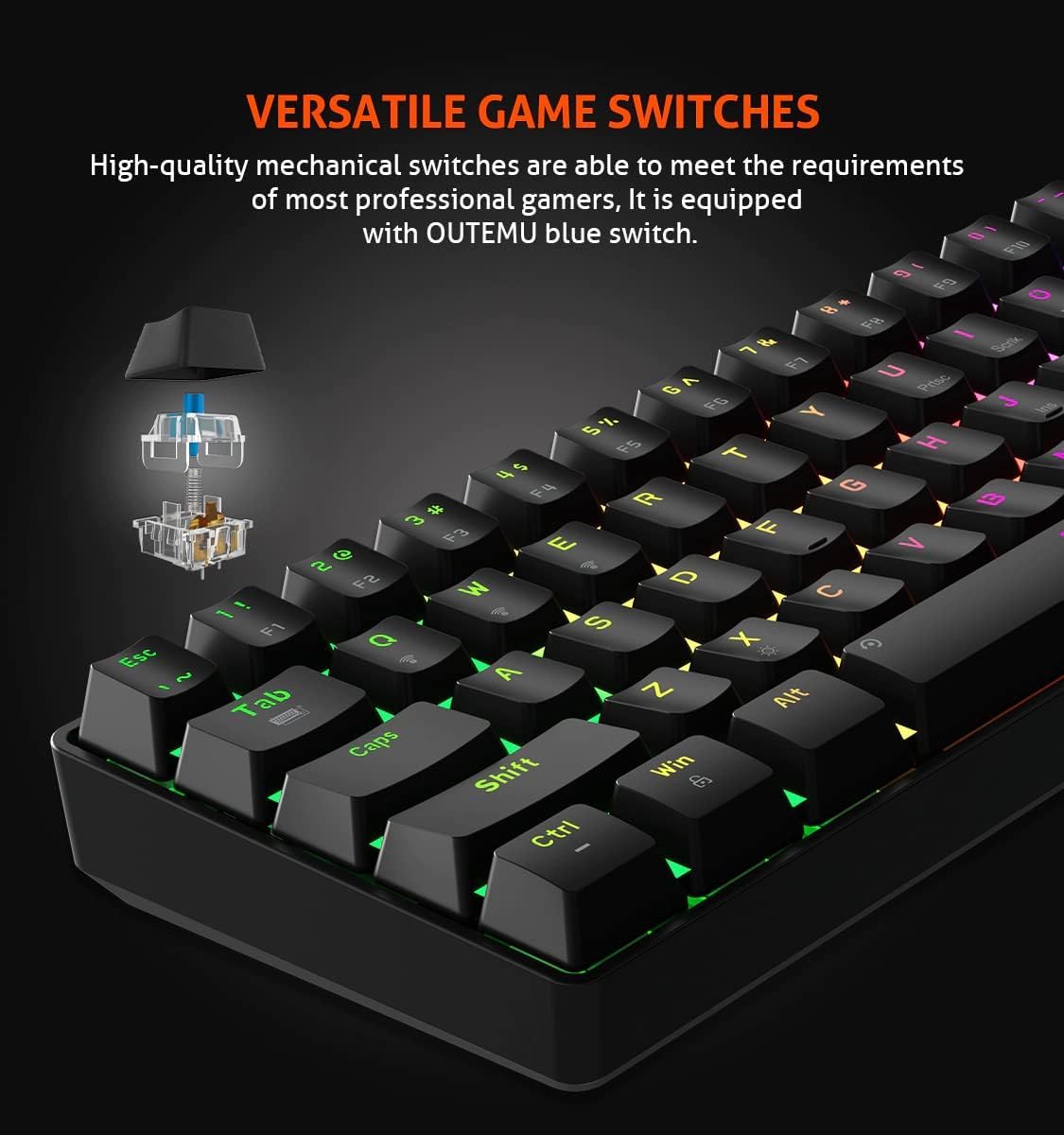
Image 4: Close-up view illustrating the OUTEMU blue mechanical switches used in the MEETION MT-MK005 keyboard. An exploded diagram of the switch mechanism is shown, indicating its tactile and clicky nature.

Image 5: Detailed view of the double injection keycaps on the MEETION MT-MK005 keyboard. This image highlights the durability and wear-resistant properties of the keycap manufacturing process.
3. Setup Instructions
Follow these steps to set up your MEETION MT-MK005 keyboard:
- Unpack the Keyboard: Carefully remove the keyboard from its packaging.
- Connect to Computer: Plug the USB cable from the keyboard into an available USB port on your computer.
- Driver Installation: Your operating system (Windows XP/Vista/7/8/10/11 or macOS) should automatically detect and install the necessary drivers. No manual driver installation is typically required.
- Test Functionality: Open a text editor or browser and test typing to ensure all keys are functioning correctly.
4. Operating Instructions
4.1. Basic Key Functions
The MT-MK005 features a 61-key layout. Many standard functions are accessed via the Fn (Function) key in combination with other keys.
4.2. RGB Backlight Control
The keyboard offers customizable RGB backlighting. Specific key combinations are used to change lighting modes, brightness, and speed. Refer to the keyboard's printed legends or a dedicated software (if available, not specified in product data) for exact combinations.
- Changing Lighting Modes: Typically Fn + [Key] (e.g., Fn + \ or Fn + P) to cycle through various effects.
- Adjusting Brightness: Often Fn + ↑ / ↓.
- Adjusting Speed: Often Fn + ← / →.
4.3. Multimedia Functions
Access multimedia controls by holding the Fn key and pressing the corresponding function keys (e.g., F1-F12, which often have secondary multimedia legends).
4.4. Anti-Ghosting
The MT-MK005 features full key anti-ghosting, meaning that all simultaneous key presses will be registered accurately. This is particularly beneficial for fast-paced gaming.

Image 6: Close-up view of the MEETION MT-MK005 keyboard, illustrating the concept of full anti-ghosting. The image visually suggests that multiple key presses are registered simultaneously without conflict.
4.5. Power-Saving Function (Wired Model Note)
While this model is primarily wired, the product description mentions power-saving features for Bluetooth mode. If a wireless variant or future update supports this, the keyboard would enter a first-level power-saving mode (lights dim) after one minute of inactivity and a full sleep mode after 30 minutes of inactivity to conserve power.
5. Maintenance
Proper maintenance ensures the longevity and performance of your keyboard:
- Cleaning: Use a soft, dry cloth to wipe the surface of the keyboard. For deeper cleaning, you can use compressed air to remove dust and debris from between the keycaps. Avoid using harsh chemicals or abrasive materials.
- Keycap Removal: If necessary, keycaps can be carefully removed using a keycap puller (not included) for thorough cleaning. Reinstall them by aligning and gently pressing down until they click into place.
- Avoid Liquid Spills: Keep liquids away from the keyboard to prevent damage to internal components.
6. Troubleshooting
If you encounter issues with your keyboard, refer to the following common solutions:
- Keyboard Not Responding:
- Ensure the USB cable is securely plugged into both the keyboard and the computer.
- Try plugging the keyboard into a different USB port on your computer.
- Restart your computer.
- Keys Not Registering:
- Check for any physical obstructions under the keycap.
- If specific keys are not working, try cleaning around them with compressed air.
- Backlight Not Working or Incorrect:
- Ensure the keyboard is properly connected.
- Cycle through lighting modes and adjust brightness using the Fn key combinations.
- If applicable, check for any keyboard software settings that might be overriding the onboard controls.
- Unexpected Behavior:
- Try resetting the keyboard to its factory defaults (refer to specific key combination if available, usually Fn + Esc for a few seconds).
- Ensure your operating system is up to date.
7. Specifications
| Feature | Detail |
|---|---|
| Brand | MEETION |
| Model Number | MT-MK005 |
| Keyboard Type | Mechanical Gaming Keyboard |
| Switch Type | OUTEMU Blue Switches |
| Key Layout | 61 Keys (60% Mini) |
| Backlight | RGB (16.8 million colors) |
| Connectivity | Wired (USB) |
| Anti-Ghosting | Full Key Anti-Ghosting |
| Keycaps | Double Injection |
| Dimensions | 29.2 x 10.2 x 3.8 cm |
| Weight | 721 g |
| Compatible OS | Win XP/Vista/7/8/10/11, macOS |
8. Warranty and Support
MEETION products are designed for reliability and performance. For warranty information and technical support, please refer to the warranty card included with your product or visit the official MEETION website. Keep your purchase receipt as proof of purchase for warranty claims.
For further assistance, you may contact MEETION customer support through their official channels.


