

1. Setup and Installation
The Ring Battery Video Doorbell Plus is designed for easy installation, typically taking approximately 5 minutes due to its wireless design. Follow these steps for a smooth setup process.
1.1 Charging the Battery
Before installation, ensure the quick-release battery pack is fully charged using the provided USB charging cable. Insert the charged battery into the doorbell unit.

The quick-release battery pack being inserted into the doorbell unit for power.
1.2 App Download and Account Setup
Download the Ring app from your device's app store. Create a new account or log in to an existing one. The app will guide you through connecting your doorbell to your home Wi-Fi network (2.4 GHz required).
1.3 Mounting the Doorbell
Use the included mounting hardware to secure the doorbell to your desired location. An ideal mounting height is approximately 1 meter from the ground, positioned directly facing your door. If mounting next to the door, the included corner kit can help optimize the field of view. For drill-free installation, a self-adhesive bracket is available separately.
2. Operating Your Ring Doorbell
Once installed, the Ring Battery Video Doorbell Plus provides advanced features for home security and convenience.
2.1 Video and Live View
The doorbell captures 1536p HD video with a 1:1 aspect ratio, offering a unique head-to-toe view to see more of your property, including packages on the ground. You can access a live video feed at any time through the Ring app.
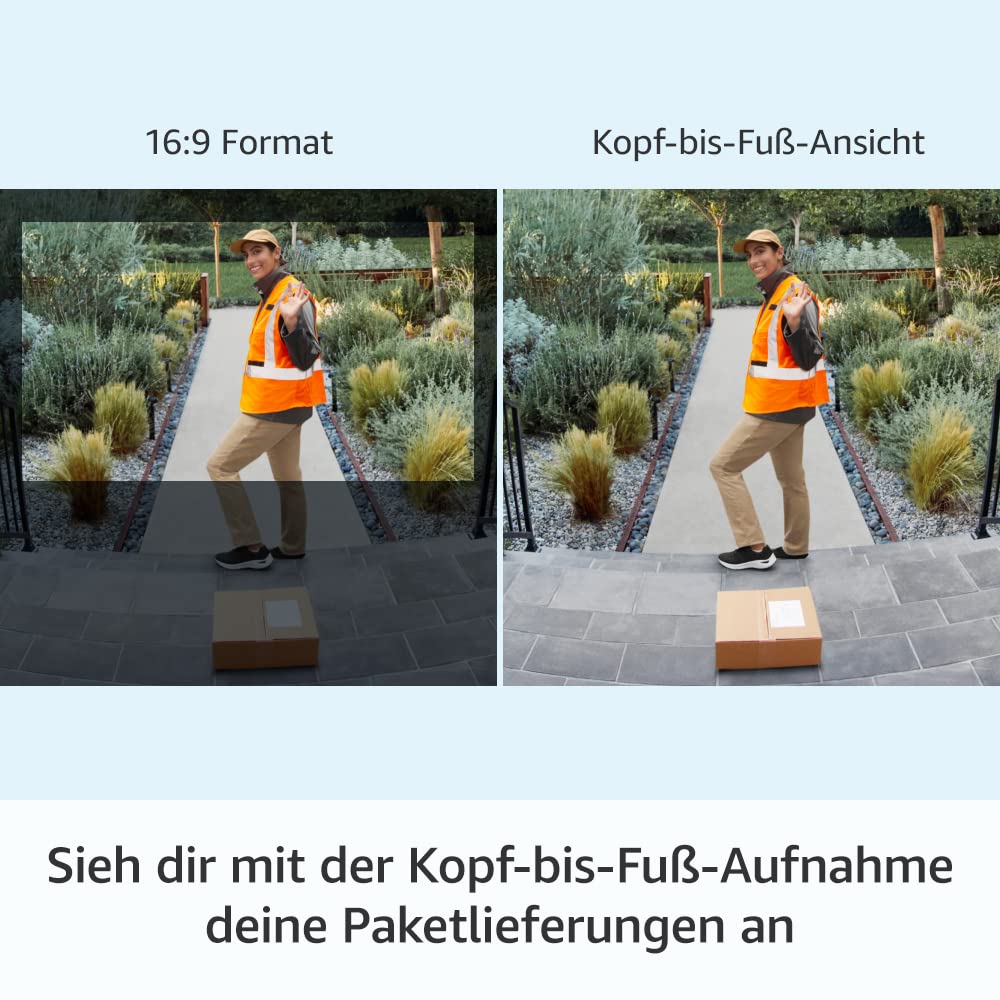
The head-to-toe view provides extended vertical coverage, allowing you to see packages and visitors more completely.

Experience clear 1536p HD live video, allowing you to see and interact with visitors in real-time.
2.2 Motion Detection and Notifications
Utilize advanced motion detection with customizable motion zones to define specific areas you want to monitor. You will receive real-time notifications on your mobile device when motion is detected or the doorbell is pressed.
2.3 Two-Way Talk and Night Vision
Engage in two-way conversations with visitors using the built-in microphone and speaker, featuring noise cancellation for clear audio. The doorbell also provides color night vision, allowing you to see clearly even in low-light conditions.
2.4 Ring App Control
The Ring app is your central control hub. From the app, you can manage settings, review event history, customize privacy features, and link other Ring devices for a comprehensive home security system.

The Ring app provides comprehensive control over your doorbell's features and privacy settings.
2.5 Alexa Integration
The Ring Battery Video Doorbell Plus can be paired with compatible Alexa-enabled devices, such as Echo Show, to receive audible announcements and view live video feeds directly on your smart display.

Seamlessly integrate your doorbell with Alexa to view live feeds and receive announcements on compatible devices.
3. Maintenance
Proper maintenance ensures the longevity and optimal performance of your Ring Battery Video Doorbell Plus.
3.1 Battery Management
The quick-release battery pack allows for easy removal and recharging. Battery life varies based on usage, including the frequency of motion events and Live View access. Recharge the battery as needed to maintain continuous operation.
3.2 Cleaning
Periodically clean the doorbell's camera lens and housing with a soft, damp cloth to remove dust and debris. Avoid using harsh chemicals or abrasive materials that could damage the device.
3.3 Environmental Conditions
The doorbell is weather-resistant and designed to operate in temperatures ranging from -20.5 °C to 50 °C. Ensure it is installed in a location within these operating conditions for best performance.
4. Troubleshooting
If you encounter issues with your Ring Battery Video Doorbell Plus, refer to the following common troubleshooting tips.
4.1 Connectivity Issues
Ensure your Wi-Fi network is operating on the 2.4 GHz band (802.11b/g/n) and provides a minimum upload speed of 2.5 Mbps for optimal performance. If experiencing connection drops, try moving your Wi-Fi router closer to the doorbell or using a Wi-Fi extender.
4.2 Battery Draining Quickly
Frequent motion detections, extensive Live View usage, and extreme temperatures can impact battery life. Adjust motion sensitivity settings, reduce Live View sessions, or consider optional wired/solar power accessories if battery life is consistently short.
4.3 Video Quality Issues
Check your internet connection speed. A weak Wi-Fi signal can lead to lower video quality. Ensure the camera lens is clean and free from obstructions.
4.4 No Notifications
Verify that notifications are enabled in both the Ring app settings and your mobile device's operating system settings. Ensure the doorbell is connected to Wi-Fi.
5. Product Specifications
| Feature | Description |
|---|---|
| Dimensions (H x W x D) | 12.8 cm x 6.2 cm x 2.8 cm |
| Color | Satin Nickel |
| Video | 1536p HD Video, Live View, 1:1 Aspect Ratio, Color Night Vision |
| Motion Detection | Advanced Motion Detection with Customizable Motion Zones |
| Field of View | 150° Horizontal, 150° Vertical |
| Audio | Two-Way Talk with Noise Cancellation |
| Power | Powered by a removable, rechargeable quick-release battery pack (included). Optional wired (8-24 VAC, 50/60 Hz, 5-40 VA) or solar power accessories available. |
| Internet Requirements | 802.11b/g/n; 2.4 GHz Wi-Fi Connection |
| Connection Speed | Requires a minimum upload speed of 2.5 Mbps for optimal performance. |
| Average Installation Time | Approx. 5 Minutes |
| Operating Conditions | -20.5 °C to 50 °C, Weather-Resistant |
| Scope of Delivery | Ring Battery Video Doorbell Plus, Rechargeable Quick-Release Battery Pack, Satin Nickel Faceplate, Corner Kit, USB Charging Cable, Mounting Hardware, User Manual, Security Sticker |
6. Warranty and Support
6.1 Warranty Information
The Ring Battery Video Doorbell Plus comes with a one-year limited manufacturer's warranty, which includes theft protection. This limited warranty is in addition to any applicable statutory warranty rights for consumer goods and does not affect them in any way.
6.2 Customer Support
For further assistance, technical support, or to access additional resources, please visit the official Ring support website or contact Ring customer service. The Ring app also provides in-app support and guides.
7. Official Product Videos
No official product videos from the seller were provided in the product data for embedding in this manual.


