
1. Introduction
Thank you for choosing the Fakir EKM 6121 Coffee Grinder. This manual provides essential information for the safe and efficient operation, maintenance, and troubleshooting of your new appliance. Please read these instructions carefully before first use and keep them for future reference.
2. Important Safety Instructions
- Read all instructions before using the appliance.
- Do not immerse the appliance, cord, or plug in water or other liquids.
- Close supervision is necessary when any appliance is used by or near children.
- Unplug from outlet when not in use, before putting on or taking off parts, and before cleaning.
- Avoid contact with moving parts.
- Do not operate any appliance with a damaged cord or plug, or after the appliance malfunctions or has been damaged in any manner.
- The use of attachments not recommended or sold by the manufacturer may cause fire, electric shock, or injury.
- Do not use outdoors.
- Do not let cord hang over edge of table or counter, or touch hot surfaces.
- Do not place on or near a hot gas or electric burner, or in a heated oven.
- Check the bean hopper for the presence of foreign objects before use.
- This appliance is for household use only.
3. Product Overview
Familiarize yourself with the components of your Fakir EKM 6121 Coffee Grinder.
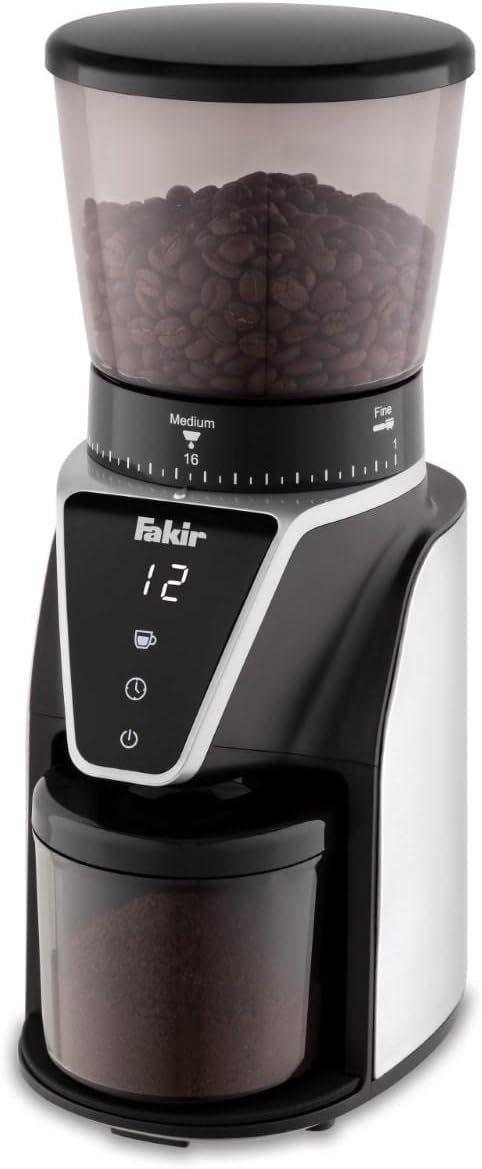
Figure 1: Fakir EKM 6121 Coffee Grinder. This image displays the main unit, including the transparent bean hopper filled with coffee beans, the grind setting dial ranging from 'Fine' to 'Medium' with numerical indicators (e.g., 1 to 16), the digital control panel showing 'Fakir' branding and a numerical display (e.g., '12'), and the ground coffee container at the bottom.
Components:
- Bean Hopper: Transparent container for whole coffee beans.
- Hopper Lid: Covers the bean hopper.
- Grind Setting Dial: Adjustable ring to select desired grind fineness (from fine to medium, typically 1-16 settings).
- Control Panel: Features a digital display and touch-sensitive buttons for operation.
- Ground Coffee Container: Removable container to collect ground coffee.
- Container Lid: Covers the ground coffee container.
- Power Cord: For connecting to an electrical outlet.
4. Initial Setup
4.1 Unpacking
- Carefully remove all packaging materials from the coffee grinder.
- Retain packaging for future storage or transport if necessary.
4.2 Cleaning Before First Use
- Wash the bean hopper, hopper lid, ground coffee container, and its lid in warm, soapy water. Rinse thoroughly and dry completely.
- Wipe the exterior of the grinder base with a damp cloth. Do not immerse the main unit in water.
4.3 Assembly
- Place the ground coffee container into its designated slot on the grinder base. Ensure it is securely seated.
- Attach the bean hopper to the top of the grinder base. Twist it gently until it locks into place.
- Place the hopper lid on top of the bean hopper.
4.4 Placement
- Place the grinder on a stable, flat, and dry surface.
- Ensure there is adequate ventilation around the appliance.
- Plug the power cord into a suitable electrical outlet.
5. Operating Instructions
5.1 Adding Coffee Beans
- Remove the hopper lid.
- Pour whole roasted coffee beans into the bean hopper. Do not overfill.
- Replace the hopper lid securely.
5.2 Adjusting Grind Settings
- Rotate the grind setting dial to select your desired fineness.
- Settings typically range from 'Fine' (e.g., 1-5) for espresso or Turkish coffee, to 'Medium' (e.g., 6-10) for drip coffee, and 'Coarse' (e.g., 11-16) for French press.
- Adjust the setting based on your brewing method.
5.3 Selecting Quantity
- Use the control panel to select the desired amount of coffee to grind. This is often indicated by cup icons or a timer.
- Press the 'cup' button to cycle through the number of cups, or the 'timer' button to set the grinding duration. The display will show your selection.
5.4 Starting and Stopping Grinding
- After selecting the grind setting and quantity, press the 'power' button (often indicated by a circle with a vertical line) to start the grinding process.
- The grinder will automatically stop once the selected quantity or time is reached.
- To manually stop grinding, press the 'power' button again.
5.5 After Grinding
- Carefully remove the ground coffee container from the grinder base.
- Use the ground coffee immediately for best freshness.
- Replace the ground coffee container and its lid after use.
6. Cleaning and Maintenance
Regular cleaning ensures optimal performance and extends the life of your coffee grinder.
6.1 Daily Cleaning
- Unplug the grinder from the power outlet before cleaning.
- Remove the ground coffee container and empty any remaining coffee grounds. Wash it with warm, soapy water, rinse, and dry.
- Use a small brush (often included) to clean any residual coffee grounds from the grinding burrs and the chute.
- Wipe the exterior of the grinder with a soft, damp cloth. Do not use abrasive cleaners or scourers.
6.2 Deep Cleaning (Periodically)
- Remove the bean hopper and the upper grinding burr (refer to specific instructions in your product manual for burr removal, as this can vary).
- Clean both burrs thoroughly with a brush to remove all coffee oil and residue.
- Ensure all parts are completely dry before reassembling.
6.3 Storage
- Store the grinder in a clean, dry place when not in use.
- Ensure the bean hopper is empty and clean before long-term storage.
7. Troubleshooting
If you encounter issues with your Fakir EKM 6121 Coffee Grinder, refer to the following common problems and solutions:
| Problem | Possible Cause | Solution |
|---|---|---|
| Grinder does not start. | Not plugged in; power outage; hopper/container not correctly assembled. | Check power connection; ensure hopper and ground coffee container are securely in place. |
| Inconsistent grind. | Grinding burrs are dirty or worn; incorrect grind setting. | Clean the grinding burrs; adjust the grind setting to a finer or coarser option. |
| Grinder makes unusual noise. | Foreign object in burrs; burrs are clogged with coffee. | Unplug and inspect the burrs for foreign objects; clean the burrs thoroughly. |
| Coffee grounds are not dispensing properly. | Chute is clogged; ground coffee container is full. | Clean the dispensing chute; empty the ground coffee container. |
If the problem persists after attempting these solutions, please contact customer support.
8. Technical Specifications
- Brand: Fakir
- Model: EKM 6121
- Material: Stainless Steel
- Product Weight: 2.1 Kilogram
- Package Dimensions: 39 x 25.4 x 22 cm
- Recommended Use: Coffee Bean Grinding
- Special Use: Grinding
9. Warranty and Support
Fakir products are manufactured to high-quality standards. For information regarding warranty coverage, terms, and conditions, please refer to the warranty card included with your product or visit the official Fakir website. For technical support, spare parts, or service inquiries, please contact Fakir customer service.