
1. Introduction
This manual provides essential information for the safe and efficient use of your intelamp 4400mAh Solar Flood Lights. Please read these instructions carefully before installation and operation, and retain them for future reference.
2. Safety Information
- Ensure all components are intact before installation.
- Do not attempt to modify or disassemble the product. This may void the warranty and pose safety risks.
- Keep the solar panel clean to ensure optimal charging efficiency.
- Install the solar panel in a location that receives direct sunlight for most of the day.
- Avoid looking directly into the light source when illuminated, as it can be very bright.
3. Package Contents
The intelamp 4400mAh Solar Flood Light (2-Pack) includes the following items:
- 2 x Solar Flood Lights
- 2 x Solar Panels with 16-foot connecting cables
- Mounting Hardware (screws, wall anchors)
- 4 x AAA Batteries (pre-installed or included for each unit)

Image: Contents of the intelamp 4400mAh Solar Flood Lights 2-pack.
4. Product Features
- Bright Illumination: Delivers 1000 lumens of bright white light, illuminating areas up to 40 x 40 feet.
- Dusk to Dawn Operation: Automatically charges during the day and illuminates at night.
- Intelligent Lighting Modes: Provides full brightness for the first 4 hours, then transitions to a lower brightness level until dawn to conserve energy and ensure extended lighting. Adjusts brightness in winter for consistent performance.
- Long Lifespan: Equipped with a high-efficiency solar panel, large capacity 4400mAh rechargeable battery, and high-efficacy LEDs for over 3 years of performance.
- Flexible Installation: Includes 16-foot cables between the solar panel and light, allowing optimal placement of the solar panel in direct sunlight while positioning the light as desired.
- Durable Design: IP65 waterproof rating ensures reliable operation in various outdoor weather conditions.

Image: Key features of the intelamp Solar Flood Light.
5. Setup and Installation
Follow these steps to set up your intelamp Solar Flood Lights:
- Unpack Components: Carefully remove all items from the packaging and verify against the package contents list.
- Choose Installation Location:
- Select a location for the solar panel that receives at least 6 hours of direct sunlight daily for optimal charging.
- Choose a location for the flood light that provides the desired illumination, such as walls, gardens, yards, or garages. The recommended mounting height is approximately 3-5 meters (10-16 feet).
- Mount the Solar Panel:
- Use the provided mounting hardware (screws and wall anchors) to securely attach the solar panel to a wall or board.
- Alternatively, use cable ties (not included, but mentioned in product description as an option) to bind the solar panel to a tree trunk or pole.
- The solar panel bracket is 180° adjustable, allowing you to angle it for maximum sun exposure.
- Mount the Flood Light:
- Attach the flood light to your chosen surface using the appropriate mounting hardware.
- Connect the Components:
- Connect the 16-foot cable from the solar panel to the flood light. Ensure the connection is secure. The connector diameter is approximately 0.5 inches.
- Activate the Light: Locate the ON/OFF switch, typically on the solar panel or light unit, and switch it to the "ON" position.

Image: Dimensions of the solar panel (6.5x6.5 inches) and flood light (4.7x5.3 inches), with a 16.4 ft cable.
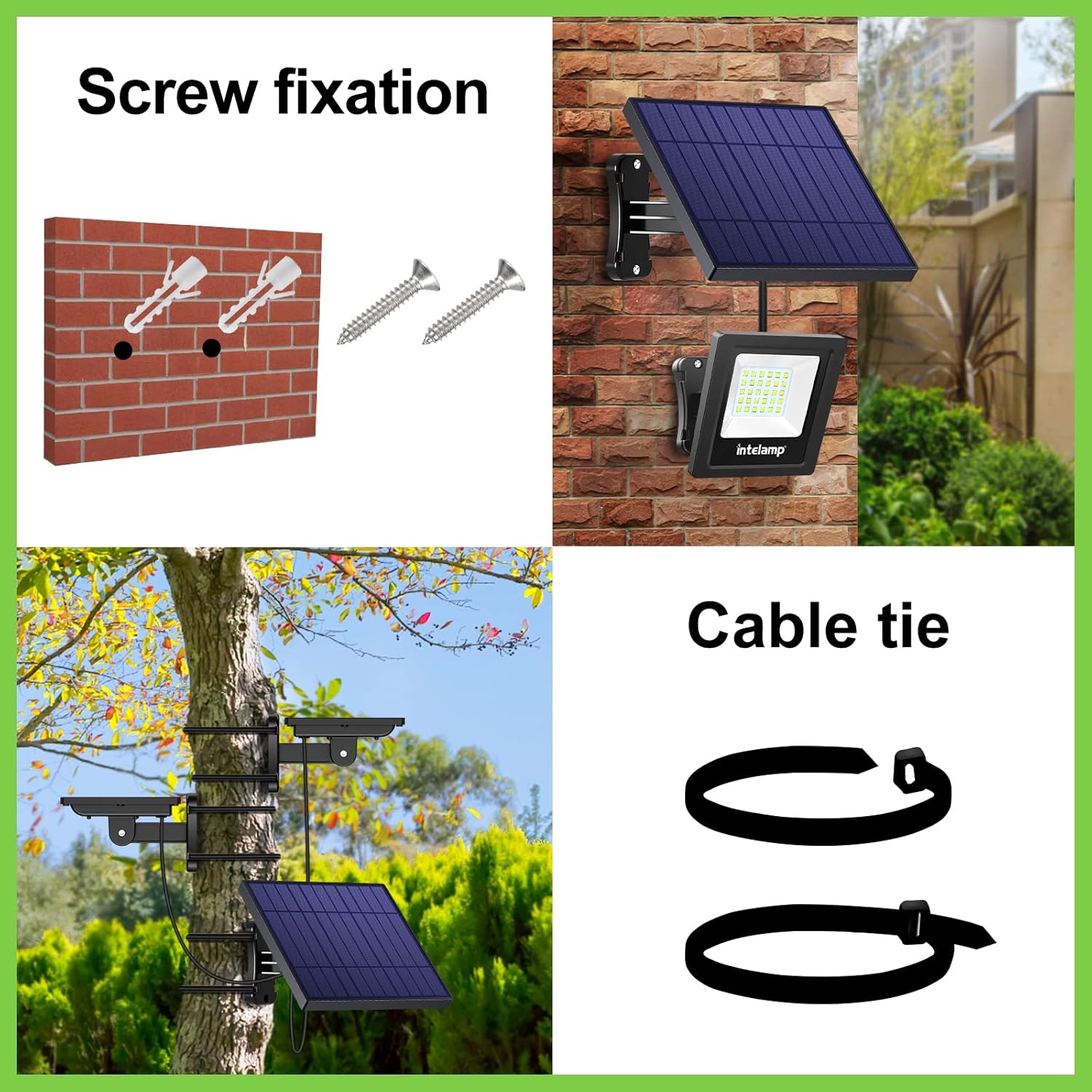
Image: Various installation methods including screw fixation and cable ties.

Image: Adjustable solar panel and diverse mounting options.

Image: Detail of the waterproof connector.
6. Operating Instructions
The intelamp Solar Flood Light is designed for automatic operation:
- Automatic Charging: During daylight hours, the solar panel converts sunlight into electricity and stores it in the internal 4400mAh battery. Ensure the solar panel is exposed to direct sunlight for optimal charging.
- Automatic Illumination: At dusk, the light sensor detects low light conditions and automatically turns on the flood light.
- Intelligent Brightness Control:
- The light will operate at full brightness (1000 lumens) for approximately the first 4 hours after activation.
- After the initial 4 hours, the light will automatically switch to a lower brightness level to extend illumination duration until dawn.
- In winter or on cloudy/rainy days, the system intelligently adjusts to a lower brightness level to ensure longer lighting times, compensating for reduced solar charging.
- Automatic Shut-off: At dawn, the light sensor detects increasing ambient light and automatically turns off the flood light to begin recharging.

Image: Solar charging for 6 hours and 18 hours of lighting.
7. Maintenance
Regular maintenance ensures optimal performance and longevity of your solar flood lights:
- Clean Solar Panel: Periodically wipe the surface of the solar panel with a soft, damp cloth to remove dust, dirt, leaves, or snow. A clean panel ensures maximum sunlight absorption and charging efficiency.
- Inspect Connections: Occasionally check the cable connections between the solar panel and the light unit to ensure they are secure and free from damage.
- Battery Care: The internal 4400mAh battery is designed for a long lifespan (over 3 years). If the light's performance significantly degrades after several years, the AAA batteries may need replacement. Refer to a qualified technician if you are unsure how to replace them.
- Clear Obstructions: Ensure no new obstructions (e.g., growing trees, new structures) block direct sunlight from reaching the solar panel.
8. Troubleshooting
If your intelamp Solar Flood Light is not functioning as expected, consider the following common issues and solutions:
- Light does not turn on at night:
- Ensure the ON/OFF switch is in the "ON" position.
- Verify the solar panel is receiving sufficient direct sunlight (at least 6 hours daily). Relocate if necessary.
- Check for any obstructions (e.g., trees, buildings, shadows) blocking the solar panel or the light sensor.
- Ensure the cable connection between the solar panel and light is secure.
- Allow the light to charge for at least one full sunny day before its first use.
- Light is dim or does not stay on long:
- The solar panel may not be receiving enough sunlight. Clean the panel and ensure it's in an optimal position.
- Weather conditions (e.g., prolonged cloudy or rainy days) can reduce charging efficiency. The light's intelligent control system will adjust brightness to extend duration.
- The battery may not be fully charged. Allow several sunny days for a full charge.
- The battery may be nearing the end of its lifespan.
- Light turns on during the day:
- The light sensor might be obstructed or located in a shaded area, tricking it into thinking it's dark. Relocate the light or clear any obstructions.
9. Specifications
| Feature | Specification |
|---|---|
| Brand | intelamp |
| Model | B09WYT19M3 |
| Light Source Type | LED |
| Brightness | 1000 Lumens |
| Color Temperature | 6000 Kelvin (White Light) |
| Wattage | 6 watts |
| Battery Capacity | 4400mAh (4 AAA batteries included) |
| Voltage | 3.2 Volts |
| Power Source | Solar Powered |
| Indoor/Outdoor Usage | Outdoor |
| Water Resistance Level | IP65 Waterproof |
| Material | Acrylonitrile Butadiene Styrene (ABS), Plastic or Resin Shade |
| Installation Type | Wall Mount |
| Control Method | Touch (Push Button Switch) |
| Cable Length (Solar Panel to Light) | 16 feet (approx. 4.88 meters) |
| Item Weight | 3.41 pounds (for 2-pack) |
| Package Dimensions | 7.95 x 6.85 x 5.12 inches |
10. Warranty and Support
For warranty information and customer support, please refer to the product packaging or contact intelamp customer service through the retailer where the product was purchased. Keep your purchase receipt as proof of purchase.