
WORKPRO 12V Cordless Rotary Tool Kit
WORKPRO 12V Cordless Rotary Tool Kit User Manual
Model: 12V Cordless Rotary Tool Kit
1. Introduction
This manual provides essential instructions for the safe operation, maintenance, and troubleshooting of your WORKPRO 12V Cordless Rotary Tool Kit. Please read this manual thoroughly before using the tool to ensure proper function and to prevent injury.
2. Important Safety Information
Always follow basic safety precautions to reduce the risk of fire, electric shock, and personal injury.
- Wear appropriate personal protective equipment (PPE) such as safety glasses, gloves, and a dust mask.
- Ensure the workpiece is securely clamped before operation.
- Keep the work area clean and well-lit.
- Do not operate power tools in explosive atmospheres, such as in the presence of flammable liquids, gases, or dust.
- Keep children and bystanders away while operating a power tool.
- Avoid accidental starting. Ensure the switch is in the off-position before connecting to battery pack, picking up or carrying the tool.
- Do not force the tool. Use the correct tool for your application.
- Disconnect the battery pack from the tool before making any adjustments, changing accessories, or storing power tools.
- Store idle tools out of the reach of children and do not allow persons unfamiliar with the power tool or these instructions to operate the power tool.
3. Package Contents
Verify that all items listed below are present in your package:
- WORKPRO 12V Cordless Rotary Tool
- 2 x 12V Lithium-ion Batteries
- Battery Charger
- Accessory Kit (114 pieces including grinding stones, sanding pads, felt wheels, mandrels, drill bits, engraving cutters, HSS cutters, cut-off wheels, collets, wrench, whet stone)
- Storage Bag
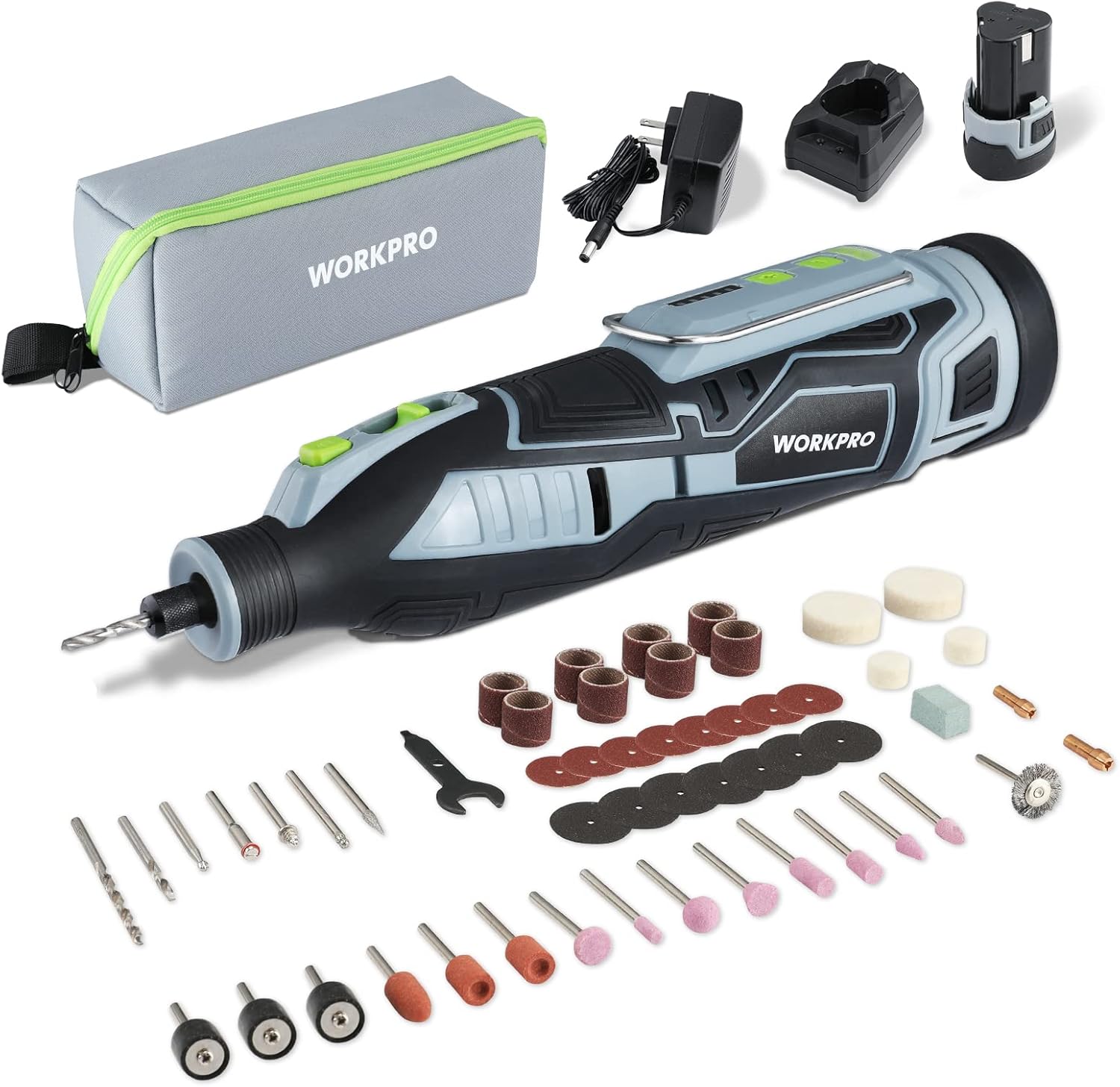
Figure 3.1: Complete WORKPRO 12V Cordless Rotary Tool Kit contents.

Figure 3.2: Assortment of 114 accessories for various applications.
4. Product Overview
Familiarize yourself with the components of your rotary tool.

Figure 4.1: Labeled components of the rotary tool. Key parts include the Chuck, Spindle Locking Button, Recessed Power/Speed Button, Speed Indicator, Battery Indicator, Hanging Ring, Heat Dissipation Holes, and Replaceable Lithium-ion Battery.
- Chuck (Range 2.3/3.2mm): Holds various accessories securely.
- Spindle Locking Button: Engages to lock the spindle for accessory changes.
- Recessed Power/Speed Button: Controls power on/off and adjusts speed settings.
- Speed Indicator: Displays the current speed setting.
- Battery Indicator: Shows the remaining battery charge level.
- Hanging Ring: Allows for convenient storage or hanging during use.
- Heat Dissipation Holes: Designed to prevent overheating during operation.
- Replaceable Lithium-ion Battery: Provides cordless power to the tool.
5. Setup
5.1 Charging the Battery
Before first use, fully charge the battery. The battery recharges in approximately 1 hour.
- Insert the battery into the charger.
- Plug the charger into a standard electrical outlet.
- The indicator light on the charger will show charging status (e.g., red for charging, green for fully charged).
- Once fully charged, remove the battery from the charger.

Figure 5.1: The 12V Li-ion battery charger.
5.2 Installing/Changing Accessories
Follow these steps to safely install or change accessories:
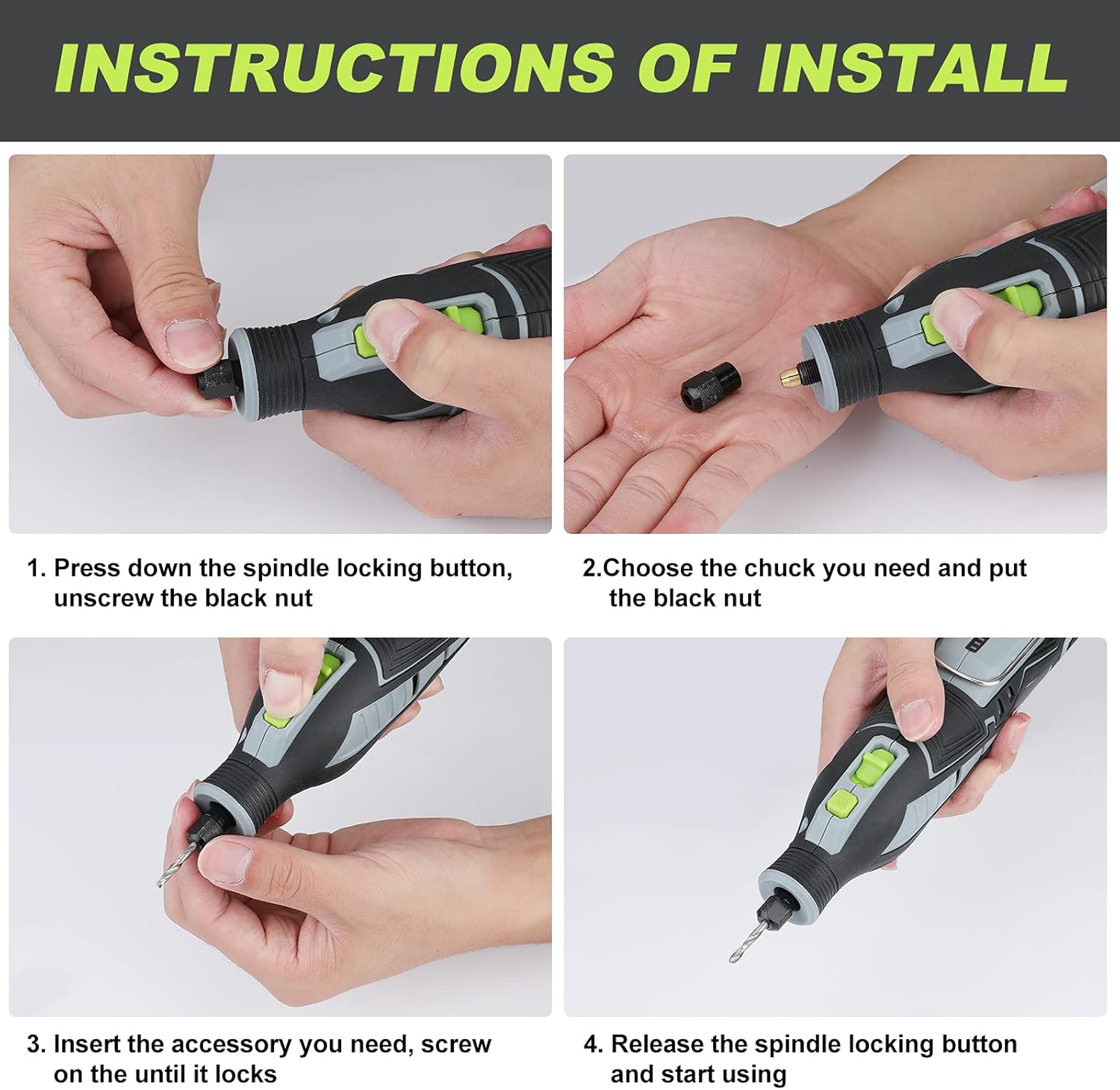
Figure 5.2.1: Press down the spindle locking button and unscrew the black nut.
Figure 5.2.2: Choose the appropriate chuck (2.3mm or 3.2mm) and place it into the nut.
Figure 5.2.3: Insert the desired accessory into the chuck and screw on the nut until it locks.
Figure 5.2.4: Release the spindle locking button. The tool is now ready for use.
6. Operating Instructions
6.1 Powering On and Speed Adjustment
The rotary tool features 5 variable speed settings to match the application.
- To turn on the tool, press the Recessed Power/Speed Button.
- Press the button repeatedly to cycle through the 5 speed settings: 7500, 15000, 20000, 25000, and 32000 RPM.
- The Speed Indicator lights will show the selected speed.
- To turn off the tool, cycle through all speeds until the tool powers down, or press and hold the button.

Figure 6.1: Speed adjustment options for optimal performance.
6.2 General Operation Tips
- Always start with a lower speed setting and gradually increase as needed for the material and accessory.
- Apply light pressure. Let the tool and accessory do the work. Excessive pressure can cause the tool to stall, overheat, or damage the accessory/workpiece.
- Keep the tool moving to prevent burning or gouging the material.
- For detailed work, hold the tool like a pen for better control.

Figure 6.2: Example of the rotary tool in use for crafting or DIY tasks.
7. Maintenance
7.1 Cleaning
- Before cleaning, ensure the tool is turned off and the battery is removed.
- Use a soft, damp cloth to wipe down the exterior of the tool. Do not use harsh chemicals or abrasive cleaners.
- Periodically clear dust and debris from the heat dissipation holes using compressed air or a soft brush.
7.2 Storage
- Store the tool and accessories in the provided storage bag in a clean, dry place, away from direct sunlight and extreme temperatures.
- Ensure the battery is partially charged (around 50%) before long-term storage to prolong its lifespan.
8. Troubleshooting
| Problem | Possible Cause | Solution |
|---|---|---|
| Tool does not turn on. | Battery is not charged or not properly inserted. | Charge the battery fully. Ensure the battery is securely inserted into the tool. |
| Tool stops during operation. | Overload or low battery. | Reduce pressure on the tool. Check battery indicator and recharge if necessary. Allow tool to cool down if overheated. |
| Accessory wobbles or falls out. | Accessory not properly secured or incorrect chuck size. | Ensure the spindle lock is engaged, and the nut is tightened securely. Verify the correct chuck size (2.3mm or 3.2mm) is used for the accessory shank. |
| Reduced performance. | Worn accessory or low battery. | Replace worn accessories. Recharge the battery. |
9. Specifications
| Feature | Detail |
|---|---|
| Brand | WORKPRO |
| Model | 12V Cordless Rotary Tool Kit |
| Voltage | 12 Volts |
| Power Source | Cordless-electric (Lithium-ion Battery) |
| Battery Capacity | 2.0 Ah (Amp-hour) |
| Variable Speeds | 5 settings: 7500, 15000, 20000, 25000, 32000 RPM |
| Chuck Range | 2.3mm & 3.2mm (3/32" & 1/8") |
| Weight | Approximately 1.38 pounds |
| Dimensions | Approximately 10 inches in length |
10. Warranty and Support
For warranty information, technical support, or service inquiries, please refer to the warranty card included with your product or visit the official WORKPRO website. Keep your purchase receipt as proof of purchase.
WORKPRO Official Website: www.workprotools.com
Related documents12V Cordless Rotary Tool Kit


Ask a question about this manual
Ask about setup, troubleshooting, compatibility, parts, safety, or missing instructions. Manuals+ will review the question and use this page’s manual context to help answer it.