
1. Introduction
This manual provides detailed instructions for the operation and maintenance of your WONNIE remote control, designed for use with WONNIE Portable Blue Ray DVD Player models W-BR141, W-BR146, and W-BR156. Please read this manual thoroughly before using the remote control to ensure proper functionality and to maximize your viewing experience.
2. Product Overview
The WONNIE remote control is an ergonomic device designed for intuitive control of your portable Blue Ray DVD player. It features a comprehensive set of buttons for navigation, playback, volume, and various player functions.
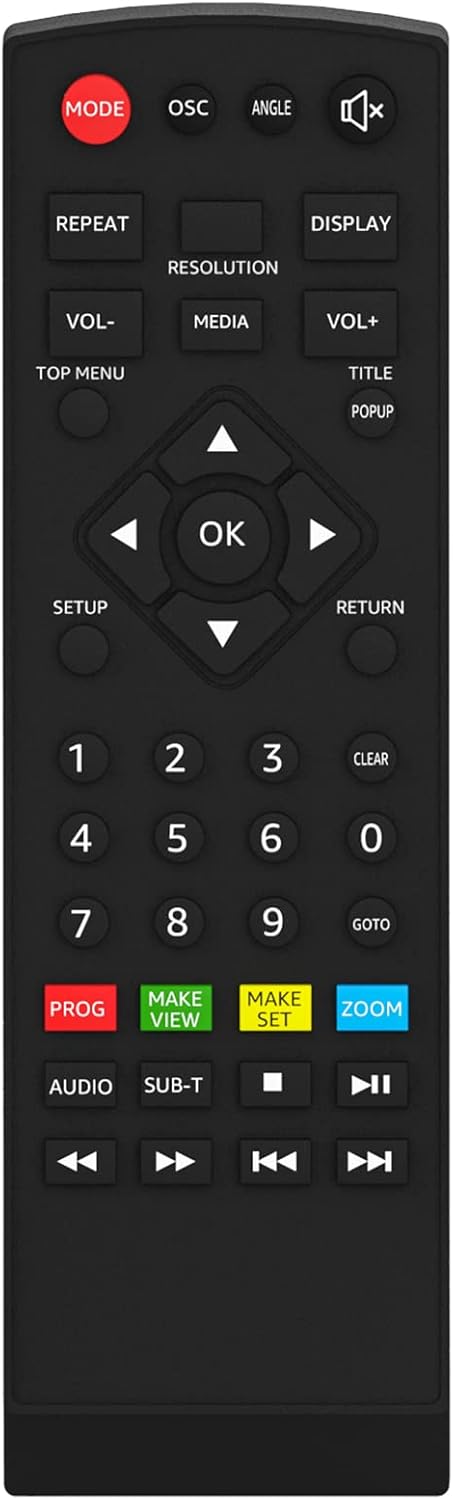
Image 1: WONNIE Remote Control. This image displays the front view of the black remote control, showing all its buttons clearly labeled for various functions such as mode, volume, navigation, playback, and numerical input.
Button Functions:
- MODE: Switches between different operating modes.
- OSC: On-Screen Character display.
- ANGLE: Changes the viewing angle (if supported by the disc).
- MUTE: Mutes or unmutes the audio.
- REPEAT: Repeats the current track, chapter, or entire disc.
- RESOLUTION: Adjusts video output resolution.
- DISPLAY: Shows on-screen information.
- VOL- / VOL+: Decreases or increases volume.
- MEDIA: Selects media source.
- TOP MENU: Accesses the disc's top menu.
- TITLE: Accesses the disc's title menu.
- POPUP: Displays the disc's pop-up menu.
- Navigation Buttons (Up, Down, Left, Right): Navigates through menus.
- OK: Confirms selection.
- SETUP: Enters the player's setup menu.
- RETURN: Goes back to the previous menu or screen.
- Number Buttons (0-9): Direct input for track/chapter selection.
- CLEAR: Clears input or selection.
- GOTO: Jumps to a specific time or chapter.
- PROG: Programs playback order.
- MAKE VIEW: Custom view settings.
- MAKE SET: Custom set settings.
- ZOOM: Zooms in or out of the video.
- AUDIO: Changes audio tracks or languages.
- SUB-T: Selects subtitle tracks.
- Playback Controls (Previous, Play/Pause, Next, Stop, Fast Rewind, Fast Forward): Standard media playback functions.
3. Setup
3.1 Battery Installation
- Locate the battery compartment on the back of the remote control.
- Slide the battery cover downwards or in the direction indicated by an arrow to open it.
- Insert two AAA batteries (not included), ensuring the positive (+) and negative (-) terminals align correctly with the markings inside the compartment.
- Replace the battery cover by sliding it back into position until it clicks securely.
3.2 Initial Use
The WONNIE remote control operates using infrared (IR) technology. No pairing is required. Simply point the remote control directly at the IR receiver on your WONNIE Portable Blue Ray DVD Player to send commands.
4. Operating Instructions
To operate your WONNIE Portable Blue Ray DVD Player using this remote control:
- Ensure the DVD player is powered on and the remote has fresh batteries.
- Point the remote control directly towards the front panel of your DVD player.
- Press the desired button for the function you wish to perform (e.g., PLAY, VOLUME+, MENU).
- For navigation within menus, use the directional arrow buttons and the OK button to confirm selections.
5. Maintenance
- Cleaning: Use a soft, dry cloth to clean the remote control. Do not use liquid cleaners or abrasive materials.
- Battery Replacement: Replace batteries when the remote's range decreases or it becomes unresponsive. Always replace both batteries at the same time with new ones.
- Storage: Store the remote control in a cool, dry place away from direct sunlight and extreme temperatures. If not used for extended periods, remove the batteries to prevent leakage.
6. Troubleshooting
| Problem | Possible Cause | Solution |
|---|---|---|
| Remote control is not working. |
|
|
| Buttons are unresponsive or sticky. |
|
|
7. Specifications
- Model: W-BR141 (Compatible with W-BR146, W-BR156)
- Product Dimensions: 4.2 x 1.8 x 0.7 inches
- Item Weight: 0.81 ounces
- Power Source: 2 x AAA Batteries (not included)
- Connectivity Technology: Infrared (IR)
- Brand: WONNIE
8. Warranty and Support
WONNIE is committed to providing high-quality products and customer satisfaction. For any questions, technical assistance, or support regarding your remote control, please contact WONNIE customer service. Our professional online and office teams are available to help resolve any issues within 24 hours.
Please refer to your product's original packaging or the WONNIE official website for specific warranty details and contact information.
