
1. Introduction
This manual provides detailed instructions for the proper setup, operation, and maintenance of your Bietrun UHF Metal Dual Handheld Cordless Dynamic Microphone System. Please read this manual thoroughly before using the product to ensure optimal performance and longevity. This system is designed for various applications including karaoke, church events, speeches, weddings, and parties, offering reliable wireless audio transmission.
2. What's in the Box
Carefully unpack the contents and ensure all items are present and in good condition. If any items are missing or damaged, please contact customer support.
- 2 x Bietrun Wireless Handheld Microphones
- 1 x Rechargeable Wireless Receiver (6.35mm / 1/4 inch plug)
- 1 x USB Charging Cable for Receiver
- 1 x 3.5mm to 6.35mm (1/4 inch) Adapter
- 1 x User Manual (this document)
- 1 x Warranty Card

Figure 2.1: System Components. This image displays the primary components included in the Bietrun Wireless Microphone System: two handheld microphones, the compact rechargeable receiver, and a 3.5mm to 1/4 inch adapter for broader compatibility. Please note that AA batteries for the microphones are not included and must be purchased separately.
3. Product Overview
Familiarize yourself with the key features and parts of your Bietrun Wireless Microphone System.
3.1 Handheld Microphone
- Microphone Head: Features a durable steel meshed design for protection and clear sound capture.
- High Quality Capsule: Ensures professional-grade audio pickup.
- Display Screen: Shows battery power and current channel/frequency.
- Power/Channel Button: Used to power the microphone on/off and change the operating frequency.
- Battery Compartment: Located at the base, requires 2 AA batteries (not included).
3.2 Wireless Receiver
- 6.35mm (1/4 inch) Plug: Connects directly to compatible audio input devices.
- USB Charging Port: For recharging the built-in 720mAh lithium battery.
- Indicator Light: Shows charging status and connection status.

Figure 3.1: Microphone Components. This image details the construction of the Bietrun handheld microphone, emphasizing its robust steel mesh head, the internal high-quality capsule responsible for sound capture, and the clear display that provides real-time information on battery level and signal strength.
4. Setup Guide
Follow these steps to set up your Bietrun Wireless Microphone System for first use.
4.1 Charging the Receiver
- Locate the USB charging port on the receiver.
- Connect the provided USB charging cable to the receiver and a standard USB power source (e.g., computer USB port, USB wall adapter).
- The indicator light on the receiver will illuminate during charging. A full charge takes approximately 3 hours.
- Once fully charged, the receiver provides approximately 4.5 hours of working time.
4.2 Installing Microphone Batteries
- Unscrew the bottom part of each handheld microphone to reveal the battery compartment.
- Insert 2 AA batteries into each microphone, ensuring correct polarity (+/-). Note: AA batteries are not included.
- Screw the bottom part back onto the microphone securely.

Figure 4.1: Battery Installation and Charging. This illustration provides clear guidance on how to correctly install two AA batteries into the handheld microphone and outlines the charging specifications for the receiver, including its 720mAh built-in battery, 4.5 hours of operation, and 3 hours charging time.
4.3 Connecting the Receiver to an Audio Device
The receiver is designed for plug-and-play operation. It must be connected to an audio device with a 6.35mm (1/4 inch) MIC input.
- Identify the 6.35mm (1/4 inch) MIC input jack on your audio equipment (e.g., speaker, singing machine, audio amplifier, PA system, mixer, audio interface).
- Insert the receiver's 6.35mm plug directly into the MIC input jack.
- If your device has a 3.5mm MIC input, use the provided 3.5mm to 6.35mm adapter.
- Important: Do not plug the receiver into an AUX input, as this will result in no sound. The system is not compatible with Bluetooth speakers or laptops unless they have a dedicated 6.35mm or 3.5mm microphone input.

Figure 4.2: Compatible Input Ports and Devices. This image illustrates the correct 6.35mm (1/4 inch) microphone input ports required for the receiver and provides examples of compatible audio equipment, including various types of speakers, amplifiers, and car audio systems. It emphasizes the necessity of a dedicated microphone input.

Figure 4.3: Expanded Device Compatibility. This visual further demonstrates the versatility of the Bietrun receiver, showing its 6.35mm plug and its compatibility with professional audio equipment such as mixers, dedicated amplifiers, and audio interfaces, ensuring broad application for various sound setups.
5. Operating Instructions
Learn how to operate your Bietrun Wireless Microphone System effectively.
5.1 Powering On/Off
- Receiver: The receiver powers on automatically when plugged into a powered MIC input.
- Microphone: Press and hold the power button on the microphone for a few seconds until the display screen illuminates. To power off, press and hold the power button again until the display turns off.
5.2 Automatic Connection
The microphones and receiver are designed to connect automatically upon power-up. No manual pairing is required.
5.3 Adjusting Volume
The microphones feature an integrated volume control. Press the power button briefly to cycle through volume levels (Level 8-1). Adjust to your desired output level.
5.4 Changing Frequency Channels
If you experience interference or are using multiple microphone systems simultaneously, you may need to change the operating frequency channel.
- Briefly click the power button on the microphone to change the frequency band.
- The display will show the new channel (e.g., CH03, CH07).
- The system supports up to 15 microphones in the same environment by utilizing different channels. Ensure each microphone operates on a unique channel to prevent interference.
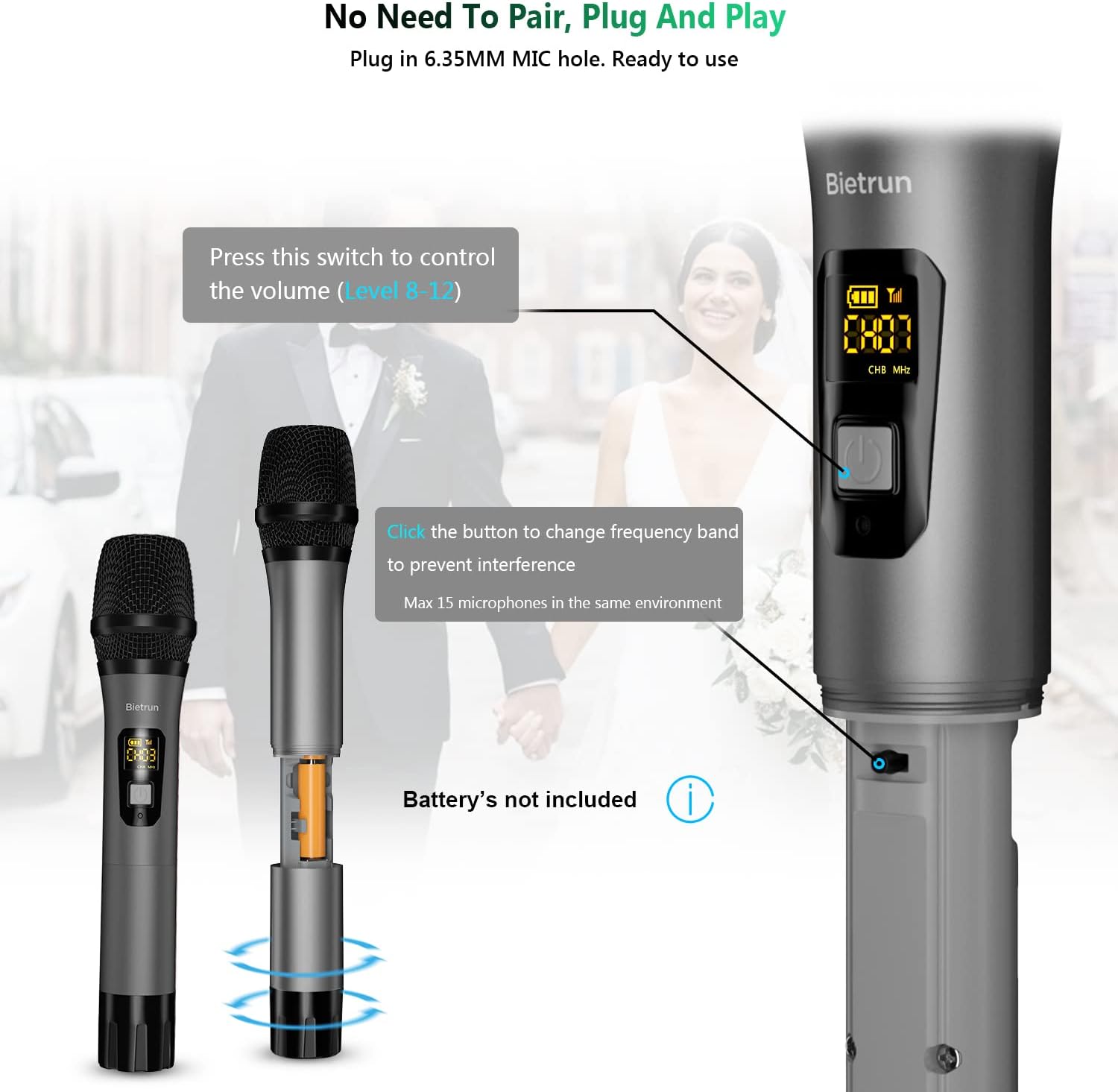
Figure 5.1: Microphone Controls. This image highlights the multi-functional power button on the microphone, explaining its use for both volume adjustment (cycling through levels 8 to 1) and changing the frequency channel to avoid interference, especially when multiple microphones are in use. The display provides visual feedback on the current settings.
5.5 Operating Range
The Bietrun Wireless Microphone System offers a transmission distance of up to 160 feet in open areas. Performance may vary depending on environmental factors such as obstacles, walls, and other wireless devices.

Figure 5.2: Wireless Range. This visual emphasizes the impressive 160-foot UHF wireless transmission range of the Bietrun microphone system, indicating its suitability for larger spaces and outdoor use, while also confirming adherence to US FCC Standard Frequency Bands for reliable operation.
6. Maintenance
Proper care and maintenance will extend the life of your microphone system.
- Cleaning: Use a soft, dry cloth to clean the microphones and receiver. Do not use abrasive cleaners or solvents.
- Storage: Store the system in a cool, dry place away from direct sunlight and extreme temperatures.
- Battery Care: Remove AA batteries from the microphones if they will not be used for an extended period to prevent leakage. Fully charge the receiver at least once every three months if not in regular use to maintain battery health.
- Handling: Avoid dropping the microphones or subjecting them to strong impacts, as this can damage internal components.
7. Troubleshooting
If you encounter issues with your Bietrun Wireless Microphone System, refer to the following common problems and solutions.
| Problem | Possible Cause | Solution |
|---|---|---|
| No sound from microphone |
|
|
| Interference or static noise |
|
|
| Short battery life |
|
|
8. Specifications
| Feature | Description |
|---|---|
| Brand | Bietrun |
| Model | Bietrun Wireless Microphone System |
| Connectivity Technology | UHF (Ultra High Frequency) |
| Microphone Type | Dynamic, Handheld |
| Polar Pattern | Unidirectional |
| Material | Metal (Microphones) |
| Operating Range | Up to 160 feet (open place) |
| Receiver Battery | 720mAh Lithium Polymer (built-in, rechargeable) |
| Receiver Working Time | Approx. 4.5 hours (fully charged) |
| Receiver Charging Time | Approx. 3 hours |
| Microphone Power Source | 2 x AA batteries (not included) |
| Connector Type | 6.35mm (1/4 inch) Jack (receiver) |
| Signal-to-Noise Ratio | 120 dB |
| Item Weight | 1.54 pounds (total package) |
| Package Dimensions | 10.31 x 3.82 x 2.72 inches |
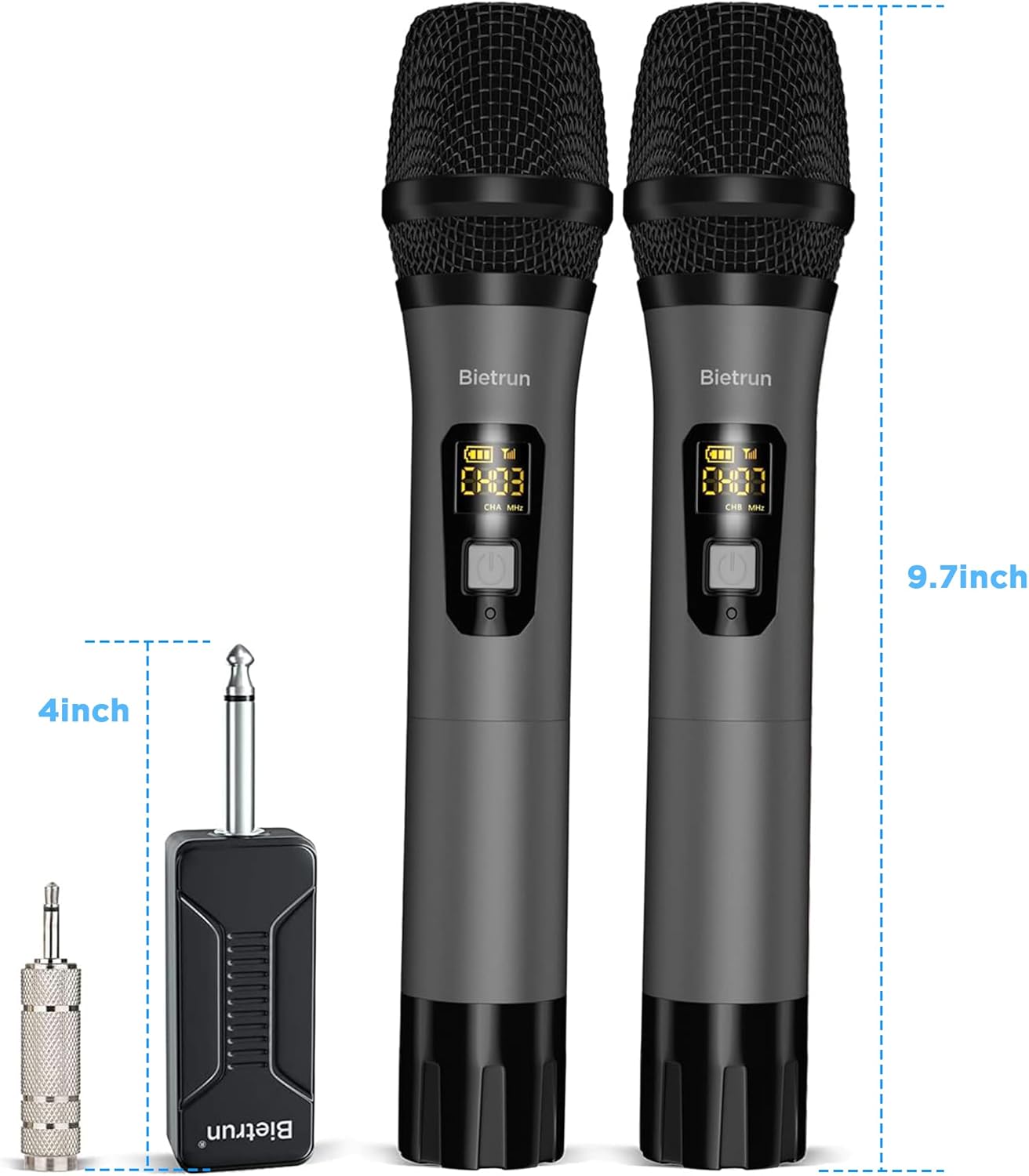
Figure 8.1: Product Dimensions. This image provides the physical dimensions of both the handheld microphones and the wireless receiver, indicating the microphone's height at approximately 9.7 inches and the receiver's length at about 4 inches, useful for storage and portability considerations.
9. Safety Information
Please observe the following safety precautions to prevent damage to the product or injury to yourself.
- Do not expose the product to water, moisture, or extreme temperatures.
- Avoid disassembling or modifying the product. Unauthorized modifications can void the warranty and pose safety risks.
- Keep the product away from strong magnetic fields.
- Use only the provided USB charging cable for the receiver.
- Dispose of batteries responsibly according to local regulations.
10. Warranty and Support
Your Bietrun Wireless Microphone System comes with a warranty. Please refer to the included warranty card for specific terms and conditions regarding coverage and duration.
10.1 Customer Support
For technical assistance, troubleshooting not covered in this manual, or warranty claims, please contact Bietrun customer support through the retailer where you purchased the product or visit the official Bietrun website for contact information.
When contacting support, please have your product model number and purchase details ready.


