
Introduction
This manual provides detailed instructions for the safe and efficient use of your ZERTRAN Multifunctional 12V DC Battery Box Trolling Motor Smart Power Center. Please read this manual thoroughly before operation and retain it for future reference.
Product Features
- Portable Smart Battery Box design.
- Integrated Power Center with Battery Quick Connector.
- Equipped with USB and DC Ports for versatile power output.
- Durable, anti-corrosion, and outdoor waterproof construction.
- Built-in Voltmeter for battery status monitoring.
- On/Off switch with 16A circuit breaker for safety.
- High Current Screw Interface Terminals.
Package Contents
Upon unpacking, please verify that all items listed below are present and undamaged:
- ZERTRAN Multifunctional 12V DC Battery Box (ZT-P2250)
- Battery securing strap (pre-installed or included separately)
- User Manual (this document)
- Note: Battery is not included.
Product Overview and Components
Familiarize yourself with the various parts of your ZERTRAN Battery Box:

Figure 1: Labeled diagram of the ZERTRAN Multifunctional Battery Box, showing the power outlet, voltmeter, handle, Anderson connectors, switch, and high current screw interface terminals.
This image displays the ZERTRAN Multifunctional Battery Box with key components labeled. On the left side of the top panel, from front to back, are a power outlet, a voltmeter display, and a red switch. A handle is centrally located on the top. On the right side of the top panel, two Anderson connectors are visible at the front, and a high current screw interface terminal is located towards the back.
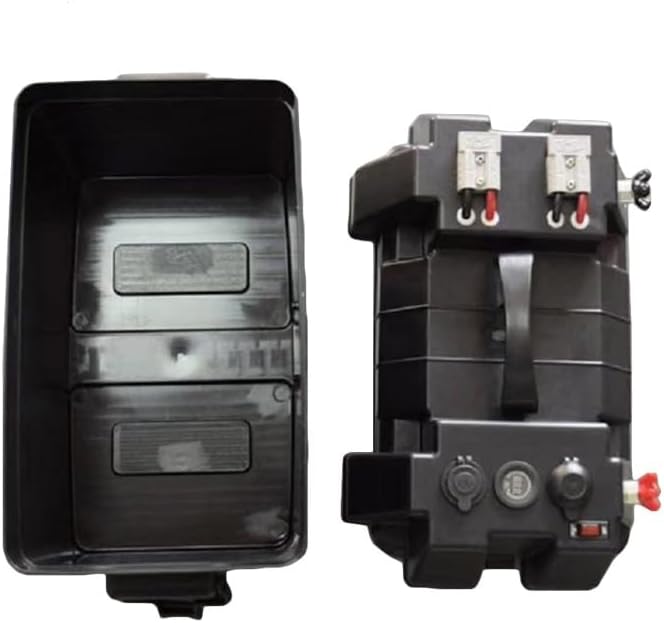
Figure 2: ZERTRAN Battery Box with the lid removed, showing the internal compartment and the top panel with integrated electronics.
This image shows the ZERTRAN Battery Box separated into two main parts: the empty base compartment on the left and the top panel assembly on the right. The base is a deep, rectangular container designed to hold a battery. The top panel includes all the electronic interfaces: the handle, Anderson connectors, power outlets, voltmeter, and switches, ready to be placed onto the battery compartment.
Setup
- Prepare the Battery: Ensure your 12V DC battery is fully charged and in good condition. The battery box is designed for batteries with dimensions up to 325mm (length) x 185mm (width) x 200mm (height).
- Open the Battery Box: Unlatch and remove the top panel of the battery box from the base compartment.
- Insert the Battery: Carefully place the 12V DC battery into the base compartment. Ensure it fits snugly and is stable.
- Connect Battery Terminals: Connect the positive (+) terminal of your battery to the red positive (+) terminal on the underside of the top panel. Connect the negative (-) terminal of your battery to the black negative (-) terminal on the underside of the top panel. Ensure connections are secure and tight.
- Secure the Top Panel: Carefully place the top panel back onto the base compartment, ensuring all wires are tucked in and not pinched. Secure the latches.
- Use Securing Strap (Optional): If provided, use the included strap to further secure the battery box, especially during transport or in marine environments.
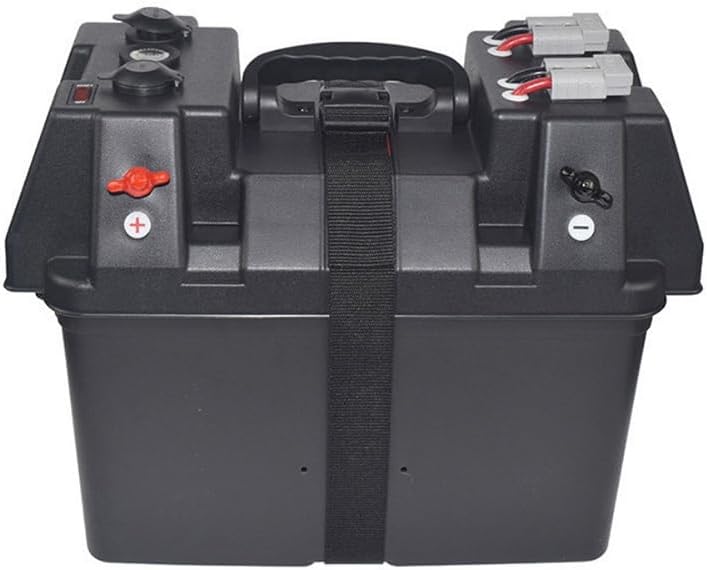
Figure 3: ZERTRAN Battery Box with an optional securing strap in place.
This image shows the ZERTRAN Multifunctional Battery Box with a black securing strap wrapped around its middle, providing additional stability and preventing accidental opening or movement during use.
Operation
- Power On/Off: Use the red On/Off switch located on the top panel to activate or deactivate the power outlets. This switch also incorporates a 16A circuit breaker for protection.
- Voltmeter: The integrated voltmeter displays the current voltage of the connected battery. Monitor this reading to ensure your battery is adequately charged and to prevent over-discharge.
- USB Ports: Connect your USB-powered devices (e.g., smartphones, tablets) to the USB ports for charging.
- DC Power Outlets: Use the 12V/24V DC power outlets for compatible accessories. Ensure your device's voltage requirements match the output.
- Anderson Connectors: The Anderson connectors provide a high-current connection point for devices such as trolling motors or other heavy-duty equipment. Ensure proper polarity when connecting.
- High Current Screw Interface Terminals: These terminals offer an alternative connection point for high-current applications, providing a secure screw-down connection.

Figure 4: Diagram highlighting the USB and DC ports, voltmeter, switch, handle, Anderson connectors, and high current screw interface terminals.
This image provides a clear view of the ZERTRAN Battery Box's top panel, specifically labeling the "Voltmeter," "Switch," "Power Outlet," "Handle," "Anderson Connector," and "High Current Screw Interface Terminals." This visual aid helps users identify each functional component for correct operation.
Maintenance
- Cleaning: Wipe the exterior of the battery box with a damp cloth. Do not use harsh chemicals or abrasive cleaners. Ensure all ports are dry before use.
- Terminal Inspection: Periodically check battery terminals and connections for corrosion or looseness. Clean any corrosion with a wire brush and baking soda solution, then rinse and dry thoroughly.
- Storage: When not in use for extended periods, store the battery box in a cool, dry place. If a battery is installed, ensure it is fully charged before storage and periodically recharged to maintain its health.
- Waterproof Integrity: Regularly inspect the seals and latches to ensure the waterproof integrity of the box, especially if used in marine or outdoor environments.
Troubleshooting
| Problem | Possible Cause | Solution |
|---|---|---|
| No power output from ports. |
|
|
| Voltmeter shows low reading. | Battery is low on charge. | Charge the battery immediately to prevent deep discharge. |
| Device not charging via USB. |
|
|
Specifications
| Feature | Detail |
|---|---|
| Model Number | ZT-P2250 |
| Input Voltage | 12V DC (from connected battery) |
| Output Voltage | 12V/24V DC (via power outlets), USB (standard 5V) |
| Circuit Breaker | 16A |
| Applicable Battery Size (Max) | 325mm (L) x 185mm (W) x 200mm (H) |
| Item Weight | 3.75 pounds (empty box) |
| Package Dimensions | 16.93 x 13.39 x 10.63 inches |
| Material | Durable Anti-Corrosion Material |
| Environmental Rating | Outdoor Waterproof |
Safety Information
- Always wear appropriate personal protective equipment (PPE) when handling batteries.
- Ensure proper ventilation when charging or operating batteries, especially lead-acid types.
- Do not short-circuit the battery terminals.
- Keep the battery box away from open flames, sparks, and excessive heat.
- Do not immerse the battery box in water, despite its waterproof rating. It is designed to withstand splashes and rain, not submersion.
- Keep out of reach of children.
- Only use 12V DC batteries that fit within the specified dimensions.
- Disconnect all devices before opening the battery box or performing maintenance.
Warranty and Support
For warranty information and technical support, please refer to the documentation provided with your purchase or contact ZERTRAN customer service directly. Keep your purchase receipt as proof of purchase.
Manufacturer: ZERTRAN
Model: ZT-P2250