
1. Welcome
Thank you for choosing the ASHATA FG-100 DDS Function Generator. This device is designed for generating various waveforms with high precision and stability, making it suitable for a wide range of electronic testing and calibration applications. Please read this manual thoroughly before operation to ensure proper use and to maximize the lifespan of your device.
2. Product Features
- Generates main output waveforms including sine, square, triangle, and sawtooth.
- Features a filter (toggle on/off) for sine and pulse outputs.
- High precision and stable frequency, ideal for oscilloscope scan time calibration.
- Square wave output suitable for oscilloscope attenuators and probe pulse adjustment.
- Compact size, multi-functional, simple operation, and portable design.
3. Package Contents
- 1 x ASHATA FG-100 DDS Function Generator
- 1 x USB Cable
- 1 x Instruction Manual
4. Safety Precautions
- Always use the specified power supply (DC 3.5-10V, DC 5V adapter or 3.7V recommended).
- Do not expose the device to moisture or extreme temperatures.
- Avoid dropping or subjecting the device to strong impacts.
- Do not attempt to disassemble or modify the device, as this will void the warranty and may cause damage.
- Keep out of reach of children.
5. Setup Guide
5.1 Connecting Power
Connect the provided USB cable to the DC 5V input port on the side of the function generator and to a suitable USB power source (e.g., a computer USB port, a USB wall adapter).

Figure 1: ASHATA FG-100 DDS Function Generator connected via USB cable.
5.2 Initial Power On
Once power is connected, the device will automatically power on, and the LCD display will illuminate, showing the current waveform function and frequency.
6. Operating Instructions
6.1 Interface Overview
The front panel of the FG-100 features an LCD display, several buttons for control, and an amplitude adjustment knob. The output is provided via a BNC connector.
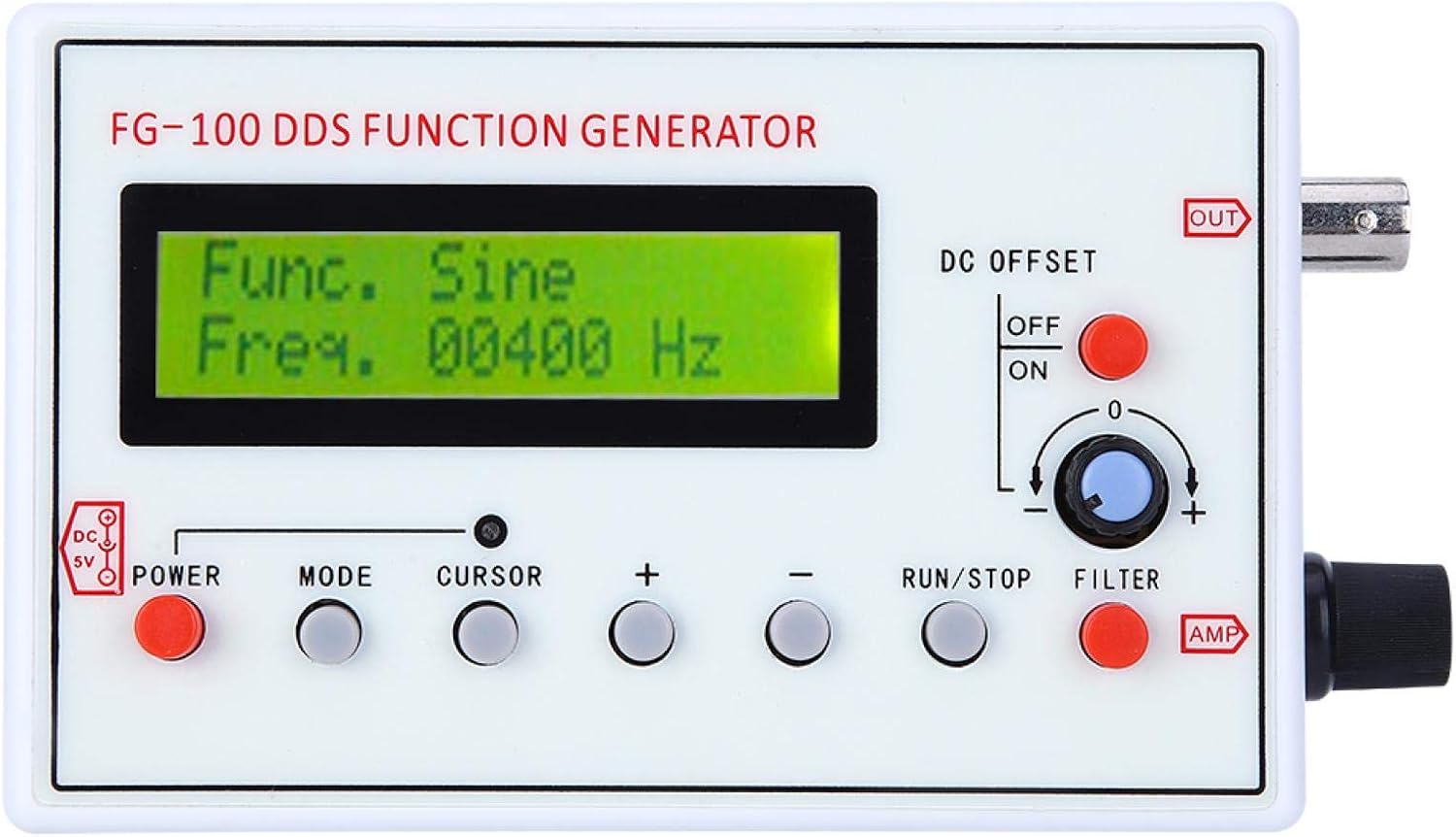
Figure 2: Front panel controls and display of the FG-100.
6.2 Selecting Waveforms
Press the MODE button to cycle through the available waveform types: Sine, Square, Triangle, Forward Sawtooth, Reverse Sawtooth, Pulse, and ECG. The selected waveform will be displayed on the LCD.
6.3 Adjusting Frequency
Use the CURSOR button to select the digit you wish to adjust. Then, use the + and - buttons to increase or decrease the frequency value. The frequency range for sine waves is 1Hz to 500kHz (amplitude flat up to 200kHz), and for other waveforms, it is 1Hz to 20kHz for optimal phase noise and distortion.
6.4 Adjusting Amplitude and DC Offset
- Amplitude (AMP): Rotate the AMP knob on the right side of the device to adjust the output waveform amplitude. The maximum output amplitude is ±10V (peak-to-peak).
- DC Offset: Use the DC OFFSET switch (ON/OFF) and the associated knob to apply or adjust a DC bias to the waveform. The maximum DC offset is ±10V.
6.5 Using the Filter
Press the FILTER button to toggle the internal filter on or off. This filter is designed for sine and pulse waveforms.
6.6 Outputting Waveforms
Press the RUN/STOP button to start or stop the waveform output. When running, the waveform will be generated at the OUT BNC connector.
6.7 Operational Demonstration
Video 1: Demonstration of waveform selection, frequency adjustment, and output control on a similar DDS Function Generator (FG-200).
7. Technical Specifications
| Specification | Value |
|---|---|
| Item Type | Function Generator |
| Material | ABS |
| Frequency Range (Sine) | 1Hz~500kHz (Magnitude flat up to 200kHz) |
| Frequency Range (Other Waveforms) | 1Hz~20kHz (with good phase noise and small distortion) |
| Resolution | 1Hz |
| Output Waveforms | Sine, Square, Triangle, Forward Sawtooth, Reverse Sawtooth, Pulse, ECG |
| Sine Distortion | 1% (frequency = 1kHz) |
| Output Amplitude | Maximum ±10V (P-P) |
| Output Impedance | 50 ohm |
| DC Offset | Maximum ±10V (can be turned off) |
| Internal Filter | For sine or pulse, can be turned on/off |
| Power Supply | DC 3.5-10V (DC 5V adapter or 3.7V recommended) |
| Item Weight | 240 g |
| Manufacturer | ASHATA |
| Model Number | RRCc16w9sb5kxiua361 |
| Country of Origin | China |
8. Care and Maintenance
- Cleaning: Use a soft, dry cloth to clean the exterior of the device. Do not use abrasive cleaners or solvents.
- Storage: Store the function generator in a cool, dry place away from direct sunlight and extreme temperatures.
- Handling: Handle the device with care to avoid damage to the display or connectors.
9. Troubleshooting Guide
| Problem | Possible Cause | Solution |
|---|---|---|
| Device does not power on. | No power, faulty USB cable, or power source issue. | Ensure USB cable is securely connected. Try a different USB port or power adapter. Verify power source is active. |
| No waveform output. | Output stopped, incorrect settings, or faulty connection. | Press the RUN/STOP button to start output. Check frequency and amplitude settings. Ensure output cable is correctly connected to the BNC port. |
| Settings are not saved after power off. | This model does not feature memory retention for settings. | Settings must be re-entered after each power cycle. |
| Inaccurate frequency output. | Calibration needed or external interference. | Use an external frequency counter or oscilloscope to verify and adjust settings if necessary. Ensure proper grounding. |
10. Warranty and Customer Support
ASHATA products are designed for reliability and performance. For warranty information, technical support, or service inquiries, please refer to the contact information provided with your purchase or visit the official ASHATA website. Keep your purchase receipt as proof of purchase for warranty claims.