
1. Introduction
This manual provides detailed instructions for the setup, operation, and maintenance of your Ejoyous Universal A/C Remote Control. Please read this manual thoroughly before using the remote control to ensure proper function and longevity of the device. This remote is designed as a replacement for various air conditioner models, specifically compatible with the ARC433A series.
2. Product Overview
The Ejoyous Universal A/C Remote Control features a large LCD screen for easy readability and operation. Constructed from durable ABS material, it is designed for wear resistance and long-term use. It offers a remote control distance of over 8 meters, which may vary depending on the specific air conditioner unit.

Image 2.1: Front view of the Ejoyous Universal A/C Remote Control, showing the LCD screen and primary buttons.
Key Features:
- Large LCD Screen: Provides clear display for settings and status.
- Durable Construction: Made from high-quality, wear-resistant ABS material.
- Long-Distance Control: Effective operating range of over 8 meters.
- Quick Temperature Adjustment: Enables rapid changes between heating and cooling modes.
- Compact and Lightweight: Ergonomic design for comfortable handling.
3. Setup
3.1 Battery Installation
- Locate the battery compartment cover on the back of the remote control.
- Slide the cover downwards to open the compartment.
- Insert two (2) AAA batteries (not included), ensuring the correct polarity (+ and -) as indicated inside the compartment.
- Slide the battery compartment cover back into place until it clicks securely.
Note: Ensure batteries are inserted correctly. Incorrect polarity can damage the remote control. Replace batteries when the display becomes dim or the remote's range decreases.

Image 3.1: Back view of the remote control, illustrating the battery compartment.
3.2 Initial Use
Once batteries are installed, the remote control is ready for use with compatible air conditioner models. No complex pairing or programming is typically required for the listed compatible models.
4. Operating Instructions
Point the remote control directly at the air conditioner's receiver when operating. Ensure there are no obstructions between the remote and the air conditioner.

Image 4.1: Illustration of the remote control being used to operate an air conditioner unit.
4.1 Basic Functions
- ON/OFF Button (Orange): Press to turn the air conditioner on or off.
- TEMP ▲ / ▼ Buttons: Press to increase or decrease the desired temperature.
- MODE Button: Cycles through operating modes such as Cool, Heat, Fan, Dry, Auto.
- FAN Button: Adjusts the fan speed (e.g., Low, Medium, High, Auto).
- SWING Button: Activates or deactivates the air swing function.

Image 4.2: Detailed view of the remote control's buttons, including MODE, FAN, and SWING.
4.2 Special Functions
- HOME LEAVE Button: Activates a specific mode, often for energy saving when leaving the home.
- POWERFUL Button: Engages a high-power mode for rapid cooling or heating.
- SILENT Button: Activates a quiet operation mode, reducing fan noise.
- SENSOR Button: May activate a sensor-based operation for optimized comfort.
- ON/OFF TIMER Buttons: Used to set a specific time for the air conditioner to turn on or off automatically.
- CANCEL Button: Used to cancel timer settings.
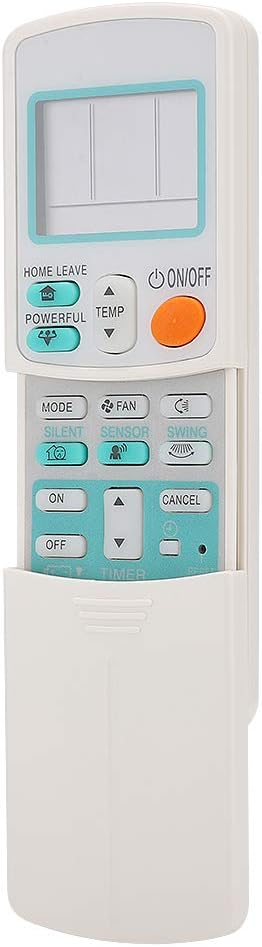
Image 4.3: Close-up of the remote control with the sliding cover open, showing advanced function buttons like HOME LEAVE, POWERFUL, SILENT, SENSOR, and TIMER controls.
5. Maintenance
5.1 Cleaning
To clean the remote control, gently wipe its surface with a soft, dry cloth. Do not use liquid cleaners, abrasive materials, or chemical solvents, as these can damage the remote's finish or internal components.
5.2 Battery Replacement
Replace batteries when the remote control's performance degrades (e.g., reduced range, unresponsive buttons, dim display). Always replace both AAA batteries at the same time with new ones. Do not mix old and new batteries, or different types of batteries.
6. Troubleshooting
- Remote Control Not Responding:
- Check if the batteries are inserted correctly and have sufficient charge. Replace if necessary.
- Ensure there is a clear line of sight between the remote control and the air conditioner's receiver.
- Verify that the remote control is compatible with your specific air conditioner model (refer to Section 7.1 Compatibility).
- Limited Operating Range:
- Replace batteries with new ones.
- Remove any obstructions between the remote and the air conditioner.
- Ensure the remote's infrared emitter is clean and unobstructed.
- Display is Dim or Blank:
- Replace the batteries.
7. Specifications
| Feature | Description |
|---|---|
| Brand | Ejoyous |
| Model Number | Liusinckud19v5a27445 |
| Connectivity Technology | Infrared |
| Compatible Devices | Air Conditioner |
| Special Features | Lightweight, Universal |
| Maximum Range | 8 Meters |
| Number of Buttons | 15 |
| Controller Type | Infrared |
| Power Source | 2 x AAA Batteries (not included) |
| Material | ABS |
7.1 Compatibility
This universal remote control is compatible with various air conditioner models, specifically designed to replace remotes in the ARC433A series, including but not limited to:
- ARC433A1
- ARC433B70
- ARC433A70
- ARC433A21
- ARC433A46
- ARC433A75
8. Important Safety Information
- Do not expose the remote control to direct sunlight, high temperatures, or high humidity.
- Avoid dropping the remote control or subjecting it to strong impacts.
- Keep batteries out of reach of children. If swallowed, seek medical attention immediately.
- Dispose of used batteries according to local regulations. Do not incinerate batteries.
9. Warranty and Support
Information regarding product warranty and customer support for the Ejoyous Universal A/C Remote Control is not available in the provided product data. Please refer to your purchase documentation or contact the seller directly for details.