
1. Introduction
Thank you for choosing the Orbegozo VP 8550 Steam Iron Station. This manual provides essential information for the safe and efficient operation, maintenance, and troubleshooting of your appliance. Please read these instructions carefully before first use and retain them for future reference.
2. Important Safety Instructions
- Always ensure the voltage indicated on the appliance matches your mains supply voltage.
- Do not immerse the iron or its base in water or any other liquid.
- Keep the appliance out of reach of children and individuals with reduced physical, sensory, or mental capabilities.
- Never leave the iron unattended while it is switched on or connected to the power supply.
- Exercise caution when handling hot parts, especially the soleplate and steam.
- Unplug the iron from the power outlet before filling or emptying the water tank, and when not in use.
- Do not operate the iron with a damaged cord or plug, or if the appliance has been dropped or damaged.
- Place the iron on a stable, heat-resistant surface during use and when resting.
- Only use distilled or demineralized water in the water tank to prevent limescale buildup.
3. Product Overview
Familiarize yourself with the components of your Orbegozo VP 8550 Steam Iron Station:
- Iron Unit: The handheld part with the soleplate and handle.
- Soleplate: The heating surface, typically stainless steel.
- Temperature Control Dial: Adjusts the heat setting for different fabric types.
- Steam Button/Trigger: Activates steam release.
- Water Tank: Removable reservoir for water.
- Base Station: Houses the water tank and provides power and steam generation.
- Power Cord: Connects the base station to the electrical outlet.
- Self-Cleaning Button: Initiates the self-cleaning cycle.

Image 3.1: Front-side view of the Orbegozo VP 8550 Steam Iron Station, showing the main unit with its blue and black casing, transparent water tank, and "POWER STEAM SYSTEM" label.
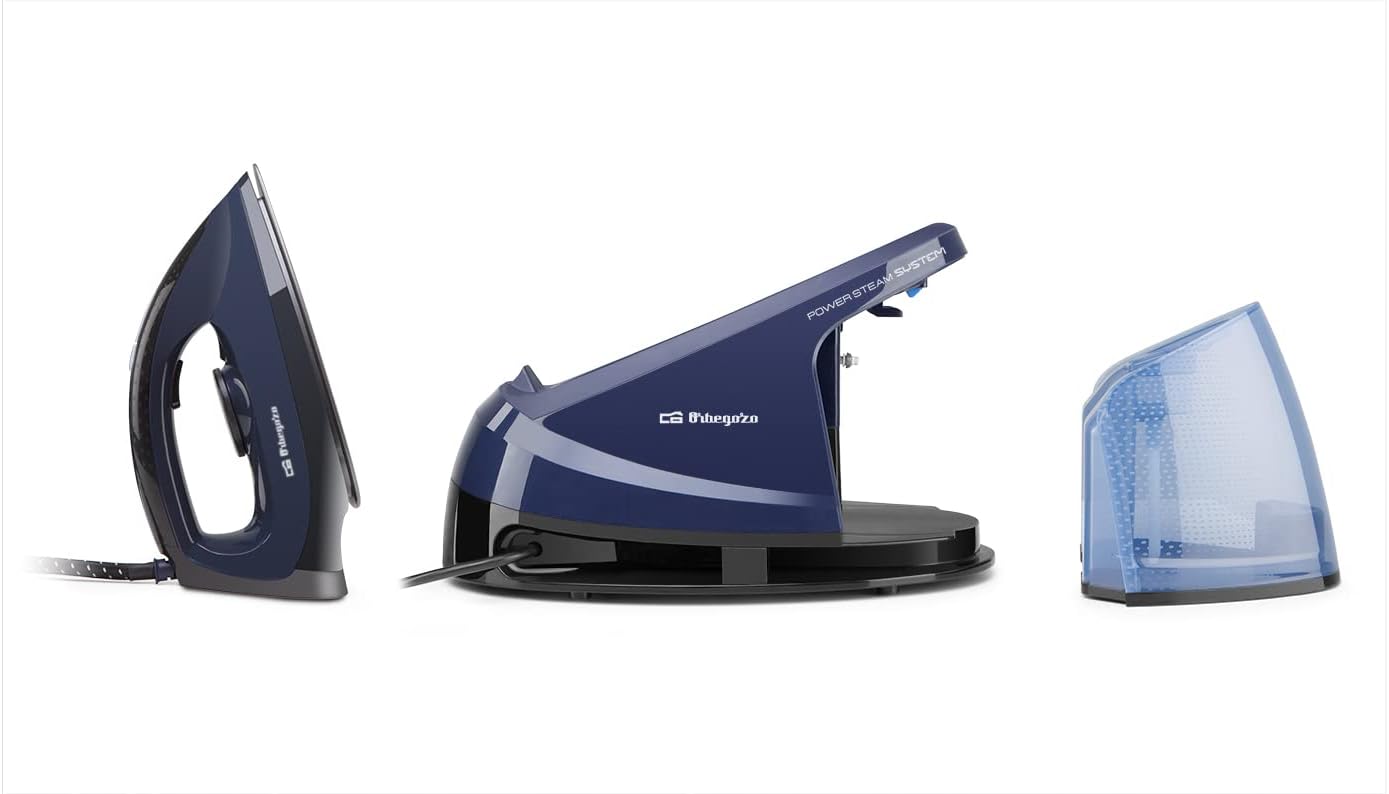
Image 3.2: Disassembled view of the Orbegozo VP 8550, showing the iron unit, the base station, and the removable water tank separately.
4. Setup
4.1 First Use
- Remove all packaging materials and labels from the iron.
- Wipe the soleplate with a soft, damp cloth to remove any manufacturing residues.
- For the first use, iron an old piece of fabric to ensure any remaining residues are removed and to test steam function.
4.2 Filling the Water Tank
- Ensure the iron is unplugged from the power outlet.
- Remove the water tank from the base station.
- Fill the tank with distilled or demineralized water up to the MAX indicator. Do not overfill.
- Replace the water tank securely into the base station.
5. Operating Instructions
5.1 Preparing for Ironing
- Place the iron station on a stable, heat-resistant ironing board or surface.
- Ensure the water tank is filled (refer to Section 4.2).
- Plug the power cord into a suitable electrical outlet.
- Turn the temperature control dial to the desired setting based on the fabric type. The indicator light will illuminate.

Image 5.1: Close-up view of the temperature control dial on the Orbegozo VP 8550 iron, showing settings for various fabric types like 'Min', 'Laine' (Wool), 'Coton' (Cotton), and 'Max Lin' (Max Linen).
5.2 Dry Ironing
- Set the temperature control dial to the appropriate setting for your fabric.
- Wait for the indicator light to turn off, indicating the iron has reached the set temperature.
- Iron the fabric without pressing the steam button.
5.3 Steam Ironing
- Ensure the water tank is filled.
- Set the temperature control dial to a steam-compatible setting (usually indicated by steam symbols or higher temperature settings like 'Coton' or 'Lin').
- Wait for the indicator light to turn off.
- Press the steam button/trigger to release steam while ironing.

Image 5.2: Underside view of the Orbegozo VP 8550 iron's soleplate, highlighting the steam vents and smooth stainless steel surface.
6. Maintenance and Cleaning
6.1 General Cleaning
- Always unplug the iron and allow it to cool completely before cleaning.
- Wipe the exterior of the iron and base station with a soft, damp cloth. Do not use abrasive cleaners or solvents.
- Clean the soleplate with a damp cloth and a non-abrasive liquid cleaner if necessary. Avoid scratching the soleplate.
6.2 Self-Cleaning Function
The self-cleaning function helps remove mineral deposits and impurities from the steam chambers. Perform this function regularly, especially if you notice reduced steam output or white flakes.
- Ensure the water tank is filled to the MAX level.
- Plug in the iron and set the temperature to maximum.
- Once the iron reaches maximum temperature (indicator light turns off), unplug it.
- Hold the iron horizontally over a sink.
- Press and hold the self-cleaning button. Hot water and steam will be expelled from the soleplate, carrying impurities.
- Shake the iron gently back and forth until the water tank is empty.
- Release the self-cleaning button and allow the iron to cool down.
- Wipe the soleplate with a damp cloth.
7. Troubleshooting
| Problem | Possible Cause | Solution |
|---|---|---|
| Iron does not heat up. | Not plugged in; power outlet fault; temperature dial set to 'Off' or minimum. | Check power connection; test outlet with another appliance; turn temperature dial to a fabric setting. |
| No steam or insufficient steam. | Water tank empty; temperature too low for steam; steam vents clogged; limescale buildup. | Fill water tank; set temperature to a steam-compatible setting; perform self-cleaning cycle. |
| Water leaks from soleplate. | Temperature too low for steam; overfilling water tank; iron not hot enough before steam use. | Ensure temperature is set correctly for steam; do not overfill tank; wait for indicator light to turn off before using steam. |
| White flakes coming from soleplate. | Limescale buildup. | Perform self-cleaning cycle. Use distilled or demineralized water. |
8. Specifications
- Model: Orbegozo VP 8550
- Power: 3600 W (Note: Product title says 2400W, but specifications list 3600W. Please refer to product labeling for exact wattage.)
- Voltage: 220 V
- Water Tank Capacity: 1.2 Liters
- Soleplate Material: Stainless Steel
- Product Dimensions: 37 x 20.5 x 25 cm
- Item Weight: 2.38 kg
- Special Features: Temperature Controller, Self-Cleaning Button, Removable Water Tank
9. Warranty and Support
Your Orbegozo VP 8550 Steam Iron Station is covered by a manufacturer's warranty. Please refer to the warranty card included with your purchase for specific terms and conditions.
For technical support, service, or spare parts, please contact Orbegozo customer service through their official website or the retailer where the product was purchased. Keep your proof of purchase for warranty claims.