
1. Introduction
The PRUNUS J-905 is a versatile multi-band emergency radio designed for both daily use and critical situations. It features FM, AM, and SW reception, an integrated MP3 player with Bluetooth, TF card, and USB flash drive support, and a powerful 5W magnetic speaker for clear audio. Beyond entertainment, it incorporates essential emergency functions including multiple charging options (Micro USB, hand-crank, solar), an LED flashlight, a reading lamp, a power bank function, and an SOS alarm. This manual provides detailed instructions for operating and maintaining your J-905 radio.
2. Product Overview
Familiarize yourself with the components and controls of your PRUNUS J-905 radio.
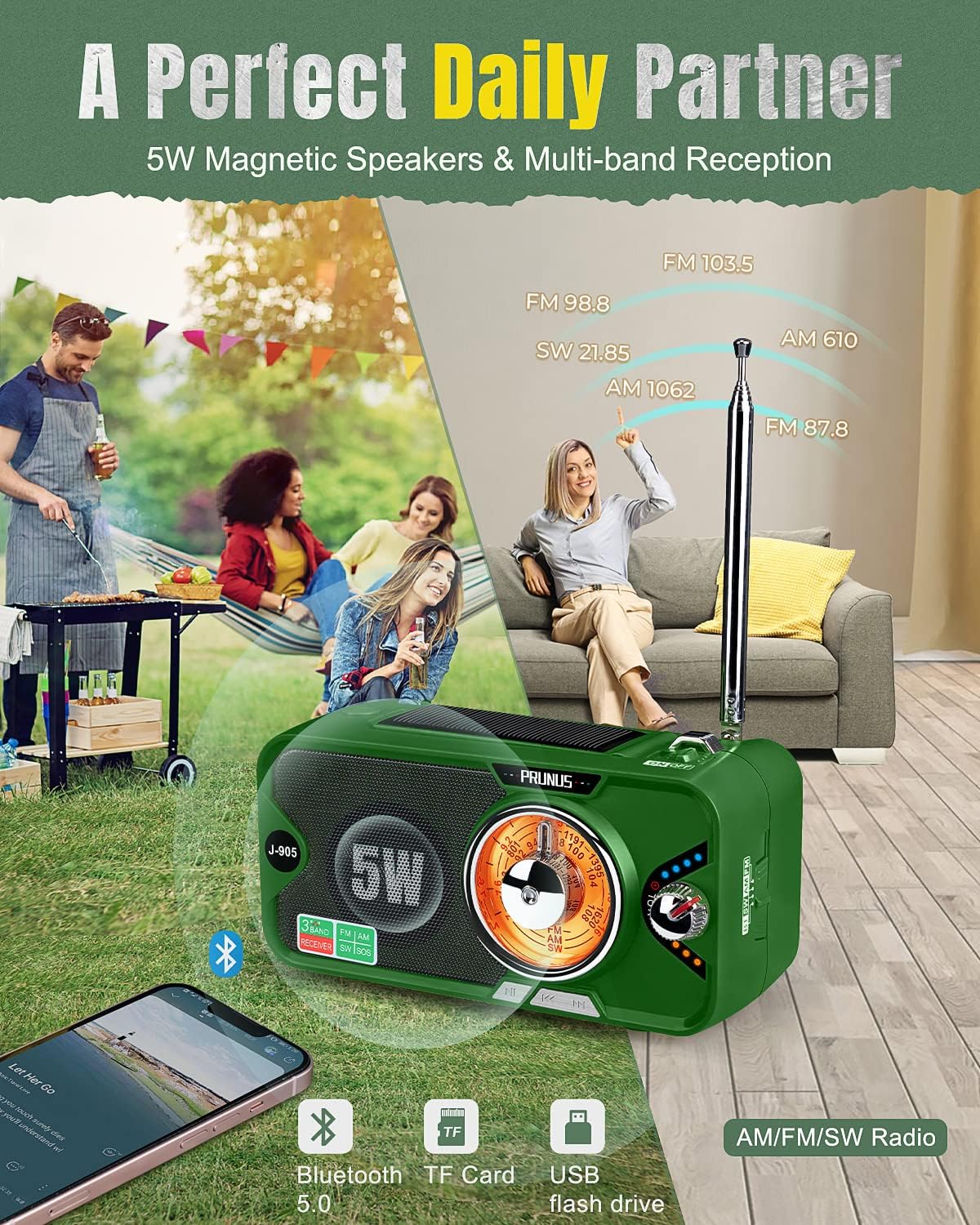
Figure 2.1: Front view of the PRUNUS J-905 radio, showing the speaker, tuning dial, and controls.

Figure 2.2: Side view of the PRUNUS J-905 radio, illustrating various ports and controls.
Package Contents:
- PRUNUS J-905 Radio
- USB Charging Cable
- User Manual
- Carrying Strap
Key Controls and Ports:
- Power/Volume Knob: Rotate to turn on/off and adjust volume.
- Tuning Knob: Rotate to select radio frequencies.
- Band Switch: Selects FM, AM, or SW radio bands.
- Mode Button: Switches between Radio, Bluetooth, and MP3 (USB/TF) modes.
- Telescopic Antenna: Extend for improved radio reception.
- Micro USB Input: For charging the radio.
- USB Output: For charging external devices (power bank function).
- TF Card Slot: For MP3 playback from a TF card.
- USB Flash Drive Port: For MP3 playback from a USB drive.
- Headphone Jack (3.5mm): For private listening.
- LED Flashlight: Located on the side.
- Reading Lamp: Located under the solar panel.
- SOS Button: Activates emergency alarm.
- Hand-Crank: For manual power generation.
- Solar Panel: For solar charging.
3. Powering the Device
The PRUNUS J-905 radio is equipped with a 3600 mAh Li-ion rechargeable battery and offers three charging methods to ensure continuous operation.

Figure 3.1: Illustration of the three charging methods for the PRUNUS J-905 radio.
3.1 Micro USB Charging
- Connect the supplied USB charging cable to the Micro USB input port on the radio.
- Plug the other end of the cable into a 5V USB power adapter (not included) or a computer USB port.
- The charging indicator light will illuminate. A full charge provides approximately 18 hours of FM radio operation at 30% volume. This is the recommended method for daily charging.
3.2 Hand-Crank Charging
- Unfold the hand-crank handle located on the back of the radio.
- Rotate the hand-crank clockwise or counter-clockwise at a steady pace (approximately 130-150 RPM) for efficient power generation.
- Cranking for 1 minute can provide enough power for a few minutes of radio use or flashlight operation. This method is ideal for emergencies when other power sources are unavailable.
3.3 Solar Charging
- Place the radio with the solar panel facing direct sunlight.
- The solar panel provides supplementary charging and helps maintain battery life. It is most effective in strong, direct sunlight and is primarily intended for extending battery life or providing minimal power in emergency situations, not for a full charge.
4. Basic Operation
4.1 Power On/Off and Volume Control
- To turn the radio ON, rotate the Power/Volume knob clockwise until you hear a click and the display illuminates.
- To adjust the volume, continue rotating the Power/Volume knob. Clockwise increases volume, counter-clockwise decreases it.
- To turn the radio OFF, rotate the Power/Volume knob counter-clockwise until you hear a click.
4.2 Radio Tuning (FM/AM/SW)
- Extend the Antenna: For optimal reception, fully extend the telescopic antenna.
- Select Band: Use the Band Switch to select your desired frequency band: FM (87-108 MHz), AM (520-1710 KHz), or SW (7-16 MHz).
- Tune to a Station: Slowly rotate the Tuning Knob to scan for radio stations. The 270-degree tuning knob allows for precise station selection.
- Improve Reception: Adjust the antenna direction and position the radio for the best signal.
5. Advanced Features
5.1 Bluetooth Mode
- Turn on the radio and press the Mode Button until "Bluetooth" mode is selected.
- The radio will enter pairing mode, indicated by a flashing Bluetooth icon or audible prompt.
- On your smartphone or other Bluetooth-enabled device, search for "PRUNUS J-905" in the Bluetooth settings and connect.
- Once paired, you can play audio from your device through the radio's speaker.
5.2 MP3 Playback (TF Card / USB Flash Drive)
- Insert a TF card into the TF card slot or a USB flash drive into the USB port.
- Press the Mode Button to switch to MP3 playback mode. The radio will automatically detect and play audio files from the inserted storage device.
- Use the playback controls (if available, or inferred from mode button presses) to navigate tracks.
5.3 LED Flashlight and Reading Lamp

Figure 5.1: The PRUNUS J-905 providing illumination with its LED flashlight and reading lamp.
- LED Flashlight: Press the dedicated Flashlight button (or a multi-function LIGHT switch) to turn on the 120 lm LED flashlight. It can illuminate up to 80 meters.
- Reading Lamp: To activate the reading lamp, rotate the solar panel upwards to reveal the lamp. Then, press the 'LIGHT' switch. This provides soft illumination for reading.
5.4 Power Bank Function

Figure 5.2: The PRUNUS J-905 functioning as a power bank to charge a smartphone.
- The built-in 3600 mAh Li-ion battery can be used to charge external devices.
- Connect your smartphone, tablet, or other USB-powered device to the USB output port on the radio using your device's charging cable.
- The radio will begin charging your device. This feature is particularly useful during power outages or emergencies.
5.5 SOS Alarm
- In an emergency situation, press and hold the SOS Button.
- A loud siren will sound, and the LED flashlight will flash brightly to attract attention from rescuers.
- To deactivate the SOS alarm, press the SOS button again.
6. Maintenance
- Cleaning: Use a soft, dry cloth to clean the radio's exterior. Do not use abrasive cleaners or solvents.
- Storage: Store the radio in a cool, dry place away from direct sunlight and extreme temperatures.
- Battery Care: If the radio will not be used for an extended period, charge the battery at least once every three months to maintain its health and prolong its lifespan.
- Water Resistance: This radio is not waterproof. Avoid exposure to rain, splashes, or immersion in water.
7. Troubleshooting
- No Power: Ensure the battery is charged. Try charging via Micro USB or hand-crank. Check if the Power/Volume knob is turned on.
- Poor Radio Reception: Fully extend the telescopic antenna. Adjust the antenna's direction and the radio's position. Move away from sources of interference (e.g., other electronic devices).
- Bluetooth Connection Issues: Ensure the radio is in Bluetooth pairing mode. Make sure your device's Bluetooth is enabled and within range. Try unpairing and re-pairing the device.
- MP3 Playback Not Working: Ensure the TF card or USB drive is inserted correctly and contains compatible audio files (e.g., MP3 format). Check if the radio is in MP3 mode.
- Flashlight/Reading Lamp Not Working: Ensure the battery has sufficient charge. Press the respective light switch firmly.
- Power Bank Not Charging Device: Ensure the radio's battery has sufficient charge. Check the connection cable and the external device.
8. Specifications

Figure 8.1: The compact and portable design of the PRUNUS J-905 radio with dimensions.
| Feature | Specification |
|---|---|
| Brand | PRUNUS |
| Model Number | J-905 |
| Color | Green |
| Supported Radio Bands | FM (87-108 MHz), AM (520-1710 KHz), SW (7-16 MHz) |
| Tuning Technology | AM, FM (DSP Chip) |
| Connectivity Technology | Bluetooth 5.0, USB |
| Special Features | Portable, MP3 Player (TF Card/USB), LED Flashlight (120 lm), Reading Lamp, SOS Alarm, Power Bank |
| Compatible Devices | Smartphone, MP3 Player, Laptop |
| Power Source | Battery Powered (Micro USB, Hand-Crank, Solar) |
| Battery Composition | Lithium-ion |
| Battery Capacity | 3600 mAh |
| Rechargeable Battery | Yes |
| Item Weight | 385.55 Grams |
| Dimensions (approx.) | 147 x 71 x 75 mm (5.79 x 2.80 x 2.95 inches) |
| Included Components | User Manual |
9. Warranty and Support
For warranty information, technical support, or any questions regarding your PRUNUS J-905 radio, please refer to the contact information provided with your purchase or visit the official PRUNUS website. Keep your purchase receipt as proof of purchase for warranty claims.


