
Midea MFK80
Midea MFK80 8 kg 1500 RPM Front Load Washer User Manual
Model: MFK80
Introduction
This manual provides essential instructions for the safe and efficient operation, installation, maintenance, and troubleshooting of your Midea MFK80 Front Load Washer. Please read this manual thoroughly before using the appliance and retain it for future reference.
Product Overview
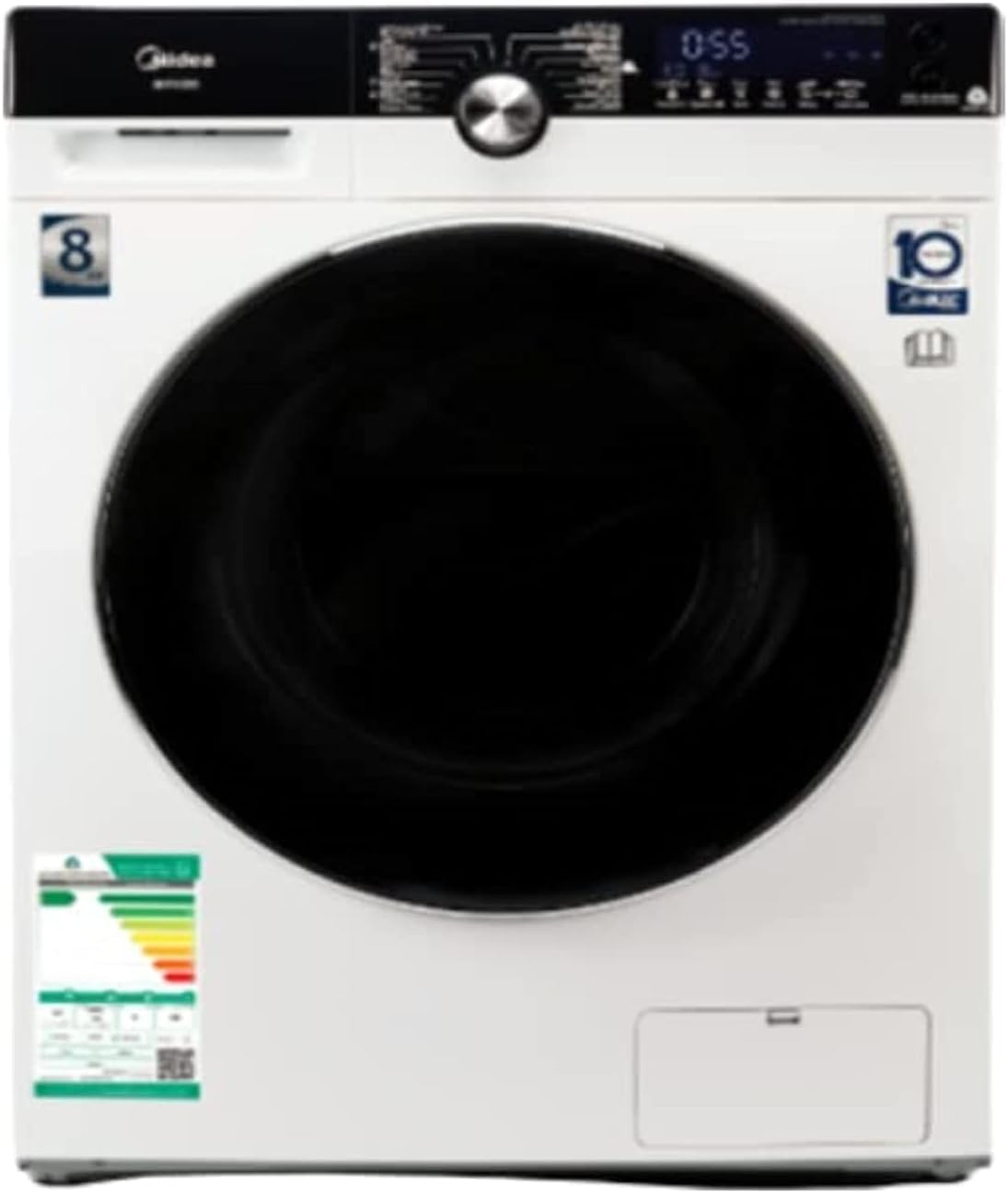
The image above displays the Midea MFK80 Front Load Washer. Key features visible include the large front-loading door, the digital display panel, and the control knob. The washer has an 8 kg capacity and a maximum spin speed of 1500 RPM, indicated by the '8' and '10' (likely referring to a 10-year warranty or similar feature) symbols on the front. An energy efficiency label is also visible on the lower left.
Setup and Installation
1. Unpacking
- Remove all packaging materials, including the polystyrene base and any protective film.
- Inspect the appliance for any damage. Do not install if damaged.
2. Removing Transit Bolts
Before use, remove all transit bolts located at the rear of the machine. These bolts secure the drum during transport and must be removed to prevent damage during operation. Keep the bolts for future transport.
3. Leveling the Appliance
The washer must be perfectly level to ensure stable operation and prevent excessive vibration. Adjust the adjustable leveling legs (as per specifications) at the bottom of the appliance until it is stable on all four corners.
4. Water and Electrical Connections
- Connect the water inlet hose to a cold water tap. Ensure connections are tight to prevent leaks.
- Position the drain hose correctly into a standpipe or sink, ensuring it is not kinked.
- Plug the power cord into a grounded electrical outlet. Ensure the voltage matches the appliance requirements.
Operating Instructions
1. Loading Laundry
- Open the washer door and load items loosely into the drum. Do not overload the machine beyond its 8 kg capacity.
- Close the door firmly.
2. Adding Detergent and Softener
Pull out the detergent dispenser drawer. Add appropriate amounts of detergent to the main wash compartment and fabric softener to its designated compartment. Close the drawer gently.
3. Selecting a Wash Program
Turn the program selector knob to choose the desired wash program. The digital display will show the default settings for the selected program. The 'Normal' cycle option is available.
4. Adjusting Settings (if applicable)
Use the touch controls to adjust temperature, spin speed, or add extra rinse options if available and desired.
5. Starting the Wash Cycle
Press the Start/Pause button to begin the wash cycle. The machine will automatically lock the door and start filling with water.
6. End of Cycle
Once the cycle is complete, the machine will signal, and the door will unlock. Remove laundry promptly.
Maintenance and Care
1. Cleaning the Exterior
Wipe the exterior surfaces with a soft, damp cloth. Avoid abrasive cleaners or solvents.
2. Cleaning the Detergent Dispenser
Regularly remove and clean the detergent dispenser drawer under running water to prevent residue buildup.
3. Cleaning the Drum
Run a maintenance wash cycle (e.g., a hot wash with no laundry and a small amount of detergent or a specialized washing machine cleaner) periodically to clean the drum and remove odors.
4. Cleaning the Drain Pump Filter
Locate the drain pump filter (typically behind a small cover at the bottom front of the machine). Open it carefully, drain any residual water, and clean out lint or foreign objects. Refer to the product image for the location of the filter access panel.
5. Door Seal Care
Wipe the door seal after each wash to remove moisture and lint, preventing mold and odors.
Troubleshooting
| Problem | Possible Cause | Solution |
|---|---|---|
| Washer does not start | Power cord not plugged in; Door not closed properly; Start/Pause button not pressed. | Check power connection; Ensure door is securely latched; Press Start/Pause. |
| No water filling | Water tap closed; Water inlet hose kinked; Water supply interrupted. | Open water tap; Straighten hose; Check household water supply. |
| Excessive vibration/noise | Transit bolts not removed; Appliance not level; Uneven load. | Remove transit bolts; Adjust leveling legs; Redistribute laundry. |
| Water not draining | Drain hose kinked or blocked; Drain pump filter clogged. | Check and clear drain hose; Clean drain pump filter. |
Specifications
- Brand: Midea
- Model: MFK80
- Capacity: 8 Kilograms
- Maximum Rotational Speed: 1500 RPM
- Access Location: Front Load
- Type of Controls: Touch
- Color: White
- Product Dimensions (DxWxH): 56.5D x 85W x 59.5H centimeters
- Item Weight: 65 Kilograms
- Special Features: Adjustable Leveling Legs
- Included Components: Power Cord
- Material Type: Plastic (for certain components)
- Specification Met: CE
Warranty and Support
This Midea MFK80 Front Load Washer comes with a 2-year warranty. For warranty claims, technical support, or installation assistance, please contact Midea customer service.
Installation Support Contacts:
- Riyadh: +966-11-4094006 Ext – 113
- Jeddah: +966-12-6577714
- Dammam: +966-13-8343691
- Qassim: +966 581044198
- Abha: +966 593322785
For general inquiries or further assistance, please visit the official Midea website or contact their customer service department.
Related documentsMFK80


Ask a question about this manual
Ask about setup, troubleshooting, compatibility, parts, safety, or missing instructions. Manuals+ will review the question and use this page’s manual context to help answer it.