
Renogy 6fed69d8-23e7-cbd7-9626-26489d81591b
Renogy 1000W/2000W Pure Sine Wave Power Inverter
Model: 6fed69d8-23e7-cbd7-9626-26489d81591b
1. Introduction
This manual provides essential information for the safe and efficient operation of your Renogy 1000W/2000W Pure Sine Wave Power Inverter. Please read this manual thoroughly before installation and use to ensure proper functionality and to prevent damage to the unit or connected devices. This inverter converts 12V DC power from batteries into 230V AC power, suitable for a wide range of household appliances and sensitive electronics.
2. Product Overview
The Renogy 1000W Pure Sine Wave Inverter is designed to deliver stable and clean AC power, mimicking grid-quality electricity. It is an ideal solution for off-grid systems, RVs, and backup power applications, allowing you to power various electronic devices and appliances reliably.
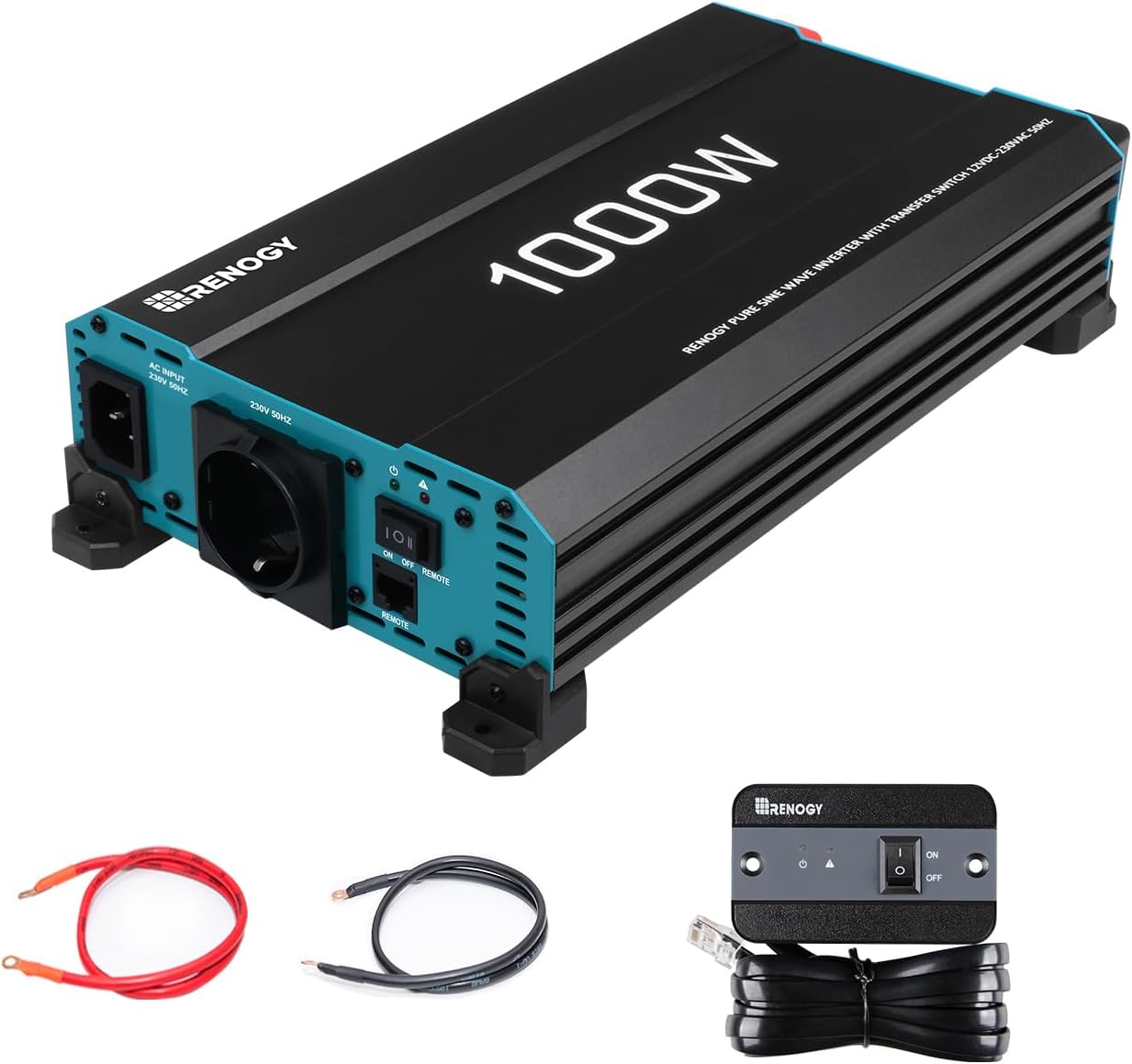
Image: The Renogy 1000W Pure Sine Wave Power Inverter, showcasing its main unit, battery connection cables (red and black), and the wired remote control unit.
3. Key Features
- Powerful DC-AC Conversion: Provides 1000W continuous DC to AC power with a 2000W peak surge capacity, converting 12V DC to 230V AC with up to 95% conversion efficiency.
- Pure Sine Wave Technology: Delivers stable and consistent power, safe for all AC devices, including sensitive electronics, protecting and extending their lifespan.
- Comprehensive Protection System: Equipped with LED indicators for undervoltage, surge, overheating, overload, and short circuit protection, ensuring complete safety and automatic fault detection.
- Integrated Network Priority Circuit: Automatically switches between shore power and UPS power, ensuring continuous 230V supply to connected electronics without interruption.
- Wide Application & Adaptability: Suitable for various household devices including PCs, mobile phones, tablets, and fans. Operates efficiently across a wide temperature range from -20°C to 40°C.
- Remote Control Functionality: Includes a wired remote control for convenient operation, especially when the inverter is installed in a hard-to-reach location.
- Efficient & Quiet Operation: Features low energy consumption in idle mode to extend battery life and high-speed cooling fans that operate with minimal noise.

Image: A graphical representation of a pure sine wave, demonstrating the clean and stable power output characteristic of the Renogy inverter.

Image: An illustration detailing the six electronic protection features: over-temperature protection, short circuit indication, GFCI switch, undervoltage protection, overvoltage protection, and overload protection.

Image: The Renogy inverter shown with indicators for its operational temperature range, highlighting its adaptability to harsh environments from -20°C to 40°C.

Image: The wired remote control unit for the Renogy inverter, mounted on a wall inside a vehicle, demonstrating its ease of use and accessibility.

Image: A visual representation indicating the Renogy inverter's low energy consumption during idle mode, contributing to extended battery life.

Image: The Renogy inverter depicted in a quiet setting, emphasizing its low noise heat dissipation due to automatically controlled fans.
4. Package Contents
Upon unpacking, please verify that all components listed below are present and undamaged:
- Renogy 1000W Pure Sine Wave Power Inverter Unit
- Battery Connection Cables (Red and Black)
- Wired Remote Control with Cable (approx. 3 meters)
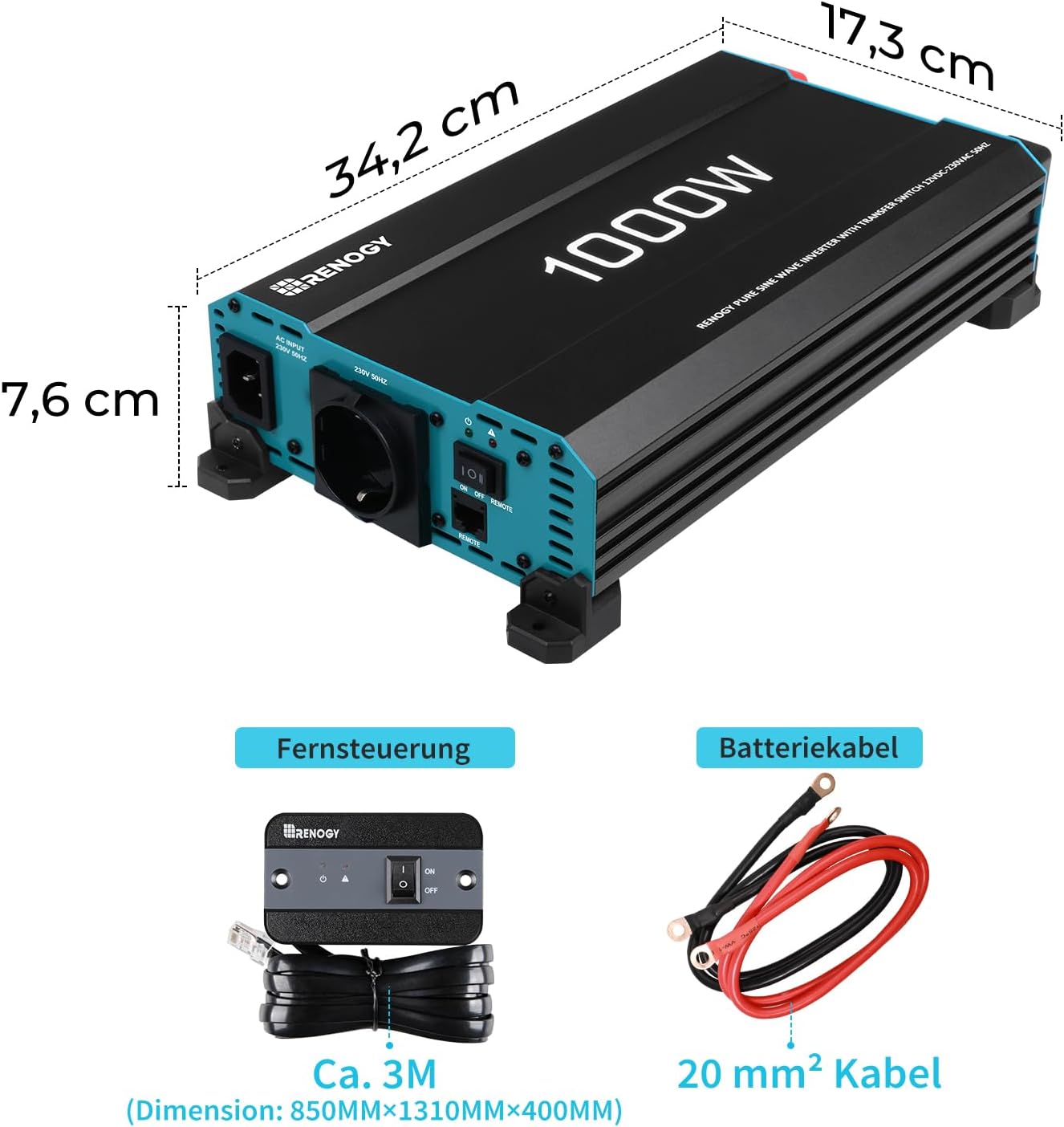
Image: A detailed view of the included accessories: the wired remote control with its approximately 3-meter cable, and the 20 mm² battery connection cables.
5. Setup & Installation
Proper installation is crucial for the safe and efficient operation of your inverter. Ensure the installation area is well-ventilated, dry, and free from flammable materials. Connect the inverter directly to a deep cycle battery.
5.1 Battery Compatibility
The inverter is compatible with various 12V battery types. Ensure your battery system can provide the necessary current for your applications.

Image: An illustration showing the Renogy inverter's compatibility with different battery chemistries, including Lithium (LI), Sealed Lead-Acid (SLD), Gel, Flooded (FLD), and Absorbed Glass Mat (AGM) batteries.
5.2 Connection Instructions
- Ensure the inverter is turned OFF before making any connections.
- Connect the positive (+) battery cable (red) to the positive (+) terminal of the inverter and the positive (+) terminal of your 12V battery.
- Connect the negative (-) battery cable (black) to the negative (-) terminal of the inverter and the negative (-) terminal of your 12V battery.
- Ensure all connections are tight and secure to prevent loose connections and overheating.
- Connect the remote control cable to the designated port on the inverter, if desired.
6. Operating Instructions
6.1 Powering On/Off
- To turn the inverter ON, press the power button on the inverter unit or the remote control. The indicator light will illuminate.
- To turn the inverter OFF, press the power button again. The indicator light will turn off.
6.2 Using the Remote Control
The wired remote control allows you to conveniently switch the inverter on or off from a distance, which is particularly useful if the inverter is installed in an inaccessible location.
6.3 Understanding LED Indicators
The inverter features LED indicators that provide status updates and alert you to potential issues such as undervoltage, overvoltage, overload, overheating, or short circuits. Refer to the troubleshooting section for specific indicator meanings.
7. Maintenance
Regular maintenance ensures the longevity and optimal performance of your inverter.
- Cleaning: Periodically clean the exterior of the inverter with a dry, soft cloth. Do not use liquid cleaners.
- Ventilation: Ensure that the cooling fans and ventilation openings are clear of dust and debris to allow for proper airflow.
- Connections: Regularly check all electrical connections to ensure they are tight and free from corrosion.
- Fan Operation: The internal cooling fans activate automatically when the inverter reaches a certain temperature or load. This is normal operation.
8. Troubleshooting
This section outlines common issues and their potential solutions. If the problem persists, contact customer support.
| Problem | Possible Cause | Solution |
|---|---|---|
| Inverter does not turn on | Loose battery connections; Low battery voltage; Blown fuse | Check and tighten connections; Recharge or replace battery; Check internal fuse (contact support if unsure) |
| No AC output | Overload; Overheating; Short circuit; Low/High input voltage | Reduce load; Allow inverter to cool; Check for shorted appliance; Verify battery voltage is within range |
| Alarm sounds | Low battery voltage; Overload; Overheating | Recharge battery; Reduce connected load; Allow inverter to cool down |
| Connected appliance not working correctly | Appliance power exceeds inverter capacity; Appliance not compatible with pure sine wave | Check appliance wattage; Ensure appliance is suitable for pure sine wave power |
9. Specifications
| Attribute | Value |
|---|---|
| Brand | Renogy |
| Model Name | Renogy 1000W/2000W Reiner Sinus Wechselrichter mit Netzvorrangschaltung, 12V zu 230V Spannungswandler mit Europäische Steckdose für Haushaltsgeräten |
| Wattage | 1000 watts (Continuous) |
| Peak Surge Power | 2000 watts |
| Input Voltage | 12V DC |
| Output Voltage | 230V AC |
| Output Waveform | Pure Sine Wave |
| Conversion Efficiency | Up to 95% |
| Power Source | Battery Powered |
| Recommended Uses | Powering various household devices, including PCs, mobile phones, tablets, and medical devices |
| Package Dimensions | 40.1 x 26.9 x 16.5 cm |
| Item Weight | 2.6 kg |
| Item Model Number | 6fed69d8-23e7-cbd7-9626-26489d81591b |
10. Warranty & Support
The Renogy 1000W Pure Sine Wave Power Inverter comes with a 1-year warranty on materials and manufacturing defects. For technical support, warranty claims, or any questions regarding your product, please contact Renogy customer service through their official channels. Ensure you have your product model number and purchase details ready when contacting support.
Related documents6fed69d8-23e7-cbd7-9626-26489d81591b


Ask a question about this manual
Ask about setup, troubleshooting, compatibility, parts, safety, or missing instructions. Manuals+ will review the question and use this page’s manual context to help answer it.