1. Introduction and Overview
The CACOE Universal Phone Lanyard is designed to provide a secure and convenient way to carry your smartphone, keeping your hands free for other activities. This product includes an adjustable neck strap and phone patches, compatible with most smartphones when used with a fully covered phone case. Its durable polyester construction ensures reliability, and the design allows for easy phone charging without obstruction.

Figure 1: CACOE Universal Phone Lanyard components (two lanyards, two patches).
2. Package Contents
- 2 × Adjustable Neck Straps
- 2 × Phone Patches
3. Setup and Installation
Follow these steps to properly install your CACOE Phone Lanyard:
- Prepare Phone Case: Ensure your phone case is a fully covered type with a charging port opening. This product is not compatible with half-cover phone cases.
- Insert Patch: Take one phone patch and insert the small tab through the charging hole of your phone case. Ensure the patch sits flat inside the case.
- Place Phone: Carefully place your smartphone into the phone case, ensuring the patch tab remains securely positioned through the charging port opening.
- Attach Lanyard: Connect the metal hook of the adjustable neck strap to the loop on the phone patch tab.

Figure 2: Visual guide for lanyard installation.
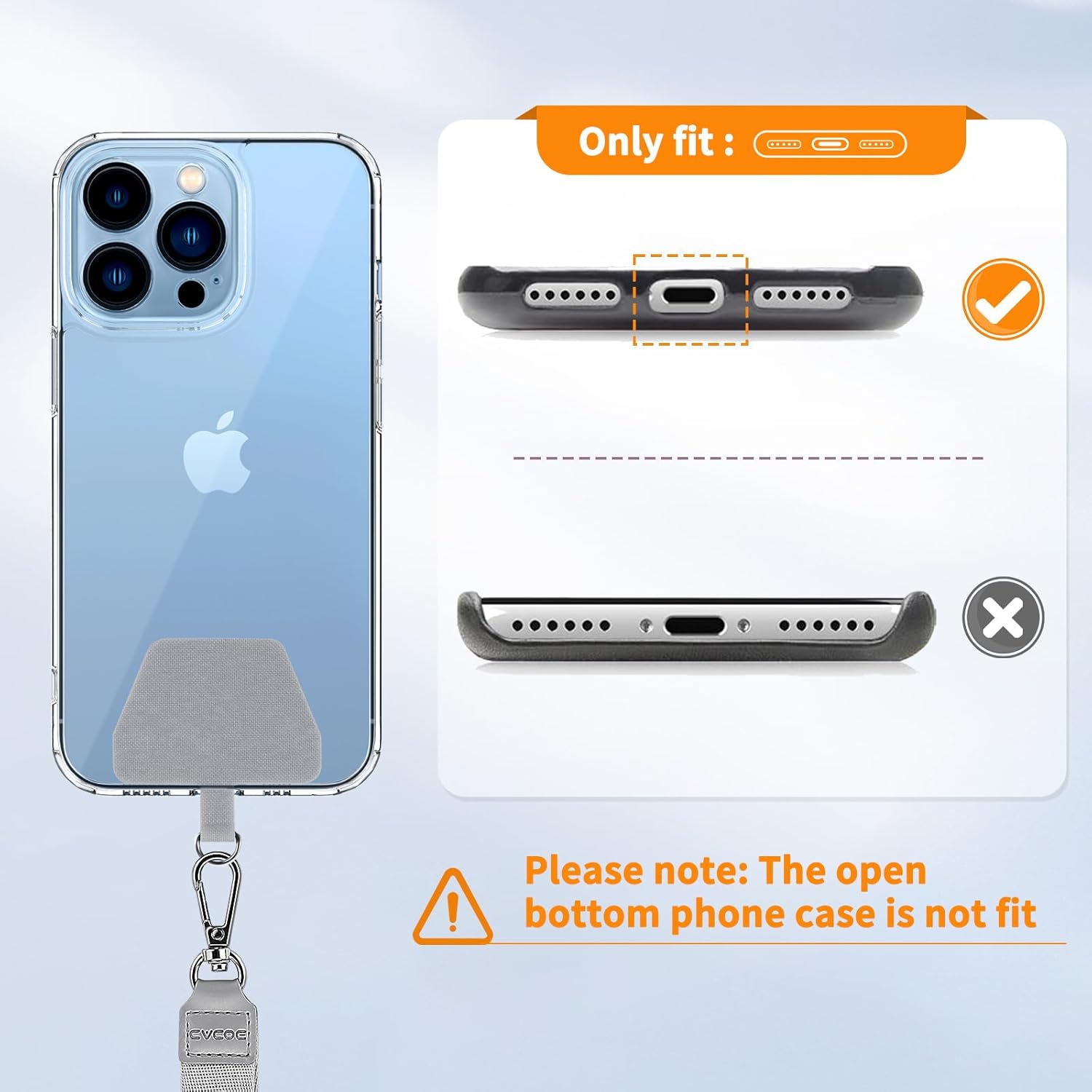
Figure 3: Illustration of compatible phone case type (fully covered bottom).
4. Operating Instructions and Usage
The CACOE Phone Lanyard offers versatile carrying options and features:
4.1 Adjusting Length
The lanyard features an adjustable buckle, allowing you to customize its length for optimal comfort and preferred wearing style. The maximum length is approximately 26 inches (66 cm) and the minimum length is approximately 13.8 inches (35 cm).

Figure 4: Lanyard length adjustment mechanism.
4.2 Wearing Options
You can wear the lanyard in various ways, including around your neck or across your body (crossbody style), depending on your activity and preference. The adjustable length accommodates different heights and wearing preferences.
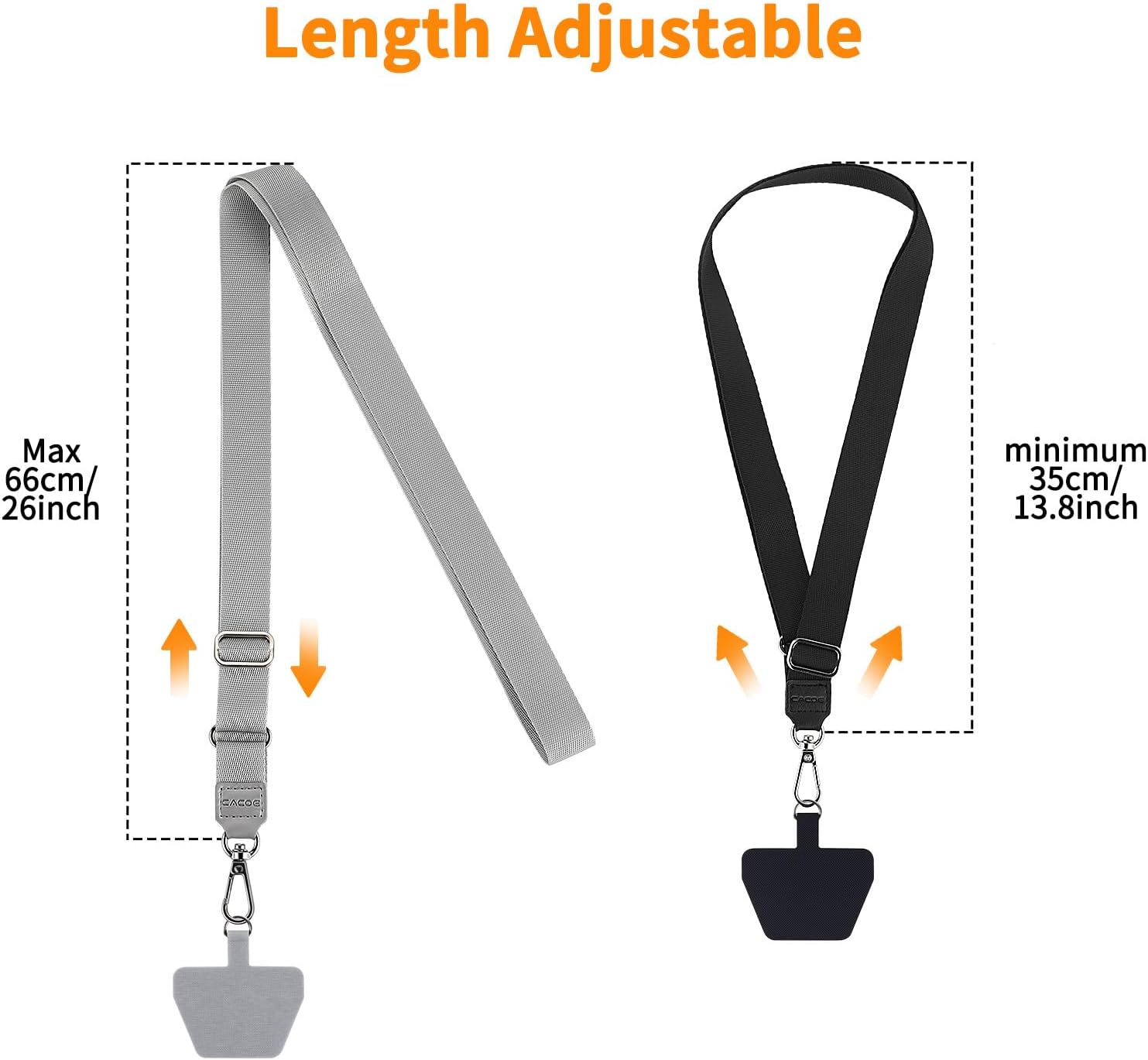
Figure 5: Examples of crossbody and neck-hanging wearing styles.
4.3 Multifunctional Use
Beyond holding your phone, the lanyard can also be used for other small items such as whistles, cameras, or keys, providing versatile utility.

Figure 6: Examples of multifunctional lanyard use.
4.4 Unobstructed Charging
The phone patch is designed to be thin (approximately 0.7 mm), ensuring it does not interfere with your phone's charging port, allowing you to charge your device while the lanyard is attached.

Figure 7: Phone charging with lanyard patch attached.
5. Maintenance
To maintain the quality and longevity of your CACOE Phone Lanyard:
- Clean the polyester strap with a damp cloth and mild soap if necessary.
- Avoid exposing the lanyard to harsh chemicals or extreme temperatures.
- Regularly inspect the strap and metal components for any signs of wear or damage.
6. Troubleshooting
- Lanyard does not fit or is unstable: Ensure you are using a fully covered phone case. Half-cover cases are not supported as they do not provide a secure anchor for the patch.
- Charging port is blocked: Verify that the patch tab is correctly aligned and not obstructing the charging cable. The thin design should allow for normal charging.
- Lanyard appears damaged: Discontinue use if the strap or metal parts show significant wear or damage to prevent accidental phone drops.
7. Specifications
| Feature | Detail |
|---|---|
| Product Dimensions | 5.12 x 1.18 x 0.59 inches (packaging) |
| Item Weight | 1.76 ounces |
| Model Number | CPLY+BAGR2 |
| Material | Polyester |
| Adjustable Length | Minimum 11.8 inches (30 cm), Maximum 21.7 inches (55 cm) (Note: Product description states 21.7 inches max, image states 26 inches max. Using product description for consistency.) |
| Compatibility | Universal, with fully covered phone cases |
8. Safety Information
Warning: To avoid danger of suffocation, keep this bag away from children and babies. Do not use this bag in cribs, beds, baby carriages, or playpens. This bag is not a toy.

Figure 8: Safety warning regarding suffocation.
9. Warranty and Support
For product support or inquiries, please refer to the contact information provided with your purchase or visit the official CACOE website. Specific warranty details may vary and are typically included with the product packaging.


