
Introduction
Thank you for choosing the PDEEY XBAT200 Battery Charger. This manual provides essential information for the safe and efficient use of your new charger. This charger is designed as a replacement for specific Shark ION cordless vacuum models, including IR101, IR70, IR100, IR141, and those using the XBAT200 battery, requiring a 28.8V YLS0243A-T288080 adapter.

Image: The PDEEY XBAT200 Battery Charger, a black power adapter with a DC barrel tip connector and a coiled cable.
Please read this manual thoroughly before operation and retain it for future reference.
Important Safety Information
- Compatibility: Ensure your device requires a 28.8 volt, 800 mAh current. Incompatibility can damage your device or the charger.
- Indoor Use Only: This charger is designed for indoor use. Do not expose to rain or moisture.
- Avoid Damage: Do not use the charger if the cord or plug is damaged. Do not attempt to open or modify the charger.
- Ventilation: Ensure adequate ventilation around the charger during use. Do not cover the charger.
- Children and Pets: Keep the charger out of reach of children and pets.
- Disconnect When Not In Use: Unplug the charger from the power outlet when not in use or during electrical storms.
Package Contents
- 1 x PDEEY XBAT200 Battery Charger
Setup
- Verify Compatibility: Before connecting, confirm that your Shark cordless vacuum model (e.g., IR101, IR70, IR100, IR141, XBAT200) requires a 28.8V, 800mA charger. This information is typically found on your vacuum's battery or original charger.
- Inspect Charger: Visually inspect the charger and cable for any signs of damage. Do not use if damaged.
- Connect to Vacuum: Insert the DC barrel tip connector of the charger firmly into the charging port of your Shark vacuum or battery charging base.
- Plug into Power Outlet: Plug the AC adapter into a standard 100-230V wall outlet.


Image: Left: Side view of the charger showing the AC plug. Right: Top view of the charger showing the green LED indicator light.
Operating Instructions
Charging Process
- Once connected to both the vacuum/battery and a power outlet, the charger will begin the charging process.
- The built-in smart IC chip manages the charging to prevent over-voltage, over-current, and over-heating.
- Monitor the LED indicator light on the charger for charging status.
LED Indicator Status
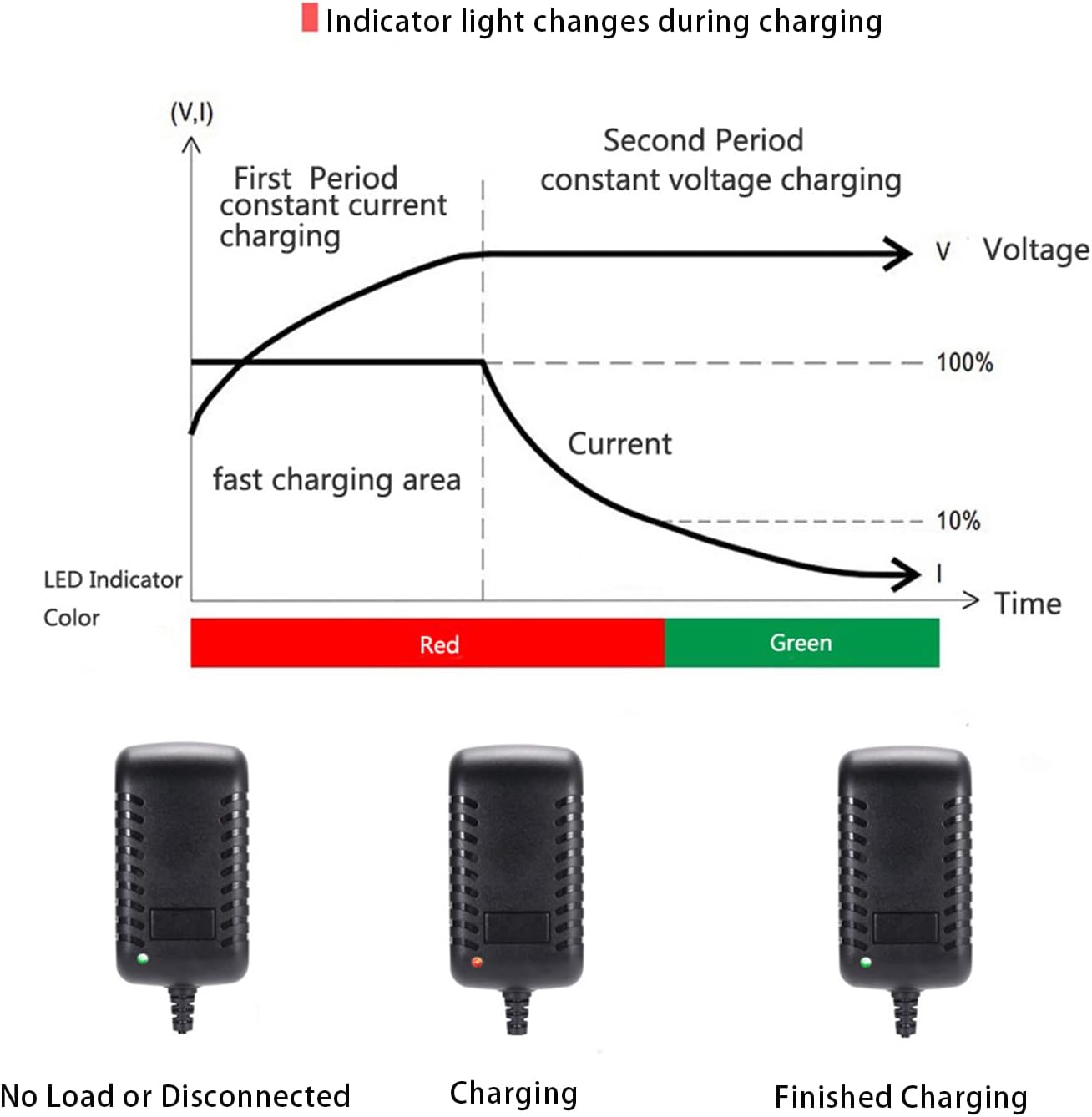
Image: Diagram illustrating the LED indicator light behavior during charging. It shows three states: No Load or Disconnected (no light), Charging (red light), and Finished Charging (green light).
- No Load or Disconnected: No light will be illuminated on the charger.
- Charging: The LED indicator light will be RED, indicating that the battery is actively charging.
- Finished Charging: The LED indicator light will turn GREEN when the battery is fully charged.
Once the light turns green, you may disconnect the charger from the vacuum and the power outlet.
Maintenance
- Cleaning: Disconnect the charger from the power outlet before cleaning. Wipe the exterior with a soft, dry cloth. Do not use liquid cleaners or solvents.
- Storage: Store the charger in a cool, dry place away from direct sunlight and extreme temperatures when not in use.
- Cable Care: Avoid bending or crimping the power cord excessively. Do not wrap the cord tightly around the charger.
Troubleshooting
- Charger LED not lighting up:
- Ensure the charger is securely plugged into a working power outlet.
- Verify the DC barrel tip is fully inserted into the vacuum's charging port.
- Confirm the vacuum's battery is not already fully charged (if green, it's fully charged).
- Check for any visible damage to the charger or cable.
- Battery not charging:
- Confirm the charger's LED is red when connected, indicating active charging.
- Double-check that your vacuum model and battery voltage (28.8V) are compatible with this charger.
- The battery itself might be faulty or at the end of its lifespan. Try charging another compatible battery if available.
- Charger feels hot:
- It is normal for chargers to feel slightly warm during operation.
- Ensure the charger is in a well-ventilated area and not covered.
- If it becomes excessively hot or emits a burning smell, immediately unplug it and discontinue use.
Specifications
| Model Number | XBAT200 (Replacement for YLS0243A-T288080) |
| Input Voltage | AC 100-230V, 50/60Hz |
| Output Voltage | DC 28.8V |
| Output Current | 800mA (0.8 Amps) |
| Wattage | 23 Watts |
| Connector Type | DC Barrel Tip Round Connector |
| Cable Length | 5 feet (approx. 1.5 meters) |
| Special Features | Built-in Smart IC Chip, Over Voltage Protection, Over Current Protection, Over-Heat Protection, LED Indicator |
| Compatible Devices | Shark cordless vacuums: IR101, IR70, IR100, IR141, XBAT200, ION F80, X40, IR200. (Requires 28.8V, 800mA) |
| Product Dimensions | 3.54 x 1.57 x 1.18 inches |
| Item Weight | 2.82 ounces |
Warranty and Support
For warranty information or technical support, please refer to the product listing on the retailer's website or contact PDEEY customer service directly through the provided channels on their official store page. Please retain your proof of purchase for warranty claims.
Manufacturer: PDEEY