
Tailcas FL-01-50
Tailcas 50W Outdoor Security Light with Motion Sensor
User Instruction Manual
Introduction
Thank you for choosing the Tailcas 50W Outdoor Security Light with Motion Sensor. This manual provides essential information for the safe installation, operation, and maintenance of your new security floodlight. Please read this manual thoroughly before installation and keep it for future reference.
Safety Information
WARNING: Risk of electric shock. Installation must be performed by a qualified electrician or a person with electrical knowledge.
- Always disconnect power before installation, servicing, or cleaning.
- Ensure the supply voltage is compatible with the product (220V-240V).
- Do not modify the product in any way.
- Ensure all connections are secure and properly insulated.
- This product is designed for outdoor use and has an IP66 waterproof rating. However, avoid submerging it in water.
- Keep away from flammable materials.
Product Overview
The Tailcas 50W Outdoor Security Light is a high-performance LED floodlight designed for enhanced outdoor security and illumination. It features a sensitive PIR motion sensor and durable construction.
Key Features:
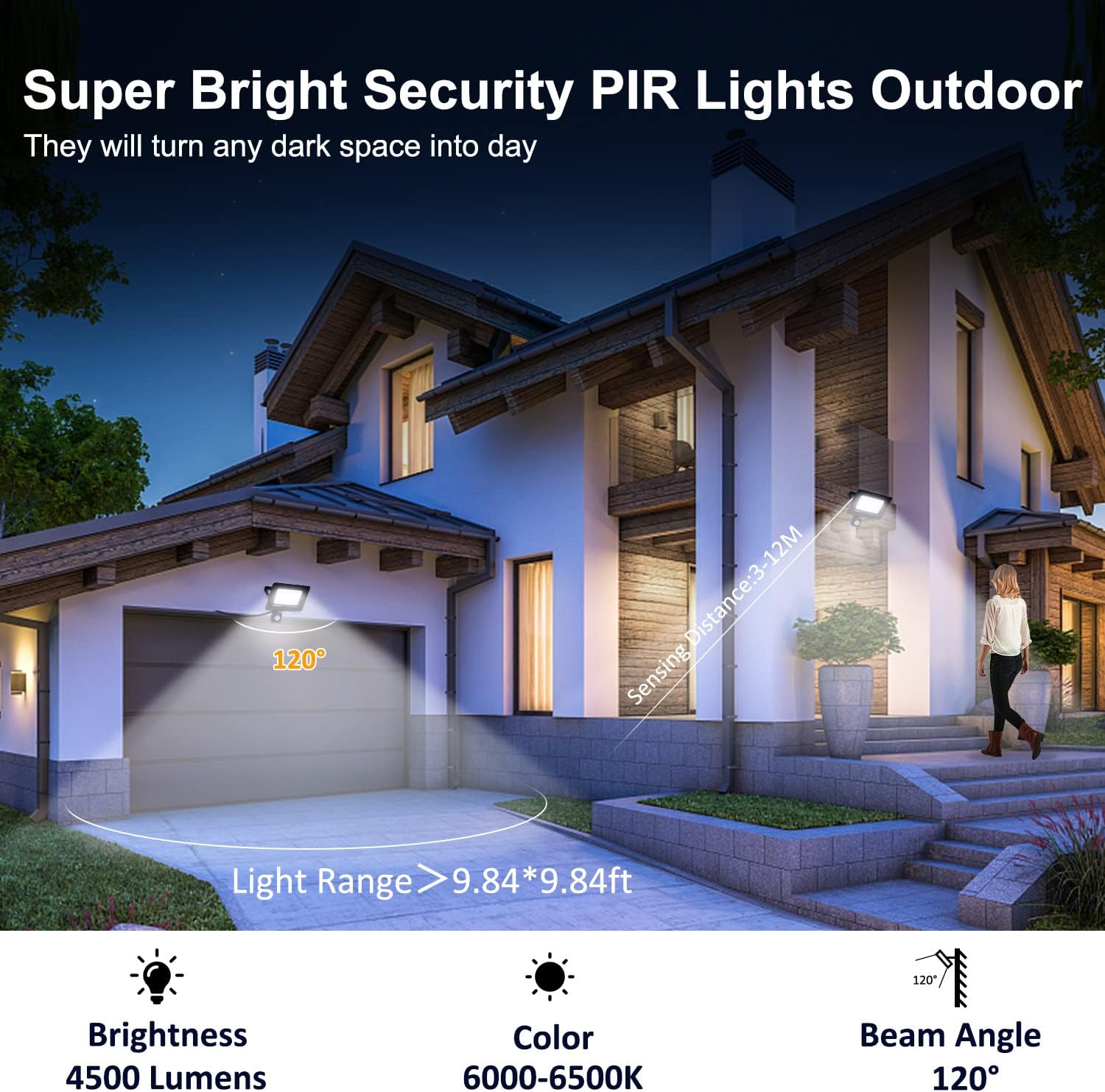
- Super Bright & Energy Saving: 50W with 72 LEDs, producing up to 4500lm with a 120-degree wide beam. Replaces 400W-500W traditional halogen floodlights, saving over 80% on electricity.
- 3 Motion Sensor Modes: Customizable settings for lighting time (5 seconds to 3 minutes), motion distance (3-12 meters), and day/night operation.
- IP66 Waterproof & Dustproof: Constructed with solid aluminum alloy, heat-resistant, frost-resistant, and designed to withstand extreme weather. The sensor's adjustment button has a waterproof rubber stopper.
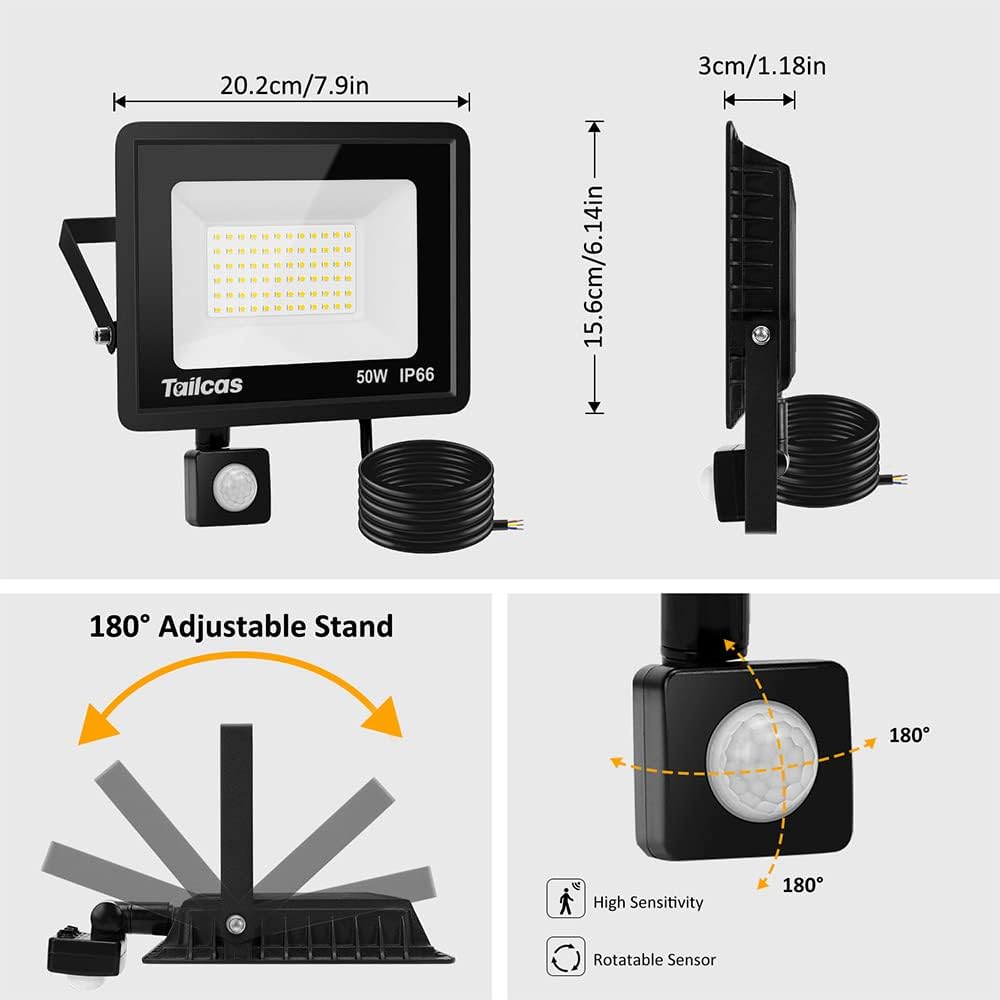
- Easy to Install: Comes with a 1.5-meter cable and mounting accessories. Features a 180° adjustable mounting bracket for versatile installation.
- Wide Application: Ideal for illuminating backyards, parking lots, corridors, gardens, doorways, and garages.
Product Components:

The package includes the 50W LED floodlight with integrated PIR motion sensor, a 1.5-meter power cable, and robust nails for mounting.




Product Video:
Video 1: An overview of the Tailcas Motion Sensor Outdoor Security Light, highlighting its IP66 waterproof rating, motion detection capabilities, and ease of installation. The video demonstrates the light's functionality in various outdoor settings.
Setup and Installation
Before beginning installation, ensure the power supply is turned off at the main circuit breaker.
- Choose Mounting Location: Select a suitable location on a wall, ceiling, or ground where the light can provide optimal coverage. The 180° adjustable bracket allows for flexible positioning.
- Mark Drilling Points: Use the mounting bracket as a template to mark the drilling points on the chosen surface.
- Drill Holes: Drill holes at the marked points. Insert wall plugs if necessary for secure mounting.
- Mount the Bracket: Secure the mounting bracket to the surface using the provided robust nails/screws.
- Connect Wiring:
- Connect the Live wire (Brown) from the floodlight to your household Live wire.
- Connect the Neutral wire (Blue) from the floodlight to your household Neutral wire.
- Connect the Ground wire (Yellow/Green) from the floodlight to your household Ground wire.
Ensure all connections are tight and properly insulated with electrical tape or connectors.
- Attach Floodlight to Bracket: Secure the floodlight body to the mounted bracket.
- Adjust Angle: Adjust the angle of the floodlight and the motion sensor to your desired coverage area. The motion sensor can be rotated 180 degrees for optimal detection.
- Restore Power: Once installation is complete and all connections are secure, restore power to the circuit.

Operating Instructions
The Tailcas security light features a PIR motion sensor with three adjustable knobs to customize its operation:
- SENS (Sensitivity): Adjusts the motion detection distance. Turn the knob towards '+' for a longer detection range (up to 12 meters) or towards '-' for a shorter range (down to 3 meters).
- TIME (Lighting Duration): Controls how long the light stays on after motion is detected. Adjust from 5 seconds to 3 minutes.
- LUX (Day/Night Setting): Determines when the sensor activates.
- Turn towards the 'Sun' icon: The sensor will activate and the light will turn on both during the day and at night when motion is detected.
- Turn towards the 'Moon' icon: The sensor will only activate and the light will turn on at night (in low light conditions) when motion is detected.
Maintenance
Regular maintenance ensures optimal performance and longevity of your security light.
- Cleaning: Periodically clean the light fixture and sensor lens with a soft, damp cloth. Do not use abrasive cleaners or solvents. Ensure power is off before cleaning.
- Inspection: Regularly inspect the power cable for any signs of damage, fraying, or wear. Check mounting screws for tightness.
- LEDs: The LEDs are integrated and not user-replaceable. If the light stops functioning, contact customer support.
- Sensor: Keep the sensor lens clear of obstructions (e.g., dirt, spiderwebs) to ensure accurate motion detection.
Troubleshooting
| Problem | Possible Cause | Solution |
|---|---|---|
| Light does not turn on. | No power supply; LUX setting too high (daylight); Faulty wiring. | Check power connection and circuit breaker. Adjust LUX setting towards 'Moon' icon. Verify wiring connections. |
| Light stays on constantly. | TIME setting too long; Continuous motion in detection area; LUX setting too low (always dark). | Adjust TIME setting to a shorter duration. Clear obstructions from detection area. Adjust LUX setting towards 'Sun' icon or to desired night-only operation. |
| Light turns on for no apparent reason. | SENS setting too high; Environmental factors (wind, small animals, heat sources). | Reduce SENS setting. Reposition the sensor to avoid detecting unwanted motion sources. |
| Light flickers or dims. | Unstable power supply; Loose wiring connection; Product defect. | Check power supply stability. Secure all wiring connections. If problem persists, contact customer support. |
Specifications
| Feature | Detail |
|---|---|
| Brand | Tailcas |
| Model Number | FL-01-50 |
| Power | 50 Watts |
| Luminous Flux | 4500 Lumen |
| Voltage | 220-240 Volts |
| Material | Glass, Aluminium, Metal |
| Colour Temperature | Cool White (6000-6500K) |
| Waterproof Rating | IP66 |
| Beam Angle | 120° |
| Motion Sensor Sensing Angle | 180° |
| Motion Sensor Sensing Distance | 3-12 meters (adjustable) |
| Lighting Time Adjustment | 5 seconds - 3 minutes (adjustable) |
| Cable Length | 1.5 meters |
| Product Dimensions | 23.4 x 22.4 x 4.8 cm |
| Item Weight | 650 g |
| Life Span | Up to 50,000 hours |
| Included Components | Power cable and robust nails |
For more energy efficiency information, please refer to the EPREL database (QR code link).
Warranty and Support
Tailcas products are manufactured to high-quality standards. For any issues or support, please contact your retailer or the manufacturer directly. Keep your proof of purchase for warranty claims.
For light bulb recycling and breakage information, please refer to local regulations and guidelines.
Ask a question about this manual
Ask about setup, troubleshooting, compatibility, parts, safety, or missing instructions. Manuals+ will review the question and use this page’s manual context to help answer it.