
BOYI WK68
BOYI WK68 Hot Swappable RGB Mechanical Keyboard User Manual
Model: WK68
Introduction
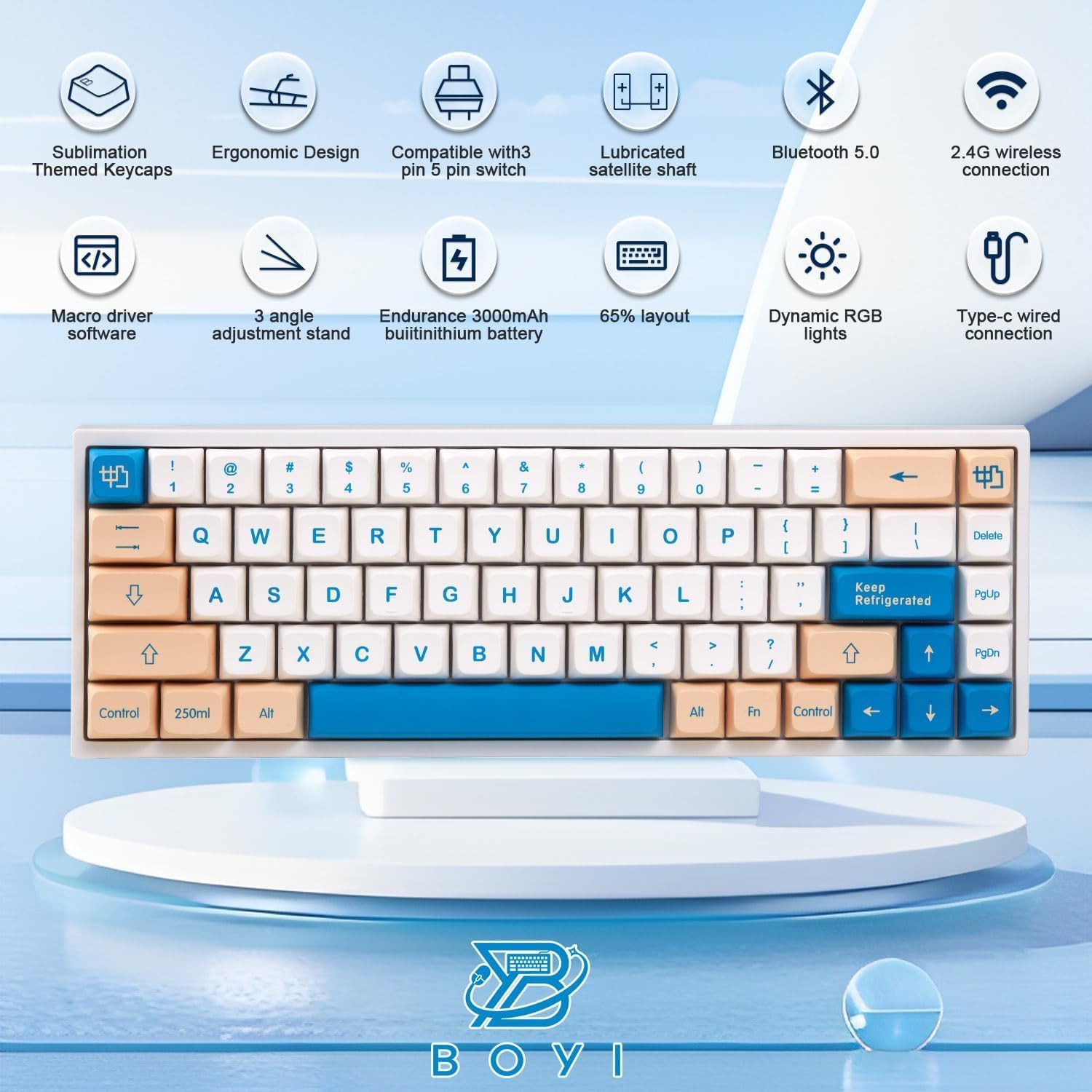
The BOYI WK68 is a versatile 65% compact mechanical keyboard designed for both gaming and office use. It features hot-swappable switches, RGB backlighting, and tri-mode connectivity (Bluetooth 5.0, 2.4G wireless, and wired Type-C). This manual provides detailed instructions for setting up, operating, and maintaining your keyboard to ensure optimal performance.
Key Features
- 65% Compact Layout: 68-key design saves desk space while retaining essential keys.
- Hot-Swappable Switches: Compatible with Gateron Mechanical 3-pin/5-pin switches for easy customization without soldering.
- Tri-Mode Connectivity: Seamlessly switch between Bluetooth 5.0 (up to 3 devices), 2.4GHz wireless (with dongle), and wired Type-C connection.
- PBT Dye-Sublimation Keycaps: Durable XDA Profile keycaps with non-fade legends for a comfortable typing experience.
- Dynamic RGB Backlighting: 12 preset lighting effects and customizable RGB via professional software.
- Ergonomic Design: Integrated palm rest and adjustable feet for comfortable use.
- Long-lasting Battery: Built-in 3500mAh polymer battery.
Package Contents
Upon unboxing your BOYI WK68 keyboard, please ensure all the following items are present:
- BOYI WK68 Mechanical Keyboard
- USB-C to USB-A Cable (Braided)
- 2.4G Wireless Receiver (Dongle)
- Keycap/Switch Puller
- Extra Switches (Gateron Yellow)
- Extra Themed Keycaps
- User Manual

Setup
1. Wired Connection (Type-C)
Connect the provided USB-C to USB-A cable from the keyboard's USB-C port (located at the back) to a USB-A port on your computer. The keyboard will be ready for use. This mode also charges the internal battery.

2. 2.4GHz Wireless Connection
Locate the 2.4G wireless receiver (dongle) stored magnetically in the keyboard's base. Plug the dongle into an available USB-A port on your computer. On the keyboard's base, switch the toggle to the '2.4G' position. The keyboard should automatically connect. If manual pairing is needed, press 'FN+Q' until the Q key flashes, then insert the receiver.

3. Bluetooth 5.0 Connection
The WK68 supports connecting up to 3 Bluetooth devices. On the keyboard's base, switch the toggle to the 'BT' position. To pair a device, press 'FN+W', 'FN+E', or 'FN+R' to select a Bluetooth channel (BT1, BT2, BT3). The corresponding key will flash rapidly, indicating pairing mode. Search for 'BOYI WK68' on your device's Bluetooth settings and connect. The keyboard indicator light will turn solid upon successful connection.
Operating Instructions
Function Key Combinations (FN+)
The keyboard utilizes FN key combinations to access various functions:
- FN + P: Change RGB lighting effects (20 different effects).
- FN + [: Decrease backlight brightness.
- FN + ]: Increase backlight brightness.
- FN + ;: Decrease backlight speed.
- FN + ': Increase backlight speed.
- FN + W/E/R: Switch between Bluetooth devices (BT1, BT2, BT3).
- FN + Q: Switch to 2.4G wireless mode.
- FN + Left Control: Lock/Unlock Win key.
- FN + Insert: Toggle backlight on/off.
RGB Lighting Customization
The keyboard offers extensive RGB customization:
- Preset Modes: Cycle through 20 built-in RGB lighting effects using FN+P.
- Brightness & Speed: Adjust backlight brightness (1-5 levels) and speed using FN key combinations.
- Software Customization: Use the dedicated BOYI software to customize individual key colors, create custom lighting profiles, and set lighting directions.

Software Customization (Windows Only)
For advanced customization, download the BOYI software from the official website. The software allows you to:
- Key Remapping: Reassign individual keys, create multi-key functions, or disable keys.
- Macro Management: Record, edit, import, and export macros for complex command sequences.
- Multimedia & Shortcuts: Assign multimedia controls (play/pause, volume) or Windows shortcuts (show desktop, lock computer) to any key.
- Advanced Lighting: Create custom per-key RGB lighting effects and save multiple profiles.
Sleep Mode & Battery Management
The keyboard features an automatic sleep mode to conserve battery life. After 10 minutes of inactivity, the keyboard and backlights will turn off. Press any key to wake it up. The charging indicator light will flash quickly when charging and turn green when fully charged. The software allows you to adjust sleep time (No Sleep, 1min, 5min, 30min).
Maintenance
Hot-Swappable Switches
The BOYI WK68 supports hot-swappable Gateron Mechanical 3-pin/5-pin switches. Use the provided switch puller to carefully remove existing switches and insert new ones. Ensure the new switches are aligned correctly before pressing them into place.

Keycap Replacement
The keyboard comes with XDA Profile PBT Dye-Sublimation keycaps. You can replace them with other compatible keycaps using the provided keycap puller. Gently pull the keycap straight up to remove it and press the new keycap straight down until it clicks into place.

Troubleshooting
- Connectivity Issues: Ensure the correct mode (BT, 2.4G, USB) is selected on the keyboard's base. For Bluetooth, re-enter pairing mode. For 2.4G, ensure the dongle is securely plugged in.
- RGB Not Working: Check if the backlight is toggled off (FN+Insert). Adjust brightness levels. If using software, ensure the profile is active.
- Keys Not Responding: Try replacing the switch for the non-responsive key. Ensure the keyboard is charged.
- Software Not Detecting Keyboard: Ensure the keyboard is connected via wired USB-C mode when using the software.
- Factory Reset: If experiencing persistent issues, a factory reset can be performed via the software settings.
Specifications
- Product Dimensions: 12.2 x 3.94 x 1.18 inches
- Item Weight: 2.23 pounds
- Number of Keys: 68
- Interface: Type-C
- Battery: 3500mAh Lithium Ion (included)
- Connectivity Technology: Bluetooth 5.0/2.4G Wireless/Wired Type-C Tri-Mode
- Keyboard Description: 65% Gaming & Office Mechanical Keyboard
- Special Feature: Backlit, Ergonomic, Hot-Swappable
- Keyboard Backlighting Color Support: RGB
- Material: Polybutylene Terephthalate (PBT Keycaps)
- Compatible Devices: Gaming Console, PC, Laptop, Tablet, Smartphone, PS5
Warranty & Support
For any product inquiries, technical support, or warranty claims, please contact BOYI Keyboard directly. You can typically find support options through the Amazon seller page or by emailing the provided support address.

Related documentsWK68


Ask a question about this manual
Ask about setup, troubleshooting, compatibility, parts, safety, or missing instructions. Manuals+ will review the question and use this page’s manual context to help answer it.