
Smartby SMTB-SANYO-OTT
Universal Replacement Remote for SANYO TVs
Model: SMTB-SANYO-OTT
1. Introduction
This manual provides comprehensive instructions for the operation and maintenance of your new Universal Replacement Remote for SANYO TVs. This remote is designed to be compatible with a wide range of SANYO LED, LCD, and Smart TVs, excluding models with built-in Roku functionality. Please read this manual thoroughly before use to ensure proper functionality and to maximize your product experience.
2. Product Overview
The Smartby Universal Replacement Remote is a pre-programmed remote control designed for immediate use with compatible SANYO televisions. It features dedicated hotkeys for popular streaming services and standard television controls.
2.1 Key Features
- No setup or pairing required for most SANYO TV models.
- Dedicated hotkeys for Netflix, YouTube, VUDU, and PIX SHAPE.
- Compatible with SANYO LED, LCD, and Smart TVs (excluding Roku built-in models).
- Replaces numerous original SANYO remote models.
2.2 Package Contents
- 1 x Smartby Universal Replacement Remote Control
- Note: Instructions and batteries are not included in the package.
2.3 Remote Control Layout
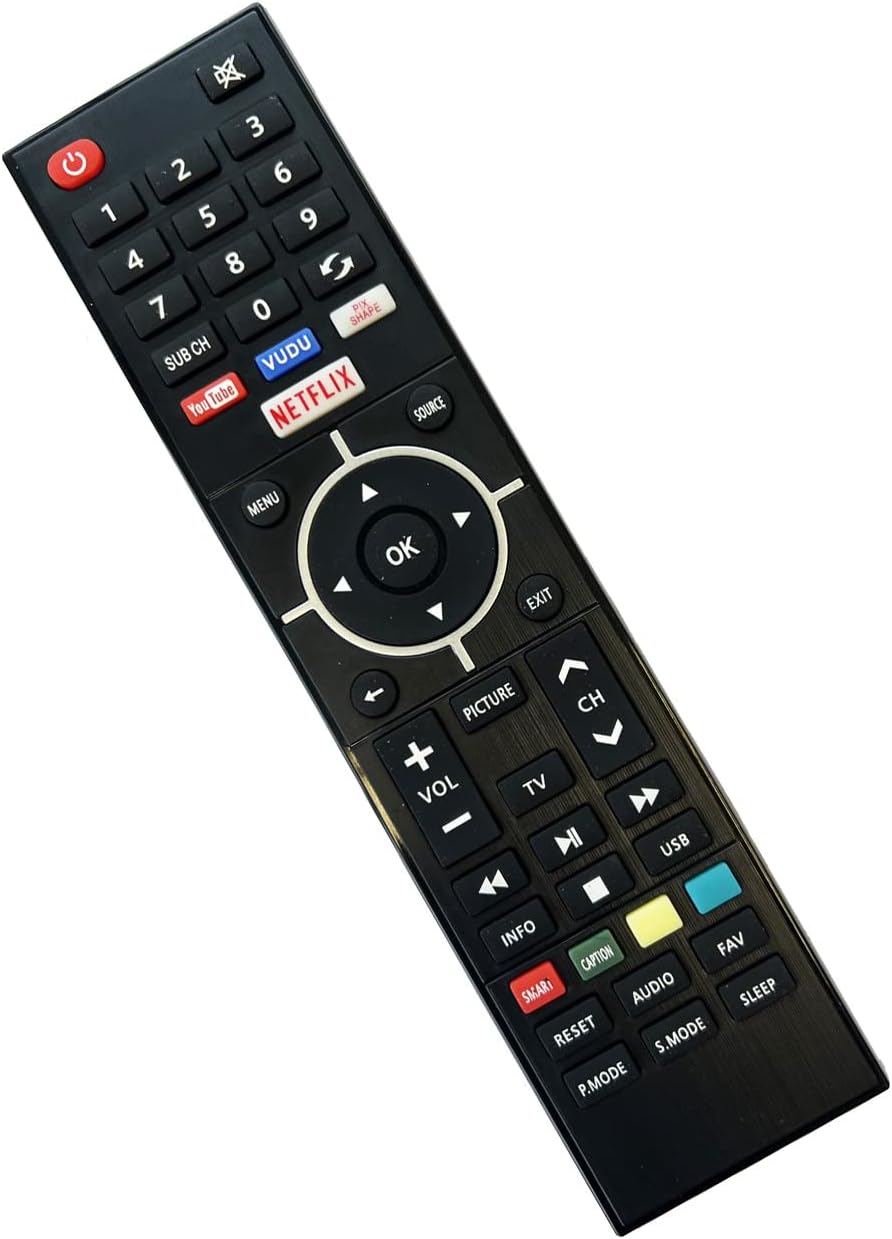
Image: Front view of the Smartby Universal Replacement Remote Control, showing all buttons including power, number pad, channel, volume, navigation, and hotkeys for Netflix, YouTube, VUDU, and PIX SHAPE.

Image: The remote control shown alongside text highlighting its key features: "Replacement Remote for All SANYO TV, LCD, LED, Smart TVs", "No Setup Required", "Netflix/YouTube/VUDU/PIX SHAPE Hot Keys", and a list of compatible SANYO remote models.

Image: A side-by-side view of the remote control, displaying both its front (button side) and its plain black back side.

Image: A three-panel view showing the front, side profile, and back of the remote control, illustrating its ergonomic design and slim profile.

Image: A detailed close-up of the remote control's front, emphasizing the texture of the buttons and the clear labeling of functions.

Image: An angled shot of the remote control, providing a perspective that highlights its overall shape and button arrangement.
3. Setup
3.1 Installing Batteries
- Locate the battery compartment on the back of the remote control.
- Slide the battery cover downwards to open.
- Insert two AAA batteries (not included), ensuring the positive (+) and negative (-) terminals align correctly with the markings inside the compartment.
- Slide the battery cover back into place until it clicks securely.
Important: Always use new batteries of the same type. Do not mix old and new batteries, or different types of batteries. Remove batteries if the remote will not be used for an extended period.
3.2 Initial Use (No Setup Required)
This universal replacement remote is pre-programmed for most SANYO TV models. No manual setup, programming, or pairing is typically required. Once batteries are installed, the remote should function immediately with your compatible SANYO television.
To test functionality, point the remote at your SANYO TV and press the Power button. The TV should turn on or off. If it does not respond, ensure the remote is pointed directly at the TV's infrared receiver and that there are no obstructions.
4. Operating Instructions
This section details the functions of the various buttons on your Smartby Universal Replacement Remote.
4.1 Basic TV Controls
| Button | Function |
|---|---|
| Power (⬤) | Turns the TV on or off. |
| Mute (🔇) | Mutes or unmutes the TV audio. |
| Number Pad (0-9) | Directly enters channel numbers. |
| SUB CH | Accesses sub-channels (e.g., 7.1, 7.2). |
| VOL +/- | Adjusts the volume level up or down. |
| CH ^/v | Changes the TV channel up or down. |
| SOURCE | Cycles through available input sources (HDMI, AV, etc.). |
| MENU | Opens the TV's main menu. |
| OK | Confirms selections within menus. |
| Navigation Arrows (Up, Down, Left, Right) | Navigates through menus and options. |
| EXIT | Exits the current menu or screen. |
| INFO | Displays information about the current program or input. |
| PICTURE | Accesses picture settings. |
| TV | Switches to TV mode. |
| USB | Accesses USB media playback. |
| SMART | Opens the Smart TV home screen or app launcher. |
| CAPTION | Toggles closed captions on/off. |
| RESET | Resets certain TV settings (functionality may vary by TV model). |
| AUDIO | Accesses audio settings or audio track selection. |
| FAV | Accesses favorite channels or content. |
| P.MODE | Cycles through picture modes (e.g., Standard, Movie, Dynamic). |
| S.MODE | Cycles through sound modes (e.g., Standard, Music, Movie). |
| SLEEP | Sets the sleep timer. |
4.2 Streaming Hotkeys
- Netflix: Directly launches the Netflix application.
- YouTube: Directly launches the YouTube application.
- VUDU: Directly launches the VUDU application.
- PIX SHAPE: Directly launches the PIX SHAPE application (functionality may vary based on TV model and region).
Note: For streaming hotkeys to function, your SANYO Smart TV must be connected to the internet and the respective applications must be installed and accessible on your TV.
5. Maintenance
5.1 Cleaning the Remote
To clean the remote control, gently wipe its surface with a soft, dry cloth. For stubborn dirt, slightly dampen the cloth with water or a mild, non-abrasive cleaner. Do not use harsh chemicals, abrasive cleaners, or spray liquids directly onto the remote.
5.2 Battery Replacement
Replace batteries when the remote's response becomes sluggish or stops working. Follow the battery installation steps in Section 3.1. Dispose of used batteries according to local regulations.
6. Troubleshooting
If you experience issues with your remote control, please refer to the following common solutions:
| Problem | Possible Cause / Solution |
|---|---|
| Remote not responding to TV. |
|
| Some buttons do not work. |
|
| Remote works intermittently. |
|
7. Specifications
| Feature | Detail |
|---|---|
| Model Number | SMTB-SANYO-OTT |
| Brand | Smartby |
| Product Dimensions | 7.8 x 2 x 0.75 inches |
| Item Weight | 3 ounces |
| Connectivity Technology | Infrared (IR) |
| Compatible Devices | SANYO Televisions (LCD, LED, Smart TVs, excluding Roku built-in) |
| Power Source | 2 x AAA Batteries (not included) |
8. Warranty and Support
Specific warranty information for this product is typically provided at the point of purchase or within the product packaging. For detailed warranty terms and conditions, please refer to the documentation included with your purchase or contact the retailer.
For technical support or inquiries regarding product compatibility, please contact Smartby customer service through the retailer's platform or their official website. Please have your product model number (SMTB-SANYO-OTT) and purchase details ready when contacting support.
Ask a question about this manual
Ask about setup, troubleshooting, compatibility, parts, safety, or missing instructions. Manuals+ will review the question and use this page’s manual context to help answer it.