
1. Introduction
Thank you for choosing the Shadowhawk S2800 LED Flashlight. This manual provides detailed instructions for the safe and effective use, maintenance, and troubleshooting of your new flashlight. Please read this manual thoroughly before operating the device and keep it for future reference.

Figure 1: The Shadowhawk S2800 LED Flashlight, showcasing its robust design, included battery, and USB charging cables.
2. Product Overview
2.1 Key Features
- Extreme Brightness: Equipped with the updated 2024 XHP160.2-Chip, producing up to 550,000 lumens.
- Long Range: Capable of focusing objects up to 1000 meters away.
- USB Rechargeable: Built-in USB charging port for convenient charging via power banks, outlets, or laptops.
- Long-lasting Battery: Up to 12 hours of runtime in low mode on a single charge.
- 5 Lighting Modes: High, Medium, Low, Strobe, and SOS.
- Adjustable Focus: Stretch the flashlight head to switch between spotlight (long-range) and floodlight (wide area) illumination.
- IP67 Waterproof: Designed to withstand harsh handling and temporary submersion (not for prolonged immersion).
- Virtually Indestructible: Can withstand a 10-foot drop.
- Efficient Heat Dissipation: Special design on the handle for rapid heat dispersion.
- Power Bank Function: Can be used to charge other USB-powered devices.
2.2 Package Contents
Ensure all items are present upon unboxing:
- 1x Shadowhawk S2800 USB Rechargeable Flashlight
- 1x Shadowhawk Rechargeable Battery
- 1x USB Charging Cable
- 1x User Manual
2.3 Component Identification
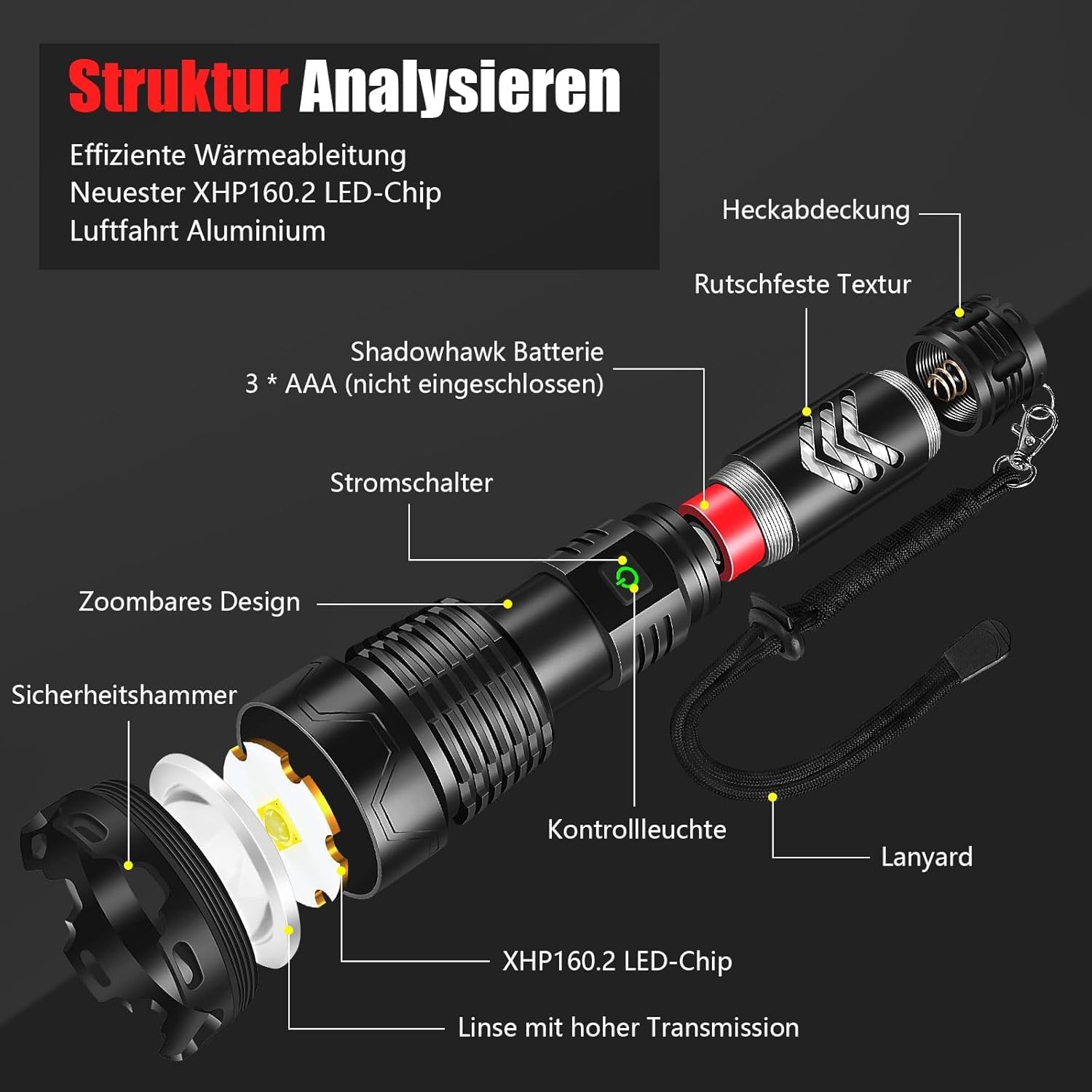
Figure 2: Detailed breakdown of the flashlight's components, including the XHP160.2 LED chip, high transmission lens, power switch, control light, zoomable design, safety hammer, anti-slip texture, and tail cap.
- XHP160.2 LED Chip: The primary light source.
- High Transmission Lens: Optimizes light output.
- Power Switch: Controls power and mode selection.
- Control Light: Indicates battery status and charging.
- Zoomable Design: Allows adjustment between floodlight and spotlight.
- Safety Hammer: Integrated into the head for emergency use.
- Anti-slip Texture: Provides a secure grip.
- Tail Cap: Secures the battery compartment.
- USB Charging Port: For charging the flashlight and external devices.
3. Setup
3.1 Battery Installation
The Shadowhawk S2800 flashlight uses a rechargeable Lithium-Ion battery. Follow these steps to install it:
- Unscrew the tail cap of the flashlight by turning it counter-clockwise.
- Important: Before first use, gently peel off and remove the transparent plastic protective film from the battery surface.
- Insert the Shadowhawk rechargeable battery into the flashlight with the positive (+) end facing towards the head of the flashlight.
- Screw the tail cap back on clockwise until it is securely tightened.

Figure 3: Visual guide for battery installation, emphasizing the removal of the protective film and correct polarity.
3.2 Initial Charging
For optimal performance, fully charge the flashlight before its first use.
- Locate the USB charging port on the flashlight body. It is usually covered by a rubber flap for water resistance.
- Open the rubber flap.
- Connect the included USB charging cable to the flashlight's port.
- Connect the other end of the USB cable to a USB power source (e.g., wall adapter, power bank, computer USB port).
- The control light on the flashlight will indicate charging status (e.g., red for charging, green for fully charged).
- Once fully charged, disconnect the cable and securely close the rubber flap to maintain water resistance.

Figure 4: The flashlight's USB-C charging port and its versatility for charging from various USB sources.
4. Operating Instructions
4.1 Power On/Off
- To turn the flashlight ON, press the power button located on the body of the flashlight.
- To turn the flashlight OFF from any mode, press and hold the power button for approximately 3 seconds.
4.2 Changing Light Modes
The Shadowhawk S2800 features 5 distinct lighting modes:
- High: Maximum brightness for powerful illumination.
- Medium: Balanced brightness for general use.
- Low: Reduced brightness for extended battery life or close-range tasks.
- Strobe: Flashing light for signaling or disorientation.
- SOS: International Morse code signal for emergencies.
To cycle through the modes, briefly press the power button repeatedly after turning the flashlight on. Each press will advance to the next mode in the sequence (High > Medium > Low > Strobe > SOS).

Figure 5: Depiction of the five available lighting modes and their visual effects.
4.3 Adjusting Focus (Zoom)
The flashlight's head can be extended or retracted to adjust the beam focus:
- Floodlight (Zoom In): Push the head of the flashlight inwards to achieve a wide, diffused beam, ideal for illuminating large areas.
- Spotlight (Zoom Out): Pull the head of the flashlight outwards to create a narrow, concentrated beam, perfect for long-distance viewing.

Figure 6: Visual comparison of the floodlight (wide beam) and spotlight (focused beam) functions.
4.4 Using as a Power Bank
Your Shadowhawk S2800 flashlight can also serve as a portable power bank to charge other devices:
- Open the rubber flap covering the USB port.
- Connect your device's charging cable to the flashlight's USB output port.
- The flashlight will begin charging your device.
- Monitor your device's charging indicator.
- Once charging is complete, disconnect the cable and securely close the rubber flap.
5. Maintenance
5.1 Cleaning
- Wipe the flashlight body with a soft, damp cloth.
- Do not use abrasive cleaners or solvents, as they may damage the finish.
- Keep the lens clean for optimal light output. Use a lens cleaning cloth if necessary.
5.2 Battery Care
- Recharge the battery regularly, even if the flashlight is not frequently used, to maintain battery health.
- Avoid completely draining the battery before recharging.
- If storing the flashlight for an extended period (more than a few weeks), it is recommended to remove the battery to prevent potential parasitic drain and preserve battery life.
5.3 Storage
- Store the flashlight in a cool, dry place away from direct sunlight and extreme temperatures.
- Keep out of reach of children.
6. Troubleshooting
If you encounter issues with your Shadowhawk S2800 flashlight, please refer to the table below for common problems and solutions:
| Problem | Possible Cause | Solution |
|---|---|---|
| Flashlight does not turn on. | Battery is dead or low. Battery installed incorrectly. Protective film on battery not removed. | Charge the battery. Check battery polarity (+/-). Remove the transparent protective film from the battery. |
| Light is dim or flickers. | Low battery. Loose connections. Dirty lens. | Recharge the battery. Ensure tail cap and head are tightened. Clean the lens. |
| Battery drains quickly when off. | Parasitic drain (rare). | If storing for extended periods or experiencing rapid discharge when off, remove the battery from the flashlight. |
| Flashlight not charging. | Charging cable faulty. USB port dirty. Power source issue. | Try a different USB cable. Clean the USB port. Try a different USB power source. |
| Cannot change modes. | Button malfunction. | Ensure the button is pressed firmly. If issue persists, contact customer service. |
7. Specifications
| Feature | Specification |
|---|---|
| Model Number | DE-S2800 |
| Light Source | XHP160.2 LED Chip |
| Light Output | Up to 550,000 Lumens |
| Beam Distance | Up to 1000 meters |
| Battery Type | Lithium-Ion (included) |
| Runtime (Low Mode) | Up to 12 hours |
| Charging Port | USB |
| Waterproof Rating | IP67 |
| Drop Resistance | 10 feet (approx. 3 meters) |
| Dimensions | 19 x 3.5 x 6 cm (approx. 7.48 x 1.38 x 2.36 inches) |
| Weight | 560 grams (approx. 1.23 lbs) |
| Material | Plastic (housing) |
| Certifications | CE, RoHS, WEEE |
8. Warranty and Support
Shadowhawk is committed to providing high-quality products. If you experience any quality issues with your Shadowhawk S2800 flashlight, please contact our customer service. We strive to provide the most satisfactory service within 24 hours.
For support, please refer to the contact information provided with your purchase or visit the official Shadowhawk store on Amazon.
8.1 Recycling Information
Please dispose of the flashlight and its battery responsibly according to local regulations. Information regarding the recycling of lamps and the disposal of broken or damaged lamps can be found through your local waste management services.