Introduction
The EZVIZ RH1 is a versatile 3-in-1 cordless wet and dry vacuum cleaner designed for efficient cleaning of hard floors. It combines sweeping, vacuuming, and mopping functions, making it suitable for various types of messes, including sticky spills and pet hair. Equipped with an intelligent sensor, an LCD screen, and a self-cleaning system, the RH1 simplifies your floor cleaning routine.

Image: The EZVIZ RH1 Cordless Wet and Dry Vacuum Cleaner, showcasing its sleek design and integrated handle.
Package Contents
Before assembly, ensure all components are present:
- RH1 Wet and Dry Vacuum Cleaner
- Charging Base
- Power Adapter
- Extra Replaceable HEPA Filter
- HEPA Holder
- Extra Replaceable Brush Roll
- Cleaning Brush
- Brush Holder
- Cleaning Solution
- Quick Start Guide
- User Manual
Setup and Initial Use
- Assembly: Carefully unpack all components. Attach the handle to the main body of the vacuum until it clicks into place.
- Charging: Place the vacuum cleaner on the charging base. Connect the power adapter to the charging base and plug it into a power outlet. The LCD screen will indicate charging status. Fully charge the device before first use.
- Fill Clean Water Tank: Locate the clean water tank. Remove it, fill with clean water (and cleaning solution if desired, ensuring it's compatible with the device and below 60°C), and reattach securely.
- Power On: Press the power button to turn on the vacuum cleaner.

Image: The EZVIZ RH1 vacuum cleaner positioned upright in a home setting, demonstrating its compact design.
Operating Instructions
3-in-1 Cleaning Functionality
The RH1 simultaneously sweeps, vacuums, and mops hard floors, effectively removing both dry debris and wet spills in a single pass.

Image: A visual representation of the RH1's multi-functional cleaning capabilities, including smart dirt sensing indicated by colored lights.
Smart Dirt Sensing
An integrated infrared sensor detects the level of dirt on the floor. The RH1 automatically adjusts water flow, brush roll speed, and suction power based on the detected dirt, ensuring optimal cleaning efficiency.
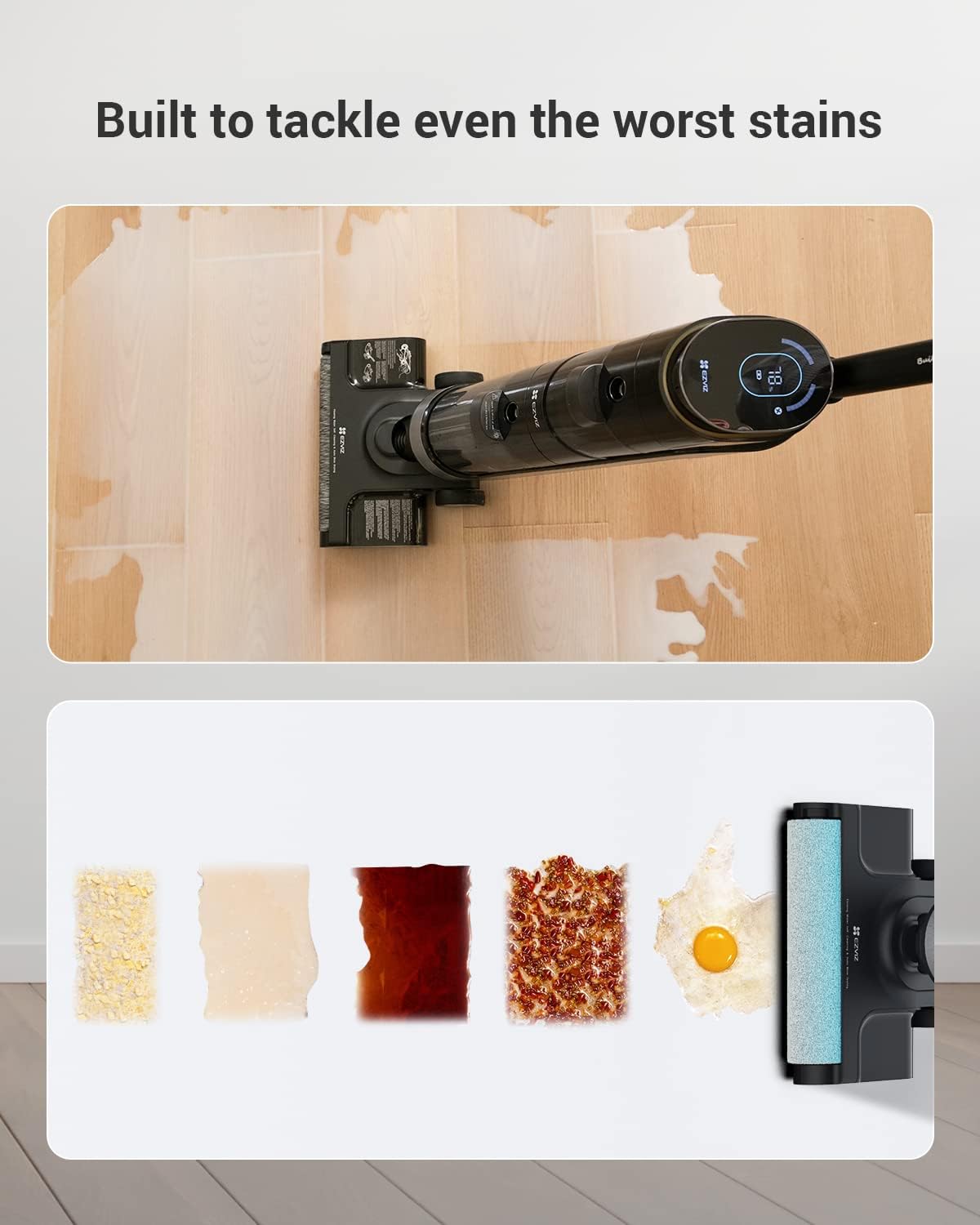
Image: The EZVIZ RH1 cleaning a floor with various types of spills and debris, demonstrating its effectiveness on different messes.
Cleaning Modes
Select the appropriate cleaning mode via the controls on the handle:
- Standard Mode: For light cleaning and general maintenance.
- Auto Mode: The vacuum automatically adjusts suction and water flow based on dirt detection. Recommended for most cleaning tasks.
- Power Mode: Provides maximum suction and brush roll speed for stubborn dirt and heavy messes.

Image: A close-up of the EZVIZ RH1's LCD screen, displaying the selected cleaning mode (Auto) and battery percentage.
LCD Screen and Voice Prompts
The large LED screen displays battery life, current cleaning mode, and maintenance alerts. Voice prompts provide real-time feedback and guidance during operation.

Image: An internal diagram highlighting the motor's speed and the powerful 12,000 Pa suction of the EZVIZ RH1.
Maintenance
Self-Cleaning Cycle
After each use, place the RH1 on its charging base and activate the self-cleaning cycle. This process cleans the brush roll and internal pathways, then dries the brush to prevent odor and germ accumulation.
- Ensure the clean water tank has sufficient water.
- Place the vacuum on the charging base.
- Press the self-clean button (refer to your device for exact button location, usually indicated by a water drop icon).
- The cycle will run automatically. Once complete, empty the dirty water tank.
Dirty Water Tank Management
The RH1 features a dual-tank system, keeping clean and dirty water separate. Empty the dirty water tank after each cleaning session or when prompted by the device.
- Remove the dirty water tank from the main unit.
- Open the tank and dispose of the dirty water and collected debris.
- Rinse the tank thoroughly with clean water.
- Ensure the internal separator (if present) is clean before reattaching the tank.
Brush Roll and HEPA Filter
Regularly inspect and clean the brush roll and HEPA filter for optimal performance.
- Brush Roll: The self-cleaning function handles daily cleaning. For deeper cleaning or to remove tangled hair, detach the brush roll cover and remove the brush. Use the provided cleaning brush to remove debris.
- HEPA Filter: Rinse the HEPA filter under running water as needed. Allow it to air dry completely before reinserting. Replace the filter periodically (an extra filter is included).
Troubleshooting
- No Power/Not Charging:
- Ensure the power adapter is securely connected to both the charging base and a working power outlet.
- Verify the vacuum is correctly seated on the charging base.
- Check for any damage to the power cord or adapter.
- Reduced Suction/Poor Cleaning Performance:
- Check if the dirty water tank is full and needs emptying.
- Inspect the brush roll for tangled hair or debris and clean it.
- Ensure the clean water tank has enough water and is properly installed.
- Clean or replace the HEPA filter.
- Check for blockages in the air ducts or nozzle.
- Water Not Dispensing:
- Ensure the clean water tank is filled and correctly installed.
- Check for any blockages in the water spray nozzle.
- Unusual Noise:
- Turn off the device and inspect the brush roll for foreign objects.
- Check for any loose parts or blockages in the air path.
Specifications
| Feature | Detail |
|---|---|
| Brand | EZVIZ |
| Model Number | OB03011 (also 314100006) |
| Color | Black |
| Dimensions (L x W x H) | 28 x 22.7 x 110 cm |
| Item Weight | 4.7 Kilograms |
| Capacity | 4 Liters (likely total tank capacity, or clean water tank) |
| Power | 180 Watts |
| Voltage | 220 Volts |
| Noise Level | 75 Decibels |
| Runtime | 20 minutes |
| Special Features | 12,000 Pa Suction, Dual-tank design, Intelligent suction/flow control, Smart stain detection, 3-in-1 (mop, vacuum, floor cleaner) |
| Filter Type | HEPA |
| Surface Recommendation | Hard floors, tiles, marble, vitrified parquet, laminate, PVC |
| Power Source | Battery Powered (1 Lithium-ion battery included) |
| Cordless | Yes |
Warranty and Support
Specific warranty details are not provided in this manual. For warranty information, technical support, or to purchase replacement parts, please refer to the official EZVIZ website or contact their customer service directly. Keep your purchase receipt for warranty claims.


