1. Introduction
Thank you for choosing the VEWIOR Air Purifier Model HQSC-50. This device is designed to improve indoor air quality by filtering out various airborne particles and odors. This manual provides essential information for the safe and efficient use of your air purifier. Please read it thoroughly before operation and retain it for future reference.
2. Important Safety Instructions
To reduce the risk of fire, electric shock, or injury, please observe the following safety precautions:
- Always unplug the air purifier before moving, cleaning, or performing any maintenance.
- Do not operate the unit with a damaged cord or plug. If the cord or plug is damaged, contact customer support.
- Keep the power cord away from heated surfaces.
- Do not use the air purifier in wet or damp environments, such as bathrooms or laundry rooms.
- Ensure the air inlet and outlet are not blocked. Maintain at least 6 inches (15 cm) clearance from walls and furniture.
- Do not insert fingers or foreign objects into any openings.
- This appliance is not intended for use by persons (including children) with reduced physical, sensory, or mental capabilities, or lack of experience and knowledge, unless they have been given supervision or instruction concerning use of the appliance by a person responsible for their safety.
- Children should be supervised to ensure that they do not play with the appliance.
- Use only genuine VEWIOR replacement filters.
3. Product Overview
3.1 Package Contents
- VEWIOR Air Purifier (Model HQSC-50)
- H13 True HEPA Filter (pre-installed)
- Charging Adapter
- User Manual
3.2 Product Diagram
Familiarize yourself with the main components of your air purifier:

3.3 Control Panel
The intuitive LED touch panel allows for easy control of all functions:

- PM2.5 Display: Shows the current particulate matter level in the air.
- Gear Indicator: Displays the current fan speed setting.
- Timer Indicator: Shows the remaining time if a timer is set.
- MODE Button: Cycles through fan speeds (Low, Medium, High) and Sleep mode.
- TIMER Button: Sets the auto-off timer (2H, 4H, 6H, 8H, 10H, 12H).
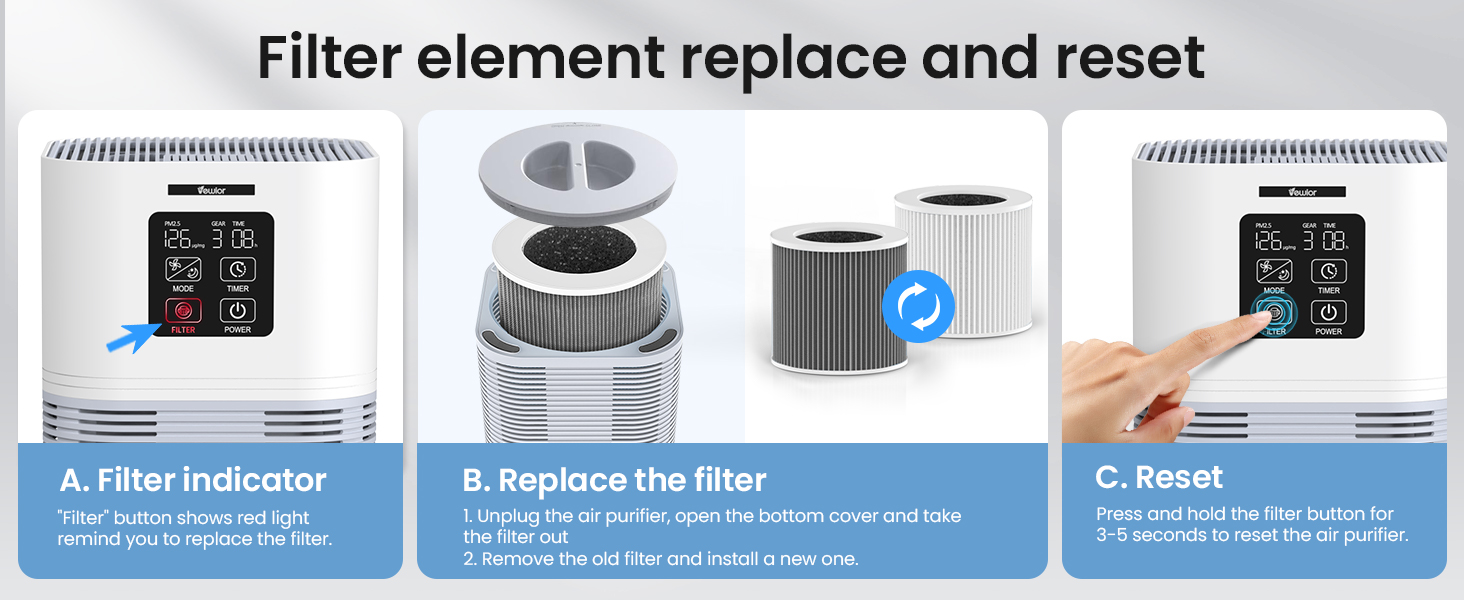
- FILTER Button: Indicates when the filter needs replacement and is used to reset the filter life counter.
- POWER Button: Turns the unit on or off.
3.4 Filtration System
The VEWIOR Air Purifier utilizes a 3-stage filtration system to effectively clean the air:
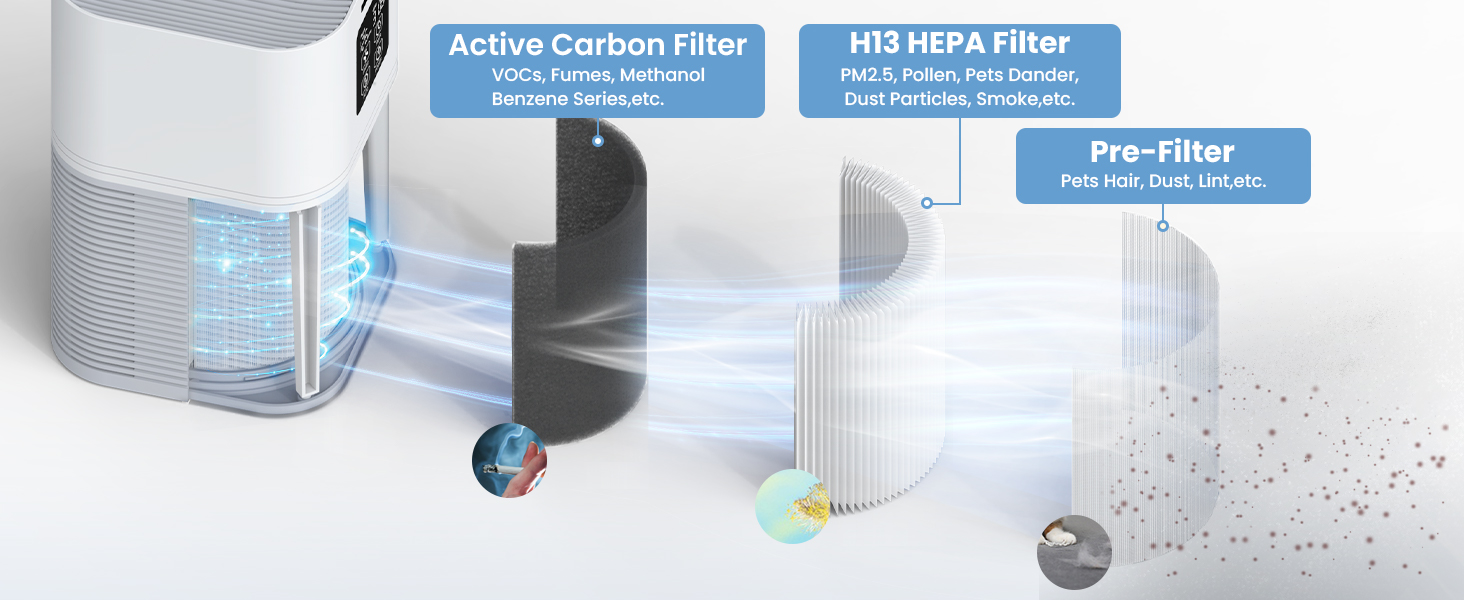
- Pre-Filter: Captures large particles such as dust, lint, and pet hair.
- H13 True HEPA Filter: Traps 99.97% of airborne particles 0.3 microns in size, including pollen, pet dander, and smoke particles.
- Activated Carbon Filter: Absorbs odors, VOCs (Volatile Organic Compounds), and other harmful gases.
4. Getting Started
4.1 Unpacking and Placement
- Remove the air purifier from its packaging.
- Place the unit on a firm, level surface.
- Ensure there is at least 6 inches (15 cm) of space around all sides of the air purifier for optimal airflow.
4.2 Filter Installation (First Use)
The filter comes pre-installed but is sealed in plastic for protection. You must remove the plastic packaging before first use.
- Unplug the air purifier from the power outlet.
- Gently turn the unit upside down.
- Twist the base cover counter-clockwise to unlock and remove it.
- Carefully remove the filter from the unit.
- Remove all plastic packaging from the filter.
- Insert the unwrapped filter back into the air purifier, ensuring it sits securely.
- Replace the base cover and twist clockwise to lock it into place.
- Return the air purifier to an upright position.
4.3 Power Connection
Plug the power adapter into the air purifier's power port, then plug the adapter into a standard electrical outlet.
5. Operating Instructions
5.1 Power On/Off
- Press the POWER button to turn the air purifier on. The unit will start in automatic mode.
- Press the POWER button again to turn the unit off.
5.2 Adjusting Fan Speed / Mode
- Press the MODE button to cycle through fan speeds: Low (1), Medium (2), High (3), and Sleep mode.
- In Sleep Mode, the fan operates at its lowest speed, and the display lights dim or turn off for quiet operation.

5.3 Timer Settings
- Press the TIMER button repeatedly to set the auto-off timer for 2, 4, 6, 8, 10, or 12 hours.
- The unit will automatically turn off once the set time has elapsed.
- To cancel the timer, press the TIMER button until no timer duration is displayed.
5.4 Aromatherapy Function
The air purifier includes a fragrance sponge for essential oils (not included).
- Locate the small compartment on the top of the air purifier.
- Open the compartment to access the fragrance sponge.
- Add a few drops of your preferred essential oil onto the sponge.
- Close the compartment. As the air purifier operates, the fragrance will be diffused into the room.

6. Care and Maintenance
6.1 Filter Replacement
The filter indicator light will illuminate when it's time to replace the filter (typically every 3-6 months, depending on usage and air quality).
- Unplug the air purifier from the power outlet.
- Turn the unit upside down and remove the base cover by twisting it counter-clockwise.
- Remove the old filter and dispose of it properly.
- Insert a new, genuine VEWIOR H13 True HEPA filter (Model HQSC-50F) into the unit. Ensure it fits snugly.
- Replace the base cover and twist clockwise to lock it.
- Plug the air purifier back in.
- To reset the filter life indicator, press and hold the FILTER button for 3-5 seconds until the light turns off.

6.2 Cleaning the Unit
- Always unplug the air purifier before cleaning.
- Wipe the exterior of the unit with a soft, dry cloth.
- Do not use abrasive cleaners, waxes, or solvents.
- Clean the air inlet and outlet vents with a soft brush or vacuum cleaner attachment to remove dust buildup.
- The filter is not washable and should not be cleaned with water.
7. Troubleshooting Guide
If you encounter any issues with your air purifier, please refer to the table below for common problems and solutions:
| Problem | Possible Cause | Solution |
|---|---|---|
| Air purifier does not turn on. | Not plugged in; Power outlet malfunction; Power adapter damaged. | Ensure the power cord is securely plugged into a working outlet. Try a different outlet. Contact customer support if the adapter is damaged. |
| Weak airflow or unusual noise. | Filter clogged; Air inlets/outlets blocked; Filter plastic not removed. | Check and replace the filter if necessary. Ensure no obstructions are blocking the vents. Verify plastic packaging has been removed from the filter. |
| Filter indicator light remains on after replacement. | Filter life counter not reset. | Press and hold the FILTER button for 3-5 seconds to reset the indicator. |
| No fragrance from aromatherapy. | No essential oil added; Sponge is dry. | Add a few drops of essential oil to the fragrance sponge. Ensure the sponge is moist. |
| PM2.5 reading is high. | Poor air quality detected; Sensor is dirty. | Allow the purifier to run for some time. If the reading remains high, gently clean the air quality sensor opening with a dry cotton swab. |
8. Technical Specifications
| Feature | Specification |
|---|---|
| Brand | VEWIOR |
| Model | HQSC-50 |
| Dimensions (D x W x H) | 6.2" x 6.2" x 10" (15.7cm x 15.7cm x 25.4cm) |
| Item Weight | 2.36 pounds (1.07 kg) |
| Floor Area Coverage | Up to 1200 sq.ft (111.6 m²) |
| Noise Level | 18 dB (lowest setting) |
| Filtration Type | 3-Stage (Pre-Filter, H13 True HEPA, Activated Carbon) |
| Particle Retention Size | 2.5 Micron (PM2.5) |
| Controller Type | Button Control |
| Wattage | 50W |
| Special Feature | Aromatherapy Diffuser, Air Quality Monitoring |
| Certification | CARB Certified |
9. Warranty and Customer Support
VEWIOR products are manufactured to high-quality standards. For warranty information, please refer to the documentation included with your purchase or visit the official VEWIOR website. If you have any questions, concerns, or require technical assistance, please contact VEWIOR customer support:
- Email: [Insert Customer Support Email Here]
- Phone: [Insert Customer Support Phone Number Here]
- Website: VEWIOR Official Store
Please have your model number (HQSC-50) and purchase details ready when contacting support.


