
1. Product Overview
The Spartan Power SpartanStart is a soft start kit designed for RV air conditioning units up to 20,000 BTU. It enables the operation of your RV A/C with lower power sources, such as a 2200-watt power inverter or generator, without excessive battery drain. This system reduces the initial surge current required by the A/C compressor, making it more efficient and extending the life of your equipment. It features a Generator Anti-Stall & Preload function to prevent generator duress during compressor startup and provides motor reversal protection during short power outages.
Video Description: An overview of the Spartan Power SpartanStart RV A/C Soft Starter, explaining its benefits and how it allows RV air conditioners to start with less power. This video is provided by Inverters-R-US, a seller of Spartan Power products.
2. What's in the Box
Each SpartanStart kit includes the following components:
- 1 SpartanStart Soft Starter Unit
- 6 Splice Connectors
- 1 Cleaning Wipe
- 2 Automotive Grade Mounting Tape Strips

Image Description: A visual representation of the SpartanStart kit contents, including the soft starter unit, splice connectors, cleaning wipe, and mounting tape strips.
3. Setup and Installation
Installation of the SpartanStart is designed to be straightforward, typically involving three wires. Always ensure all power to the A/C unit is disconnected before beginning installation.
3.1. Preparation
- Disconnect Power: Ensure all power to your RV A/C unit is completely disconnected at the breaker or power source.
- Access A/C Unit: Open your A/C unit's outer cover on the roof. This usually involves removing a few screws.
- Identify Wires: Locate the three wires (Run, Common, and Start) that connect your A/C compressor to its power supply. These are often found in a sheath. Refer to your A/C unit's wiring diagram for precise identification.
- Choose Mounting Location: Select a mounting location for the SpartanStart unit that is close to these three wires, allowing sufficient slack for connection. Avoid areas directly exposed to extreme heat.
- Clean Surface: Use the provided cleaning wipe (or Windex and a paper towel for heavily soiled areas, followed by the wipe) to thoroughly clean the mounting surface if using the adhesive strips.
3.2. Wiring Connections
The SpartanStart unit has three wires on its 'Supply' side and three wires on its 'Compressor' side. These correspond to the Run (R), Common (C), and Start (S) wires of your A/C unit.
- Supply Side Connection: Cut the three wires from your A/C unit's power supply. Match and connect these wires to the corresponding wires on the 'Supply' side of the SpartanStart unit.
- Compressor Side Connection: Match and connect the three wires from the 'Compressor' side of the SpartanStart unit to the corresponding wires leading into your A/C compressor.
- Secure Connections: Use the provided splice connectors to ensure secure and insulated connections.

Image Description: The SpartanStart unit displaying its integrated wiring diagram, illustrating the connections for the Run (R), Common (C), and Start (S) wires on both the supply and compressor sides.
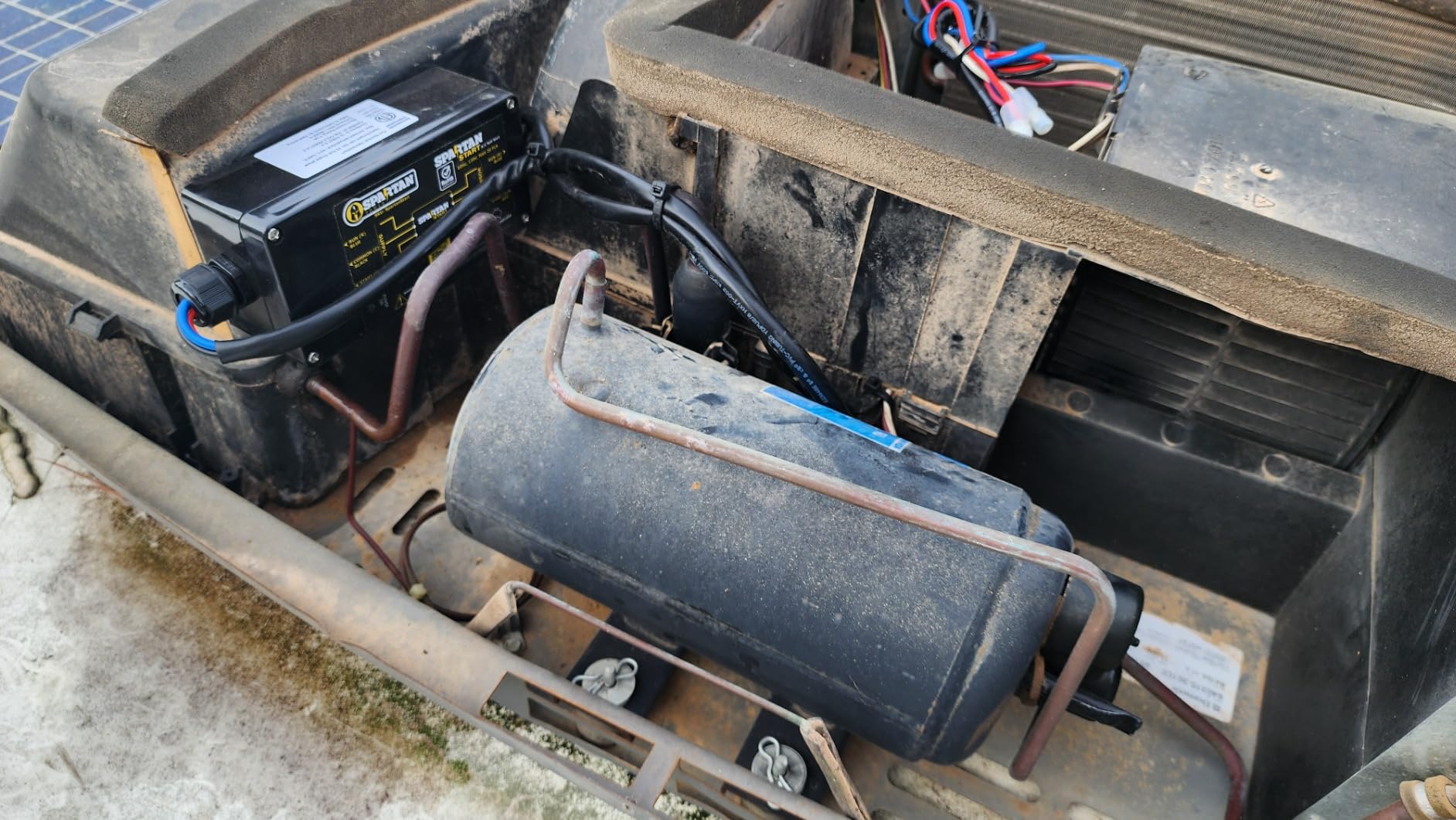
Image Description: A table listing various RV A/C manufacturers (e.g., Dometic, Coleman, Furrion) and their typical wire color codes for Run, Common, and Start connections, alongside the SpartanStart's corresponding wire colors.
3.3. Final Steps
- Mount Unit: Securely mount the SpartanStart unit in your chosen location using either the pre-drilled holes for screws or the provided automotive-grade adhesive strips.
- Replace Cover: Once all connections are secure and the unit is mounted, replace the A/C unit's outer cover.
- Restore Power: Reconnect power to your RV A/C unit.
For a detailed visual guide, you can scan the QR code on the unit or visit http://bit.ly/SpartanStartManual?r=qr for the online manual.
4. Operating Instructions
The SpartanStart operates automatically once installed. It intelligently manages the power delivery to your A/C compressor, reducing the initial current draw during startup. There are no learning cycles required; the unit functions immediately upon installation. Simply operate your RV A/C unit as you normally would, and the SpartanStart will optimize its startup performance.
5. Maintenance
The SpartanStart is designed for durability and requires minimal maintenance. Periodically inspect the unit and its connections for any signs of wear or damage. Ensure the mounting remains secure. Keep the unit free from excessive dust or debris. No internal user-serviceable parts are present.
6. Troubleshooting
If you encounter issues with your SpartanStart or A/C unit after installation, consider the following:
- No Power/Unit Not Functioning: Verify all power connections are secure and that the main power supply to the A/C unit is active. Check for any tripped breakers.
- A/C Not Starting: Double-check all wiring connections against the provided diagram and your A/C unit's specific wiring. Ensure the correct wires (Run, Common, Start) are connected to their respective terminals on the SpartanStart.
- LED Status Lights: The SpartanStart unit features LED status lights. Refer to the online manual for interpretation of these lights, which can indicate operational status or fault conditions (e.g., overload protection, low voltage).
- Generator Stalling: While the SpartanStart includes an anti-stall feature, ensure your generator is adequately sized for the A/C unit's running wattage. If issues persist, contact support.
If troubleshooting steps do not resolve the issue, please contact Spartan Power customer support for assistance.
7. Specifications
| Model | SpartanStart |
| Voltage | 120 Volts (AC) |
| Wattage | 2200 watts (Max) |
| Capacity | Up to 20,000 BTU (1.6 Tons) |
| Item Weight | 1.57 pounds |
| Product Dimensions | 9.75 x 5 x 3.5 inches |
| Installation Type | Simple (3 wires) |
| Special Features | 3 Year Warranty, Generator Anti-Stall, Hassle-free Installation, No Learning Cycles |
8. Warranty and Support
The Spartan Power SpartanStart comes with a Three Year Warranty, ensuring reliability and peace of mind. For any installation questions, technical support, or warranty claims, live phone assistance is available directly from Spartan Power in the United States.
Contact Information:
Website: spartanpower.com
Phone: 775-800-1725
It is important to note that this is an electrical device. If you are uncertain about any part of the installation process after reviewing this manual and safety warnings, please contact customer support. They are available to help answer your questions and ensure a safe and correct installation.


