
Introduction
The KAOLALI L3 OBD2 Head-Up Display is designed to project essential driving information directly into your line of sight, enhancing safety and convenience. This device connects to your vehicle's OBD2 port to display data such as speed, engine RPM, water temperature, and more, without requiring a film on the windshield. Its advanced 3D reflection technology ensures a clear and bright display in various lighting conditions.
Package Contents
Please verify that all the following items are included in your package:
- 1 x KAOLALI L3 OBD2 Head-Up Display Unit
- 1 x OBD2 Cable
- 1 x Non-slip Mat
- 1 x Cable Spudger (Crowbar)
- 1 x User Manual
- 1 x Certification
Video: Unboxing and contents of the KAOLALI L3 OBD2 Head-Up Display package.
Product Overview
The KAOLALI L3 OBD2 Head-Up Display features a compact design with an integrated display panel. Key components are:
- Display Panel: The main screen where information is projected.
- Wave Button: Used for navigating menus and adjusting settings.
- Power On/Off Button: Controls the device's power.
- OBD Interface: Port for connecting the OBD2 cable to your vehicle.
- Optical Transparent Reflector: Provides a clear, reflection-free display.
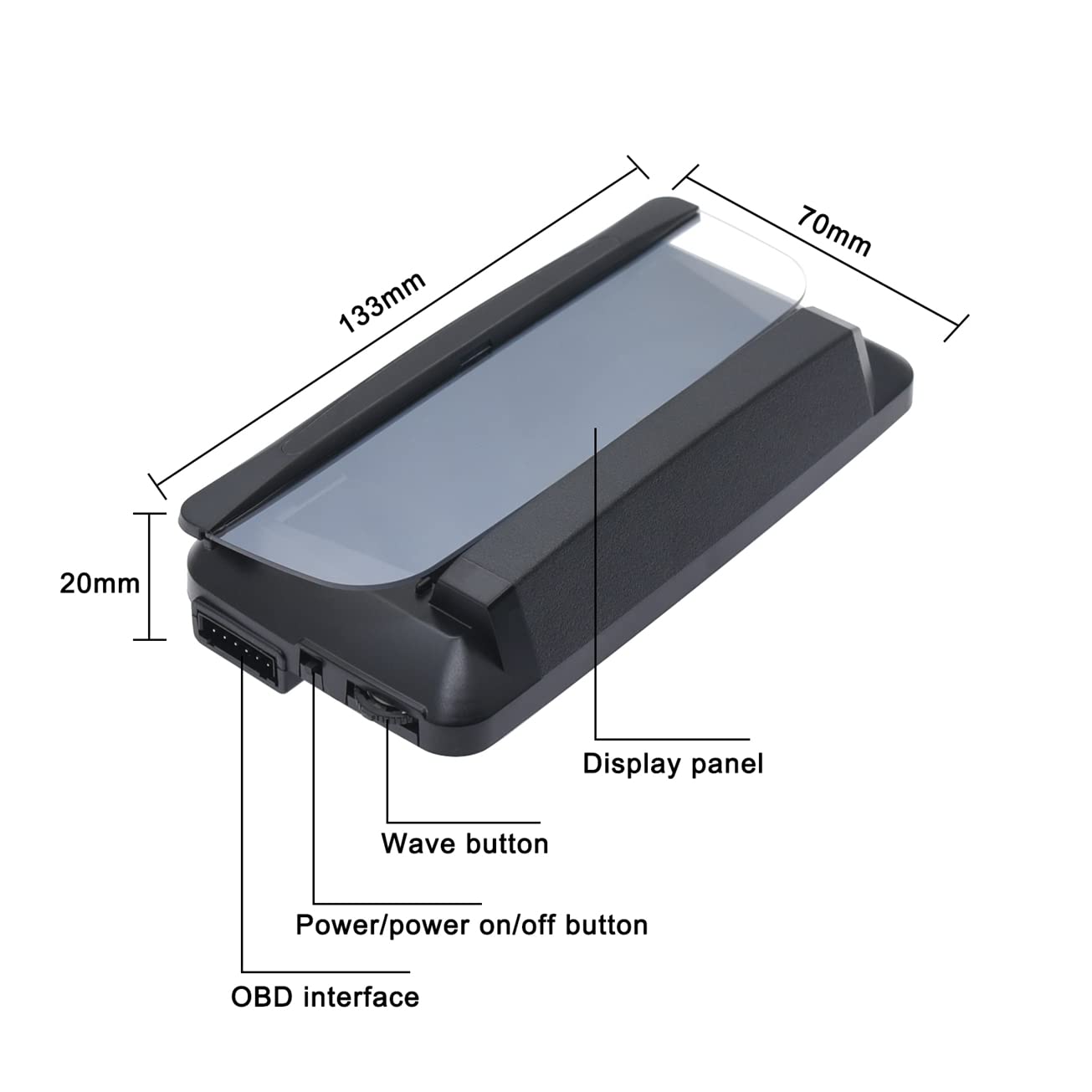
Image: Labeled diagram of the KAOLALI L3 OBD2 HUD unit, highlighting its physical components and dimensions.

Image: Detailed views of the HUD's OBDII interface, wave button, power button, and optical transparent reflector.
Setup
Follow these steps to install your KAOLALI L3 OBD2 Head-Up Display:
- Place the non-slip mat on your dashboard in a position that does not obstruct your view of the road.
- Place the HUD unit on the non-slip mat.
- Connect the OBD2 cable to the HUD unit's OBD interface.
- Locate your vehicle's OBD2 port (typically under the dashboard on the driver's side) and connect the other end of the OBD2 cable.
- Start your vehicle. The HUD unit should power on automatically.
- Use the cable spudger to neatly tuck away the OBD2 cable for a clean installation.
Compatibility Note: This OBD2 HUD is generally suitable for cars produced after 2004 (American cars) and 2008 (European and Asian cars). It is not compatible with most hybrid electric cars, diesel cars, pickup trucks, RVs, or other special vehicles. Please confirm your vehicle's compatibility before installation.
Operating Instructions
The HUD offers various functions and display modes:
Interface Modes
The device provides 6 different interface modes to display various information. Use the wave button to cycle through these modes and select your preferred display:
- Interface 1: Speed, RPM, Water Temperature, Voltage
- Interface 2: Speed, Time
- Interface 3: Speed, Single Driving Distance
- Interface 4: Speed, Water Temperature
- Interface 5: Speed, RPM
- Interface 6: Speed, Fuel Consumption

Image: Six multi-functional display interfaces available on the HUD.
Unit Switching
Speed units can be switched between Kilometers per Hour (KM/H) and Miles per Hour (MPH). When MPH is selected, related units like water temperature, one-way driving distance, and fuel consumption will automatically switch to Fahrenheit (°F), Miles, and Miles Per Gallon (MPG) respectively.
Alarm Functions
The device includes several alarms to enhance driving safety:
- Speed Alarm: Flashes to alert when a preset speed limit is exceeded.
- Fatigue Driving Alarm: Reminds the driver to take a break after extended driving periods.
- Engine RPM Fault Alarm: Alerts to abnormal engine RPM.
- Low Voltage Alarm: Indicates when the battery voltage drops below a set value.
- Water Temperature Alarm: Warns if the engine water temperature exceeds a safe limit.
Video: Demonstration of the KAOLALI L3 OBD2 HUD in operation while driving, showing speed and other data.
Features
The KAOLALI L3 OBD2 Head-Up Display incorporates several key features for an optimal user experience:
- Automatic Brightness Adjustment: The display automatically adjusts its brightness based on ambient light conditions, ensuring clear visibility during both day and night driving without manual intervention.
- 3D Reflection Technology: This technology projects information onto a transparent display board, providing a clear, reflection-free view and eliminating double images often associated with traditional HUDs. The brightness is increased by 20% to maintain clarity even in direct sunlight.

Image: Automatic light adjustment feature of the HUD, showing clear display in different lighting.
Maintenance
To ensure optimal performance and longevity of your HUD, follow these simple maintenance guidelines:
- Cleaning: Keep the display panel clean and free from dust. Use a soft, dry, lint-free cloth for cleaning. Avoid using harsh chemicals, abrasive materials, or excessive moisture, as these can damage the display surface.
- Storage: When not in use for extended periods, store the HUD in a cool, dry place away from direct sunlight and extreme temperatures.
Troubleshooting
If you encounter issues with your KAOLALI L3 OBD2 Head-Up Display, please refer to the following common problems and solutions:
- Display Not Turning On:
Ensure the OBD2 cable is securely connected to both the HUD unit and your vehicle's OBD2 port. Verify that your vehicle's ignition is in the 'ON' position or the engine is running. - Inaccurate Speed Reading:
The HUD's speed reading may slightly differ from your vehicle's speedometer due to various factors, including tire size variations or vehicle manufacturer settings. Most HUDs allow for a speed calibration adjustment. Please refer to the detailed user manual (physical copy) for specific calibration instructions if available, or contact customer support for guidance. - Double Image or Blurry Display:
Ensure the transparent reflector on the HUD unit is clean and free from smudges or dust. Adjust the viewing angle of the HUD unit on your dashboard. While the 3D reflection technology is designed to minimize this, extreme lighting conditions or improper placement can sometimes affect clarity. - HUD Powers Off While Driving:
Check the OBD2 cable connection for looseness. Ensure your vehicle's OBD2 port is functioning correctly. This could also indicate a low voltage condition in your vehicle's electrical system, triggering the low voltage alarm.
Specifications
| Feature | Detail |
|---|---|
| Model | OBD2 Connection |
| Ambient Temperature | -30℃ to 85℃ |
| Power Supply Voltage | 12-36V |
| Dimensions | 135 x 68 x 30 mm |
| Material | Rubber |
| Part Number | SD-1 |
Warranty and Support
Warranty: The KAOLALI L3 OBD2 Head-Up Display comes with a half-year warranty from the date of purchase. This warranty covers manufacturing defects under normal use.
Support: For technical assistance, troubleshooting, or warranty claims, please refer to the contact information provided in your product packaging or visit the official KAOLALI support website for further assistance.