
Introduction
The Bose L1 Pro8 is a highly portable line array PA system designed for musicians, DJs, and presenters. It offers a generous 180-degree horizontal coverage with wide vertical dispersion, ensuring clear audio for audiences in small to medium-sized venues. Featuring an integrated mixer and Bluetooth connectivity, the L1 Pro8 provides quick setup and superior sound clarity.
This manual provides essential information for the proper use and care of your L1 Pro8 system.

Image: The Bose L1 Pro8 Portable PA System, showcasing its sleek, assembled design.
Setup
Unpacking and Assembly
- Carefully remove all components from the packaging: the L1 Pro8 power stand (subwoofer), and the line array extension and array module.
- Place the power stand on a stable, flat surface.
- Align the line array extension with the connector on top of the power stand and gently push down until it clicks into place.
- Align the line array module with the connector on top of the extension and push down until it clicks into place. Ensure all connections are secure.

Image: The main components of the L1 Pro8 system, including the power stand (subwoofer) and the two line array sections, ready for assembly.
Power Connection
- Connect the supplied AC power cord to the power input on the rear of the L1 Pro8 power stand.
- Plug the other end of the power cord into a live electrical outlet.
- Press the power button located on the rear panel to turn on the system. The power indicator will illuminate.

Image: The Bose L1 Pro8 Portable PA System fully assembled, viewed from the front.
Operating Your L1 Pro8 System
Mixer Controls
The L1 Pro8 features an integrated 3-channel mixer with illuminated rotary encoders for instant access to settings.
- Volume: Adjusts the overall output level for the corresponding channel.
- Reverb: Controls the amount of reverberation effect applied to the channel.
- Bass: Adjusts the low-frequency response for the channel.
- ToneMatch Presets: Channels 1 and 2 offer ToneMatch presets for microphones and instruments. Use the dedicated button to cycle through options (Mic, Inst, Off).
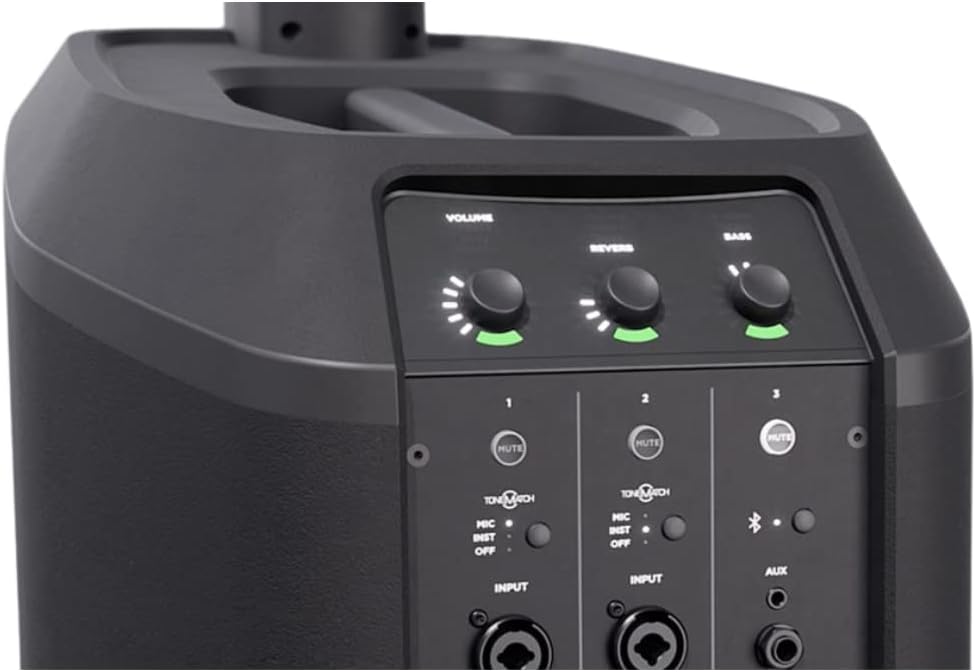
Image: A detailed view of the L1 Pro8's integrated mixer, showing the Volume, Reverb, and Bass control knobs, along with input channels.
Input Connections
The L1 Pro8 provides versatile input options:
- Channels 1 & 2: Two combo XLR-1/4" inputs with phantom power for microphones and instruments.
- Channel 3: Features a 1/4" auxiliary input, a 1/8" (3.5 mm) auxiliary input, and Bluetooth streaming capability.
- Line Out: XLR balanced line output for connecting to other systems or recording devices.

Image: The rear panel of the L1 Pro8, displaying all available input and output ports, including XLR, 1/4", 1/8" (3.5mm) auxiliary, and power input.
Bluetooth Connectivity
- Press and hold the Bluetooth button on Channel 3 until the Bluetooth indicator light begins to flash.
- On your mobile device, enable Bluetooth and select "Bose L1 Pro8" from the list of available devices.
- Once connected, the Bluetooth indicator light will glow solid. You can now stream audio wirelessly to your L1 Pro8 system.
L1 Mix App
The L1 Mix app provides intuitive wireless control over your L1 Pro8 system. Download the app from your device's app store.
- Adjust mixer settings, volume, tone, and reverb from your mobile device.
- Walk around the venue to fine-tune your mix from different listening positions.
- The app and the physical mixer controls are always synchronized in real-time.
Maintenance
Proper maintenance ensures the longevity and optimal performance of your L1 Pro8 system.
- Cleaning: Use a soft, dry cloth to clean the exterior surfaces. Do not use liquid cleaners or solvents. Ensure the system is powered off and unplugged before cleaning.
- Storage: Store the system in a cool, dry environment. When transporting, use appropriate carrying bags or cases to protect components from damage.
- Ventilation: Ensure that the ventilation openings on the power stand are not blocked during operation to prevent overheating.
- Cable Management: Keep cables organized and free from kinks or excessive bending to prevent damage.
Troubleshooting
This section addresses common issues you might encounter with your L1 Pro8 system.
| Problem | Possible Solution |
|---|---|
| No sound output |
|
| Bluetooth not connecting or dropping out |
|
| Distorted audio |
|
Technical Specifications
Key specifications for the Bose L1 Pro8 Portable PA System:
| Feature | Detail |
|---|---|
| Model Name | L1 Pro8 |
| Brand | Bose |
| Maximum Speaker Output Power | 120 Watts |
| Connectivity Technology | Bluetooth, XLR, 1/4", 1/8" |
| Audio Output Mode | Stereo |
| Mounting Type | Tabletop Mount |
| Housing Material | Plastic and Aluminum |
| Speaker Type | Portable PA |
| Recommended Uses | Live performances, musical events, entertainment |
| Color | Black |
| Control Method | Application |
| Woofer Diameter | 2 Inches (for line array drivers) |
| Item Weight | 22 Kilograms |
| Compatible Devices | Laptop, Smartphone |
| Audio Channel Number | 2.0 |
| GTIN | 614524550912 |
Warranty and Support
Warranty Information
The Bose L1 Pro8 Portable PA System comes with a one-year manufacturer's limited warranty. This warranty covers defects in materials and workmanship under normal use. Please retain your proof of purchase for warranty claims.
Customer Support
For technical assistance, troubleshooting beyond this manual, or warranty service, please contact Bose customer support. Refer to the official Bose website or your product registration materials for the most current contact information.


