
1. Product Overview
The Chamberlain CHSL400EVC is a robust motorization solution designed for sliding gates. It offers efficient and quiet operation for gates weighing up to 400 kg and with a maximum width of 4 meters. This system incorporates a soft start and stop function for smooth and careful gate movement. It is also compatible with myQ technology for smart control via smartphone or tablet (myQ Starter Kit sold separately).

Image 1.1: The Chamberlain CHSL400EVC sliding gate motor system, including the main motor unit, two remote controls, and two infrared photocells. This image provides a comprehensive view of the primary components included in the package.
Key Features:
- High Capacity: Supports sliding gates up to 400 kg and 4 meters wide.
- Smooth Operation: Features soft start and stop for quiet and gentle gate movement.
- Energy Efficient: Consumes only 4.45 W in standby mode.
- myQ Compatibility: Ready for integration with myQ smart home technology for remote access and control (optional accessory).
- Comprehensive Kit: Includes motor, control panel, remote controls, infrared photocells, unlocking keys, and rack.
2. Package Contents
Before beginning installation, verify that all components listed below are present in your package. If any items are missing or damaged, please contact customer support.

Image 2.1: An overhead view displaying all components included in the Chamberlain CHSL400EVC sliding gate motor kit. This includes the motor unit, remote controls, photocells, rack segments, mounting hardware, and the instruction manual.
- 1x Motor with control panel
- 2x 4-channel Remote Controls
- 1x Infrared Photocell Barrier (pair)
- 2x Unlocking Keys
- Rack segments (totaling 1x33 cm, typically multiple pieces)
- Installation Manual
- Mounting Hardware (screws, washers, etc.)
3. Setup and Installation
Proper installation is crucial for the safe and efficient operation of your sliding gate motor. It is recommended that installation be performed by a qualified professional. Always refer to the detailed installation manual provided in the package for specific instructions, safety warnings, and wiring diagrams.
General Installation Steps (Consult detailed manual for specifics):
- Site Preparation: Ensure the gate area is clear and level. Verify the gate moves freely and smoothly on its track.
- Motor Mounting: Securely mount the motor unit on a stable, level concrete base adjacent to the gate. The motor should be positioned so its drive gear aligns correctly with the gate's rack.
- Rack Installation: Attach the rack segments along the bottom edge of the gate, ensuring they are level and properly meshed with the motor's drive gear. Leave a small gap (approx. 1-2mm) between the rack and the gear to allow for thermal expansion and smooth operation.
- Photocell Installation: Mount the infrared photocells on opposite sides of the gate opening, ensuring they are aligned and at the recommended height. These provide a safety barrier to prevent the gate from closing if an obstruction is detected.
- Electrical Connection: Connect the motor to the main power supply according to local electrical codes and the provided wiring diagram. Ensure all connections are secure and insulated.
- Limit Switch Adjustment: Adjust the motor's limit switches to define the fully open and fully closed positions of the gate.
- Remote Control Programming: Program the remote controls to operate the gate motor.
- Safety Testing: Perform thorough safety tests, including photocell functionality and emergency stop procedures, before regular use.

Image 3.1: An illustration showing the Chamberlain sliding gate motor installed at the base of a modern sliding gate. This demonstrates the typical placement and integration of the motor with the gate structure.
4. Operating Instructions
The Chamberlain CHSL400EVC sliding gate motor is designed for user-friendly operation. The primary method of control is via the included remote controls. For advanced features and remote access, the optional myQ Starter Kit can be integrated.
4.1. Using the Remote Control
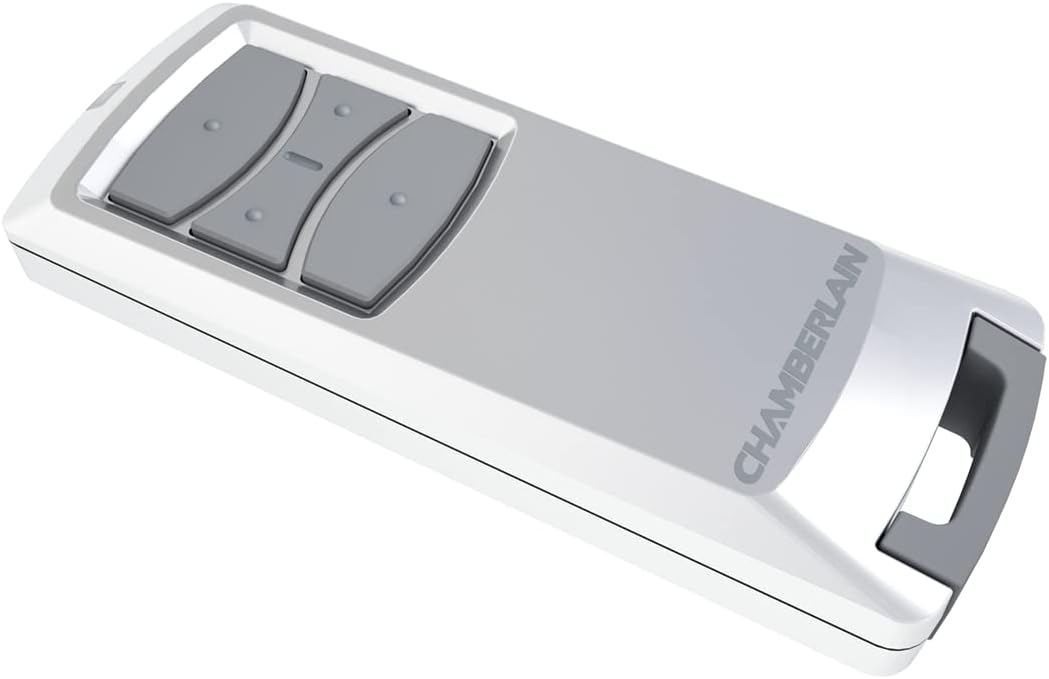
Image 4.1: A close-up view of the Chamberlain 4-channel remote control. This remote is used to send commands to the gate motor, such as opening, closing, or stopping the gate.
- Open/Close: Press the designated button on your remote control to initiate the gate's movement. A single press typically toggles between opening, stopping, and closing.
- Stop: Press the same button again during gate movement to stop the gate at any desired position.
- Multiple Gates: If you have multiple Chamberlain devices, the 4-channel remote allows you to program different buttons for different devices.
4.2. Manual Release
In case of a power outage or system malfunction, the gate can be operated manually using the provided unlocking keys. Insert the key into the manual release mechanism on the motor unit and turn it to disengage the motor, allowing the gate to be moved by hand.
4.3. myQ Smart Home Integration (Optional)
The CHSL400EVC motor is compatible with the myQ Smart Home Starter Kit (sold separately). This technology allows you to control and monitor your gate from anywhere using your smartphone or tablet via the myQ app.


Image 4.2: Examples of myQ app usage. The left image shows a user receiving a notification about their garage door (or gate) status. The right image displays two smartphones with the myQ app interface, highlighting its remote control and monitoring capabilities.
- Remote Control: Open or close your gate from anywhere with an internet connection.
- Status Alerts: Receive real-time notifications on your phone when the gate opens or closes.
- Activity History: View a log of gate activity.
5. Maintenance
Regular maintenance ensures the longevity and reliable operation of your Chamberlain sliding gate motor. Perform these checks periodically:
- Clean the Motor Unit: Keep the motor housing free from dust, dirt, and debris. Use a soft, dry cloth.
- Inspect the Rack and Gear: Check the gate rack and the motor's drive gear for any signs of wear, damage, or obstructions. Ensure the rack is securely fastened to the gate.
- Lubricate Moving Parts: Apply a suitable lubricant to the gate's wheels, hinges, and any other moving parts to ensure smooth operation. Avoid lubricating the motor's internal components unless specified in the detailed manual.
- Check Photocell Alignment: Ensure the infrared photocells are clean and perfectly aligned. Obstructions or misalignment can prevent the gate from closing.
- Test Safety Features: Periodically test the safety features, such as the photocells, by placing an object in the gate's path to ensure it reverses or stops.
- Power Supply Check: Ensure the power cable is intact and connections are secure.
For detailed maintenance schedules and procedures, refer to the complete installation and maintenance manual.
6. Troubleshooting
This section addresses common issues you might encounter with your Chamberlain CHSL400EVC sliding gate motor. For more complex problems, consult a qualified technician or the full troubleshooting guide in your manual.
| Problem | Possible Cause | Solution |
|---|---|---|
| Gate does not respond to remote control. |
|
|
| Gate stops or reverses unexpectedly. |
|
|
| Motor runs but gate does not move. |
|
|
| Gate moves slowly or with difficulty. |
|
|
7. Technical Specifications
Below are the detailed technical specifications for the Chamberlain CHSL400EVC sliding gate motor:
| Specification | Value |
|---|---|
| Model Number | CHSL400EVC |
| Input Voltage | 230 - 240 V, 50 Hz |
| Motor Voltage | 24V DC |
| Speed | 160 mm/s |
| Standby Power Consumption | 4.45 W (without accessories) |
| Max Gate Width | 4 m |
| Max Gate Weight | 400 kg |
| Product Weight | 12 kg |
| Power | 110 W |
| Product Dimensions (L x W x H) | 13 x 9 x 35 cm |
| Torque | 12 Newton-meters |
| Included Batteries | Yes (for remote controls, CR2032) |
8. Warranty and Support
For information regarding the product warranty, please refer to the warranty card included in your product packaging or visit the official Chamberlain website. Warranty terms and conditions may vary by region.
For technical support, spare parts, or service inquiries, please contact Chamberlain customer service. Contact details can typically be found on the manufacturer's website or in the product documentation.
Note: Information regarding spare parts availability was not provided in the product details. Please contact the manufacturer directly for spare parts inquiries.


