Important Safety Information
Please read the instruction manual carefully before using the product to ensure safe and proper operation. Keep this manual for future reference.
Product Overview
The iRest A710 Alfine 4D Massage Chair is designed to provide a comprehensive full-body massage experience. It incorporates advanced 4D technology, zero gravity reclining, and various specialized massage techniques to promote relaxation and well-being.
Key Features:
- Advanced 4D technology iRest system for precise and deep tissue massage.
- Automatic footrest detection & extension for personalized comfort.
- Full body heating therapy on shoulders, back, waist, and abdomen.
- Calf roller kneading and drainage massage & Foot roller scraping massage.
- Three control methods: AI voice control, TFT touch screen, and quick button access.
- Programme Customization and Memory Function: Create and save personal massage programs.

Image: Overview of the iRest A710 massage chair highlighting various massage points including shoulder airbags, TFT touch screen, wireless phone charging, quick access buttons, palm magnetic therapy, 4D massage rollers, lower back heating therapy, calf airbags, legs rolling and draining massage, foot roller massager, toe heating therapy, and 360° fully-wrapped foot airbags.
Video: An official product video showcasing the iRest A710 4D Massage Chair's features, including the 4D AI massage robot, yoga stretch massage, back cushion with independent shawl design for heat therapy, Tai Chi style calf kneading, wireless recharge station, and Bluetooth 3D digital speakers.
Setup and Assembly
The iRest A710 massage chair requires some assembly. Please follow the steps below carefully. It is recommended to have two people for assembly.
Assembly Steps:
- Unpack Components: Carefully remove all components from the packaging. Identify the main unit, left armrest, right armrest, footrest, and accessories (power cord, touch screen, screws, tools).
- Power Connection: Plug in the power cord to the main unit and turn on the power switch.
- Touch Screen Connection: Align the groove of the touch screen cable terminal and connect it securely. Press the side button of the touch screen to reset the chair.
- Install Right Armrest:
- Connect the air hoses and plug the wires together. Ensure terminals of the same color are connected. Use the provided cloth to cover the connections.
- Buckle the black metal hook on the front of the armrest into the groove of the seat frame.
- Insert the two plastic blocks at the rear of the armrest into the white groove on the seat frame.
- Tap the armrest to ensure it is firmly embedded in the seat frame.
- Fasten the front end of the armrest with the seat frame using M5*12 screws.
- Unzip the shoulder airbag on the armrest. Fix the M6*16 screw into the hole and zip it back.
- Snap the cover into the armrest hole.
- Install Left Armrest: Repeat the same steps as for the right armrest.
- Install Footrest:
- Remove the ties and protective covers from both sides of the footrest connection points.
- Remove the screws on both sides of the footrest connection.
- Remove the sleeves on both sides and install them on the support frame of the footrest.
- Connect the air hose and plug the wires together. Push them inside the chair as much as possible.
- Put down the cover and fix it with screws.
- Fix firmly the protective cover on each side of the support base.
- Zip the cloth to secure the footrest.
- Install Touch Screen Support: Insert the base of the touch screen support into the designated hole on the armrest. Fix it with three M4*10 screws. Put the cover and buckle it. Install the touch screen onto the support.
Video: An official assembly video for the iRest A710 4D Health Cloud Massage Chair, demonstrating step-by-step instructions for connecting components, installing armrests, footrest, and the touch screen.
Operating Instructions
The iRest A710 offers multiple ways to control your massage experience.
Control Methods:
- TFT Touch Screen: The intuitive touch screen allows you to select massage programs, adjust settings, and customize your experience.
- AI Voice Control: Use voice commands for hands-free operation. Simply say "Hi Alice" to activate the voice assistant and issue commands like "Massage on" or "Full-body stretch."
- Quick Button Access: Convenient buttons located on the armrest provide quick access to essential functions like power, heat, and recline adjustments.

Image: Close-up view of the iRest A710's control features, including the TFT touch screen interface, quick access buttons on the armrest, Bluetooth speaker, and wireless charging pad.
Massage Programs and Customization:
- The chair features various pre-set automatic massage programs.
- Utilize the program customization and memory function to create and save your personalized massage routines.
- The chair includes an automatic body scanning system to detect shoulder width, weight, and height, adjusting the massage to your body shape.
- Experience Yoga Stretching, a classic and effective massage technique.

Image: Diagram illustrating the iRest A710's automatic body scanning system, which detects shoulder width, weight, and height to customize the massage experience.
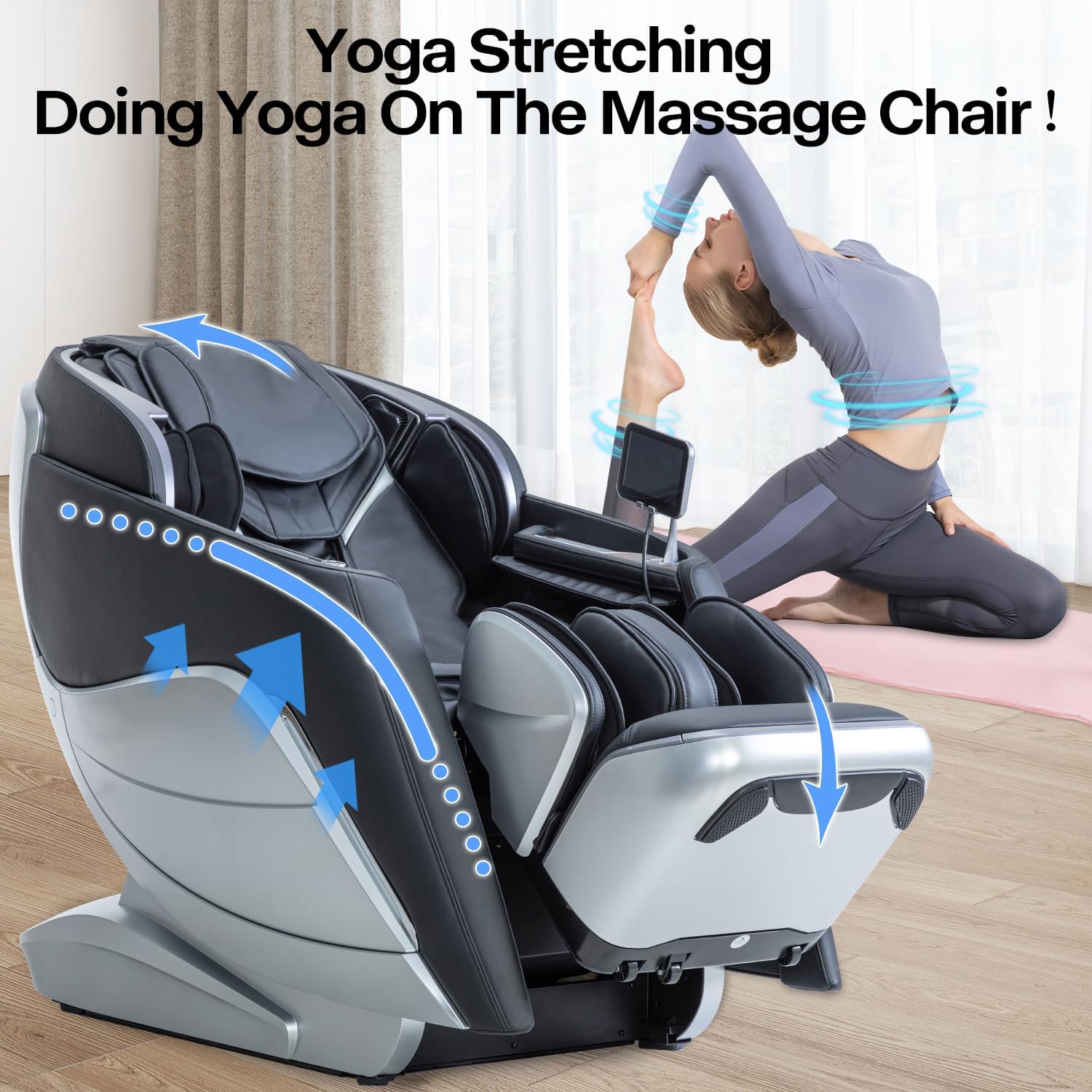
Image: The iRest A710 massage chair in a yoga stretching position, demonstrating its capability to provide full-body stretching for enhanced relaxation.
Maintenance
To ensure the longevity and optimal performance of your iRest A710 massage chair, follow these simple maintenance guidelines:
- Cleaning: Wipe clean with a soft, damp cloth. Avoid harsh chemicals or abrasive cleaners.
- Storage: When not in use for extended periods, store the chair in a cool, dry place away from direct sunlight.
- Regular Checks: Periodically check all connections and fasteners to ensure they are secure.
Troubleshooting
If you encounter any issues with your iRest A710 massage chair, please refer to the following common troubleshooting tips:
- Chair not powering on: Ensure the power cord is securely plugged into both the chair and a working electrical outlet. Check that the main power switch is in the 'on' position.
- Massage rollers not moving: Verify that a massage program is selected on the touch screen or via voice control. Ensure no obstructions are present in the roller track.
- Voice control not responding: Make sure the voice control feature is activated. Speak clearly and at a moderate volume.
- Unusual noises: If you hear any abnormal sounds, immediately turn off the chair and contact customer support.
For more complex issues or if troubleshooting steps do not resolve the problem, please contact iRest customer support.
Specifications
| Feature | Detail |
|---|---|
| Brand | iRest |
| Model Name | SL-A710 |
| Color | Light Black |
| Product Dimensions | 58.27"D x 48.03"W x 33.07"H |
| Item Weight | 292 pounds |
| Maximum Weight Recommendation | 330 Pounds |
| Material | Faux Leather |
| Special Feature | Arm Rest, Cushion Availability, Ergonomic, Heated, Reclining |
| Control Methods | AI Voice Control, TFT Touch Screen, Quick Button Access |
| Massage Technology | 4D, SL Track, Yoga Stretching, Calf Kneading, Foot Scraping |
| Heating Therapy | Shoulders, Back, Waist, Abdomen |
| UPC | 850037299218 |
| Date First Available | March 24, 2022 |

Image: Detailed product dimensions of the iRest A710 massage chair in recline and upright statuses, showing depth, width, and height measurements.
Warranty and Support
Your iRest A710 massage chair is backed by a 3-year warranty. For any inquiries, technical assistance, or warranty claims, please contact our 24/7 customer support.
You can also visit one of our 50+ showrooms across the states. Contact us to find your nearest location.


