
1. Product Overview
The INMEI A10 Portable Teleprompter is a versatile device designed for smartphones and DSLR cameras, ideal for live streaming, interviews, speeches, and video production. It features a 7.95’’×5.68’’ (20.2×14.5cm) screen, compatible with various mobile devices including iPhone 12 Pro Max, iPad Mini, and Galaxy S21+. The teleprompter utilizes beam splitter glass with up to 97% light transmittance for clear text reflection and includes an adjustable hood to minimize light interference. Smart control is provided via an included remote and the Inmei teleprompter App, allowing for easy control of text playback, speed, and page turning.
Key Features:
- Multi-functional Teleprompter: Designed for video recording with DSLR cameras or smartphones, and prompting via teleprompter apps on smartphones/tablets.
- High Definition Display: Features single-sided high reflective mirror with high light transmittance for clear prompting and minimal impact on video recording.
- Wide Compatibility: Supports wide-angle lenses and includes a lens fix pocket for compatibility with most camera lenses, eliminating the need for adapter rings.
- Professional Accessories Extension: Equipped with dual cold shoe mounts for attaching external microphones, LED fill lights, and other accessories.
- Wireless Remote Control: Includes a Bluetooth-enabled remote for convenient control of text playback, speed adjustment, and page turning.
2. Package Contents
Please verify that all items listed below are included in your package:

Image: Contents of the INMEI A10 Teleprompter package, including the main unit, phone holder, remote, and accessories.
- INMEI A10 Teleprompter Unit
- Smartphone/Tablet Holder
- Wireless Remote Control
- Lens Fix Pocket / Hood
- Cleaning Cloth
- User Manual
- Various foam rings for camera lenses
- Mounting plate/bracket
3. Setup Guide
Follow these steps to assemble and prepare your INMEI A10 Teleprompter for use.
Assembly Steps:
- Attach Teleprompter to Tripod: Secure the main teleprompter unit to a compatible tripod or light stand using the 1/4-inch screw mount at the base. Ensure it is stable.
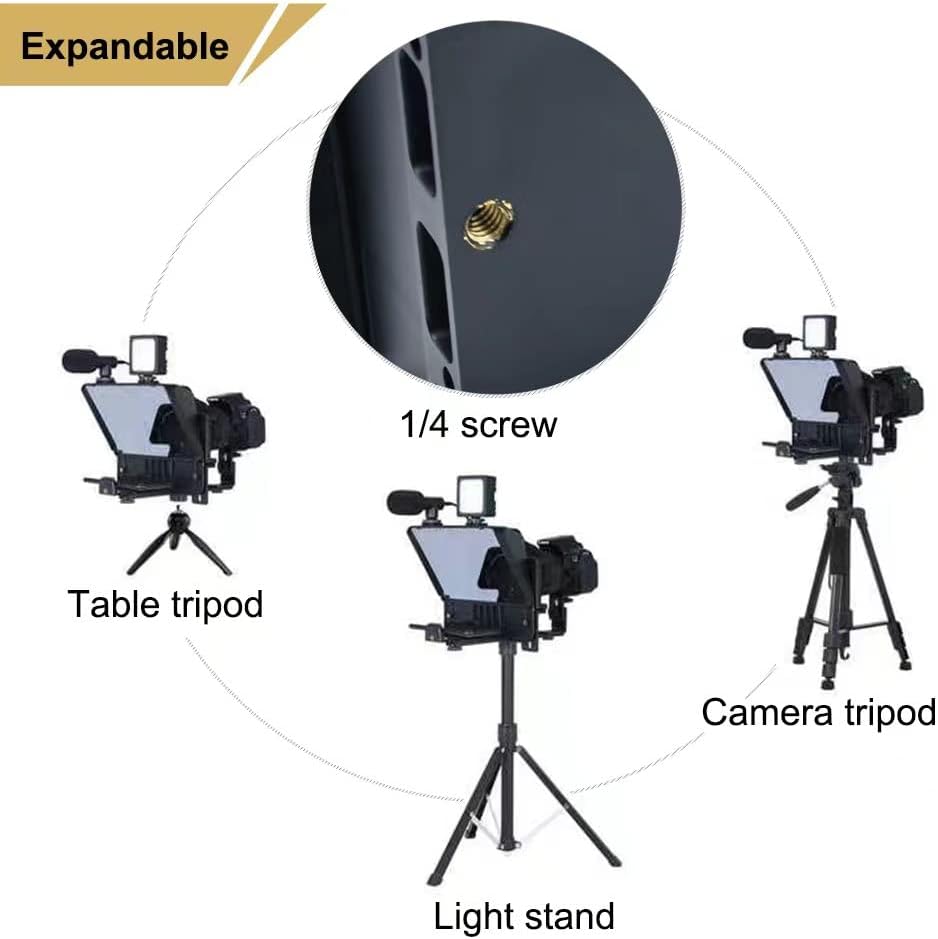
Image: The teleprompter unit shown mounted on a table tripod, camera tripod, and light stand, demonstrating its versatility.
- Install Smartphone/Tablet Holder: Slide the smartphone/tablet holder into the designated slot at the bottom of the teleprompter unit and secure it with the locking knob. This holder will face upwards towards the beam splitter glass.
- Insert Smartphone/Tablet: Place your smartphone or tablet into the holder. Ensure it is securely seated and positioned correctly for the text to be reflected clearly on the beam splitter glass. The teleprompter supports both landscape and vertical orientations for mobile phones.

Image: Demonstrates how to set up a mobile phone for both landscape and vertical video recording with the teleprompter.
- Attach DSLR Camera and Lens Hood: If using a DSLR camera, attach it to the camera mounting plate. Slide the lens of your DSLR camera through the lens fix pocket (hood) and secure it to the teleprompter unit. Use the appropriate foam ring to ensure a snug fit and prevent light leakage.
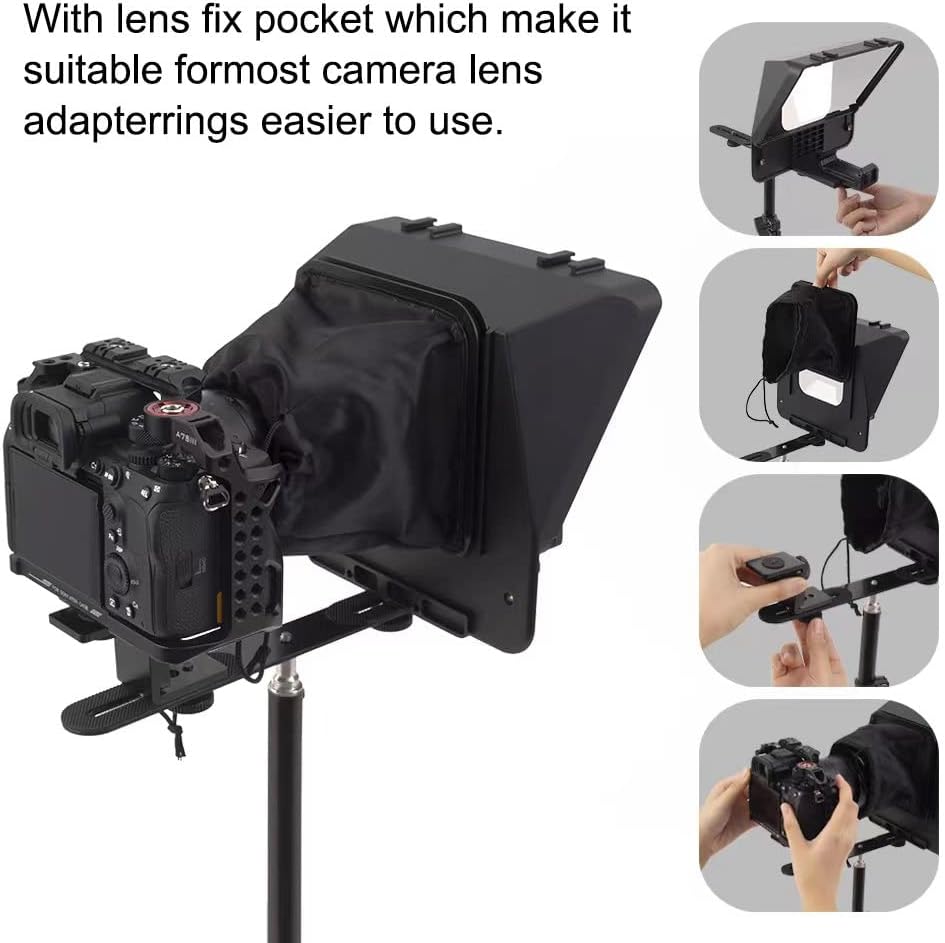
Image: Step-by-step guide showing how to attach a DSLR camera and its lens to the teleprompter using the lens fix pocket.

Image: A fully assembled teleprompter unit with a DSLR camera mounted, displaying text from a tablet.
- Optional: Attach Accessories: Utilize the dual cold shoe mounts on top of the teleprompter to attach external accessories such as a microphone or an LED ring light for enhanced video production.

Image: The teleprompter with an attached ring light and microphone, illustrating accessory integration.
Video Installation Guide:
Video: A detailed demonstration of how to install both mobile phones and cameras with the INMEI A10 Teleprompter.
4. Operating Instructions
Using the Remote Control:
The included wireless remote control allows for convenient operation of the teleprompter app on your smartphone or tablet.

Image: A hand holding the compact wireless remote control for the teleprompter.
- Pairing: Turn on the remote control. On your smartphone/tablet, go to Bluetooth settings and pair with the remote (usually named something like "AB Shutter3" or similar).
- Functions: Once paired, open the Inmei teleprompter app. Use the remote to:
- Play/Pause the scrolling text.
- Speed up or slow down the scrolling text.
- Turn pages or navigate through scripts.
Using the Teleprompter App:
Download the official Inmei teleprompter app from your device's app store. The app allows you to load scripts, adjust font size, color, and background, and control the scrolling speed. Ensure your device is in the correct orientation (landscape or portrait) as required by your shooting setup and the app.
5. Maintenance
Proper maintenance ensures the longevity and optimal performance of your teleprompter.
- Cleaning the Beam Splitter Glass: Use the provided cleaning cloth or a soft, lint-free microfiber cloth. For stubborn smudges, lightly dampen the cloth with a lens cleaning solution. Wipe gently to avoid scratches. Do not use abrasive cleaners.
- Cleaning the Body: Wipe the exterior of the teleprompter with a soft, dry cloth. Avoid using harsh chemicals or solvents.
- Storage: When not in use, store the teleprompter in a dry, dust-free environment. It is recommended to keep it in its original packaging or a protective case to prevent damage.
6. Troubleshooting
Here are solutions to common issues you might encounter:
- Text is blurry or unclear on the glass:
- Ensure the smartphone/tablet is positioned correctly and securely in its holder.
- Check that the beam splitter glass is clean and free of smudges or dust.
- Adjust the brightness of your smartphone/tablet screen.
- Verify that the lens hood is properly installed to block external light.
- Remote control is not connecting or responding:
- Ensure the remote control has fresh batteries and is turned on.
- Check your smartphone/tablet's Bluetooth settings to confirm the remote is paired. If not, unpair and re-pair the device.
- Make sure the teleprompter app is open and active.
- Glare or reflections in the video recording:
- Ensure the lens fix pocket/hood is properly attached and covers the camera lens area completely.
- Adjust lighting in your shooting environment to minimize direct light hitting the teleprompter glass.
- Ensure the foam rings are correctly used to seal any gaps around the camera lens.
- Smartphone/Tablet does not fit the holder:
- Verify your device's dimensions against the teleprompter's compatibility specifications (7.95’’×5.68’’ / 20.2×14.5cm screen).
- Ensure the holder is fully extended or adjusted to accommodate your device.
7. Product Specifications
| Feature | Specification |
|---|---|
| Model Number | sb-112 |
| Screen Size | 7.95’’×5.68’’ (20.2×14.5cm) |
| Compatibility | Smartphones (e.g., iPhone 12 Pro Max, Galaxy S21+), Tablets (e.g., iPad Mini), DSLR Cameras |
| Beam Splitter Glass | Up to 97% light transmittance |
| Control Method | Wireless Remote Control, Inmei Teleprompter App |
| Mounting Options | 1/4-inch screw mount for tripods/light stands |
| Accessory Mounts | Dual cold shoe mounts |
| Package Dimensions | 9.29 x 8.58 x 6.14 inches |
| Item Weight | 2.42 pounds |
| Manufacturer | Inmei Photography Equipment |
8. Warranty and Support
For warranty information, technical support, or service inquiries, please contact INMEI customer support through the retailer where the product was purchased or refer to the contact details provided on the official INMEI website. Please retain your proof of purchase for warranty claims.