1. Product Overview
The RYOBI 18V Cordless 5 inch Variable Speed Dual Action Polisher Kit (Model PBF100K) is designed for efficient polishing and waxing tasks. This kit includes the polisher, a 4.0 Ah battery, and an 18V charger, providing cordless convenience for various applications.

Image 1.1: The RYOBI 18V Cordless 5 inch Variable Speed Dual Action Polisher Kit, including the polisher, battery, and charger, shown in its retail packaging.
2. Important Safety Information
Always read and understand all safety warnings, instructions, illustrations, and specifications provided with this power tool. Failure to follow all instructions listed below may result in electric shock, fire, and/or serious injury.
- Work Area Safety: Keep work area clean and well lit. Cluttered or dark areas invite accidents.
- Electrical Safety: Do not expose power tools to rain or wet conditions. Water entering a power tool will increase the risk of electric shock.
- Personal Safety: Stay alert, watch what you are doing, and use common sense when operating a power tool. Do not use a power tool while you are tired or under the influence of drugs, alcohol, or medication.
- Tool Use and Care: Do not force the power tool. Use the correct power tool for your application. The correct power tool will do the job better and safer at the rate for which it was designed.
- Battery Tool Use and Care: Recharge only with the charger specified by the manufacturer. A charger that is suitable for one type of battery pack may create a risk of fire when used with another battery pack.
3. Package Contents
Verify that all items listed below are included in your package. If any parts are missing or damaged, contact RYOBI customer service.
- RYOBI 18V Cordless 5 in. Variable Speed Dual Action Polisher
- RYOBI 4.0 Ah Lithium-Ion Battery (style may vary)
- RYOBI 18V Battery Charger
- Polishing Pads (quantity and type may vary)
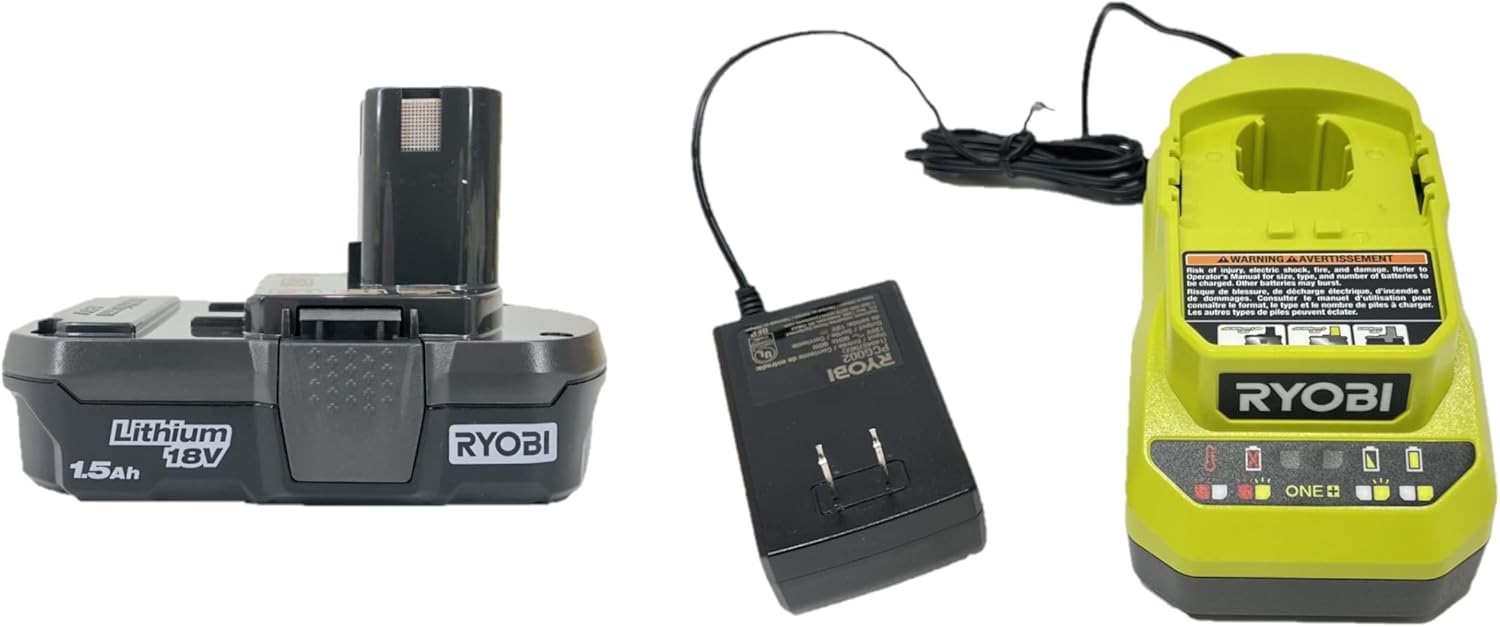
Image 3.1: A RYOBI 18V Lithium-Ion battery and an 18V battery charger, essential components of the polisher kit.
Note: This product is supplied in bulk packaging, which means it does not come in standard retail packaging. The contents are new and fully functional.

Image 3.2: A visual reminder that the product is shipped in bulk packaging, not standard retail packaging.
4. Setup
4.1 Charging the Battery
- Connect the 18V charger to a standard electrical outlet.
- Slide the 4.0 Ah battery onto the charger until it clicks into place.
- Allow the battery to charge fully before first use. Refer to the charger's indicator lights for charging status.
- Once fully charged, remove the battery from the charger.
4.2 Attaching the Battery to the Polisher
- Ensure the polisher is turned off.
- Align the battery with the battery port on the polisher.
- Slide the battery into the polisher until it locks securely into place.
- To remove, press the battery release latches and slide the battery out.
4.3 Attaching Polishing Pads
- Ensure the polisher is off and the battery is removed.
- Align the polishing pad with the hook-and-loop backing plate on the polisher.
- Press the pad firmly onto the backing plate to ensure a secure attachment.
- To remove, simply peel the pad off the backing plate.
5. Operating Instructions
5.1 Powering On/Off
- To turn on the polisher, press and hold the power button.
- To turn off the polisher, release the power button.
5.2 Adjusting Variable Speed
The polisher features variable speed control, allowing you to adjust the revolutions per minute (RPM) to suit different applications and materials. The speed range is typically 3,000 - 7,500 OPM (Orbits Per Minute).
- Locate the speed adjustment dial or buttons on the polisher.
- Rotate the dial or press the buttons to increase or decrease the operating speed.
- Start with a lower speed for initial application of compounds or waxes, and increase as needed for polishing or finishing.
5.3 Polishing Techniques
- Apply a small amount of polishing compound or wax directly to the pad or the work surface.
- Place the polisher flat on the surface before turning it on to prevent splatter.
- Move the polisher in a slow, overlapping cross-hatch pattern, maintaining even pressure.
- Avoid applying excessive pressure, as this can reduce the effectiveness of the dual-action motion and potentially damage the surface.
- Work in small sections (e.g., 2x2 feet) to ensure thorough coverage and optimal results.
- Periodically clean or replace polishing pads as they become saturated with product or debris.
6. Maintenance
6.1 Cleaning
- Always remove the battery before cleaning.
- Wipe down the exterior of the polisher with a clean, damp cloth. Do not use harsh chemicals or abrasive cleaners.
- Clean polishing pads thoroughly after each use. Rinse them with water and mild soap, then allow them to air dry completely before storage.
- Inspect the backing plate for any debris or damage.
6.2 Storage
- Store the polisher, battery, and charger in a cool, dry place, away from direct sunlight and moisture.
- Ensure the battery is partially charged (not fully depleted or fully charged) for long-term storage to prolong its lifespan.
- Keep out of reach of children.
7. Troubleshooting
| Problem | Possible Cause | Solution |
|---|---|---|
| Polisher does not turn on. | Battery not charged or not properly inserted. | Ensure battery is fully charged and securely seated in the polisher. |
| Reduced power or inconsistent speed. | Low battery charge; excessive pressure applied. | Recharge battery. Reduce pressure on the work surface. |
| Polishing pad detaches during use. | Pad not properly attached; hook-and-loop backing worn. | Ensure pad is firmly pressed onto the backing plate. Replace worn pads or backing plate if necessary. |
| Excessive vibration or noise. | Improperly attached pad; damaged backing plate; internal issue. | Re-attach pad correctly. Inspect backing plate for damage. If problem persists, contact customer service. |
8. Specifications
| Feature | Detail |
|---|---|
| Model Number | PBF100K |
| Brand | RYOBI |
| Power Source | 18V Battery Powered |
| Voltage | 18 Volts |
| Pad Size | 5 inches |
| Type | Variable Speed Dual Action Polisher |
| Operating Speed | 3,000 - 7,500 OPM (Orbits Per Minute) |
| Item Weight | 3.75 Pounds |
| Material | Acrylonitrile Butadiene Styrene (ABS) |
| UPC | 033287201419 |
9. Warranty and Support
RYOBI products are typically backed by a manufacturer's warranty. For specific warranty details, including duration and coverage, please refer to the warranty card included with your product or visit the official RYOBI website.
For technical assistance, replacement parts, or warranty claims, please contact RYOBI customer support through their official channels. Keep your proof of purchase and model number (PBF100K) readily available when contacting support.
Online Resources: For additional information, FAQs, and product registration, visit the official RYOBI Tools website.