
1. Introduction
This manual provides comprehensive instructions for the Accutime GSM4107 LED Digital Watch. Designed for children, this watch features a clear LED display for time and date, operated by two simple buttons. Please read this manual carefully to ensure proper use and longevity of your watch.
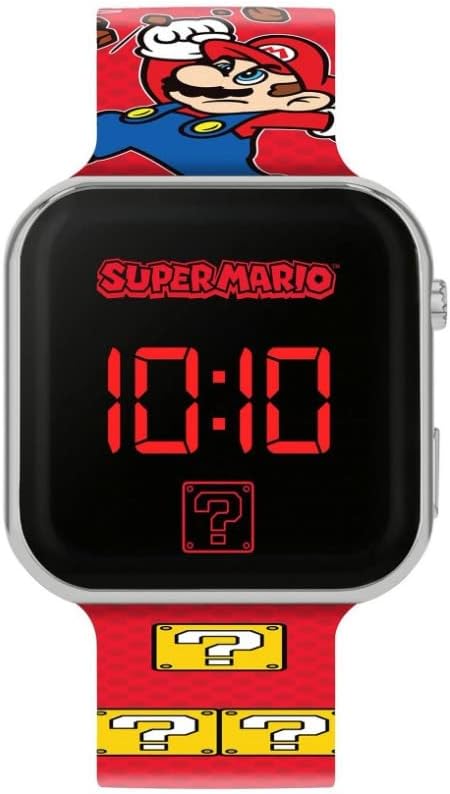
Figure 1: Front view of the Accutime GSM4107 LED Digital Watch, showing the time display and Super Mario design.
2. Setup
2.1 Initial Use
The Accutime GSM4107 watch comes with an integrated battery. No initial charging or battery installation is required. Simply press the button to activate the display.
2.2 Setting Time and Date
The watch features two control buttons located on the right side of the watch case. These buttons are used for activating the display and adjusting settings.
- Access Setting Mode: Press and hold the top button (or the primary setting button) for approximately 3-5 seconds until the hour digits begin to flash.
- Adjust Hours: While the hour digits are flashing, press the top button repeatedly to advance the hour. Press the bottom button (or secondary setting button) to confirm the hour and move to the next setting.
- Adjust Minutes: The minute digits will now flash. Press the top button repeatedly to adjust the minutes. Press the bottom button to confirm.
- Set 12/24 Hour Format: The display will show "12H" or "24H". Press the top button to toggle between the 12-hour and 24-hour formats. Press the bottom button to confirm.
- Adjust Month: The month digits will flash. Press the top button to adjust the month. Press the bottom button to confirm.
- Adjust Day: The day digits will flash. Press the top button to adjust the day. Press the bottom button to confirm and exit the setting mode.
If no button is pressed for a few seconds during setting, the watch may exit setting mode automatically. Repeat the steps if this occurs.

Figure 2: Full length view of the Accutime GSM4107 LED Digital Watch, illustrating the strap design.
3. Operating the Watch
3.1 Displaying Time and Date
To view the time, simply press the top button once. The LED display will illuminate, showing the current time (hours and minutes). Subsequent presses of the top button will cycle through:
- Time (Hours and Minutes)
- Seconds
- Month and Day
The LED display is designed to turn off automatically after a few seconds of inactivity to conserve battery life.
4. Maintenance
4.1 Cleaning
To clean your watch, gently wipe the display and strap with a soft, dry, or slightly damp cloth. Avoid using harsh chemicals or abrasive materials, as these can damage the watch's finish or display.
4.2 Battery Information
The Accutime GSM4107 watch is powered by an integrated CR2032 button cell battery. This battery is not rechargeable and not replaceable. The watch is designed for optimal battery life by automatically turning off the LED display after a short period of inactivity.
4.3 Water Resistance
Information regarding the water resistance rating of this watch is not specified. To prevent damage, it is recommended to avoid exposing the watch to water, moisture, or extreme humidity.
5. Troubleshooting
- Display Not Lighting Up: Ensure the button is pressed firmly. If the display still does not light up, the integrated battery may have reached the end of its lifespan. As the battery is not replaceable, the watch may need to be replaced.
- Incorrect Time or Date Displayed: Re-enter the setting mode and follow the instructions in Section 2.2 to correctly set the time and date.
- Display Turns Off Too Quickly: This is a normal function designed to conserve battery life. The display will automatically turn off after a few seconds of inactivity.
6. Specifications
| Model Number | GSM4107 |
| Display Type | LED Digital |
| Time Formats | 12-hour, 24-hour selectable |
| Battery Type | Integrated CR2032 (non-rechargeable, non-replaceable) |
| Strap Material | Acrylic |
| Strap Dimensions | Approx. 21.7 cm (length) x 2.2 cm (width) |
| Case Dimensions | Approx. 3.8 cm x 3.7 cm x 0.9 cm |
| Weight | Approx. 24 g |
| Package Contents | LED watch with integrated battery, multi-language user manual |
7. Warranty and Support
Specific warranty information for the Accutime GSM4107 LED Digital Watch is not provided in the product details. For any warranty claims or technical support, please contact your retailer or the manufacturer directly with your proof of purchase.


