
1. Introduction
The Etoolcity Automatic Dust Collector Switch (Model HVC-05) is designed to enhance efficiency and safety in your workshop by automating the operation of your dust collection system. This device automatically activates your vacuum or dust collector when a connected power tool is turned on and delays its shutdown after the tool is turned off, ensuring thorough debris removal and minimizing airborne dust.
2. Safety Information
- Always ensure the switch and connected devices are unplugged before making any connections or disconnections.
- Do not exceed the maximum electrical ratings of 120V/15A 50/60Hz, 1875W for the connected tools and vacuum. Overloading the circuit can cause damage to the device, tools, or lead to electrical hazards.
- Keep the switch away from water or damp environments to prevent electrical shock.
- Inspect the power cord and the unit for any damage before each use. Do not use if damaged.
- Ensure proper ventilation around the unit during operation.
- This device is intended for indoor use only.
3. Product Overview
The Etoolcity Automatic Dust Collector Switch features two standard 3-prong outlets: one for your power tool and one for your vacuum or accessory. It is constructed with UL-certified 14AWG power cord and a durable PC+ABS V0 grade flame retardant material casing.

Image 3.1: Front view of the Etoolcity Automatic Dust Collector Switch, showing the two power outlets and the attached power cord.

Image 3.2: Detailed view of the switch's construction, emphasizing the durable PC+ABS V0 grade flame retardant material and the UL-listed 14AWG power cable designed for maximum current passage.
4. Specifications
| Model Number | HVC-05 |
| Max Motor Rating | 120V/15A 50/60Hz, 1875W |
| Power Cord | UL-certified American Standard 14AWG |
| Material | PC+ABS V0 grade flame retardant material, Copper |
| Dimensions (L x W x H) | 6.3 x 1.8 x 1.8 inches (approximately) |
| Power Cord Length | 18.1 inches (approximately) |
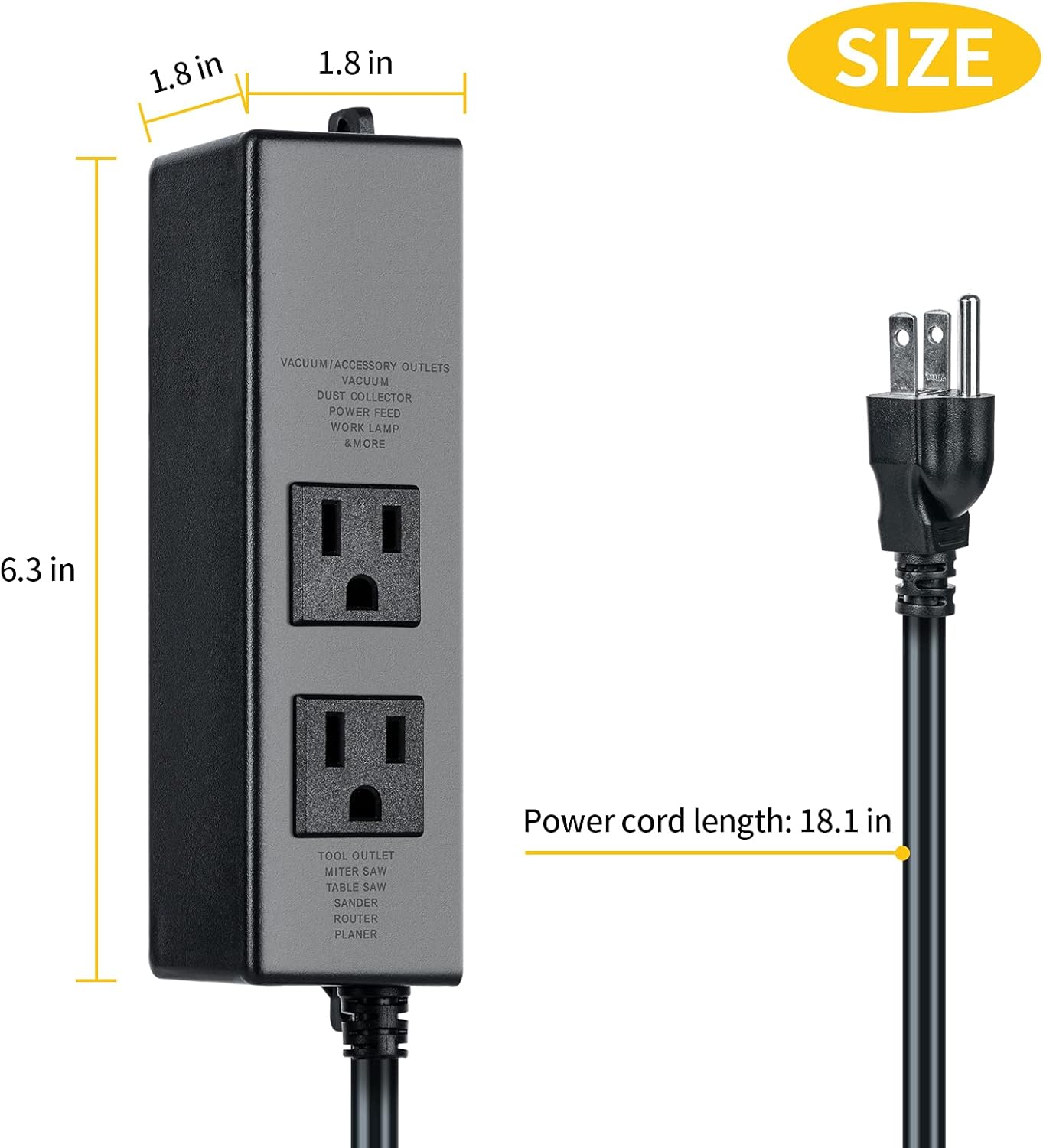
Image 4.1: Visual representation of the switch's dimensions (6.3 inches long, 1.8 inches wide, 1.8 inches deep) and the power cord length (18.1 inches).
5. Installation and Setup
Follow these simple steps to set up your Etoolcity Automatic Dust Collector Switch:
- Plug the Auto Switch into a Wall Socket: Connect the switch's power cord directly into a standard 120V wall outlet.
- Connect the Vacuum: Plug your vacuum or dust collector into the outlet labeled "VACUUM/ACCESSORY OUTLETS". Ensure the vacuum's power switch is in the "ON" position.
- Connect the Power Tool: Plug your power tool into the outlet labeled "TOOL OUTLET".
The unit can be mounted to a surface using the integrated mounting holes for a more permanent setup.

Image 5.1: Step-by-step visual guide for connecting the automatic switch to a wall socket, then plugging in the vacuum, and finally the power tool.
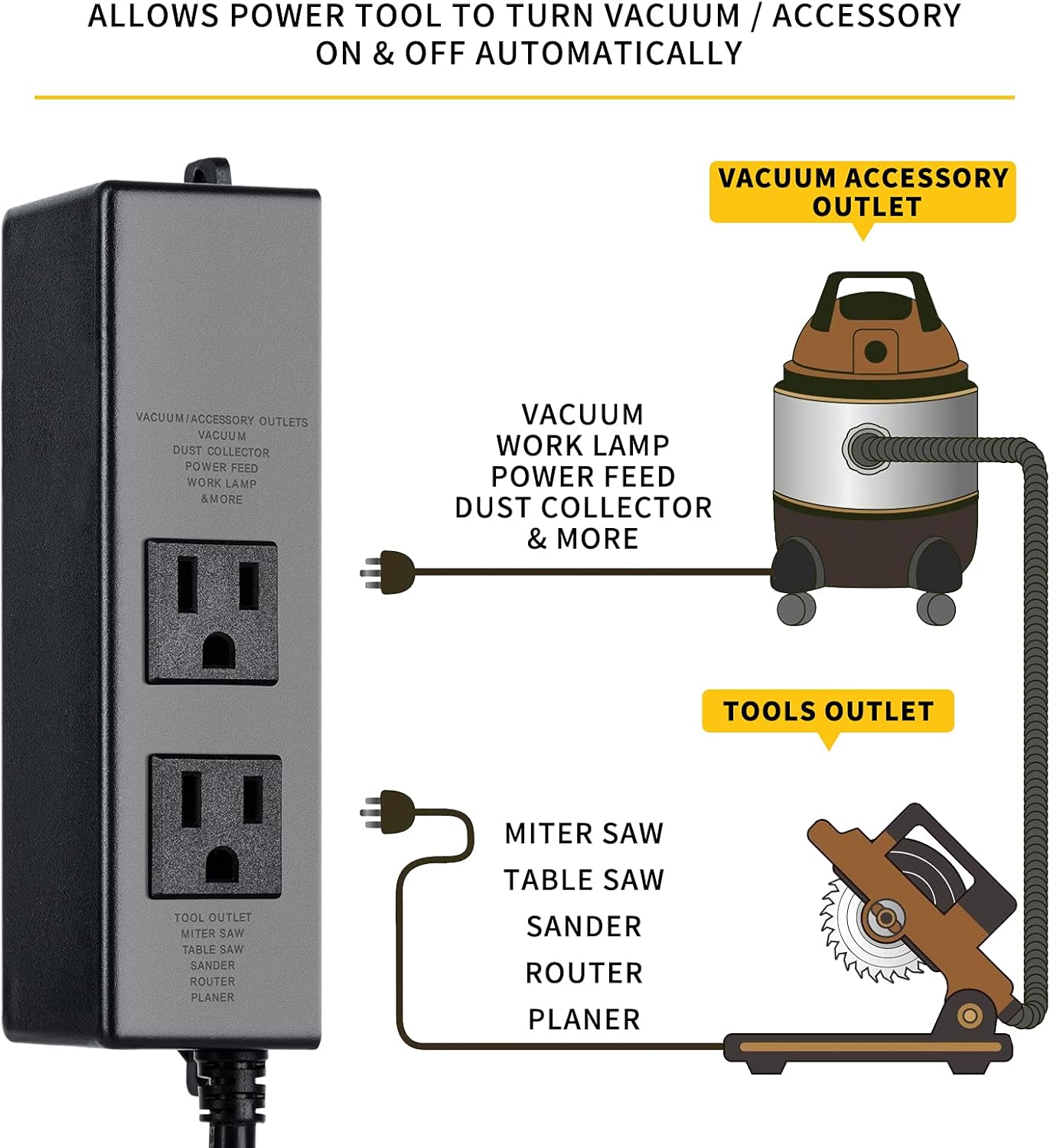
Image 5.2: Connection diagram showing a miter saw connected to the 'TOOL OUTLET' and a shop vacuum connected to the 'VACUUM ACCESSORY OUTLET'.

Image 5.3: Example of the automatic dust collector switch securely mounted to a wooden workshop wall, demonstrating its installation flexibility.
6. Operation
Once installed, the Etoolcity Automatic Dust Collector Switch operates automatically:
- When you turn on your power tool, the vacuum will automatically turn on after a 1-second delay. This delay helps prevent circuit overload.
- When you turn off your power tool, the vacuum will continue to run for an additional 7 seconds. This delayed shutdown ensures that any remaining debris in the hose is cleared, contributing to a cleaner workspace and reducing noise.
This automatic functionality eliminates the need to manually turn the vacuum on and off, streamlining your workflow and improving dust control.
7. Compatibility
The Etoolcity Automatic Dust Collector Switch is compatible with a wide range of power tools and accessories, provided they do not exceed the maximum motor rating of 120V/15A 50/60Hz, 1875W. Compatible tools include, but are not limited to:
- Miter Saws
- Table Saws
- Power Sanders
- Routers
- Joiners
- Planers
- Wood Lathes
- Scroll Saws

Image 7.1: Examples of various power tools such as miter saws, sanders, router tables, wood lathes, table saws, and scroll saws, all compatible with the automatic dust collector switch.
8. Care and Maintenance
- Keep the unit clean and free from dust and debris. Use a dry cloth to wipe the exterior.
- Do not use harsh chemicals or abrasive cleaners.
- Regularly check the power cord and plugs for any signs of wear or damage. Replace the unit if any damage is found.
- Store the switch in a dry, protected environment when not in use.
9. Troubleshooting
- Vacuum does not turn on with tool:
- Ensure the vacuum is plugged into the correct "VACUUM/ACCESSORY OUTLETS" and its power switch is in the "ON" position.
- Verify the power tool is plugged into the "TOOL OUTLET" and is drawing sufficient power to trigger the switch.
- Check if the wall socket has power.
- Vacuum turns off too soon or too late:
- The delay times (1s on, 7s off) are fixed and cannot be adjusted. Ensure your workflow accommodates these timings.
- Unit feels warm during operation:
- Some warmth is normal. Ensure the total wattage of connected devices does not exceed 1875W to prevent overheating.
- Ensure adequate ventilation around the unit.
10. Warranty and Support
Etoolcity products are designed for reliability and performance. For specific warranty information or technical support, please refer to the product packaging or contact Etoolcity customer service directly through their official website or the retailer where the product was purchased. Please have your model number (HVC-05) and purchase details ready when contacting support.