
Introduction
Thank you for choosing the BoxWave MagnetoSync Mini Adapter. This versatile magnetic charging and data transmission adapter is designed to provide a convenient and efficient solution for connecting various devices. With its interchangeable magnetic tips, it offers broad compatibility with Micro USB, USB Type-C, and other compatible interfaces. This manual provides detailed instructions on how to set up, operate, and maintain your MagnetoSync Mini Adapter to ensure optimal performance and longevity.
Safety Information
- Keep the adapter and its components away from water or other liquids to prevent electrical shock or damage.
- Do not attempt to disassemble or modify the adapter. This may void the warranty and pose safety risks.
- Avoid exposing the adapter to extreme temperatures, direct sunlight, or high humidity.
- Keep out of reach of children and pets. Small parts can be a choking hazard.
- Ensure the magnetic tips are clean and free of debris before connecting to your device to prevent poor contact or damage.
- Use only with compatible devices and power sources as specified in this manual.
Product Overview and Components
The BoxWave MagnetoSync Mini Adapter consists of a main USB-A adapter body and interchangeable magnetic tips. These tips allow the adapter to connect to devices with different port types.

Figure 1: Main components of the MagnetoSync Mini Adapter, including the USB-A base and various magnetic tips.

Figure 2: Detailed view of the magnetic connection mechanism and interchangeable tips.
- USB-A Adapter Body: The main part of the adapter that plugs into a USB-A port on a computer or charger. It features a magnetic receptacle for the tips.
- Magnetic Tips: Small, interchangeable connectors that plug into your device's charging port. Common types include Micro USB, USB Type-C, and i-product (Lightning compatible).
Setup and Installation
Follow these steps to set up and begin using your MagnetoSync Mini Adapter:
- Select the Correct Tip: Identify the charging port type on your device (e.g., Micro USB, USB Type-C). Choose the corresponding magnetic tip from the adapter set.
- Insert the Tip into Your Device: Carefully insert the selected magnetic tip into your device's charging port. This tip can remain in your device for convenience, protecting the port from dust and wear.
- Connect the Adapter Body: Plug the USB-A end of the MagnetoSync Mini Adapter body into a compatible USB-A port on a power adapter, computer, or power bank.
- Attach Magnetically: Bring the magnetic end of the adapter body close to the magnetic tip inserted in your device. The strong magnets will automatically snap together, establishing the connection.
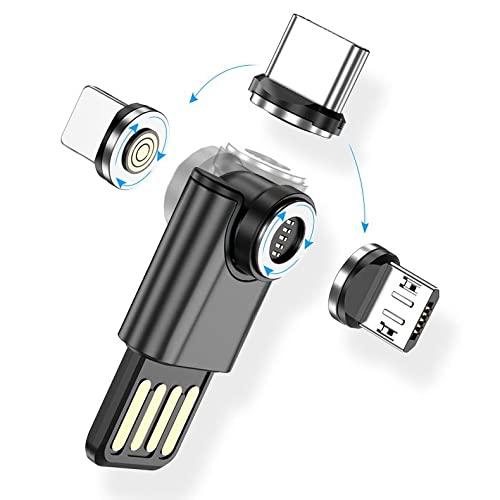
Figure 3: Illustrating the simple magnetic connection.

Figure 4: Adapter in use, connected to a device.
Operating Instructions
Once connected, the MagnetoSync Mini Adapter facilitates both charging and data transmission, depending on the capabilities of your device and the connected USB port.
- Charging: When connected to a power source (e.g., wall adapter, power bank), your device will begin charging. The adapter supports various current and voltage outputs as detailed in the specifications.
- Data Transmission: When connected to a computer, the adapter allows for data transfer between your device and the computer. Ensure your device is set to the correct USB mode (e.g., File Transfer, MTP) if prompted.
- 540° Rotation Feature: The magnetic connection point on the adapter body allows for a full 540-degree rotation, providing flexibility and preventing cable strain. This feature enables you to position your device comfortably while charging or transferring data.

Figure 5: Demonstrating the 540-degree rotation for flexible use.
Maintenance
Proper maintenance will extend the life of your MagnetoSync Mini Adapter:
- Cleaning: Use a soft, dry cloth to wipe the adapter and magnetic tips. Do not use harsh chemicals or abrasive cleaners. Ensure the magnetic contact points are free of dust and metallic particles.
- Storage: Store the adapter and tips in a cool, dry place when not in use. Avoid tangling the adapter body with other cables.
- Handling: Always pull from the adapter body when disconnecting, not the cable itself, to prevent damage to the internal wiring.
Troubleshooting
| Problem | Possible Cause | Solution |
|---|---|---|
| Device not charging/connecting. |
|
|
| Slow charging. |
|
|
| Data transfer issues. |
|
|
Specifications
The following are the technical specifications for the BoxWave MagnetoSync Mini Adapter:
| Product Name | 540° Rotate Mini Magnetic Charger |
| Function | Charging + Data Transmission |
| Current / Voltage | 9V/2A, 5V/3A |
| Applicable Interface | Micro USB, i-product (Lightning compatible), Type-C |
| Material | Aluminum Alloy |
| Color Options | Black, Red, Purple, Green, Blue (Jet Black for this model) |
| Dimensions (Adapter Body) | Approx. 41.5mm (Length) x 14.2mm (Width) x 9mm (Thickness) |

Figure 6: Product parameters and dimensions.
Warranty and Support
BoxWave products are designed for reliability and performance. For specific warranty information, please refer to the warranty card included with your purchase or visit the official BoxWave website. For technical support, troubleshooting assistance, or to inquire about replacement parts, please contact BoxWave customer service through their official channels. Please have your product model and purchase details ready when contacting support.
Manufacturer: BoxWave
Date First Available: September 25, 2024