
1. Introduction
This manual provides comprehensive instructions for the WOSTOKE 10-inch Android Navigation Stereo, designed specifically for Honda Civic models manufactured between 2004 and 2011. This head unit integrates advanced features such as GPS navigation, Bluetooth connectivity, Wi-Fi, and reverse camera support, enhancing your driving experience. Please read this manual thoroughly before installation and operation to ensure proper use and to maximize the product's functionality.
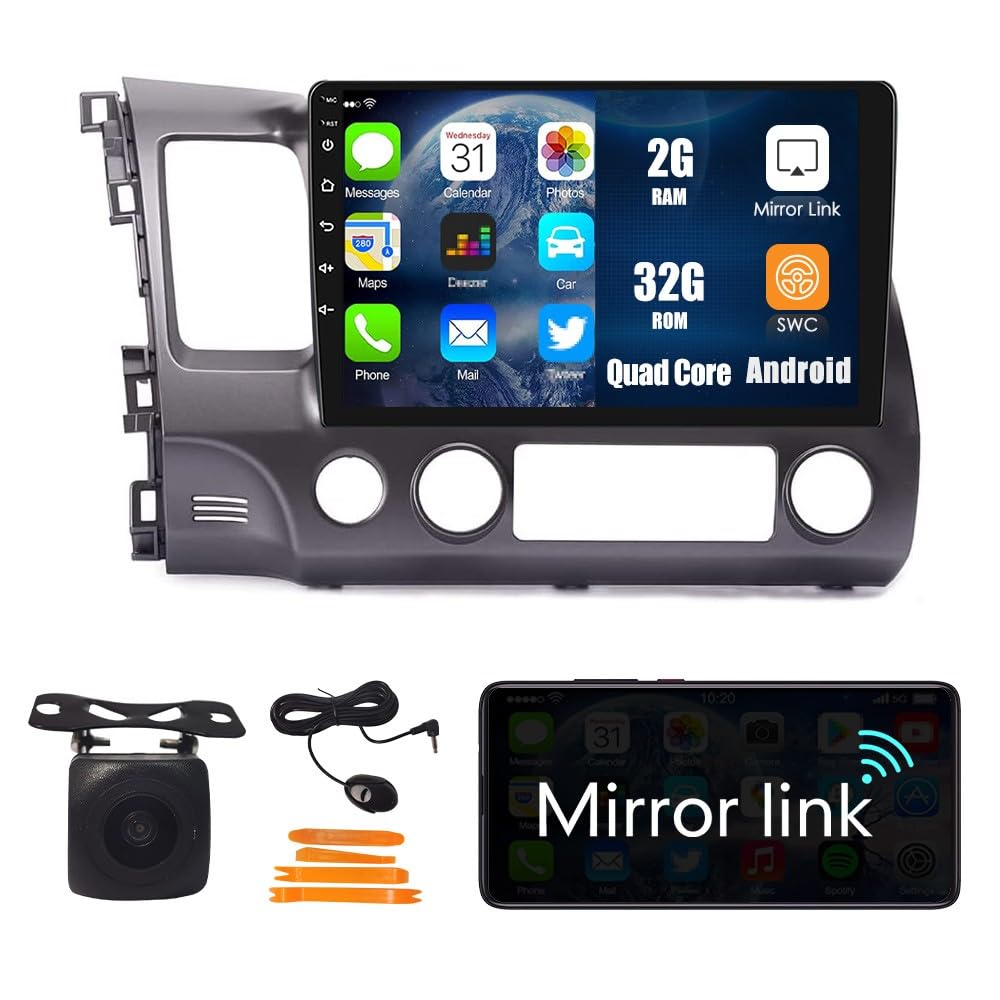
Figure 1: WOSTOKE 10-inch Android Navigation Stereo main unit.
2. Product Features
- 10-inch IPS Touchscreen: High-definition (1024x600 resolution), scratch-resistant, and wear-resistant display for clear visuals.
- Android Operating System: Provides a versatile platform for various applications and functions.
- GPS Navigation: Real-time satellite GPS navigation, functional with or without internet connection (with pre-downloaded maps). Supports various navigation applications.
- Wi-Fi Connectivity: Browse the internet, access online navigation, stream videos, and download applications.
- Bluetooth (BT 4.0): Enjoy wireless music streaming, hands-free calling, and navigation audio.
- Mirror Link: Wireless screen mirroring for iOS devices and wired for Android devices.
- Steering Wheel Control (SWC): Quickly switch functions using your vehicle's existing steering wheel controls.
- Car Reverse Camera Support: Displays video feed from a rear-view camera when reversing.
- FM Radio: Tune into your favorite radio stations.
- Quad Core Processor with 2GB RAM and 32GB Storage: Ensures smooth operation and ample space for apps and media.
3. Setup and Installation
3.1 Compatibility Note
This unit is designed for Honda Civic models from 2004 to 2011. It is crucial to verify your vehicle's specific configuration before installation.
3.2 Important Amplifier Information
If your Honda Civic has an original factory amplifier, you must purchase a CANBUS decoder separately. Without the CANBUS decoder, the stereo will produce no sound. Vehicles with a large colorful screen or factory navigation typically indicate the presence of an amplifier.

Figure 2: Important note regarding CANBUS requirement for vehicles with original amplifiers.
3.3 Package Contents
Before beginning installation, ensure all components listed below are present in your package:

Figure 3: Contents of the product package, including the 10-inch unit, power cable, cable plug, camera input, USB cables, GPS antenna, RCA wire harness, AHD reverse camera, external mic, and crowbar tool.
- 10-inch Head Unit
- Power Cable
- Cable Plug
- Camera Input Cable
- USB Cables (4-pin and 6-pin)
- GPS Antenna
- RCA Wire Harness
- AHD Reverse Camera
- External Microphone
- Crowbar Tool (for trim removal)
3.4 Installation Overview
Installation typically involves removing the factory radio, connecting the new head unit's wiring harness to the vehicle's wiring, installing the GPS antenna and reverse camera (if applicable), and securing the new unit in the dashboard. Professional installation is recommended if you are unfamiliar with car audio wiring.

Figure 4: Visual comparison of the dashboard before and after the installation of the WOSTOKE Android Navigation Stereo.
4. Operating Instructions
4.1 Power On/Off and Basic Controls
Press and hold the power button (usually located on the front panel) to turn the unit on or off. Use the volume controls to adjust audio levels. The touchscreen interface allows for intuitive control of all functions.
4.2 GPS Navigation
The unit comes with pre-installed navigation capabilities. Connect to Wi-Fi to download map updates or use online navigation services. The GPS antenna ensures accurate real-time positioning.

Figure 5: The GPS Navigation interface displaying map data and vehicle information. Supports various navigation apps.
4.3 Bluetooth Connectivity
Pair your smartphone via Bluetooth to make hands-free calls and stream audio. Access the Bluetooth settings menu on the head unit to search for and connect to your device.

Figure 6: Bluetooth 4.0 functionality for hands-free calling and audio streaming. The image shows the Bluetooth calling interface on the stereo and a phone connected.
4.4 Wi-Fi Connection
Enable Wi-Fi in the settings menu to connect to a mobile hotspot or available Wi-Fi networks. This allows for online features, app downloads, and internet browsing.

Figure 7: The Wi-Fi interface, enabling access to online content and applications.
4.5 Steering Wheel Control (SWC)
Configure the steering wheel controls through the unit's settings to manage audio, calls, and other functions without taking your hands off the wheel. Refer to the "Steering Learn" option in the settings.

Figure 8: The Steering Wheel Control learning interface, allowing customization of button functions.
4.6 Car Reverse Camera Function
When the vehicle is shifted into reverse, the display automatically switches to the rear-view camera feed, providing visual assistance for parking and maneuvering.

Figure 9: Display showing the car reverse camera view with parking guidelines.
4.7 FM Radio
Access the FM Radio application to scan for and save your preferred radio stations. Long-press on a frequency to save it as a preset.

Figure 10: The FM Radio interface, displaying frequency and station presets.
4.8 Mirror Link
Use Mirror Link to display your smartphone's screen on the head unit. This feature works wirelessly for iOS devices and requires a wired connection for Android devices.
5. Maintenance
To ensure the longevity and optimal performance of your WOSTOKE Android Navigation Stereo, follow these maintenance guidelines:
- Screen Cleaning: Use a soft, lint-free cloth to gently wipe the touchscreen. For stubborn smudges, slightly dampen the cloth with water or a screen-safe cleaner. Avoid harsh chemicals or abrasive materials.
- Software Updates: Periodically check for software updates through the unit's settings menu to ensure you have the latest features and security patches.
- Environmental Conditions: Avoid exposing the unit to extreme temperatures, direct sunlight for prolonged periods, or excessive moisture.
- Cable Connections: Ensure all cables are securely connected. Loose connections can lead to intermittent functionality.
6. Troubleshooting
| Problem | Possible Cause | Solution |
|---|---|---|
| No sound from speakers. | Vehicle has an original factory amplifier without a CANBUS decoder. | Purchase and install a compatible CANBUS decoder. Ensure all audio connections are secure. |
| GPS signal is weak or inaccurate. | GPS antenna is not properly installed or obstructed. | Ensure the GPS antenna is mounted in a clear location, free from metal obstructions, and securely connected to the unit. |
| Bluetooth device cannot connect. | Bluetooth is off, device is out of range, or pairing mode is not active. | Ensure Bluetooth is enabled on both the head unit and your device. Place devices close together and activate pairing mode on your phone. Try restarting both devices. |
| Touchscreen is unresponsive. | Temporary software glitch or screen protector interference. | Restart the head unit. If a screen protector is installed, ensure it is applied correctly and not causing issues. |
| Unit does not power on. | Power cable loose or fuse blown. | Check all power connections. Inspect vehicle fuses related to the stereo system and replace if necessary. |
7. Specifications
| Feature | Detail |
|---|---|
| Brand | WOSTOKE |
| Model | 10-Quad-Core-2G-32G |
| Screen Size | 10 Inches |
| Screen Resolution | 1024 x 600 |
| Operating System | Android |
| Processor | Quad Core |
| Memory (RAM) | 2 GB |
| Storage (ROM) | 32 GB |
| Connectivity Technology | USB, Bluetooth, Wi-Fi |
| Bluetooth Version | BT 4.0 |
| Map Type | North America (pre-installed) |
| Mounting Type | Panel Mount |
| Compatible Vehicle Type | Honda Civic (2004-2011) |
8. Warranty and Support
The WOSTOKE Android Navigation Stereo comes with a 1-year warranty covering non-human damage. For any questions, technical assistance, or warranty claims, please contact the seller directly. Your consultation is always welcomed.
For support, please refer to your purchase platform or the contact information provided by the seller at the time of purchase.