
senri A9
Senri Mini Camera User Manual
Model: A9
Brand: senri
1. Introduction
This manual provides comprehensive instructions for the Senri Mini Camera (Model A9), a portable 1080P HD WiFi camera designed for home security, surveillance, and monitoring. Its compact and discreet design makes it suitable for various indoor and outdoor applications, including use as a nanny cam, pet camera, or door camera.

Figure 1: Senri Mini Camera with live view on a smartphone.
2. What's in the Box
Verify that all components are present in the package:
- Mini Camera
- USB Charging Cable
- Support Frame / Bracket

Figure 2: Included accessories: USB cable and mounting bracket.
3. Product Overview and Features
The Senri Mini Camera is equipped with advanced features for reliable surveillance:
- 1080P HD & 120° Wide-angle: Captures clear details with a broad field of view.
- Compact & Discreet Design: Easily hidden for various applications.
- 24/7 Loop Recording: Continuous recording with power bank connection.
- WiFi Connectivity: Supports 2.4G WiFi for remote viewing.
- Micro SD Card Support: Compatible with 2GB to 128GB SD cards (not included).

Figure 3: The compact size of the Senri Mini Camera.

Figure 4: Example of discreet placement on a bookshelf.

Figure 5: Wide-angle shooting capability of the camera.

Figure 6: Comparison of Standard Definition (SD) and High Definition (HD) video quality.

Figure 7: HD Infrared Night Vision capability.
4. Setup Guide
Follow these steps for initial setup:
- Charge the Camera: Before first use, fully charge the camera using the provided USB cable. Connect it to a USB power source (e.g., wall adapter, computer USB port).
- Insert Micro SD Card (Optional): If you wish to record video, insert a Micro SD card (2GB to 128GB, not included) into the designated slot. Ensure the card is formatted correctly (FAT32 recommended).
- Download the App: Scan the QR code in the quick start guide (or search for the recommended app name in your device's app store) to download the companion mobile application.
- Connect to Wi-Fi:
- Power on the camera.
- Open the app and follow the on-screen instructions to add a new device.
- Connect the camera to your 2.4Ghz Wi-Fi network. (5Ghz networks are not supported).
- Mount the Camera: Use the included support frame to position the camera in your desired location. Its compact size allows for discreet placement.
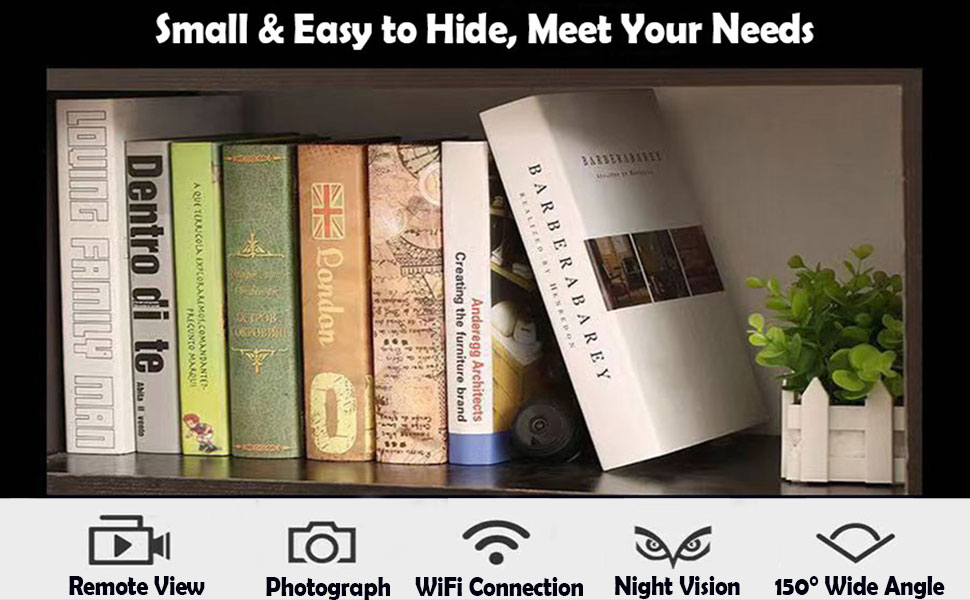
Figure 8: Quick connection steps: App download and camera charging.
5. Operating Instructions
5.1. Live View
Once connected to Wi-Fi, open the mobile app to access the live video feed from your camera. You can monitor your space remotely from anywhere with an internet connection.
5.2. Recording Modes
- Continuous Recording: If an SD card is inserted and the camera is powered, it will continuously record.
- Motion Detection Recording: Configure motion detection settings in the app. The camera will automatically begin recording when motion is detected, saving storage space and alerting you to activity.
- Loop Recording: When the SD card is full, the camera will automatically overwrite the oldest files to continue recording.
5.3. Night Vision
The camera features HD infrared night vision. This mode automatically activates in low-light conditions, providing clear black and white video footage in the dark.
5.4. Playback
Access recorded footage directly through the mobile app. You can view saved videos from the Micro SD card on your smartphone, tablet, or other compatible devices.
6. Maintenance
- Cleaning: Use a soft, dry cloth to clean the camera lens and body. Avoid using liquid cleaners or abrasive materials.
- Battery Care: To prolong battery life, avoid extreme temperatures. If storing for extended periods, charge the battery to about 50%.
- Firmware Updates: Periodically check the mobile app for any available firmware updates to ensure optimal performance and security.
- SD Card Management: Regularly back up important footage from the SD card. Consider formatting the SD card periodically to maintain performance.
7. Troubleshooting
| Problem | Possible Cause / Solution |
|---|---|
| Camera not connecting to Wi-Fi. |
|
| Poor image quality / Black screen at night. |
|
| Camera not recording to SD card. |
|
| Battery not holding charge. |
|
8. Specifications
| Feature | Detail |
|---|---|
| Model Name | A9 |
| Video Capture Resolution | 1080p |
| Connectivity Technology | Wireless (Wi-Fi 2.4Ghz) |
| Power Source | Battery Powered (1 Lithium Ion battery included) |
| Indoor/Outdoor Usage | Outdoor (suitable for indoor as well) |
| Controller Type | APP Control |
| Mounting Type | Wall Mount |
| Item Dimensions L x W x H | 4.3 x 1.7 x 4.3 inches |
| Item Weight | 1.76 ounces |
| Special Feature | Motion Sensor, Night Vision |
| Storage | Supports Micro SD card from 2GB to 128GB (not included) |
9. Warranty and Support
Senri provides comprehensive customer support for your mini camera:
- Money Back Guarantee: 30 days.
- Technical Support: 3 years.
If you encounter any issues or have questions about your camera, please contact Senri customer support. For additional information, you may refer to the official user manual PDF: Senri Mini Camera User Manual (PDF).
Related documentsA9

Ask a question about this manual
Ask about setup, troubleshooting, compatibility, parts, safety, or missing instructions. Manuals+ will review the question and use this page’s manual context to help answer it.