
1. Introduction
Thank you for choosing the Furmax Electric Height Adjustable Standing Desk. This manual provides essential information for the safe assembly, operation, and maintenance of your new desk. Designed to promote a healthier work environment, this desk allows you to effortlessly switch between sitting and standing positions, reducing physical strain and enhancing focus.

Figure 1.1: Furmax Electric Height Adjustable Standing Desk (White, 48x24 Inch)
2. Safety Information
Please read and understand all safety warnings before assembly and use. Failure to follow these instructions may result in injury or damage to the product.
- Weight Limit: Do not exceed the maximum weight capacity of 145 pounds (65 kg). Overloading can cause instability and damage.
- Collision Prevention: Exercise caution when adjusting the desk height. Ensure no objects or body parts are in the path of the moving desk to prevent collisions or pinching.
- Assembly Safety: Follow all assembly instructions carefully. It is recommended to have two people for certain assembly steps to prevent injury.
- Power Source: Connect the desk only to a grounded power outlet. Do not use damaged power cords or adapters.
- Children and Pets: Keep children and pets away from the desk during operation to prevent accidents.
3. Package Contents
Before beginning assembly, verify that all components are present and undamaged. If any parts are missing or damaged, please contact Furmax customer support.

Figure 3.1: Quick Installation Overview
Typical package contents include:
- Desktop (two pieces)
- Desk Legs (2)
- Foot Pads (2)
- Crossbar/Frame Components
- Motor and Control Box
- Digital Control Panel
- Power Adapter and Cable
- Headphone Hook
- Assembly Hardware (screws, bolts, Allen wrench)
- Cable Management Ties
4. Assembly Instructions
Assembly typically takes approximately 30 minutes. While a basic tool is provided, using a standard screwdriver may offer better leverage for certain screws. It is recommended to have a second person assist with handling the desktop.
- Unpack Components: Carefully remove all parts from the packaging and lay them out on a clean, soft surface to prevent scratches.
- Assemble Desk Legs: Attach the foot pads to the bottom of each desk leg using the provided screws.
- Connect Crossbar: Assemble the crossbar components and attach them to the desk legs. Ensure all connections are secure.
- Install Motor and Control Box: Mount the motor and control box to the designated positions on the frame. Connect the motor cable to the control box.
- Attach Desktop Halves: Place the two desktop halves face down on your soft surface. Align them carefully. Use the provided steel bracing plates and screws to secure the two desktop pieces together. When tightening these screws, work progressively on each screw to ensure a minimal gap between the desktop halves. Avoid overtightening with power tools.
- Mount Desktop to Frame: Carefully place the assembled desktop onto the desk frame. Secure it using the screws provided, ensuring proper alignment.
- Install Digital Control Panel: Attach the digital control panel to the underside of the desktop in a convenient location and connect its cable to the control box.
- Attach Headphone Hook: Install the headphone hook to the side of the desk as desired.
- Cable Management: Use the included cable management ties to organize and secure all cables, preventing them from dangling or getting caught during height adjustments.
- Initial Setup: Before connecting to power, ensure both desk legs are at the same height. Adjust using the leveling feet at the bottom if necessary.
5. Operating Instructions
Your Furmax standing desk features an intuitive digital control panel for easy height adjustment and memory presets.
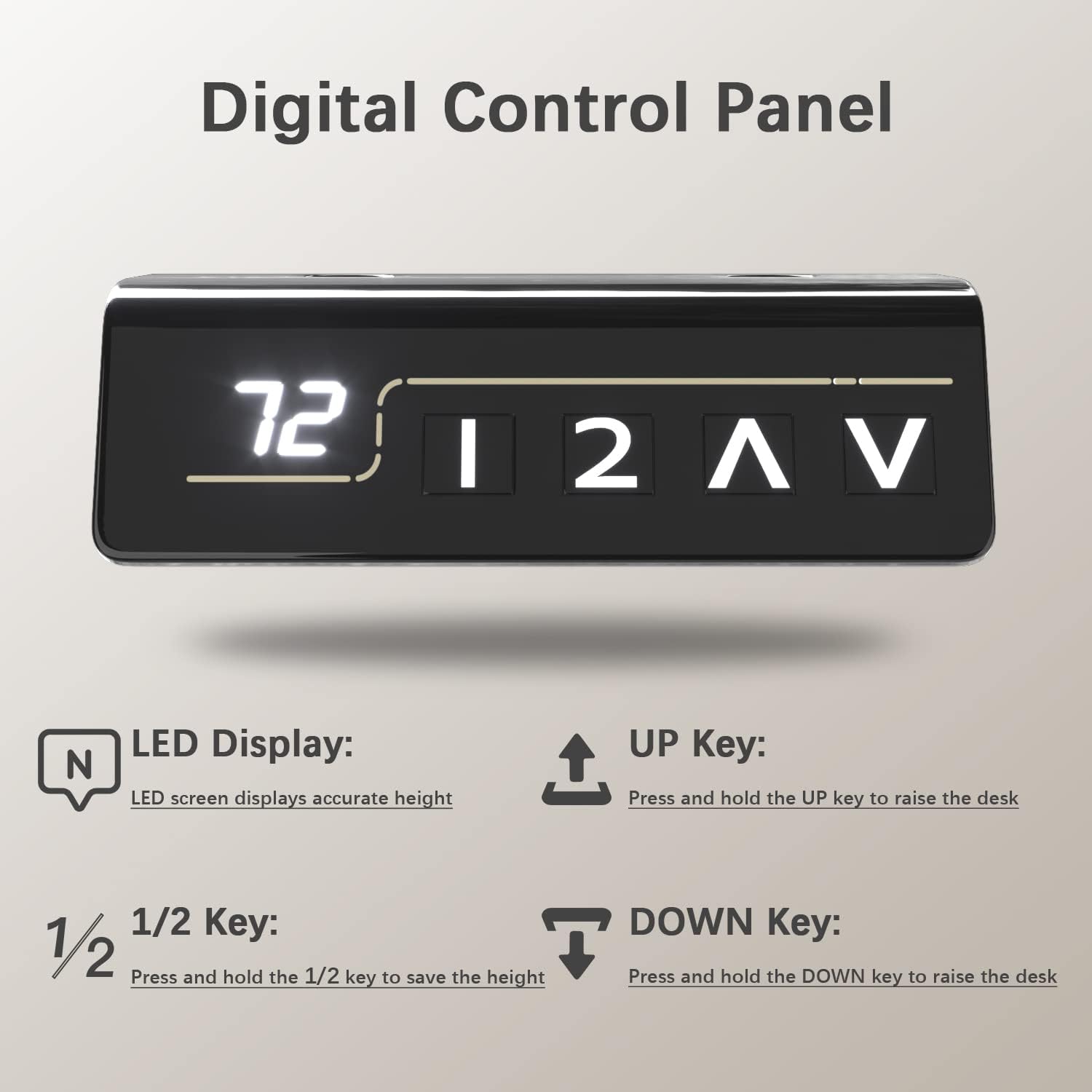
Figure 5.1: Digital Control Panel
5.1 Control Panel Functions
- LED Display: Shows the current desk height in inches.
- UP Key (▲): Press and hold to raise the desk. Release to stop.
- DOWN Key (▼): Press and hold to lower the desk. Release to stop.
- Memory Keys (1, 2): Press and hold to save the current height to that preset. A short press will move the desk to the saved height.
5.2 Adjusting Height
To adjust the desk height, simply press and hold the UP or DOWN arrow keys until the desired height is reached. The LED display will show the current height.

Figure 5.2: Height Adjustment Range
5.3 Setting Memory Presets
The desk allows you to save two preferred height settings for quick adjustments:
- Adjust the desk to your desired sitting or standing height using the UP/DOWN keys.
- Press and hold one of the memory keys (1 or 2) until the LED display flashes or beeps, indicating the height has been saved.
- To recall a saved height, simply press the corresponding memory key (1 or 2) once. The desk will automatically move to that position.
5.4 Safety Features
The motor system includes built-in safety features:
- Anti-Collision Function: If the desk encounters an obstruction during movement, it will stop and slightly reverse direction to prevent damage.
- Overheat Protection: The motor will temporarily shut down if it overheats from continuous use. Allow it to cool down before resuming operation.
- Safety Lock Function: Consult your specific control panel instructions for details on activating and deactivating any safety lock features.
6. Maintenance
Regular maintenance ensures the longevity and optimal performance of your desk.
- Cleaning: Wipe the desktop and frame with a soft, damp cloth. Avoid harsh chemicals or abrasive cleaners that could damage the finish.
- Check Connections: Periodically inspect all screws and bolts to ensure they are tight. Re-tighten if necessary.
- Cable Management: Ensure cables remain neatly organized and are not pinched or stressed during height adjustments.
7. Troubleshooting
If you encounter issues with your desk, refer to the following common problems and solutions:
| Problem | Possible Cause | Solution |
|---|---|---|
| Desk does not move. | Power cable disconnected; Overheat protection activated; Control box error. | Check power connections. Allow motor to cool for 20 minutes. Reset the desk by unplugging for 10 seconds and plugging back in. |
| Desk moves unevenly. | Uneven load; Legs not synchronized. | Ensure weight is evenly distributed. Perform a reset (see above) which may re-synchronize the legs. |
| Desk stops during adjustment. | Anti-collision activated; Overload. | Remove any obstructions. Reduce weight on the desk. |
| Memory presets not working. | Presets not saved correctly. | Re-save your desired heights following the instructions in Section 5.3. |
If the problem persists after attempting these solutions, please contact Furmax customer support for further assistance.
8. Specifications
Key technical specifications for the Furmax Electric Height Adjustable Standing Desk (Model ST241):

Figure 8.1: Desk Dimensions and Weight Capacity
- Model: ST241
- Brand: Furmax
- Desktop Dimensions: 48 inches (W) x 24 inches (D)
- Height Adjustment Range: 28.7 inches to 46.4 inches
- Weight Capacity: 145 lbs (65 kg)
- Adjustment Speed: Approximately 1 inch per second
- Noise Level: Under 50 dB
- Motor Life: Tested for over 10,000 cycles
- Base Material: Alloy Steel
- Top Material: Wood (Laminated finish)
- Color: White
- Assembly Required: Yes (Recommended 1 person)
9. Warranty and Support
For warranty information, product support, or to purchase replacement parts, please contact Furmax customer service. Refer to your purchase documentation for specific warranty terms and contact details.
You can also visit the official Furmax store on Amazon for more information and support: Furmax Amazon Store


