
1. Safety Instructions
Please read all instructions carefully before assembly and use. Failure to follow these instructions may result in injury or damage to the product.
- Maximum Weight Capacity: Do not exceed the maximum weight recommendation of 145 pounds (65.7 kg).
- Motor System Safety: Ensure the motor system's safety lock, anti-collision, and overheat protection functions are working correctly.
- Assembly: Follow the assembly instructions precisely. Two people are recommended for assembly to prevent injury and ensure proper setup.
- Power Tools: Avoid using power tools for tightening screws, especially for the desktop, as this may strip threads or damage components. Use hand tools provided or appropriate manual tools.
- Stability: The desk features a wide T-shaped foot design for stability. Ensure all feet are level on the ground before use.
- Clearance: Ensure there are no obstructions above or below the desk when adjusting height to prevent damage or injury.
- Children and Pets: Keep children and pets away from the desk during operation.
2. Product Overview and Features
The Furmax Electric Height Adjustable Standing Desk is designed to promote a healthier work environment by allowing seamless transitions between sitting and standing positions. Its robust construction and intelligent features enhance productivity and comfort.
- Electric Height Adjustment: Easily control desk height with intuitive buttons, accommodating various user heights and preferences.
- Memory Presets: Features 1/2 memory keys for quick and accurate adjustment to your preferred sitting and standing heights.
- Safety Features: Equipped with safety lock, anti-collision, and overheat protection functions for secure operation.
- Spacious Desktop: A large 55 x 24 inch (139.7 x 60.96 cm) wood desktop provides ample space for computers, notebooks, files, and other office supplies. Note: The desktop is divided into two pieces.
- Durable and Quiet Motor: High-quality motor allows height adjustment between 28.7 to 46.4 inches (72.9 to 117.9 cm) at 1 inch/second with low noise (under 50 dB). Designed for over 10,000 uses.
- Sturdy Construction: Box-frame structured steel legs with a wide T-shaped foot design ensure stability even at maximum height.
- Integrated Features: Includes cable holes for organization and a headphone hook for convenience.

Image: Adjustable height range of the Furmax Electric Standing Desk.
3. Package Contents
Before beginning assembly, ensure all parts are present and undamaged. Refer to the included parts list in your package for exact quantities.
- Desktop (2 pieces)
- Legs (2 pieces)
- Feet (2 pieces, T-shaped)
- Crossbar/Connecting Rod
- Motor and Control Box
- Digital Control Panel
- Power Adapter and Cable
- Headphone Hook
- Assembly Hardware (screws, Allen wrench, etc.)
4. Setup and Assembly
Follow these steps for proper assembly. It is recommended to have two people for this process.
- Prepare Workspace: Clear a spacious area for assembly. Lay out all components and hardware.
- Assemble Legs and Feet: Attach the T-shaped feet to the bottom of each leg using the provided screws.
- Connect Legs with Crossbar: Secure the crossbar between the two legs. Ensure the connecting rod is properly inserted and aligned to transmit motor torque. Maintain equal height for both legs before securing the shaft.
- Attach Desktop Halves: Use the wooden dowels and metal plates to join the two desktop pieces securely. Tighten screws carefully by hand to avoid damage.
- Mount Frame to Desktop: Carefully place the assembled frame onto the underside of the desktop. Align screw holes and secure the frame to the desktop.
- Install Control Box and Panel: Mount the control box and digital control panel to the designated areas under the desktop.
- Connect Wiring: Connect the motor, control panel, and power adapter to the control box. Use cable management clips to keep wires tidy.
- Attach Headphone Hook: Install the headphone hook to your preferred side of the desk.
- Final Check: Ensure all screws are tightened, and the desk is stable. Plug in the power adapter.

Image: Exploded view of Furmax Electric Standing Desk components.
Video: Official installation guide for the Furmax Electric Height Adjustable Standing Desk.
5. Operating Instructions
The digital control panel allows for easy and precise height adjustments.
- LED Display: The LED screen displays the current desk height in inches.
- UP Key (▲): Press and hold the UP key to raise the desk. Release to stop at the desired height.
- DOWN Key (▼): Press and hold the DOWN key to lower the desk. Release to stop at the desired height.
- Memory Presets (1, 2): To save a height, adjust the desk to your desired position, then press and hold the '1' or '2' key until you hear a beep or the display flashes. To recall a saved height, simply press the corresponding '1' or '2' key.
- Anti-Collision Feature: The desk is equipped with an anti-collision system. If the desk encounters an obstacle during adjustment, it will stop and reverse slightly to prevent damage.
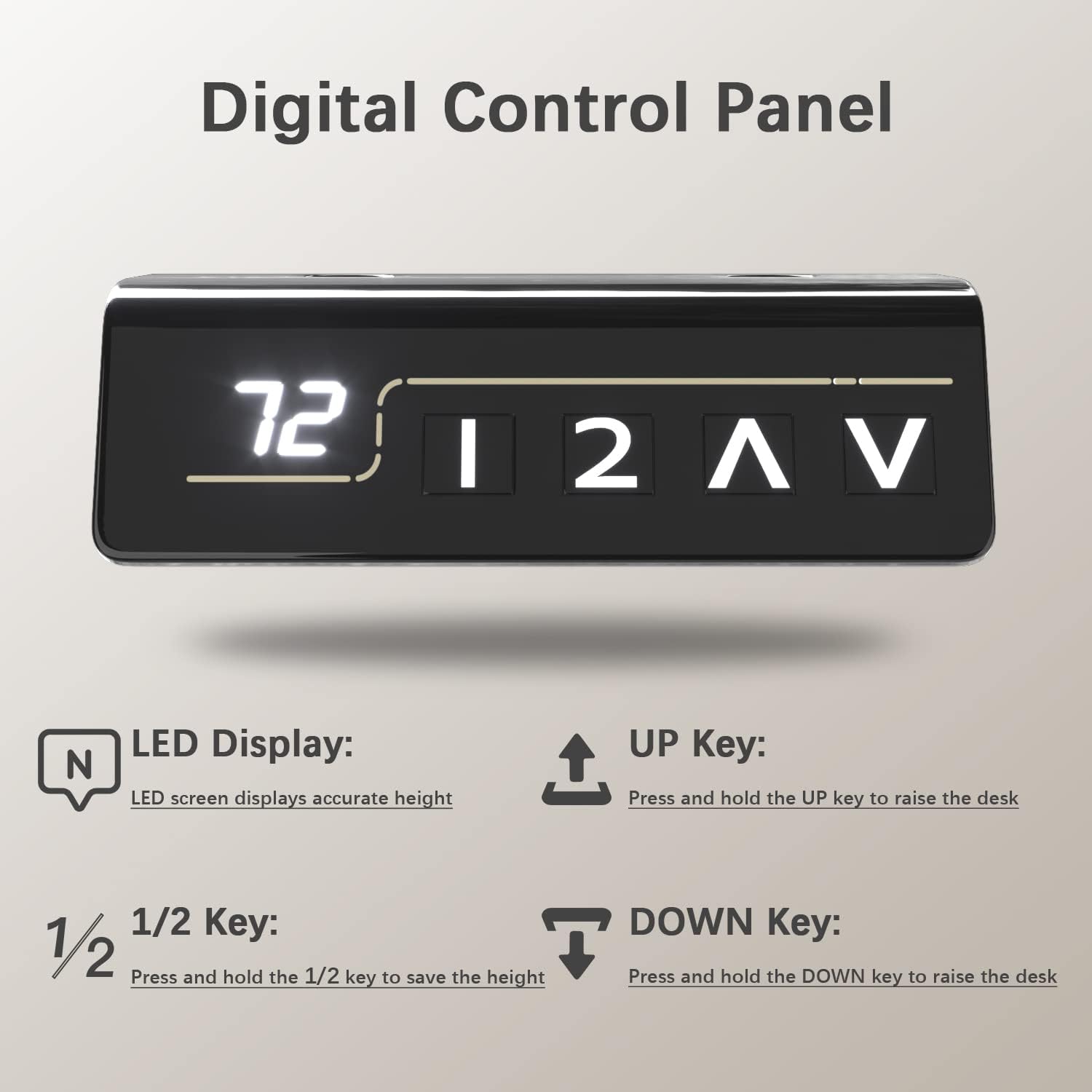
Image: Digital Control Panel.
6. Maintenance
Regular maintenance ensures the longevity and optimal performance of your desk.
- Cleaning: Wipe the desktop and frame with a soft, damp cloth. Avoid harsh chemicals or abrasive cleaners.
- Check Connections: Periodically check all screws and connections to ensure they are tight. Retighten if necessary.
- Cable Management: Keep cables organized to prevent tangling or interference with the desk's movement.
- Motor Care: The motor is designed for durability. Avoid overloading the desk beyond its weight capacity to prevent strain on the motor.
7. Troubleshooting
If you encounter any issues, refer to the following common troubleshooting tips:
- Desk Not Moving: Check if the power cable is securely plugged into both the desk and the wall outlet. Ensure no cables are caught or obstructing movement.
- Uneven Height: If the desk appears uneven, check that the connecting rod between the legs is properly installed and secured. Refer to the assembly instructions.
- Error Codes: If the LED display shows an error code, consult the full user manual (if provided separately) or contact customer support for specific instructions.
- Anti-Collision Activation: If the desk stops unexpectedly, it might be due to the anti-collision feature. Remove any obstructions and try adjusting again.
8. Specifications
| Feature | Detail |
|---|---|
| Brand | Furmax |
| Model Number | ST241 |
| Desktop Dimensions (W x D) | 55" x 24" (139.7 cm x 60.96 cm) |
| Height Adjustment Range | 28.7" - 46.4" (72.9 cm - 117.9 cm) |
| Maximum Weight Capacity | 145 lbs (65.7 kg) |
| Speed | 1"/second |
| Noise Level | Under 50 dB |
| Desktop Material | Wood (Laminated) |
| Frame Material | Metal (Alloy Steel) |
| Special Features | Adjustable Height, Memory Presets, Anti-Collision, Cable Hole, Headphone Hook |

Image: Furmax Electric Standing Desk dimensions and weight capacity.
9. Warranty and Support
This Furmax Electric Height Adjustable Standing Desk comes with a Limited Warranty. Please refer to the warranty card included in your package for specific terms and conditions.
For technical support, troubleshooting assistance, or warranty claims, please contact Furmax customer service through the retailer where the product was purchased or visit the official Furmax website for contact information.


