
1. Important Safety Information
Please read and understand all instructions before assembly and use. Failure to follow these instructions may result in injury or damage to the product.
- Do not exceed the maximum weight limit of 145 pounds (65.7 kg).
- Exercise caution when adjusting the desk height to prevent pinching or crushing injuries. Ensure no objects or body parts are in the path of the moving desk.
- Ensure all screws and fasteners are securely tightened before using the desk. Regularly check for loose connections.
- Keep children and pets away from the desk during operation.
- Do not sit or stand on the desk.
- If any parts are missing or damaged, do not attempt to assemble or use the desk. Contact customer support immediately.
2. Package Contents
Verify that all components are present and undamaged before beginning assembly.
- Desktop Panels (2 pieces)
- Desk Legs (2) with T-shaped feet
- Motor and Control Panel
- Connecting Rod
- Power Adapter and Cable
- Headphone Hook
- Cable Hole Covers
- Assembly Hardware (screws, brackets, tools)
- Instruction Manual
3. Setup and Assembly
Assembly is straightforward and typically requires one person, though two people are recommended for lifting the desktop. All necessary tools are included.
- Assemble the Frame: Attach the T-shaped feet to the desk legs. Connect the two desk legs using the crossbar and connecting rod. Ensure the connecting rod is properly aligned between both legs.
- Attach Desktop Panels: Place the two desktop panels upside down on a soft, clean surface. Securely attach the metal brackets to join the two desktop pieces. Then, attach the assembled frame to the underside of the desktop using the provided screws.
- Install Control Panel and Accessories: Mount the digital control panel to the underside of the desktop in the desired location. Connect the motor and control panel cables. Install the headphone hook and cable hole covers.
- Connect Power: Plug the power adapter into the control unit and then into a wall outlet.
- Initial Setup: Before first use, ensure both legs are at the same height. If not, adjust manually using the control panel.
Video: Full installation and usage guide for the Furmax Electric Height Adjustable Standing Desk. This video demonstrates the step-by-step assembly process and initial setup procedures.

Image: A view of the underside of the desk, highlighting the motor, connecting rod, and how the two desktop panels are joined. This illustrates the robust construction and internal mechanisms.
4. Operating Instructions
The Furmax Electric Height Adjustable Standing Desk features an intuitive digital control panel for easy height adjustments and memory presets.
Control Panel Functions:
- LED Display: Shows the current desk height in inches.
- Up (▲) Key: Press and hold to raise the desk.
- Down (▼) Key: Press and hold to lower the desk.
- Memory Presets (1, 2): Press and hold the 'S' (Set) button, then press '1' or '2' to save the current height. To recall a saved height, simply press '1' or '2'.
The desk can be adjusted between a minimum height of 28.7 inches and a maximum height of 46.4 inches. The motor operates smoothly at 1 inch per second with low noise levels (under 50 dB).
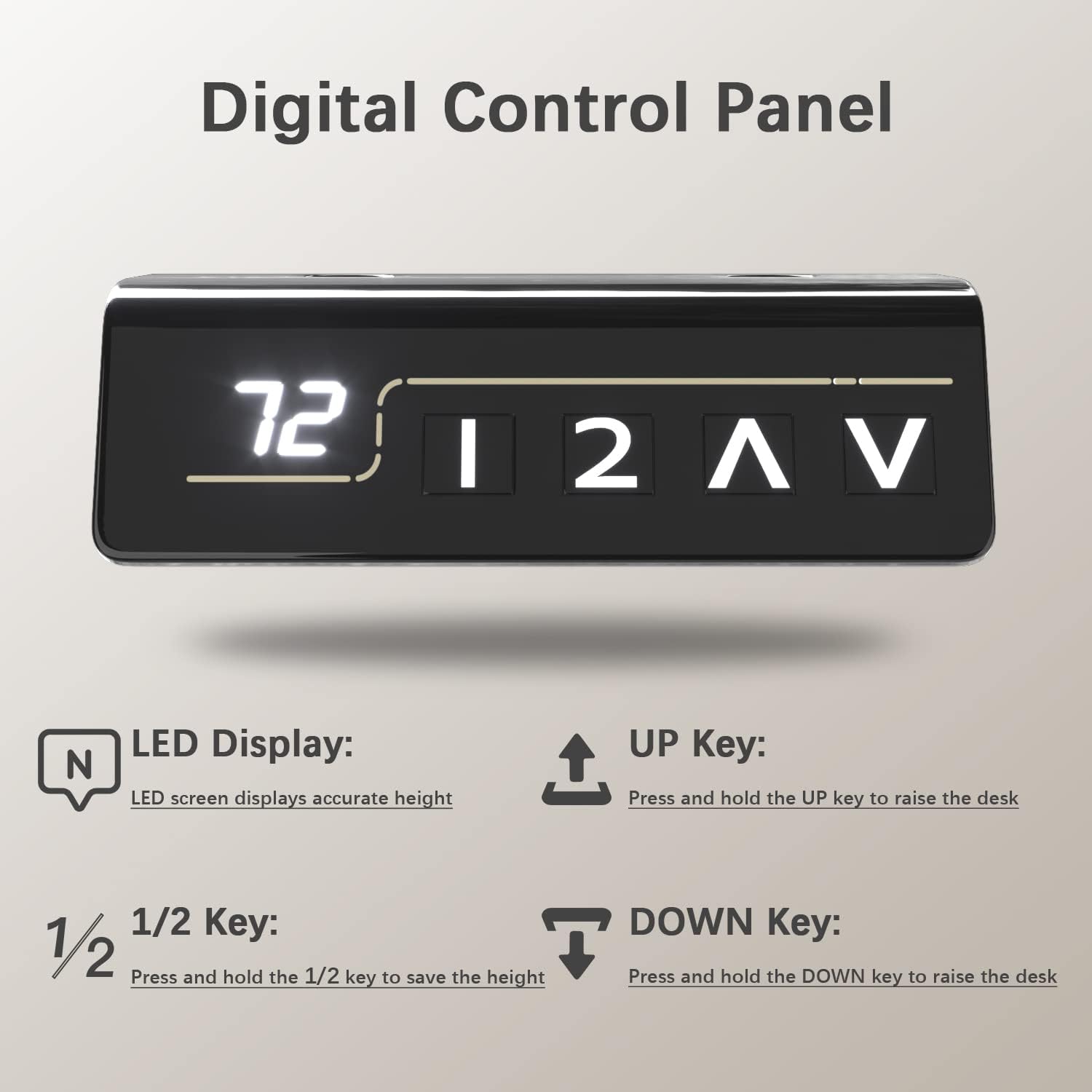
Image: A detailed view of the digital control panel, illustrating the LED height display and the intuitive buttons for height adjustment and memory settings.
Video: Demonstration of the Furmax Electric Height Adjustable Desk in operation, showcasing the smooth and quiet height adjustment feature.
5. Key Features
- Electric Height Adjustment: Seamlessly switch between sitting and standing positions with the touch of a button, promoting a healthier work environment.
- Memory Presets: Two programmable memory settings allow you to quickly recall your preferred sitting and standing heights.
- Spacious Desktop: The 55 x 24 inch desktop (composed of two high-class wood panels) provides ample space for multiple monitors, laptops, and office accessories. Features round desk corners and wire holes for organization.
- Durable and Quiet Motor: Operates at 1 inch per second with noise levels below 50 dB, ensuring minimal disruption. Designed for over 10,000 uses.
- Sturdy Construction: Box-frame structured steel legs with wide T-shaped feet provide excellent stability, even at maximum height.
- Safety Features: Includes safety lock, anti-collision function, and overheat protection for reliable operation.
- Integrated Accessories: Comes with a convenient headphone hook and cable management holes to keep your workspace tidy.

Image: A visual representation of the desk's height range, from its lowest point of 28.7 inches to its highest point of 46.4 inches, demonstrating its versatility.
Image: Detailed views of the practical desk hook for headphones, the stable wide T-shaped foot design, and the ergonomically designed cambered table corners.
6. Maintenance
- Cleaning: Wipe the desktop and frame with a soft, damp cloth. Avoid harsh chemicals or abrasive cleaners.
- Regular Checks: Periodically inspect all screws and connections to ensure they remain tight.
- Cable Management: Ensure cables are neatly organized and do not interfere with the desk's movement.
7. Troubleshooting
| Problem | Possible Cause | Solution |
|---|---|---|
| Desk does not move. | Power cable disconnected, motor issue, control panel malfunction. | Check power connections. Ensure the power adapter is securely plugged into the wall and the control unit. If the issue persists, contact customer support. |
| Uneven height adjustment. | Connecting rod not properly installed or damaged. | Verify the connecting rod is correctly seated and secured between both legs. Perform an initial setup/reset if necessary (refer to full manual for specific reset procedures). |
| Desk stops during adjustment. | Overload (exceeding 145 lbs), anti-collision activated, overheat protection. | Reduce weight on the desk. Check for obstructions. Allow the motor to cool down if it has been used continuously. |
8. Specifications
- Brand: Furmax
- Model Number: ST241
- Desktop Dimensions: 55" W x 24" D (139.7 cm x 60.96 cm)
- Height Range: 28.7" - 46.4" (72.9 cm - 117.9 cm)
- Weight Capacity: 145 lbs (65.7 kg)
- Motor Speed: 1 inch/second
- Noise Level: Under 50 dB
- Desktop Material: Wood (Laminated finish)
- Frame Material: Alloy Steel
- Color: Brown (Desktop), Black (Frame)
- Features: Electric Lift, Memory Presets, Anti-Collision, Overheat Protection, Cable Hole, Headphone Hook

Image: A comprehensive diagram detailing the dimensions of the desk (55 inches wide, 24 inches deep, and a height range of 28.7 to 48.1 inches) and its maximum weight capacity of 145 lbs.
9. Warranty Information
This Furmax Electric Height Adjustable Standing Desk comes with a Limited Warranty. Please refer to the warranty card included in your package or contact Furmax customer support for detailed terms and conditions.
10. Customer Support
For any questions, assistance with assembly, troubleshooting, or warranty claims, please contact Furmax customer support through the retailer's platform or the official Furmax website.
You can also visit the Furmax Store on Amazon for more information and support resources.