Introduction
The Libovgogo DF-580Pro is a versatile emergency radio designed for outdoor activities and emergency preparedness. It combines multiple functions including an AM/FM radio, Bluetooth speaker, powerful 5000mAh power bank, bright flashlight, and a convenient reading lamp. Its robust, splash-resistant design and multiple charging options (Type-C, hand crank, solar panel) ensure reliability in various conditions.
This manual provides detailed instructions on how to set up, operate, maintain, and troubleshoot your DF-580Pro radio. Please read it carefully before use to ensure optimal performance and longevity of your device.

Image: The Libovgogo DF-580Pro Emergency Radio, highlighting its splash-resistant design, integrated solar panel, powerful flashlight, and included bicycle mount.
Product Components
Before using your DF-580Pro radio, please ensure all components are present:
- Libovgogo DF-580Pro Emergency Radio
- Bicycle Mount
- USB-C Charging Cable
- Carabiner
- User Manual (this document)

Image: The DF-580Pro radio in an outdoor environment, emphasizing its portability and key features such as Bluetooth 5.0, loud stereo sound, deep bass, TF card playback, and IPX5 water resistance.
Setup
Initial Charging
It is recommended to fully charge the radio before first use. The DF-580Pro offers multiple charging methods:
- USB-C Charging: Connect the provided USB-C cable to the radio's Type-C input port and a standard USB power adapter (not included). The charging indicator will illuminate.
- Hand Crank Charging: Extend the hand crank from the back of the radio. Rotate the crank clockwise or counter-clockwise at a steady pace (approximately 130-150 RPM) for 3-5 minutes to generate power for short-term use or to initiate charging.
- Solar Panel Charging: Place the radio with the solar panel facing direct sunlight. The solar panel will slowly charge the internal battery. This method is ideal for maintaining charge or for emergency power in sunny conditions, but it is slower than USB-C charging.
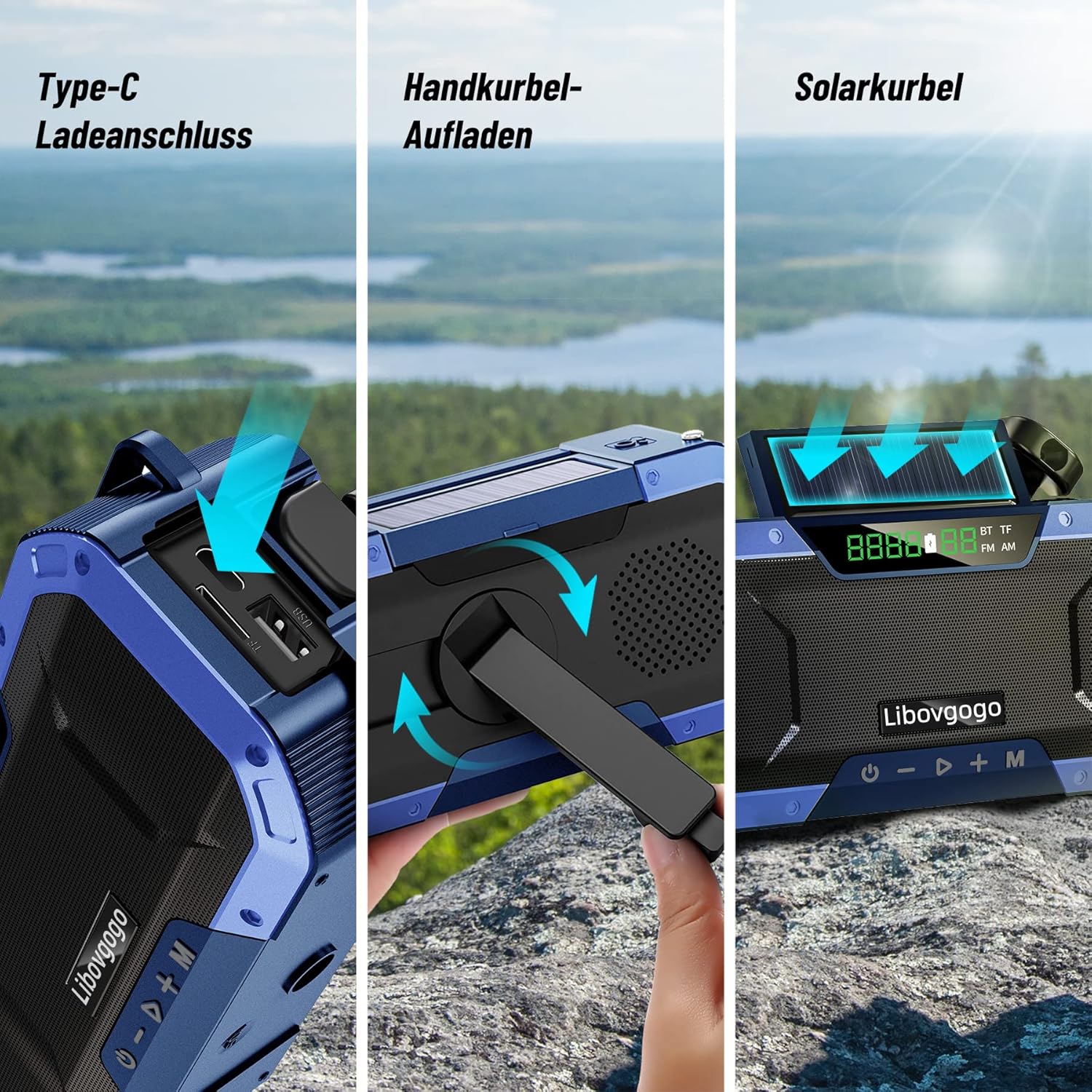
Image: Visual representation of the three charging methods: Type-C port for wired charging, the hand-crank mechanism, and the integrated solar panel for emergency power.
Powering On/Off
Press and hold the power button (U) located on the front panel to turn the radio on or off. The digital display will light up when the device is active.
Operating Instructions
Radio Function (AM/FM)
- Switching Modes: Press the 'M' button to cycle through modes (FM, AM, Bluetooth, TF Card).
- Tuning: Extend the telescopic antenna for better reception. Use the '+' and '-' buttons to manually tune to desired frequencies. Press and hold '+' or '-' to auto-scan for the next available station.
Bluetooth Speaker
- Pairing: Switch the radio to Bluetooth mode. The display will show 'BT'. On your mobile device, search for 'DF-580Pro' in the Bluetooth settings and connect.
- Playback: Once connected, you can play audio from your device through the radio's speaker. Use the radio's '+' and '-' buttons to adjust volume or skip tracks.
Flashlight
Press the dedicated flashlight button (usually marked with a light bulb icon) to turn the 3W flashlight on or off. The flashlight provides illumination up to 35 meters.
Reading Lamp
Open the solar panel to reveal the 4-LED reading lamp. Press the reading lamp button (often located near the solar panel) to activate it. This provides soft, diffused light for reading or ambient illumination.

Image: Demonstrating the powerful 3W portable flashlight with a range of 35m, and the 4-LED reading lamp providing soft light for nighttime use.
Power Bank Function (5000mAh)
The built-in 5000mAh battery can be used to charge external devices. Connect your device's charging cable to the USB-A output port on the radio. This feature is crucial for charging smartphones or other small electronics during emergencies.

Image: Highlighting the 5000mAh battery's capacity for emergency power, capable of charging devices like an iPhone 1.7 times, providing 30 hours of radio use, 20 hours of speaker use, or 70 days of flashlight standby.
TF Card Playback
Insert a TF (MicroSD) card with MP3 audio files into the designated slot. Switch the radio to TF Card mode. The radio will automatically begin playing audio from the card.
Bicycle Mount Installation
Attach the provided bicycle mount to your bike's handlebars. Securely slide the radio onto the mount until it clicks into place. Ensure the radio is firmly attached before riding.

Image: The DF-580Pro radio securely mounted on a bicycle handlebar, demonstrating its use as a portable audio and emergency device during cycling.
Maintenance
- Cleaning: Wipe the radio with a soft, damp cloth. Do not use harsh chemicals or abrasive cleaners.
- Storage: Store the radio in a cool, dry place away from direct sunlight and extreme temperatures. If storing for extended periods, charge the battery to about 50% every 3-6 months to preserve battery life.
- Water Resistance: The DF-580Pro is IPX5 splash-resistant, meaning it can withstand splashes of water from any direction. It is not designed to be submerged in water. Ensure all ports are securely closed when exposed to moisture.

Image: The DF-580Pro radio positioned inside a tent, illustrating its IPX5 water resistance, making it suitable for various outdoor activities where it might encounter splashes.
Troubleshooting
| Problem | Possible Cause | Solution |
|---|---|---|
| Radio does not turn on | Low battery; Power button not pressed long enough | Charge the radio via USB-C, hand crank, or solar. Press and hold the power button for 3 seconds. |
| Poor radio reception | Antenna not extended; Weak signal area | Fully extend the telescopic antenna. Reposition the radio for better signal. |
| Bluetooth not connecting | Radio not in Bluetooth mode; Device not discoverable | Ensure radio is in 'BT' mode. Make sure your device's Bluetooth is on and discoverable. Try unpairing and re-pairing. |
| Flashlight/Reading lamp not working | Low battery; Button not pressed correctly | Charge the radio. Ensure the correct button is pressed firmly. |
| External device not charging | Radio battery too low; Incorrect cable/port | Ensure the radio has sufficient charge. Use the correct USB-A output port and a compatible charging cable for your device. |
Specifications
| Feature | Detail |
|---|---|
| Model Number | DF-580Pro |
| Brand | libovgogo |
| Color | Blue |
| Connectivity Technology | Bluetooth, USB-C Input, USB-A Output |
| Special Features | Bluetooth Speaker, Flashlight, Reading Lamp, Power Bank, Hand Crank, Solar Panel |
| Material | ABS, TPU |
| Compatible Devices | Android, iPhone, Tablet, Laptop |
| Battery Composition | Lithium-polymer |
| Battery Capacity | 5000 mAh |
| Power Source | Lithium-polymer battery, Hand Crank, Solar Panel, Wired Charge |
| Radio Bands Supported | AM/FM |
| Product Dimensions | 15.9L x 4W x 7.1H centimeters |
| Water Resistance | IPX5 |
Warranty and Support
For any questions, technical support, or warranty claims regarding your Libovgogo DF-580Pro Emergency Radio, please contact Libovgogo customer service. Refer to the contact information provided with your purchase or visit the official Libovgogo website for assistance.
Please note that specific warranty details, including duration and coverage, may vary. Keep your proof of purchase for any warranty-related inquiries.


