
Introduction
The Khadas Tea is an ultra-thin portable headphone amplifier and Digital-to-Analog Converter (DAC) designed to enhance your audio experience on smartphones and other compatible devices. Featuring a high-performance ESS ES9281AC Pro DAC and Qualcomm QCC5125 Bluetooth chip, it supports Hi-Res audio formats including LDAC, aptX HD, PCM, DSD, and MQA. Its magnetic design allows for convenient attachment to MagSafe-compatible devices, providing a seamless and high-fidelity listening experience on the go.
Setup
Package Contents
Verify that all components are present in your Khadas Tea package. The outer box may depict the product in a different color; refer to the side label for the actual color of your device.

Image: Khadas Tea package showing two color options and key features listed on the box labels.
Charging the Device
To charge your Khadas Tea, use a 5V≥1A power adapter. Avoid using fast chargers as this may cause adverse effects. If you experience product failure due to a charging adapter problem, please contact Khadas technical support.
Bluetooth Connection
Follow these steps to connect your Khadas Tea via Bluetooth:
- Long press the power button on the Tea device to turn it on.
- On your mobile phone, navigate to Bluetooth settings and turn Bluetooth on.
- Search for available devices and select "Tea" to connect.
Video: Demonstrates the steps for connecting the Khadas Tea to a smartphone via Bluetooth.
Note: The Bluetooth function of the Tea device can only receive data and cannot send data. Therefore, it cannot be directly connected to other Bluetooth headsets, such as TWS Bluetooth headsets.
Wired Connection
The Khadas Tea supports wired audio connections via its USB-C port, allowing for direct digital audio transfer from various devices. It features a 3.5mm mini plug for headphone output.
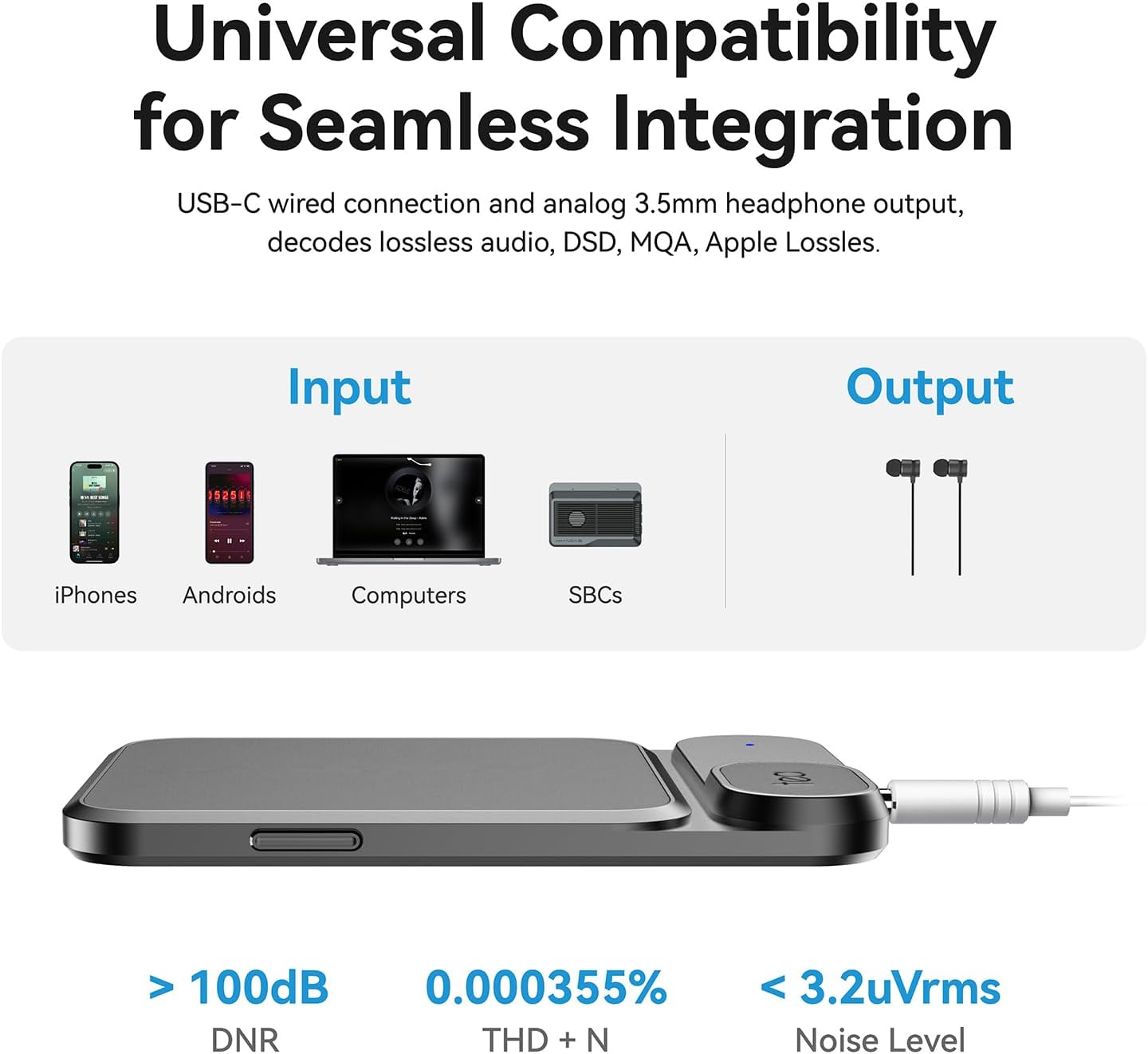
Image: Diagram illustrating the universal compatibility of the Khadas Tea with various input devices and its 3.5mm headphone output.
MagSafe Attachment
The Khadas Tea is designed with MagSafe compatibility, allowing it to magnetically attach to the back of your iPhone 12 or newer series, or other devices with MagSafe-compatible cases. This provides a secure and integrated setup.

Image: Illustration of the Khadas Tea magnetically attaching to the back of a smartphone.
Operation
Basic Controls
The Khadas Tea features physical buttons for convenient control of your audio playback. These buttons can be used to adjust volume, play/pause music, and skip tracks.
Video: Demonstrates adjusting the volume using the physical buttons on the Khadas Tea device.
Khadas Audio App
For advanced customization, download the Khadas Audio App. This application allows you to tailor your music experience with precision through customizable Gain, EQ, and Filter settings. You can also assign desired functions to the device's buttons.

Image: Screenshot of the Khadas Audio App interface on a smartphone, displaying various audio settings.
Microphone Functionality
The Khadas Tea is equipped with an integrated Bluetooth microphone, enabling you to make and receive voice calls with clear audio communication.

Image: A person using the Khadas Tea for wireless audio and calls, highlighting the integrated microphone.
Audio Features
The Khadas Tea integrates a high-performance ESS ES9281AC Pro DAC, delivering a signal-to-noise ratio of up to 116dB and a dynamic range of 115dB. It supports high-resolution Bluetooth audio codecs like LDAC and aptX HD, and is compatible with PCM, DSD, and MQA formats, ensuring high-quality sound from various streaming services.

Image: Details of the ESS ES9281AC Pro DAC chip and its support for premium Hi-Fi streaming services.
Maintenance
Battery Care
The device features a built-in 1160mAh lithium polymer battery, providing up to 8 hours of continuous playback. Always use a 5V≥1A power adapter for charging to prevent damage. Avoid fast chargers.
Device Care
The Khadas Tea is constructed from lightweight aluminum and anti-fingerprint tempered glass, offering both durability and a sleek appearance. Handle the device with care to maintain its aesthetic and functional integrity.
Troubleshooting
Bluetooth Connectivity
If you encounter issues with Bluetooth connection, ensure the Tea device is powered on and your phone's Bluetooth is enabled. Remember that the Tea's Bluetooth function is for receiving data only and cannot send data to other Bluetooth headsets.
Power and Functionality Issues
If the device stops working or experiences power-related problems, first ensure you are using the correct charging adapter (5V≥1A). If issues persist, contact Khadas technical support for assistance. Some users have reported issues after several months of use, which may require warranty service.
Specifications
| Feature | Value |
|---|---|
| Item dimensions L x W x H | 2 x 1 x 3 inches |
| Manufacturer | Khadas Technology Co.,Ltd. |
| Maximum Supply Voltage | 5 Volts (DC) |
| Brand | Khadas |
| Number of Channels | 1 |
| Output Power | 165 Milliwatts |
| Item Weight | 5 ounces |
| Item model number | K1002 |
| Batteries | 1 Lithium Polymer batteries required. |
Warranty and Support
For any technical support needs, product failures, or warranty inquiries, please contact Khadas directly. Refer to your purchase documentation for specific warranty terms and contact information.


