
1. Introduction
This manual provides instructions for the safe and effective use of your UpBright 12V AC/DC Adapter. This power supply is designed to provide reliable power to compatible QUINEAR leg and foot massagers, including models QN-021A, QN-001F, QN-070A, and QN-071A.

Image 1.1: The UpBright AC/DC Adapter is compatible with various QUINEAR massager models, such as the QN-021A leg massager and QN-001F foot massager, shown here for reference. The massager units are not included with the adapter.
2. Safety Instructions
Please read and follow these safety instructions carefully to prevent damage to the adapter or connected devices, and to ensure user safety.
- Input Voltage: Ensure the adapter is connected to a power outlet within the specified input voltage range of 100-240VAC, 50/60Hz.
- Protection Features: The adapter is equipped with Over Voltage Protection (OVP), Over Current Protection (OCP), and Short Circuit Protection (SCP) to safeguard your devices.
- Environmental Conditions: Use the adapter indoors only. Avoid exposure to water, moisture, or extreme temperatures.
- Ventilation: Do not cover the adapter during use to ensure proper ventilation and prevent overheating.
- Damage: Do not use the adapter if the cord or plug is damaged. Do not attempt to open or repair the adapter. Contact support if damaged.

Image 2.1: The adapter incorporates multiple protection features, such as overcharge, overvoltage, overheat, and overcurrent protection, along with good heat resistance and fire-retardant materials for enhanced safety.
3. Setup
Follow these steps to properly connect your UpBright AC/DC Adapter to your QUINEAR massager.
- Inspect the Adapter: Before use, visually inspect the adapter and its cable for any signs of damage.
- Connect to Device: Insert the barrel connector of the adapter firmly into the power input port of your QUINEAR leg or foot massager. Ensure a snug fit.
- Connect to Power Outlet: Plug the AC power cord of the adapter into a standard wall outlet (100-240VAC).

Image 3.1: The UpBright 12V AC/DC Adapter, showing its barrel connector for device connection and the standard AC power plug.
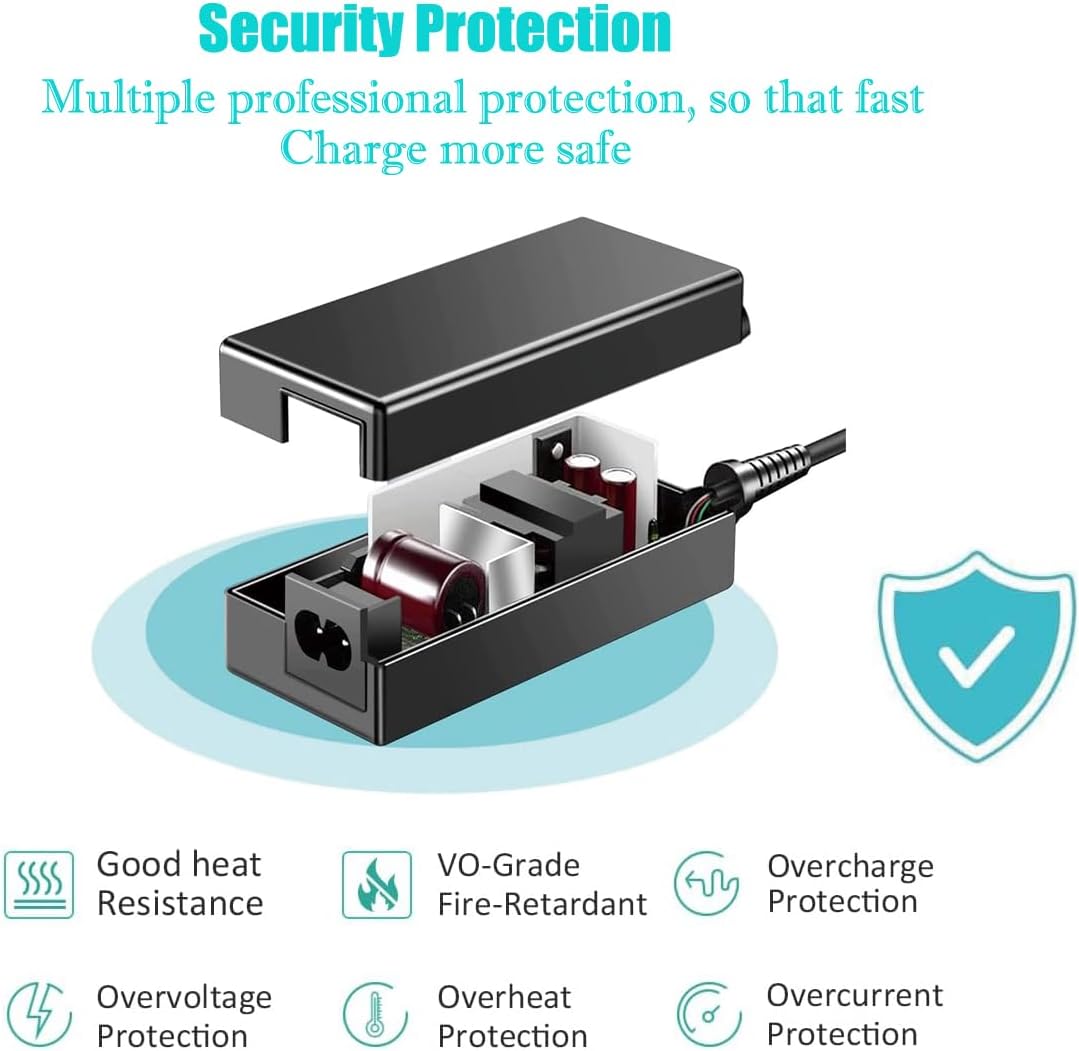
Image 3.2: The adapter properly connected to a wall outlet, ready for use. A certificate of compliance is visible in the background, indicating adherence to safety standards.
4. Operating
Once the adapter is correctly set up, your QUINEAR massager is ready for operation.
- Power On: Turn on your QUINEAR massager using its power button or controls. The adapter will supply the necessary power.
- Usage: Operate your massager according to its specific instruction manual.
- Power Off: When finished, turn off your massager. You may unplug the adapter from the wall outlet if not in use for an extended period.
5. Maintenance
Proper care will extend the life of your UpBright AC/DC Adapter.
- Cleaning: Disconnect the adapter from the power outlet and the device before cleaning. Wipe the adapter with a dry, soft cloth. Do not use liquid cleaners or solvents.
- Storage: Store the adapter in a cool, dry place away from direct sunlight and moisture when not in use. Avoid tightly winding the cable to prevent damage.
- Cable Care: Do not pull on the cable to disconnect the adapter from the wall or device. Always grasp the plug or connector directly.
6. Troubleshooting
If you encounter issues with your adapter, refer to the following common solutions:
- Device Not Powering On:
- Ensure the adapter is securely plugged into both the wall outlet and the massager.
- Verify that the wall outlet is functional by testing it with another device.
- Check if the massager itself is functioning correctly with its original power supply (if available).
- Adapter Overheating:
- Ensure the adapter is not covered and has adequate ventilation.
- Disconnect the adapter and allow it to cool down. If overheating persists, discontinue use and contact support.
- Loose Connection:
- Ensure the barrel connector is fully inserted into the massager's power port.
- Check for any debris in the power port of the massager or on the adapter's connector.
If these steps do not resolve the issue, please contact UpBright customer support.
7. Specifications
| Feature | Specification |
|---|---|
| Input Voltage | 100-240VAC, 50/60Hz |
| Output Voltage | 12VDC |
| Output Current | 3A (3000mA) |
| Power Output | 36W |
| Connector Type | Barrel Connector |
| Product Dimensions | 6 x 4 x 2 inches (approximate) |
| Item Weight | 8.1 ounces (approximate) |
| Protection Features | OVP, OCP, SCP (Over Voltage, Over Current, Short Circuit Protection) |
8. Warranty and Support
Your UpBright AC/DC Adapter comes with a limited warranty and support.
- Refund Policy: UpBright offers a 30-day refund policy from the date of purchase.
- Exchange Policy: A 24-month exchange policy is provided for defective units.
For warranty claims, technical assistance, or any questions regarding your product, please contact UpBright customer support through the retailer where the product was purchased or visit the official UpBright website.

Image 8.1: The product may include a suitable outlet adapter for international orders. A sample of the UpBright Limited Warranty Certificate is also shown.
