
Introduction
This manual provides detailed instructions for the assembly, operation, and maintenance of your GreenForest Computer Desk. Please read this manual thoroughly before beginning assembly or use to ensure proper setup and safe operation. Keep this manual for future reference.

Image: The GreenForest Computer Desk, featuring a monitor stand and integrated storage shelves.
Safety Information
- Ensure all parts are present and undamaged before assembly. Do not use if any parts are missing or damaged.
- Assemble the desk on a soft, clean surface to prevent scratches.
- Tighten all screws and bolts securely, but do not overtighten. Periodically check and retighten fasteners as needed.
- Do not exceed the maximum weight capacity of 90 kg (198 lbs) for the tabletop.
- Keep small parts away from children during assembly to prevent choking hazards.
- Place the desk on a level surface to prevent tipping.
Package Contents
Verify that all components listed below are included in your package. If any parts are missing or damaged, please contact customer support.
- Tabletop sections (Engineered Wood)
- Metal frame components
- Monitor stand components
- Storage shelf panels
- Assembly hardware (screws, bolts, Allen wrench)
- Instruction manual
Setup and Assembly Instructions
Assembly typically takes less than 45 minutes. Follow the numbered steps provided in the included detailed instructions. The storage shelves are reversible, allowing you to position them on either the left or right side of the desk according to your preference.
Key Assembly Steps:
- Unpack all components and verify against the parts list.
- Assemble the metal frame structure using the provided hardware.
- Attach the tabletop sections to the assembled frame.
- Install the storage shelf panels into the desired left or right configuration. The middle shelf is removable for larger items like a computer tower.
- Attach the monitor stand to the tabletop.
- Ensure all connections are secure before use.
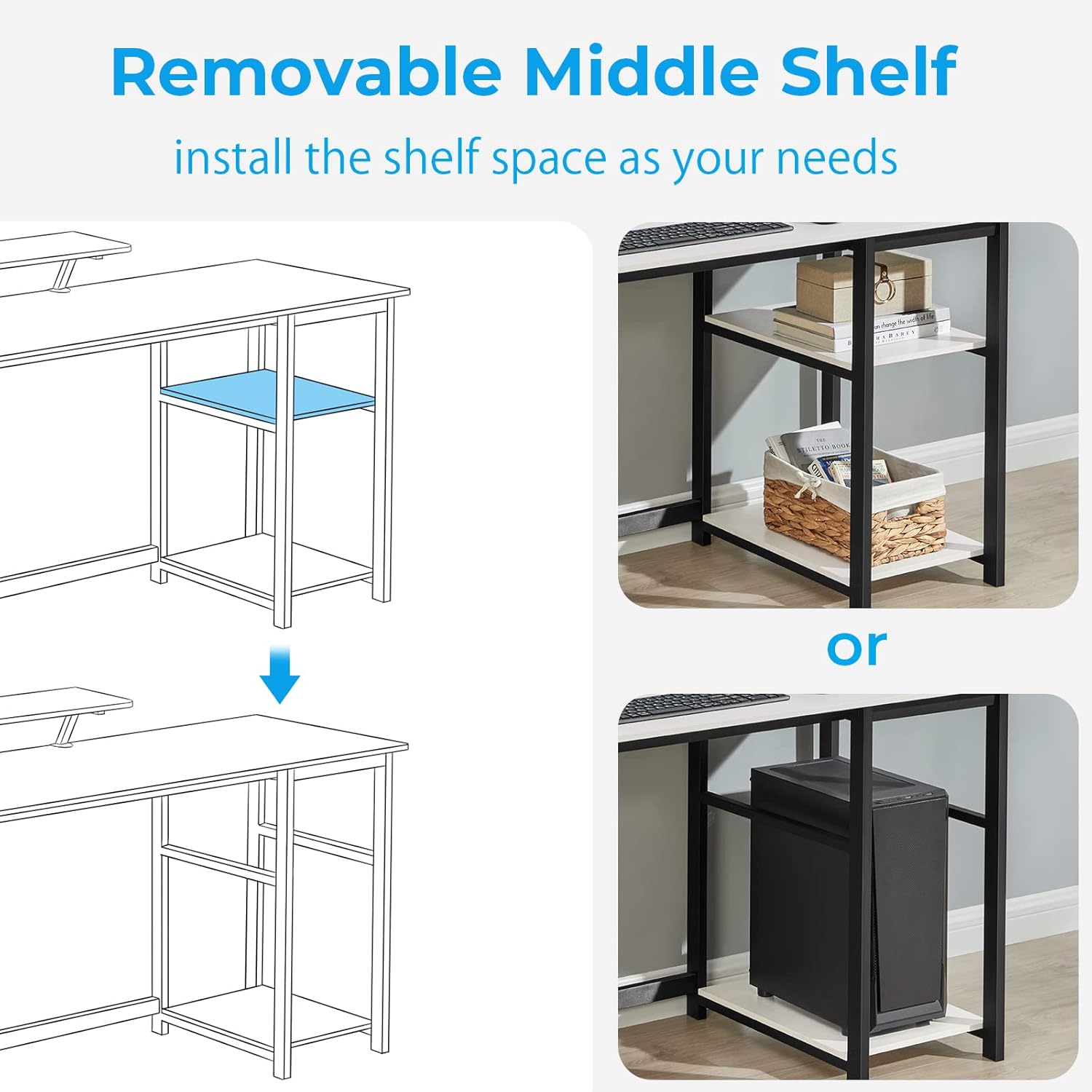
Image: Illustration demonstrating the removable middle shelf feature, allowing space for a computer tower.
Operating Instructions (Usage)
The GreenForest Computer Desk is designed for versatile use in various environments.
Monitor Stand Functionality:
The integrated monitor stand (48 cm x 20 cm) elevates your screen to an ergonomic height, promoting a correct sitting posture and reducing strain during extended use.

Image: Visual comparison illustrating the ergonomic benefits of using the monitor stand for improved posture.
Storage Shelves:
Utilize the reversible storage shelves for organizing books, documents, office supplies, or a computer tower. The middle shelf can be removed to accommodate taller items.

Image: The desk configured with two monitors, a printer, and organized storage shelves, demonstrating its capacity.
Maintenance
- Cleaning: Wipe the desk surfaces with a soft, damp cloth. Avoid harsh chemicals or abrasive cleaners that may damage the laminated finish.
- Inspection: Periodically check all screws and bolts to ensure they remain tight. Retighten as necessary to maintain stability.
- Avoid Excessive Moisture: Protect the desk from prolonged exposure to liquids to prevent damage to the engineered wood.
- Weight Distribution: Distribute weight evenly across the tabletop and shelves to prevent stress on any single point.
Troubleshooting
Desk is wobbly:
- Ensure all screws and bolts are fully tightened.
- Verify the desk is placed on a flat, level surface. Adjust floor glides if present.
Parts do not fit during assembly:
- Double-check the assembly instructions to ensure you are using the correct parts for each step.
- Ensure parts are oriented correctly. Some parts may appear similar but have specific alignments.
- If a part is genuinely defective or incorrect, contact customer support.
Specifications
| Feature | Detail |
|---|---|
| Brand | GreenForest |
| Model Number | VITO-S-1SH-1WH-GF |
| Color | White |
| Overall Dimensions (L x W x H) | 100 x 50 x 75 cm (39.37 x 19.68 x 29.52 inches) |
| Monitor Stand Dimensions (L x W) | 48 x 20 cm (18.89 x 7.87 inches) |
| Weight | 14.8 kg (32.6 lbs) |
| Material | Engineered Wood (Tabletop), Metal (Frame) |
| Finish Type | Laminated |
| Special Feature | Reversible Storage Shelves |
| Max Weight Capacity | 90 kg (198 lbs) |

Image: Detailed diagram showing the dimensions of the GreenForest Computer Desk, including the monitor stand and storage shelves.
Support
For any questions regarding assembly, use, or if you require additional assistance, please do not hesitate to contact GreenForest customer service. Refer to your purchase documentation for contact details or visit the official GreenForest website.