
GreenForest Noir
GreenForest Computer Desk 39 Inch User Manual
Model: Noir | Brand: GreenForest
Introduction
This manual provides detailed instructions for the assembly, operation, and maintenance of your GreenForest Computer Desk 39 Inch. Designed for functionality and comfort, this desk features a built-in monitor stand and reversible storage shelves, making it ideal for home office, gaming, writing, or study use. Please read this manual thoroughly before assembly and use to ensure proper setup and longevity of your product.
Safety Information
Please observe the following safety guidelines to prevent injury or damage to the product:
- Do not exceed the maximum weight recommendation of 90 kg (approximately 198 lbs) on the desk surface.
- Ensure all screws and fasteners are securely tightened during assembly and periodically check for looseness.
- Be cautious when adjusting or removing the reversible storage shelves to avoid pinching or dropping components.
- Assemble the desk on a soft, clean surface to prevent scratches or damage to the parts.
- Keep small parts and packaging materials away from children to prevent choking hazards.
Parts List
Before beginning assembly, verify that all components are present and undamaged. Refer to the included manual for a complete visual parts list.
- Desktop Panel (Engineered Wood)
- Monitor Stand (Engineered Wood)
- Metal Frame Components (40mm premium metal)
- 2-Tier Storage Shelves (Engineered Wood)
- Assembly Hardware (Screws, bolts, etc.)
- Installation Tool (Allen wrench, screwdriver)

Figure 1: Overview of the GreenForest Computer Desk components.
Setup and Assembly
The GreenForest Computer Desk is designed for easy assembly. All necessary tools and instructions are included. Follow the step-by-step guide provided in the package for a smooth setup, typically taking around 30 minutes.
Key Assembly Steps:
- Unpack all components and lay them out on a soft, clean surface. Verify against the parts list.
- Assemble the metal frame using the provided hardware and tools. Ensure all connections are secure.
- Attach the desktop panel to the assembled frame.
- Install the 2-tier storage shelves. These can be positioned on either the left or right side of the desk to suit your preference and space requirements.
- Attach the monitor stand to the desktop. The monitor stand is designed to be movable, allowing you to adjust its position for optimal ergonomics.
- Tighten all screws and connections once the desk is fully assembled to ensure stability.
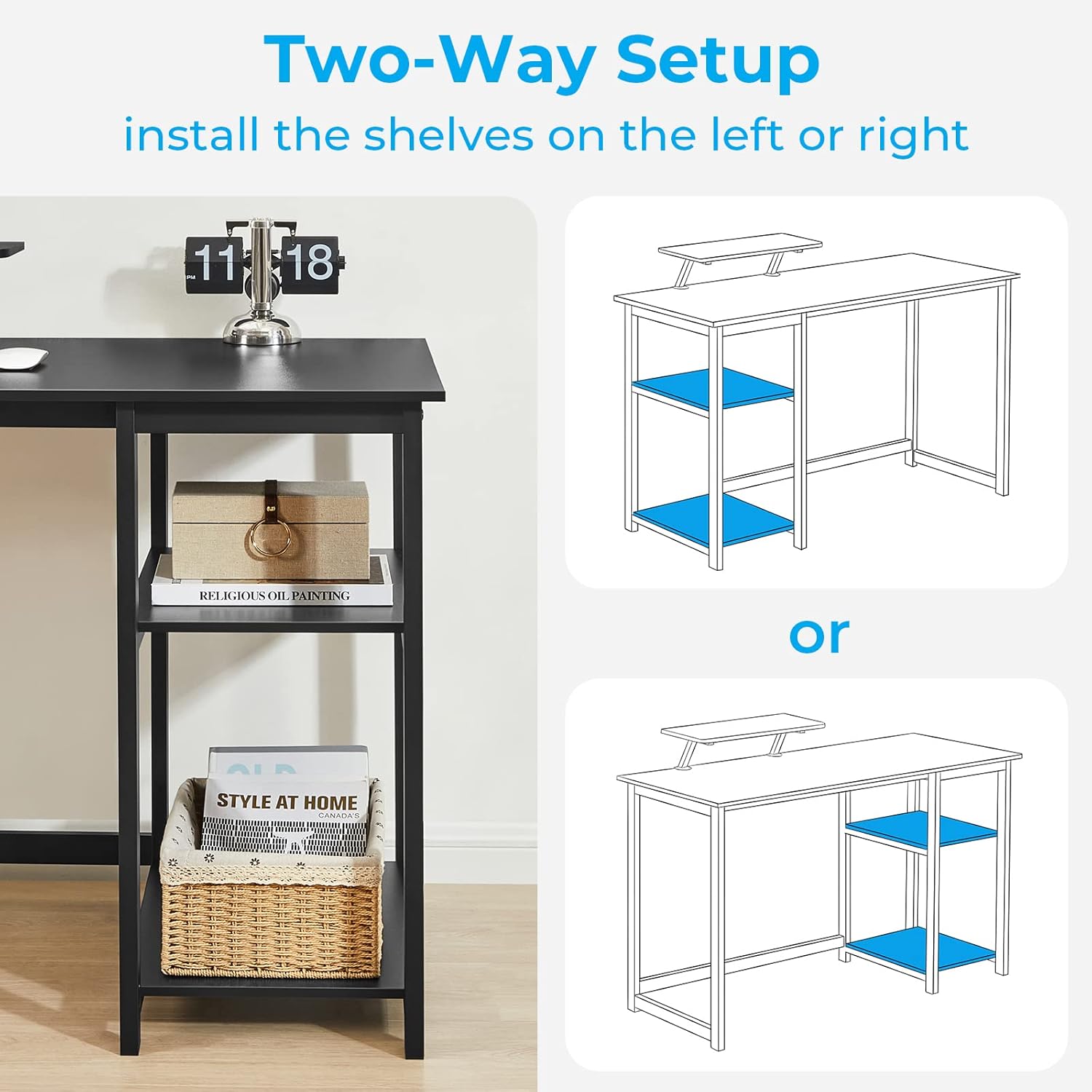
Figure 2: The 2-tier storage shelves can be installed on either the left or right side of the desk.

Figure 3: The middle shelf of the storage unit can be removed to accommodate a larger computer tower.
Video 1: Official GreenForest product video demonstrating the assembly and features of the computer desk, including the reversible shelves and monitor stand.
Operating and Usage
Your GreenForest Computer Desk is designed for versatile use in various settings. Here are some key features and usage tips:
- Built-in Monitor Stand: The monitor stand (18.89" x 7.87") helps maintain a comfortable sitting posture by elevating your monitor to eye level. It also frees up valuable desktop space for other items like laptops, headphones, or notebooks.
- Reversible Storage Shelves: The 2-tier shelves can be configured on either the left or right side of the desk. Use them to store books, storage boxes, or other office supplies. The middle shelf is removable to create space for a computer tower.
- Ample Leg Room: With 26.37 inches of width under the desktop, the desk provides sufficient leg room for comfortable movement during extended use.
- Versatile Applications: This desk is suitable for various purposes, including work, study, writing, and gaming. Its modern design complements any room style.

Figure 4: The monitor stand promotes better posture by elevating the screen.

Figure 5: Multiple GreenForest desks can be combined to create a larger L-shaped workstation.
Maintenance
To ensure the longevity and appearance of your GreenForest Computer Desk, follow these simple maintenance tips:
- Cleaning: Wipe the desk surfaces with a dry cloth to remove dust and light dirt. For stubborn marks, use a slightly damp cloth and mild soap, then dry immediately. Avoid harsh chemicals or abrasive cleaners.
- Stability Check: Periodically check all screws and connections to ensure they remain tight. Re-tighten if necessary to maintain the desk's stability.
- Weight Distribution: Distribute weight evenly across the desktop and shelves to prevent stress on the frame and potential warping of the wood.
- Avoid Moisture: Protect the desk from excessive moisture and direct sunlight, which can cause damage to the engineered wood.
Troubleshooting
If you encounter any issues with your GreenForest Computer Desk, refer to the following common troubleshooting tips:
- Desk Wobbles:
- Ensure all assembly screws are fully tightened.
- Check that the desk is placed on a flat, even surface. Adjust the adjustable screw pads on the feet if necessary to level the desk.
- Parts Missing/Damaged:
- Carefully re-check all packaging materials.
- Contact GreenForest customer support for assistance with replacement parts.
- Difficulty Assembling:
- Review the assembly instructions carefully, paying attention to diagrams.
- Ensure you are using the correct hardware for each step.
- If issues persist, consider seeking assistance from another person.
Specifications
| Feature | Detail |
|---|---|
| Brand | GreenForest |
| Model Number | Noir |
| Product Dimensions (L x W x H) | 39.37" x 19.68" x 29.52" (100cm x 50cm x 75cm) |
| Monitor Stand Size | 18.89" x 7.87" |
| Color | Black |
| Style | Modern |
| Base Material | Metal |
| Top Material Type | Engineered Wood |
| Finish Type | Painted |
| Special Feature | Monitor Stand, Reversible Storage Shelves |
| Item Weight | 14.8 Kilograms (approx. 32.6 lbs) |
| Maximum Weight Recommendation | 90 Kilograms (approx. 198 lbs) |
| Assembly Required | Yes (All tools included) |

Figure 6: Detailed dimensions of the GreenForest Computer Desk.
Warranty and Support
GreenForest is committed to providing quality products. For any questions, concerns, or assistance with your computer desk, please contact GreenForest customer support. While specific warranty details are not provided in this manual, please retain your purchase receipt for any potential warranty claims or support inquiries.
You can often find support contact information on the product packaging or the official GreenForest website.
Related documentsNoir


Ask a question about this manual
Ask about setup, troubleshooting, compatibility, parts, safety, or missing instructions. Manuals+ will review the question and use this page’s manual context to help answer it.