
1. Introduction
This manual provides essential information for the proper use and maintenance of your QUICKO T12 Soldering Iron Tips. These tips are designed for precision soldering tasks and are compatible with QUICKO and QUECOO soldering stations, including the FX-951 series. Please read this manual thoroughly before use to ensure optimal performance and longevity of the tips.

Image 1: A complete set of QUICKO T12 Soldering Iron Tips neatly arranged in their metal storage case.
2. Product Features
- High-Quality Construction: Made of durable, heat-resistant materials with fast conductivity, ensuring long-term use.
- Easy Installation: Designed for simple installation and removal, enhancing user convenience.
- Optimized for Lower Temperatures: These soldering tips are particularly suitable for applications requiring lower soldering temperatures.
- Versatile Selection: Includes 10 different types of soldering tips to meet various soldering requirements.
- Broad Compatibility: Fully compatible with QUICKO and QUECOO soldering stations, including the FX-951 series.

Image 2: A close-up showing the variety of T12 soldering iron tips, emphasizing their ease of installation and removal.
3. Setup and Installation
The QUICKO T12 soldering iron tips are designed for quick and easy replacement. Follow these steps to install or replace a tip:
- Ensure Power Off: Always ensure your soldering station is powered off and unplugged before handling tips.
- Allow Cooling: If replacing a used tip, allow it to cool completely to avoid burns.
- Remove Old Tip: Carefully pull the existing tip straight out from the soldering iron handle.
- Insert New Tip: Align the new T12 tip with the receptacle in the soldering iron handle and push it firmly until it is fully seated. Ensure a secure connection for proper heat transfer.
- Verify Compatibility: Confirm the tip is correctly seated and compatible with your soldering station model (e.g., FX-951).

Image 3: T12 soldering tips shown alongside their open storage case, illustrating the ease of access for installation.
4. Operating Instructions
Once a tip is installed, you can begin soldering. These tips are optimized for lower temperature soldering, which can be beneficial for sensitive components.
- Power On: Plug in and power on your compatible QUICKO or QUECOO soldering station.
- Set Temperature: Adjust the soldering station to the desired temperature. For optimal performance and tip longevity, avoid excessively high temperatures unless specifically required for the solder type.
- Tinning the Tip: Before first use and periodically during operation, tin the tip by applying a small amount of solder to the heated tip. This helps prevent oxidation and ensures efficient heat transfer.
- Soldering: Apply the tinned tip to the joint, then feed solder into the joint. Ensure proper heat distribution for a strong, clean solder joint.
- Tip Selection: Choose the appropriate tip shape (e.g., K, KU, BC2, JL02, ILS) for the specific task. Different tip geometries are designed for various applications, from fine-pitch components to larger pads.
Tip Types Overview:
T12-K (Knife Tip)

Image 4: The T12-K knife tip, ideal for drag soldering and large pad soldering, shown with its dimensional diagram.
T12-KU (Bevel Knife Tip)

Image 5: The T12-KU bevel knife tip, suitable for general purpose soldering and drag soldering, with its dimensional diagram.
T12-BC2 (Conical Bevel Tip)

Image 6: The T12-BC2 conical bevel tip, offering a good balance for various soldering tasks, shown with its dimensional diagram.
T12-JL02 (J-Shape Tip)

Image 7: The T12-JL02 J-shape tip, useful for specific component leads and fine work, with its dimensional diagram.
T12-ILS (Fine Conical Tip)

Image 8: The T12-ILS fine conical tip, excellent for precision soldering of small components, with its dimensional diagram.
5. Maintenance and Care
Proper maintenance extends the life of your soldering tips and ensures consistent performance.
- Clean Regularly: Wipe the tip on a damp sponge or brass wool cleaner frequently during use to remove excess solder and flux residue.
- Re-tin Tips: Always re-tin the tip with a fresh coat of solder before storing it or when turning off the soldering station. This protects the tip from oxidation.
- Avoid Excessive Force: Do not apply excessive force when cleaning or using the tip, as this can damage the plating.
- Storage: Store tips in a dry, clean environment, preferably in their original case, to prevent damage and oxidation.
- Inspect for Wear: Periodically inspect tips for signs of wear, pitting, or excessive oxidation. Replace tips when they no longer tin easily or perform effectively.
6. Troubleshooting
If you encounter issues with your soldering tips, consider the following common solutions:
- Tip Not Heating:
- Ensure the tip is fully seated in the soldering iron handle.
- Check if the soldering station is powered on and set to an appropriate temperature.
- Verify the soldering iron itself is functioning correctly.
- Solder Not Sticking to Tip (Poor Wetting):
- Clean the tip thoroughly with a damp sponge or brass wool.
- Re-tin the tip with fresh solder.
- Ensure the tip temperature is adequate for the solder being used.
- If the tip is heavily oxidized or pitted, it may need to be replaced.
- Tip Oxidation:
- Always tin the tip before and after use.
- Avoid leaving the iron at high temperatures for extended periods when not actively soldering.
- Use a good quality flux.
7. Specifications
| Feature | Detail |
|---|---|
| Model Series | T12 |
| Material | Copper |
| Compatibility | QUICKO and QUECOO soldering stations (e.g., FX-951) |
| Wattage (Typical) | 72 watts (station dependent) |
| Upper Temperature Rating | 480 Degrees Celsius |
| Item Weight (Approx.) | 6.7 ounces (0.19 Kilograms) for the set |
| Product Dimensions (Approx.) | 7.09 x 3.15 x 3.15 inches (packaging) |
Internal and External Structure:
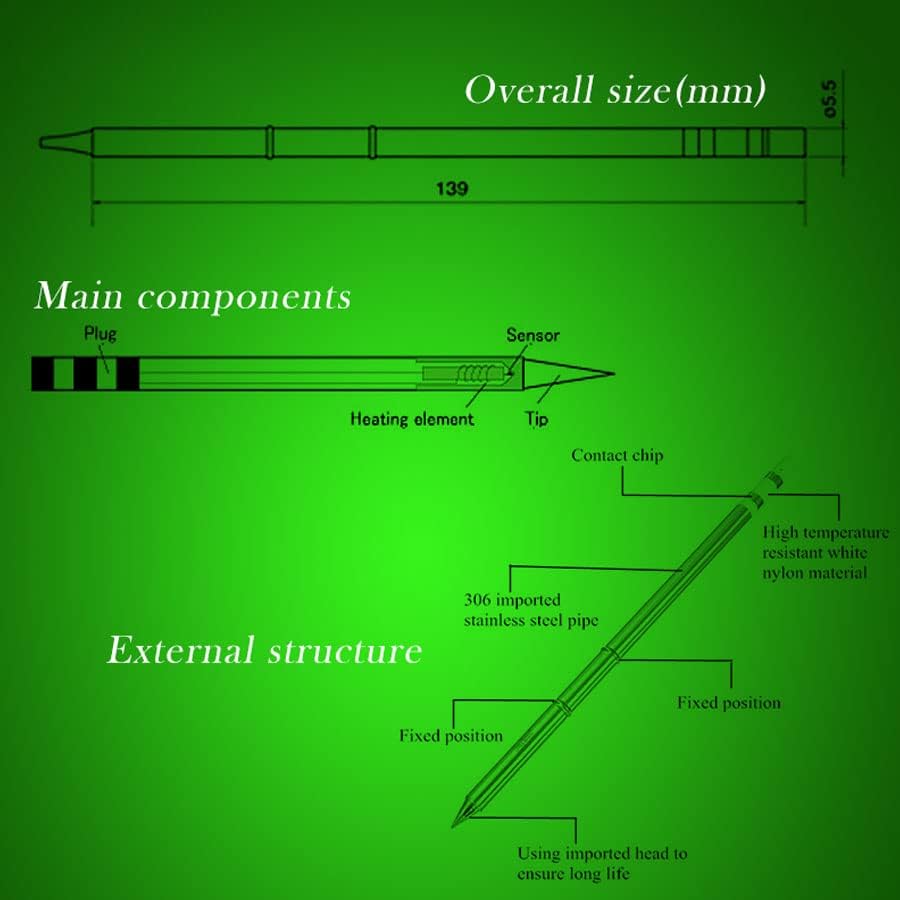
Image 9: Detailed diagram illustrating the overall dimensions, internal main components (plug, heating element, sensor, tip), and external structure of a T12 soldering tip, highlighting materials like 306 imported stainless steel pipe and high temperature resistant white nylon material.
8. Warranty and Support
For information regarding product warranty, returns, or technical support, please refer to the official QUICKO website or contact your point of purchase. Ensure you have your product model number (T12) and purchase details available when seeking support.
You can visit the QUICKO Store on Amazon for more product information and support resources.


